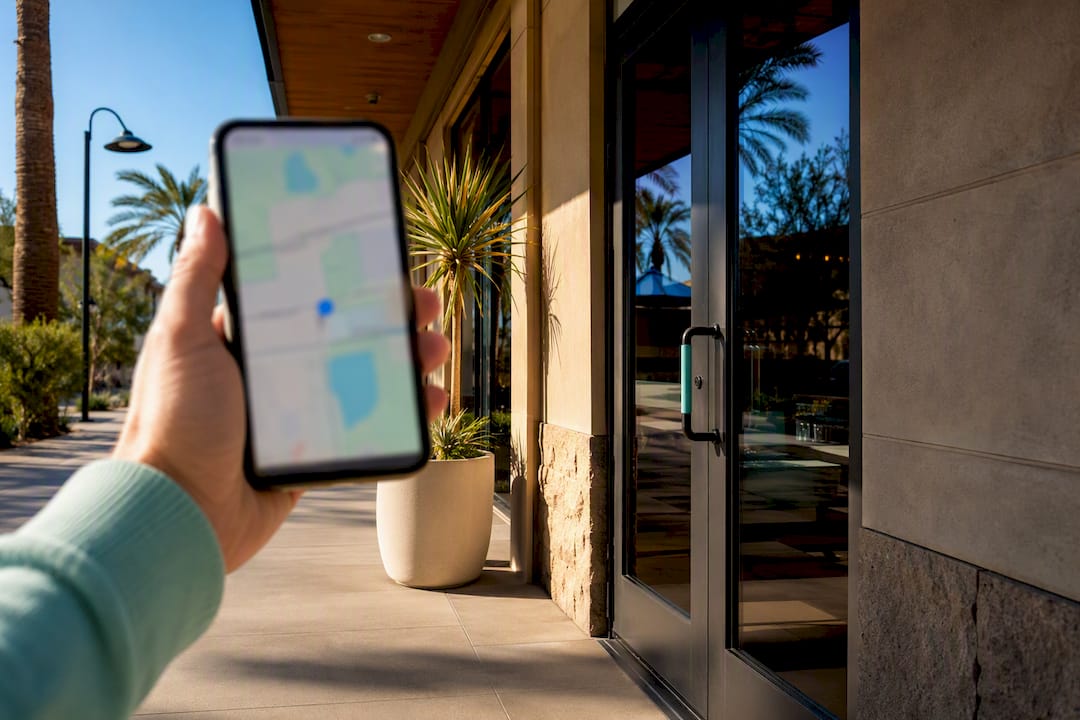
Searcher checking nearby Scottsdale business
Written by webtechs

30 Day Local SEO Checklist for Scottsdale Small Businesses

Searcher checking nearby Scottsdale business

Claim and verify your Google Business Profile, fix your name/address/phone data everywhere it appears online, and start collecting reviews this week. Those three moves alone shift most Scottsdale small businesses noticeably in local search within a matter of weeks. The rest of this local SEO checklist compounds from there, with citations, on-page fixes, and links paying off over the following months, and a full 30-day plan below turns it into a sequence you can actually execute.


TL;DR:

  • Claim and verify your Google Business Profile immediately because it influences most local search visibility, especially in the Map Pack.
  • Ensure your business name, address, and phone number are consistent across all online directories and your website to boost trust signals.
  • Regularly request and respond to reviews to improve your local rankings and demonstrate active customer engagement.
  • Create detailed local service pages with natural language, embedded maps, and schema markup to enhance organic and voice search visibility.
  • Focus on building relevant backlinks from local organizations and sources, and analyze competitors monthly to identify new opportunities.

Webtechs
Make Local Search Work Harder
WebTechs helps small and mid-sized businesses improve online visibility through tailored web design and advanced SEO strategies.

Visit WebTechs

Table of Contents

Priority Local SEO Checklist: What To Do First

Not every task on a local SEO checklist deserves the same urgency. Work through these in order.

  1. P1, this week: Claim and verify your Google Business Profile, fix your NAP across your website and top directories, and pick the most specific primary category. Budget a short amount of time; a business owner can do this alone.
  2. P2, weeks 2 to 3: Launch review requests, publish a real location or service page, and add LocalBusiness schema. Budget five to eight hours, or hand it to a freelancer familiar with schema markup.
  3. P3, weeks 3 to 4: Clean up remaining citations, chase two or three local backlinks, and set a weekly Google Business Profile posting habit. Budget ongoing time, or outsource to an agency for consistency.

How Do You Claim and Optimize a Google Business Profile?

Google Business Profile drives most of what shows up in the Map Pack, so it earns the first hour you spend on any local SEO strategy. Verification usually runs through a phone call, text, email, or postcard mailed to your Scottsdale address; postcards may take some time to arrive, so start that step immediately even if you’re not ready to touch anything else.

Once verified, the details matter more than most owners assume:

  • Choose the single most specific primary category available. “HVAC contractor” beats “Contractor” every time.
  • Add every relevant secondary category and list specific services, not just broad offerings.
  • Write a complete business description using natural language, not a keyword dump.
  • Upload multiple real photos of your storefront, team, and finished work. Stock images hurt more than they help.
  • Add booking or quote request links directly on the profile.

Pro Tip: Treat your profile like a second website. Post updates regularly, answer every question in the Q&A tab before a competitor answers it incorrectly, and respond to reviews promptly.

Why Does NAP Consistency Still Matter for Local Rankings?

Search engines cross-reference your business name, address, and phone number across the web to confirm you’re a real, stable business. Mismatches, a suite number here, a missing “LLC” there, an old phone number on a directory you forgot existed, dilute that trust signal and can hold back your Google Business Profile even after you’ve optimized everything else.

Run a quick audit by searching your business name plus your city, then write down one canonical NAP format and use it everywhere. Fix these first:

  • Your own website footer and contact page
  • Google Business Profile, Apple Maps, and Bing Places
  • Facebook and Yelp business listings
  • Your local chamber of commerce or industry association directory, ensuring consistency

Set a regular reminder to recheck, since directories update independently and drift happens quietly.

How Do You Get More Reviews and Respond the Right Way?

Review count and recency both factor into Map Pack placement, and Scottsdale’s service categories, from HVAC to salons to home repair, tend to reward businesses that ask consistently rather than sporadically.

Build a simple system:

  • Ask soon after service completion, while the experience is fresh.
  • Send a direct review link by text message, which typically gets opened faster than email.
  • Keep the ask short: one line thanking them, one line with the link.
  • Respond to every review, positive or negative, promptly.

Aim for a steady flow of new reviews over time rather than a single push, as consistent activity signals an active, trustworthy business.

Pro Tip: When you respond to a negative review, mention the specific issue by name. A generic “sorry for your experience” reads as canned; naming the actual problem shows you read it.

What On-Page Changes Improve Local Search Visibility?

Your Google Business Profile gets you into the Map Pack. Your website earns the organic blue links underneath it, and neglecting either one costs local market share. Build a dedicated page for each service or location, and give each one real substance:

  • Write 500 or more words of genuinely local detail: neighborhoods served, specific project examples, local testimonials.
  • Put the service and city in your H1 and title tag naturally, “Scottsdale Roof Repair,” not a stuffed string of keywords.
  • Embed a Google Map on your contact or location page.
  • Add LocalBusiness, Service, and Review schema markup so search engines and AI-generated overviews can pull accurate business details.
Check Tool What it tells you
Core Web Vitals Google PageSpeed Insights Load speed, interactivity, visual stability
Mobile usability Google Search Console Pages with mobile display issues
Schema validity Google Rich Results Test Whether structured data is readable

You don’t need hundreds of backlinks. You need a handful of relevant ones from sources tied to Scottsdale. Realistic targets include:

  • The Scottsdale Area Chamber of Commerce and industry-specific associations
  • Local news outlets covering small business features or community events
  • Vendors and suppliers who list client or partner businesses
  • Event sponsorships, even small ones, that come with a website mention

Prioritize based on relevance and domain trust over sheer volume, and treat outreach as an ongoing habit, not a one-time sprint.

What Should You Track to Prove Local SEO Is Working?

Set up Google Search Console and GA4 before you make any other changes; without a baseline, you can’t prove progress later. Google Business Profile Insights adds calls, direction requests, and map views on top of that.

  • Track Map Pack rank separately from organic keyword rank; they respond to different signals.
  • Watch calls, direction requests, and booking form submissions as your core conversion KPIs.
  • Check rank tracking and reporting monthly rather than daily, since local rankings fluctuate normally.

Your 30-Day Local SEO Action Plan

  1. Week 1: Claim and verify Google Business Profile, fix the most visible NAP mismatches (website, Google, Facebook, Yelp), and connect Google Search Console and GA4.
  2. Week 2: Publish one location or service page with genuine local detail, send your first batch of review requests, and add LocalBusiness schema to your homepage.
  3. Weeks 3 to 4: Finish citation cleanup across remaining directories, reach out to two or three local link targets, and review your early metrics to adjust priorities for month two.

Optimizing for Voice Search in Local SEO

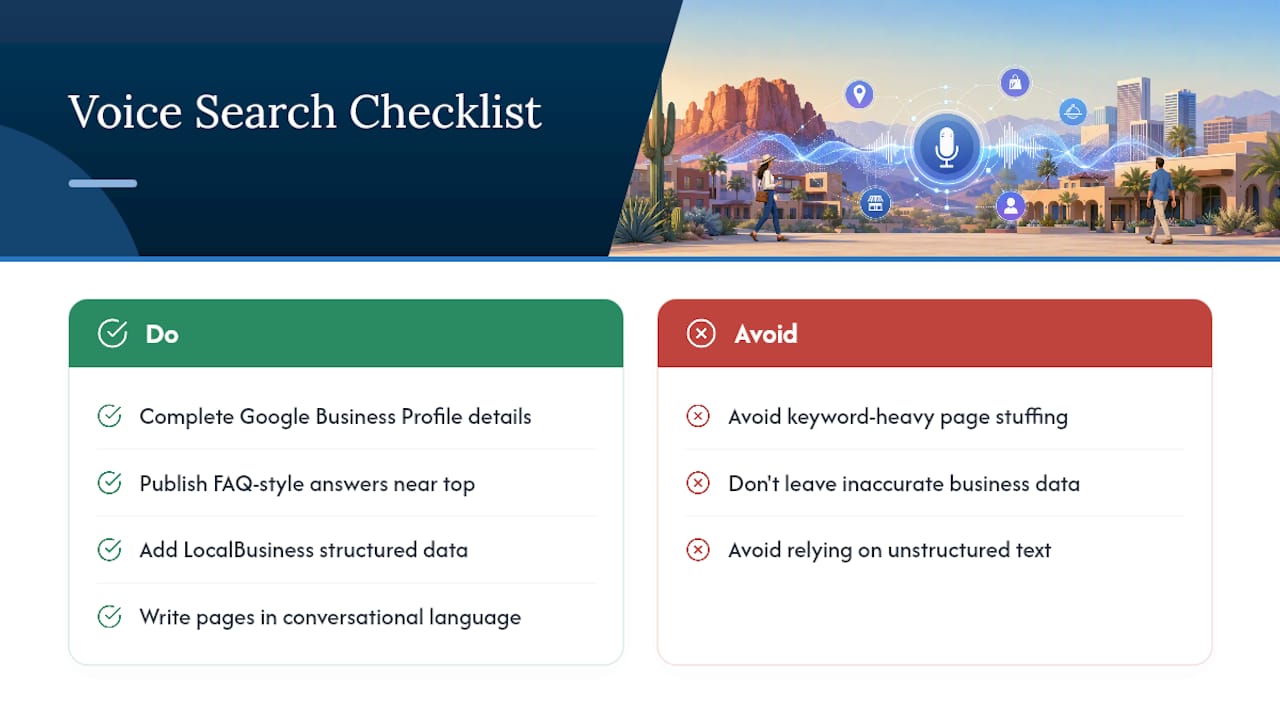
Voice queries lean conversational: “who fixes garage doors near me” instead of “garage door repair Scottsdale.” That shift changes what you optimize for, because voice assistants pull answers from structured, specific data rather than long-form keyword-heavy pages.

Your Google Business Profile does most of the heavy lifting here. Complete hours, an accurate address, and specific service categories give Google’s assistant a clean answer to pull from when someone asks a location-based question out loud. FAQ-style content on your website helps too, since voice search tends to favor pages that answer a direct question in a direct sentence near the top.

Structured data plays a bigger role than most owners realize. LocalBusiness schema tells search engines and voice assistants exactly what you are, where you are, and what you offer, without forcing an algorithm to guess from unstructured text. Pages written in natural, conversational language, the way a customer would actually phrase a question, tend to match voice queries better than pages stuffed with keyword variations.

Review content matters here too. Voice assistants sometimes read review snippets aloud when answering “best” or “top-rated” queries, so reviews that mention specific services in natural language (“fixed our AC same day”) double as voice search fuel. None of this requires a separate strategy from the rest of your local SEO checklist; it requires making sure your existing data is accurate, specific, and written the way people actually talk.

Optimizing for Voice Search in Local SEO — overview diagram

Leveraging Local Social Media Channels for SEO Impact

Social media doesn’t directly move your Google ranking the way a backlink or a review does, but it feeds the same trust signals search engines and customers both look for. An active Facebook or Instagram profile with recent posts, local photos, and community engagement tells a visitor, and indirectly Google, that you’re a real, operating Scottsdale business.

Local Facebook groups and Nextdoor threads matter more than a generic follower count. When someone asks for a plumber or a hair stylist recommendation in a Scottsdale neighborhood group, an active, responsive business page gets mentioned. That mention often turns into a direct visit or call, and sometimes into a review or a link from a local blogger who found you through social first.

Cross-link your social profiles and your website consistently. Use the same business name, hours, and contact details on Facebook, Instagram, and LinkedIn that you use on your Google Business Profile, reinforcing the same NAP consistency that matters for citations. Geotag your posts and photos when the platform allows it, since location tags help surface your content to nearby users browsing by area.

Posting frequency beats posting perfection. A quick photo of finished work with a one-line caption, shared weekly, does more for local visibility than a polished campaign published twice a year. Treat social channels as a supporting layer of your local SEO strategy, not a replacement for the Google Business Profile and website work that carries the most ranking weight.

Using Localized Keywords and Search Intent Analysis

Generic keywords lose to localized ones in nearly every local search scenario. “Pool repair” is a losing bet against “pool repair Scottsdale AZ” or “pool resurfacing Old Town Scottsdale,” because the second and third versions match how people actually search when they want someone nearby, today.

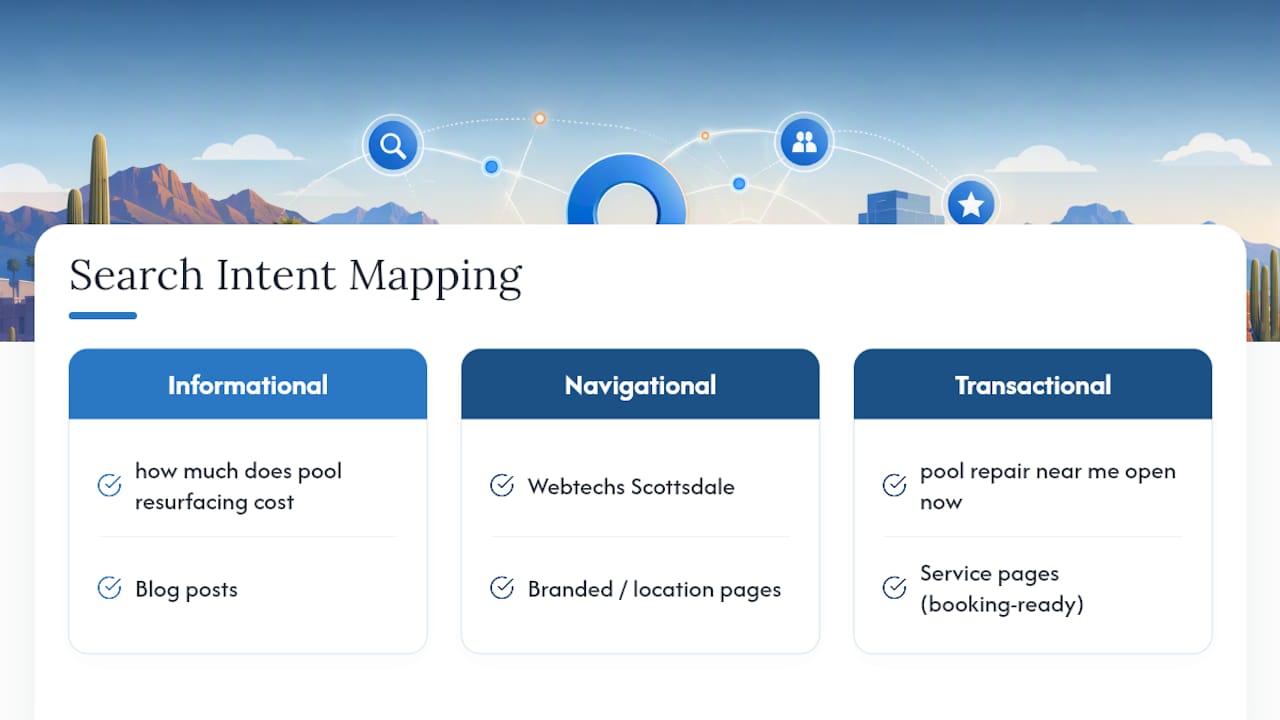
Start by mapping search intent into three buckets: informational (“how much does pool resurfacing cost”), navigational (“Webtechs Scottsdale”), and transactional (“pool repair near me open now”). Your service pages should target transactional and navigational intent directly, while blog content can capture informational searches earlier in a customer’s decision process.

Three local search intent categories

Neighborhood-level specificity often outperforms city-wide keywords for service businesses. If you serve Old Town, McCormick Ranch, and DC Ranch, mentioning each by name on your service pages, in photo captions, and in your Google Business Profile description helps you show up for hyper-local variations you’d otherwise miss entirely.

Tools like Google’s “People Also Ask” boxes, the autocomplete suggestions in Google Maps, and even the questions customers ask in phone calls or emails reveal real local phrasing worth targeting. A landscaping company that keeps hearing “desert landscaping” from callers should use that exact phrase on its site, not the more generic “xeriscaping” term an outsider might assume is standard.

Match your keyword choices to buyer readiness. Someone searching “best HVAC company Scottsdale reviews” is closer to booking than someone searching “why is my AC not cooling,” and your site should have distinct pages built for each stage rather than one page trying to catch every query.

Competitor Analysis Specific to Local SEO

Pull up the Map Pack for your top two or three keywords and study who actually ranks, not who you assume your competitors are. The businesses showing up for “roofing contractor Scottsdale” might surprise you, and they’re the ones worth analyzing.

Check their Google Business Profile completeness first. Note their review count, average rating, response rate, and how recently they posted an update. If a competitor has 150 reviews and you have 20, that gap tells you exactly where to focus your next quarter of effort.

Look at their website’s location pages next. Do they have a dedicated page for each service area, or one generic page trying to cover everything? Weak competitor pages, thin content, no local specifics, missing schema, represent an opening you can outproduce without much difficulty.

Citation and backlink analysis rounds out the picture. Tools built for this kind of audit can show which directories and local sites link to a competitor but not to you, giving you a direct list of outreach targets rather than a guessing game. If three competitors all have a link from the same local news feature or chamber directory, that’s a strong signal it’s worth pursuing for your own site.

Revisit this analysis quarterly, since Map Pack rankings shift as competitors add reviews, fix their own NAP issues, or launch new location pages. Competitor analysis isn’t a one-time task on a local SEO checklist; it’s a recurring check that keeps your priorities honest.

Optimizing for ‘Near Me’ and Proximity-Based Searches

“Near me” searches assume Google already knows where the searcher is standing, which shifts weight toward proximity and away from pure keyword matching. A business three miles from the searcher with a complete profile often beats a business with better content sitting eight miles away, because distance is a direct ranking input for these queries.

You can’t move your physical address, but you can control the signals that help Google understand your exact service area. List specific service areas in your Google Business Profile settings rather than leaving the default radius. If you serve Scottsdale, Paradise Valley, and North Phoenix, name all three explicitly instead of assuming the algorithm will infer your reach.

Consistency between your listed address and your actual service radius matters too. A business claiming to serve a 50-mile radius from a single storefront address sends a weaker signal than one with realistic, clearly defined coverage. For multi-location businesses, a separate, verified Google Business Profile for each physical location outperforms a single profile trying to represent several addresses.

On-page content should reflect proximity language naturally. Phrases like “serving Old Town Scottsdale and surrounding neighborhoods” or “just minutes from the Scottsdale Waterfront” help both search engines and readers confirm relevance. Mobile page speed carries extra weight here too, since most “near me” searches happen on a phone, often while someone is standing in a parking lot deciding where to go next. A slow-loading location page loses that customer before they ever see your hours or reviews.

Why This Checklist Is Built the Way It Is

Most local SEO checklists dump thirty or forty tasks on a business owner with no sense of sequence, which is how good intentions turn into a half-finished Google Business Profile and a spreadsheet nobody opens again. The order matters as much as the tasks themselves. GBP and NAP fixes work fast because they touch the exact signals Google already weighs heaviest for the Map Pack; reviews and citations take longer because they accumulate. Scottsdale’s market rewards this sequencing especially well, since so many local categories, home services, salons, boutique retail, are crowded enough that a business with a genuinely complete profile and consistent reviews can outrank a bigger, better-funded competitor who never finished the basics. That gap is where WebTechs.Net has spent years working with Scottsdale small businesses, building out the local case studies and proof points that show a prioritized approach beats a scattershot one nearly every time.

— Brett

Ready to Put This Checklist to Work?

Running through this entire local SEO checklist alone, on top of running your business, is where most owners stall out around week two. There are alternatives to hiring a full-time marketing employee for local SEO: one team can handle your Google Business Profile, NAP cleanup, schema, and review system together, instead of you piecing it together from a dozen tabs and tutorials.

Webtechs

Webtechs has built location and service pages, GBP optimization, and local SEO retainers for Scottsdale businesses across categories from roofing to hair salons, and typically structures engagements around a short audit before recommending a monthly retainer or a one-time project fix, depending on how much of this checklist you’ve already tackled. If you’re not ready for a retainer yet, a professional web design project alone can fix the location page gaps slowing down your organic side. Browse the portfolio to see completed local projects, then request a quote to find out where your business stands today.

Further Reading and Templates

BrightLocal’s downloadable checklist and templates cover every task in more granular detail, while Search Engine Journal’s compounding stack guide explains the sequencing logic behind foundation, trust, and authority work. Backlinko’s local SEO guide offers a first-30-day playbook worth comparing against your own progress, and Webtechs’ Scottsdale SEO FAQ page answers common cost and timeline questions specific to this market.

Business owner sharing local SEO case study
Written by webtechs

Case Study Writing That Ranks Locally, 4–6 Hours for Scottsdale SMBs

Business owner sharing local SEO case study

A marketing case study turns one client’s win into a proof point that ranks in Google and closes new business. For Scottsdale small and mid-sized businesses, the payoff is specific: higher local search visibility and a steady flow of sales-qualified leads who already trust you before the first call. Experienced marketing teams have built these for local clients for years, and the structure below reflects what actually gets published and used.


TL;DR:

  • A dedicated case study page with measurable results improves Google ranking and provides social proof tailored to local prospects.
  • The optimal format is the Situation, Challenge, Solution, Results structure, averaging 500 to 1,500 words, with a strong snapshot at the top.
  • To gather effective evidence, keep client interviews brief, focused on specific numbers, timelines, and emotional quotes, supported by matching analytics data.
  • Visual elements like before/after charts and authentic photos boost credibility, while distribution across website, social media, and email maximizes return.
  • Secure written client permission, review drafts together, and avoid exaggeration or vague language to maintain trust and compliance.

Table of Contents

Why Case Studies Matter for Scottsdale Small and Mid-Sized Businesses

A well-documented case study does two jobs at once. It gives a hesitant buyer social proof from someone who looks like them, a Scottsdale roofer, a north Phoenix hair salon, a garage door company down the road. And it gives Google a page packed with the kind of specific, keyword-relevant language that generic service pages never contain: neighborhood names, industry terms, and real numbers.

Agencies that publish well-documented case studies report higher conversion rates and shorter sales cycles, largely because the content leads with measurable results and before/after metrics instead of vague promises. That specificity is exactly what local search rewards, too. Case study pages naturally pick up long-tail, intent-rich phrases, and they pair well with Google Business Profile posts that link back to the full story.

A few reasons this format outperforms a standard testimonial:

  • It shows the process, not just the outcome, which builds more trust with skeptical buyers.
  • It contains natural local and industry keywords a generic landing page won’t.
  • It gives your sales team a document to send instead of a cold pitch.
  • It can be repurposed into social posts, PDFs, and email content without extra writing.

Pro Tip: Publish your strongest case study on its own URL, not buried in a blog category. A dedicated page ranks better and is easier to hand to a prospect.

What Is the Best Case Study Format and Word Count?

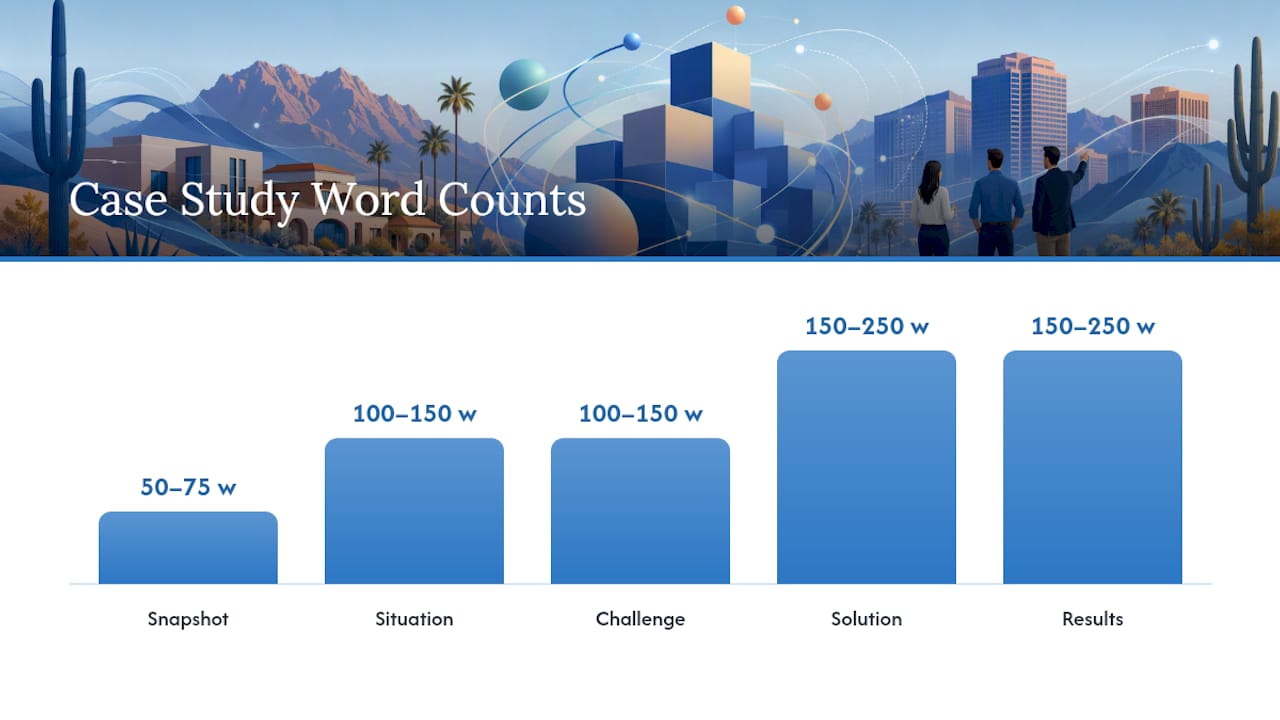
The four-part structure known as Situation, Challenge, Solution, Results (SCSR) is the format that performs best for marketing case studies, and most published examples run between 500 and 1,500 words. Anything shorter feels thin. Anything longer loses the skimmer.

Here’s the practical breakdown for a single case study page:

  1. Snapshot box (50 to 75 words). Headline result up top, plus two or three hard metrics. This is what a skimmer reads first, so put your best number here.
  2. Situation (100 to 150 words). Who the client is, what their business does, and the local market context.
  3. Challenge (100 to 150 words). The specific problem, not a generic pain point. “Our garage door company wasn’t showing up for emergency repair searches” beats “we needed more visibility.”
  4. Solution (150 to 250 words). What was actually done, in plain language, without turning it into a service brochure.
  5. Results (150 to 250 words). Before/after numbers with a clear timeline, plus a client quote if you have one.

Placement matters as much as content. Drop a pull quote right after the Challenge section to build tension, and put another near the end of Results to close on emotion rather than a spreadsheet. A chart or before/after screenshot belongs between Solution and Results, where the reader is primed to want proof.

For sales use, create two extra formats from the same material: a one-page PDF for email attachments and a single paragraph summary your sales team can paste directly into a proposal.

What Is the Best Case Study Format and Word Count? — overview diagram

How Do You Collect the Right Evidence From a Client?

Skip the long survey. The best case study interviews are short, structured, and pre-sent, and they stay focused on three areas: the problem, the solution, and the measurable result. Send the client five to seven questions in advance so they can pull real numbers instead of guessing on the call.

A workable question set looks like this:

  • What was happening in your business before we started working together?
  • What made you decide to fix it now instead of waiting?
  • What specific numbers can you share, before and after, and over what time period?
  • What surprised you most about the process?
  • Would you say this to another Scottsdale business owner considering the same fix?

Keep the actual interview to 15 or 20 minutes. Longer conversations produce more filler, not more usable material. Record it, but don’t transcribe the whole thing. Pull the two or three lines that carry emotion or specificity and build the narrative around those.

Data collection runs parallel to the interview. Pull analytics screenshots, ranking reports, or sales figures from the same date range the client references, and note the exact timeline: start date, milestone dates, and the date results were measured. A result without a timeline reads as unverifiable, and buyers notice the gap even if they can’t name it.

What Design Elements Make a Case Study More Credible?

Visuals do the persuading that paragraphs can’t. A snapshot box with the headline metric, a pull quote, and at least one chart or screenshot lets a skimmer absorb company, main result, and methodology within seconds of landing on the page.

Three elements consistently earn their place:

  • A before/after chart. Traffic, rankings, revenue, whatever the client’s real metric is. A simple bar chart beats a paragraph describing the same numbers.
  • A screenshot of the actual result. A Google ranking, a Google Business Profile insight panel, an analytics dashboard. Authenticity reads instantly.
  • A styled client quote callout. Pull it out of body text and set it in a larger font or a colored box so it breaks up the page visually.

Avoid stock photography of generic office handshakes. It signals template content and undercuts the specificity you worked to build into the writing. If you have real photos of the client’s storefront, product, or team, use those instead, even if they’re not professionally shot. A slightly imperfect real photo outperforms a polished fake one on trust.

How Do You Publish and Promote a Case Study for Local SEO?

Writing the case study is half the job. Getting it in front of the right people locally is the other half, and it’s the step most Scottsdale SMBs skip.

Start with placement: publish on a dedicated page in your main navigation, not buried three folders deep. Add schema markup where relevant so search engines can parse the review or article data cleanly. From there, distribute the case study across social, email, and sales channels rather than letting it sit as a static page.

A practical publishing checklist:

  • Publish on a standalone URL under a visible “Case Studies” or “Results” navigation item.
  • Add a short excerpt to your Google Business Profile as a post, linking back to the full page.
  • Cut the headline result into two or three social posts spaced a week apart.
  • Send the one-paragraph summary version to your email list.
  • Hand the PDF version to your sales team for use in proposals.

Repurposing a single strong case study across these channels produces better ROI than churning out several thin ones. One well-promoted story beats five that nobody sees past the publish button.

Which Metrics Should You Include, and How Should You Present Them?

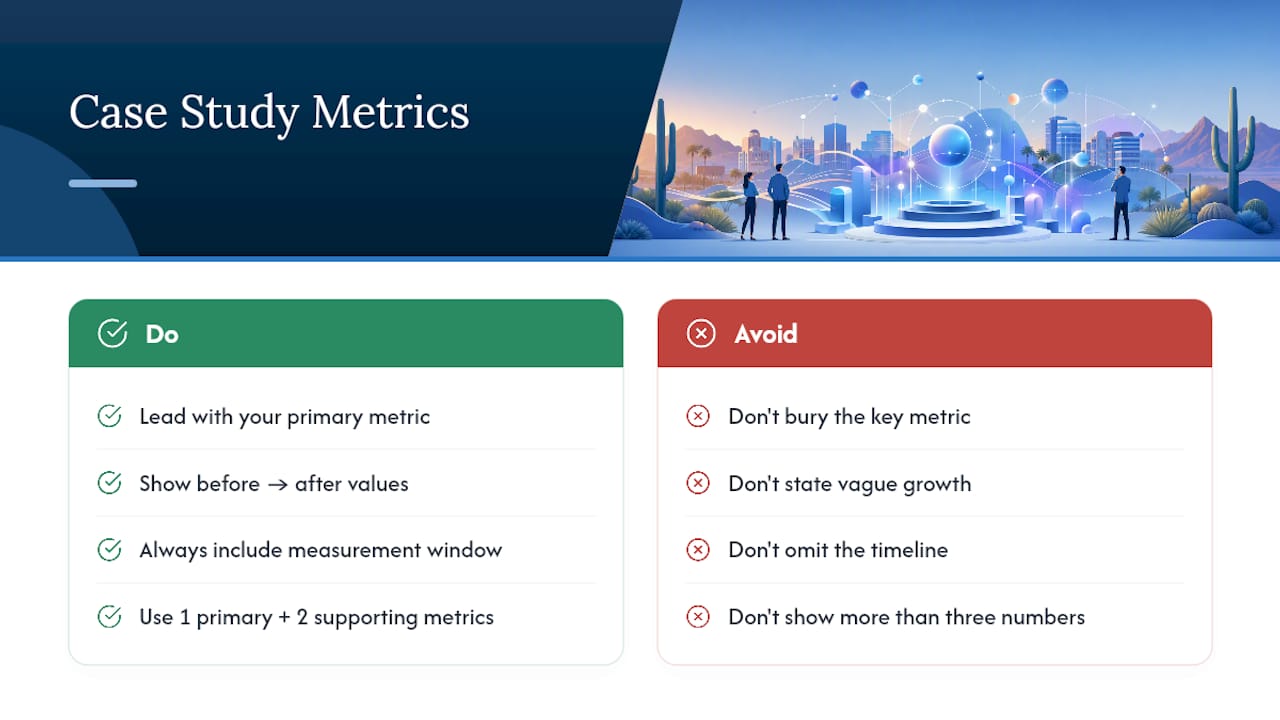
Lead with the number that matters most to your specific business, not the one that’s easiest to measure. Readers decide quickly whether a case study is worth their time, so the best metric belongs in the headline and the snapshot box, not buried in paragraph four.

Good metrics to consider, depending on the client’s goals: organic traffic growth, keyword ranking improvements, phone calls or form submissions, revenue change, or review count growth. Pick one primary metric and two supporting ones. Three total numbers is the sweet spot. More than that dilutes the impact.

Present every number with before/after framing and an explicit timeline. “Organic traffic grew” means nothing. “Organic traffic grew from 340 to 1,200 monthly sessions over five months” gives a reader something concrete to evaluate. The timeline also protects you from the appearance of cherry-picking, since a defined window signals the number wasn’t massaged to look better than it is.

Before-and-after SEO result timeline

A simple table format works well for presenting multiple metrics at once:

How Do You Write a Case Study That Actually Reads Well?

The biggest mistake in case study writing isn’t a lack of data. It’s writing the client’s story like a spec sheet instead of a story. Give the business a name and a face early, even if you anonymize details later. “A Scottsdale HVAC company” is fine, but “Dave, who runs a three-truck HVAC operation near Old Town” is memorable.

Structure the narrative around tension and resolution the way any good story works. What was actually at stake if the problem went unsolved? Lost revenue, a competitor pulling ahead, a slipping reputation. Naming that stakes moment before you introduce the solution makes the eventual results land harder.

Use the client’s own words wherever you can. A single unpolished quote, “I honestly didn’t think a website redesign could do this,” carries more weight than three paragraphs of polished marketing copy. If you’re looking for more technique on this front, approaches to human-centered storytelling offer useful detail on building emotional through-lines without overselling.

Cut every sentence that describes a feeling instead of showing a fact. “The client was thrilled” is filler. “The client called back three times in the first week to ask when they could hire us for a second location” shows the same enthusiasm with evidence behind it.

What Common Mistakes Should You Avoid in Case Study Writing?

Exaggeration is the fastest way to lose a reader’s trust. If a result took eight months, don’t imply it happened in six weeks. If growth was strong but not dramatic, resist the urge to round up. Buyers who’ve read a dozen inflated case studies can smell one from the first paragraph, and once they doubt one number, they doubt all of them.

Vague language is the second most common failure. “Significant improvement” and “impressive results” say nothing. Replace every vague qualifier with the actual figure, or cut the sentence.

A few other pitfalls worth flagging:

  • Burying the result. If the reader has to scroll past three paragraphs of company background before hitting a number, you’ve lost most of your audience.
  • Skipping the timeline. A result with no date range invites skepticism.
  • Writing for the client, not the prospect. The case study exists to persuade a future buyer, not to flatter the client you interviewed.
  • Forgetting a call to action. Every case study should end with a clear next step, not just trail off after the last metric.
  • Overloading on jargon. If a Scottsdale small business owner wouldn’t say it out loud, don’t put it in the case study.

Get written permission before a case study goes live, every time, no exceptions. A quick email confirmation works, but a simple signed release is better protection for both sides, especially if the case study includes specific revenue figures or business names.

Confidentiality needs the same care. If a client shares internal numbers, confirm exactly what can be public. Some clients are comfortable with exact revenue figures; others want percentage growth only, with no dollar amounts. Ask directly rather than assuming, and put the agreed scope in writing.

Give the client a chance to review the draft before publication. This isn’t just good manners. It catches factual errors, protects against misquotes, and prevents disputes after the piece is live. Most clients only ask for minor wording changes, and the review step tends to build goodwill rather than slow things down.

If the case study will appear in ads or be sent to a specific competitor of the client’s, ask first. Some businesses are fine being featured publicly but don’t want their story used in paid promotion aimed at a direct rival. It’s a small conversation that avoids a real problem later.

What Do Strong Case Study Examples Look Like?

The clearest way to understand the format is to look at a finished example rather than a template alone. WebTechs.Net’s own SEO case study portfolio shows the SCSR structure applied across different Scottsdale-area industries, including a garage door repair company that saw a 1,620% increase in relevant traffic after a targeted local SEO overhaul.

What separates a strong example from a mediocre one usually comes down to specificity in three places: the challenge section names the actual problem instead of a generic pain point, the results section anchors every number to a real timeline, and the quote section uses the client’s actual phrasing instead of a polished paraphrase.

If you’re building your first case study, pull up two or three published examples in your own industry and note what order the information appears in. Most follow the same rhythm: hook, context, tension, resolution, proof. Once you see that pattern a few times, writing your own version gets considerably easier.

An Agency’s View on What Case Study Production Actually Takes

Most people overestimate how long a good case study takes to produce. For an experienced team, the realistic window is four to six hours total: interview, drafting, and design combined. What takes longer isn’t the writing. It’s waiting on the client to approve data or send screenshots.

The outcomes worth chasing aren’t abstract. They show up as ranking movement, call volume, and page traffic you can point to on a dashboard, the kind of documented wins visible across Webtechs. The fastest way to speed up approval is to send the draft with the numbers already filled in, so the client is confirming facts instead of writing from scratch. That single change cuts most review cycles in half.

— Brett

Get a Case Study Written and Working for Your Business

Webtechs is the alternative to hiring a freelance writer or handling this in-house for Scottsdale businesses that want a case study written, designed, and actually promoted, not just typed up and forgotten in a folder. A DIY draft can capture the basics, but it usually misses the local SEO structuring, the schema, and the promotion checklist that turns a nice story into a lead-generating page.

Webtechs

A typical engagement includes a short pre-sent interview, drafting in the SCSR format, a designed snapshot box and visuals, and a publish-ready page built for your site. Turnaround runs on the same timeline discussed above, four to six hours of production once the interview is complete, plus normal review time on your end. If design support is part of the project, the team can also handle the page layout through professional web design so the finished case study matches your site rather than looking bolted on.

Take a look at the full portfolio of past client work to see examples across different Scottsdale industries, then reach out to get a quote for your own case study project.

Sources

Hands organizing a monthly content calendar
Written by webtechs

One Hour Content Calendar Ideas for Arizona Small Businesses

Hands organizing a monthly content calendar

Build your calendar around three or four content pillars, a repeatable weekly pattern, and an 80/20 mix of helpful-to-promotional posts. That structure turns a blank month into a fillable grid instead of a staring contest. Prioritize short video, carousels, and one blog or email piece per week, then multiply each into three or more spinoffs. The sections below give you a template example, a one-hour monthly sprint, and a review checklist to keep the whole thing honest.


TL;DR:

  • Focusing on four content pillars like Teach, Tools, Stories, and Offers ensures variety and relevance based on customer questions.
  • Using a structured one-hour monthly sprint simplifies planning and helps create a balanced, repeatable content schedule.
  • A good content mix should match the 70-20-10 or 80-20 rule, emphasizing helpful content over promotional posts while tracking key metrics.
  • Prioritizing high-effort ideas for repurposing through multiplication maximizes content output without overloading production capacity.
  • Hiring an agency can streamline management, guarantee consistency, and improve KPI tracking without adding extra workload.

Table of Contents

Content Calendar Ideas Organized by Pillar and Channel

Pillars are the four or five buckets your content lives in, so you never stare at a blank page wondering what to post. Most small businesses do fine with four: Teach (how-to and tips), Tools (behind-the-scenes of what you use or sell), Stories (customers, staff, local moments), and Offers (promotions, availability, community shoutouts). Each pillar answers a different question a customer already has, which is why it works better than posting whatever comes to mind that morning.

Here are ideas you can drop straight into a calendar, grouped by pillar:

Teach:

  • A 3-step how-to Reel solving one small problem your customer faces
  • A “mistakes to avoid” carousel with five slides
  • A myth-busting post correcting a common misconception in your industry
  • A quick FAQ answer pulled from a real customer question
  • A blog post expanding on your most-asked question

Tools:

  • A walkthrough of one piece of equipment, software, or material you rely on
  • A “day in the life” story showing your actual workflow
  • A before/after post showing your process, not just the result
  • A comparison post: option A vs. option B, and why you pick one

Stories:

  • A customer spotlight (with permission) told in their words
  • A team introduction post for a new hire or long-tenured staffer
  • A local-event tie-in showing up at something happening in your area
  • A “why we started this business” post, told in under 100 words

Offers and community:

  • A limited-time promotion tied to a slow week on your calendar
  • A referral-program reminder
  • A local partnership or collaboration announcement
  • A poll or question sticker asking followers what they want next

Mark each idea as low effort (a phone photo, a quick caption, a repost) or high effort (scripted video, design work, a full blog draft) before it goes on the calendar. That single flag prevents overloading one week with everything that needs a camera crew. And whenever you produce a high-effort piece, run it through the multiplier method: one blog post becomes a short video, a carousel, an email blurb, and two social captions, instead of one asset that gets used once and forgotten.

Content Calendar Template Fields You Can Copy Today

A content calendar only works if it tracks the right fields, not every field. Skip the ones that just add clutter to your Google Sheet or Notion board.

  • Date: when it publishes, not when it’s due
  • Platform: Instagram, TikTok, LinkedIn, blog, email
  • Pillar: which bucket it falls under (Teach, Tools, Stories, Offers)
  • Format: Reel, carousel, static post, blog, newsletter
  • Title/hook: the first line or headline, written out in full
  • CTA: what you want the viewer to do next
  • Asset link: where the file, draft, or design lives
  • KPI: the one metric this post is meant to move
  • Status: idea, in progress, ready, published

Columns like pillar, hook, and asset link are what separate a real working template from a bare list of dates. Here’s what one filled row looks like:

Date Platform Pillar Format Title/Hook CTA KPI Status
March Instagram Reel Teach Short video “3 signs your AC needs service before summer” Book a checkup Reach Ready

Picking Pillars and a Cadence Your Team Can Actually Keep Up

Choose your three or four pillars by listing the questions customers ask most, then matching each one to a business goal (awareness, trust, sales). If nobody’s asking about your equipment, drop that pillar and give the slot to something they do ask about.

Cadence should match your actual capacity, not an influencer’s schedule:

  • One short video weekly (Reels or TikTok)
  • Two to three feed posts weekly (carousels or static)
  • One blog or email monthly minimum, weekly if you can sustain it

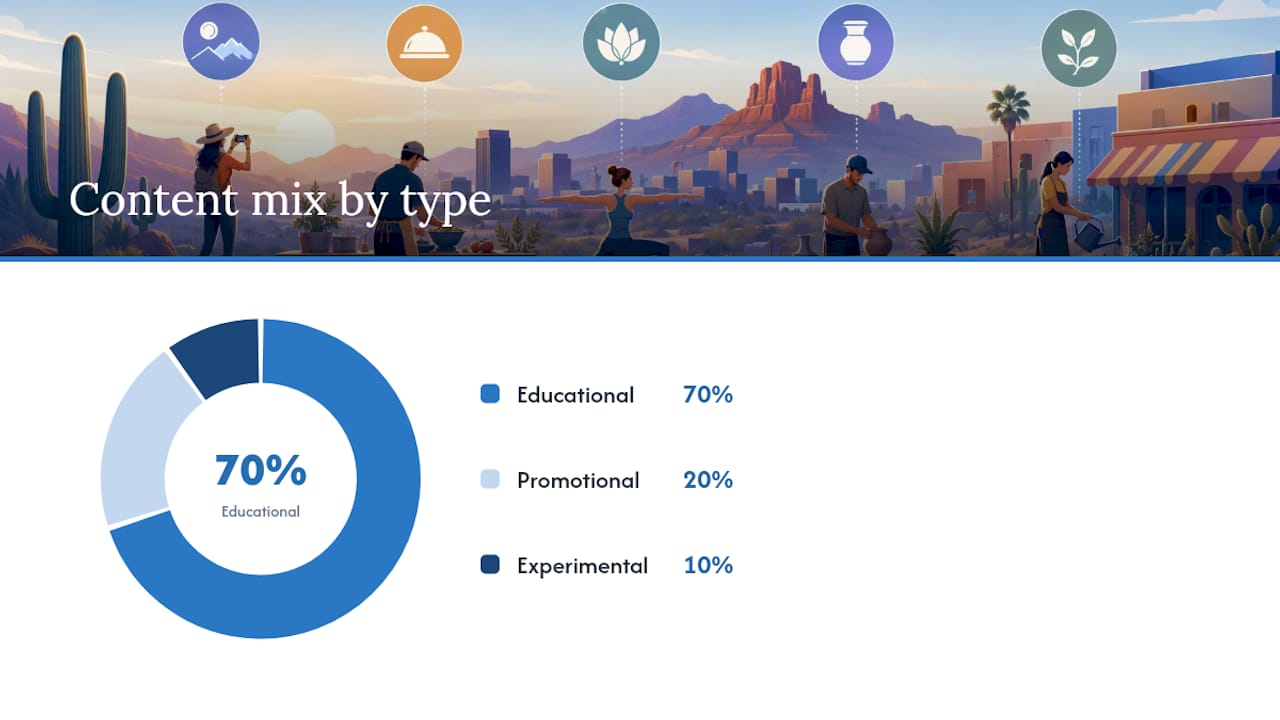
Track your ratio against the 70-20-10 rule: 70% educational, 20% promotional, 10% experimental, or a simpler 80/20 split favoring helpful content. Count your posts at month’s end.

Pro Tip: Tag each post with its pillar in the calendar’s dropdown or color code. At a glance, you’ll see if “Offers” quietly took over your month.

Picking Pillars and a Cadence Your Team Can Actually Keep Up — overview diagram

The One-Hour Sprint That Fills Your Whole Month

Set a timer and run this once a month instead of scrambling weekly. A structured one-hour sprint beats a dozen scattered fifteen-minute sessions because you stay in planning mode the entire time.

  1. Setup (10 minutes): Pick your channels, posting pace, and confirm your pillars. Note any deadlines, holidays, or launches this month.
  2. Idea fill (35 minutes): For each calendar slot, apply pillar plus pain point plus format plus promise. Example: Teach pillar, “AC breaking down mid-summer,” Reel format, “3 signs before it fails.”
  3. Realism pass (15 minutes): Mark each idea’s effort level and slot it against your actual bandwidth for that week.

Once you’ve drafted one long-form piece, run it through the multiplier: blog post becomes short video becomes carousel becomes email snippet becomes two social captions, scheduled the same week instead of spread across a quarter.

Pro Tip: Do the sprint the same day every month, like the first Monday. Recurring habits survive busy seasons better than “whenever I get to it” habits.

Monthly Review Checklist: Balance, Effort, and Three KPIs

Run two passes before you close out the month. First, a balance pass: count posts per pillar and check your promotional percentage against your 80/20 or 70-20-10 target. Second, an effort pass: did low-effort posts carry the month while high-effort pieces sat untouched, or the reverse?

Then check three numbers:

  • Reach or impressions: is content getting seen at all?
  • Engagement rate: are people reacting, commenting, sharing?
  • Website traffic or conversions from social: is any of this turning into business?

If engagement is strong but website traffic is flat, add a clearer CTA next month instead of adding more posts. If reach is low across every pillar, the fix usually isn’t more content, it’s better hooks on the content you already have. One weak KPI tells you exactly which lever to pull, not which pillar to abandon.

What a Scottsdale Service Business Would Actually Do With This

A Scottsdale HVAC or landscaping company running four pillars would map its 30-day plan around obvious seasonal pain points: AC failures before summer, irrigation timing before the heat sets in, or holiday lighting in November. That’s Teach and Offers doing most of the heavy lifting, with Stories filling in customer spotlights once or twice monthly.

The businesses that stick with a calendar past month two are the ones that made it boring on purpose. Boring means repeatable. Repeatable means it survives a busy week.

If you’re hiring an agency or freelancer to run this for you, ask specifically what deliverables you get each month, what cadence they commit to per channel, and which three KPIs they’ll report against. Vague answers on any of those three points are a red flag before you sign anything.

Why Most Content Calendar Advice Skips the Part That Matters

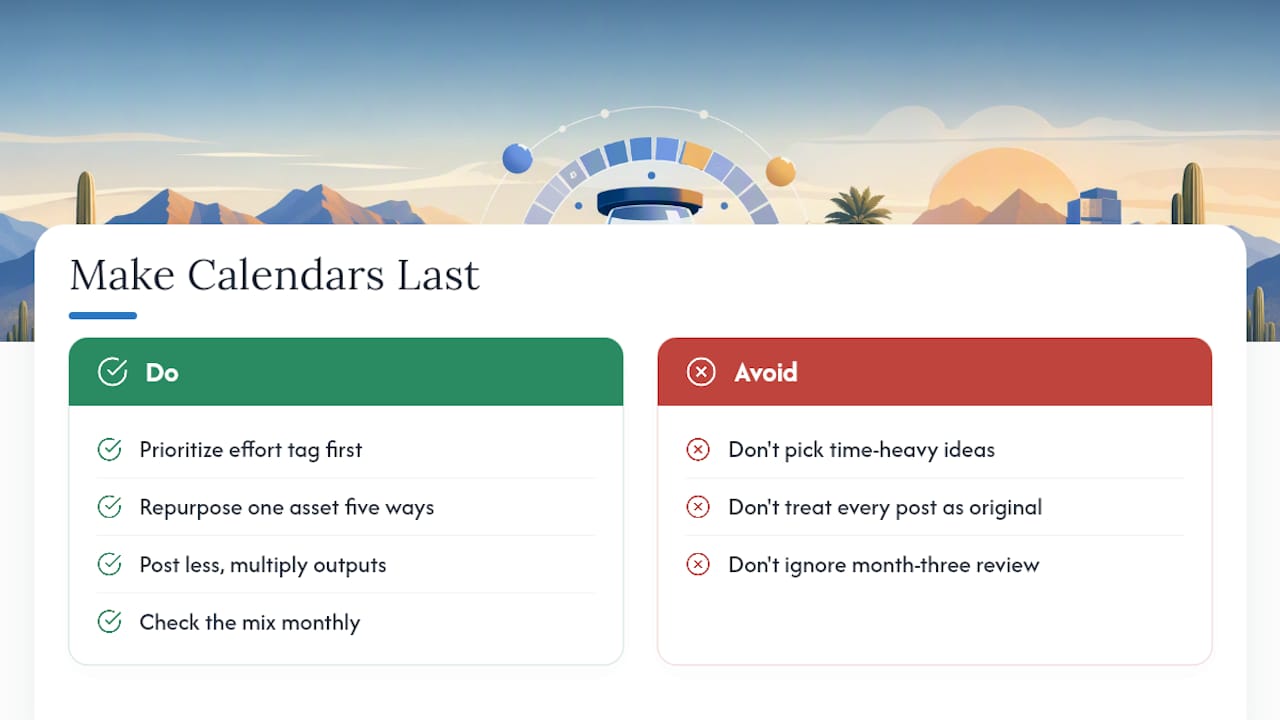
Most guides oversell the ideas part and undersell the maintenance part. The real failure point is month three, when nobody’s checking whether the mix actually holds or whether the “quick” Reel format turned into a two-hour production nightmare nobody has time for anymore.

Why Most Content Calendar Advice Skips the Part That Matters — overview diagram

The conventional wisdom says post more. The better move, based on how these calendars actually survive past a quarter, is post less but multiply harder. One solid long-form asset repurposed five ways beats five separate scrambles to invent five separate ideas. Small teams that treat the calendar like a factory line, one input, several outputs, outlast the teams treating every post as an original creative act.

If you’re prioritizing anything first, prioritize the effort tag on every idea before you fall in love with the idea itself. A brilliant concept that needs four hours you don’t have isn’t a content idea. It’s a resentment waiting to happen.

Get Your Calendar Built and Managed Without Adding It to Your Own Plate

Consider hiring an agency to manage the pillars, the weekly pattern, and the sprint described above, freeing up your own schedule. Social media management at Webtechs covers scheduling, content creation, and monthly reporting against the same KPIs covered here: reach, engagement, and traffic from social.

Webtechs

Deliverables typically include a monthly content calendar, produced posts across your priority channels, and a report showing what moved and what didn’t. If you’d rather see what that work looks like before committing, check our portfolio of past client projects or read through client testimonials from other Scottsdale-area businesses we’ve worked with. When you’re ready to hand this off, request a consult and we’ll map your first 30-day calendar together.

Sources

Checklist and workspace for SEO tasks
Written by webtechs

Small Business SEO Checklist for Arizona Owners in 2026

Checklist and workspace for SEO tasks

Do three things this week: claim and fully build out your Google Business Profile, fix every mismatched business listing online, and publish one optimized service or location page. Then watch two numbers in Google Search Console: total impressions and your top queries. Those two metrics tell you faster than anything else whether Google is starting to notice you.

Here’s the quick-start version before the full checklist:

  1. Claim your Google Business Profile and verify it (usually a postcard or phone call from Google).
  2. Audit your NAP (name, address, phone) across your website, GBP, and the top five directories.
  3. Set up Search Console and link it to your GBP, so you can see what’s already driving impressions.
  4. Publish one location or service page built around a real neighborhood or city name, not just “Arizona.”
  5. Ask your last five customers for a Google review. Fresh reviews move the needle more than people expect.

Pro Tip: Check your Search Console impressions weekly for the first month. A jump in impressions with no click increase usually means your title tags or meta descriptions need work, not your rankings.

Key Takeaways

Local SEO success for small businesses comes down to a complete, active Google Business Profile, consistent NAP data, and a steady weekly cadence of reviews and updates.

Point Details
Start with Google Business Profile Claim, verify, and fully complete every field; update photos and posts weekly.
Fix NAP everywhere Audit your name, address, and phone across Google, Apple Maps, Yelp, and data aggregators.
Track two core KPIs Watch total impressions and top queries in Search Console to measure early progress.
Build one strong location page Localize with real neighborhood names instead of creating thin duplicate pages.
Follow a 30/60/90-day plan Sequence GBP and NAP first, on-page fixes next, then links and schema by day 90.
Get help when it’s complex Webtechs handles technical audits, GBP management, and location pages for Arizona businesses that want expert execution.

Table of Contents

Small Business SEO Checklist: How to Prioritize With Limited Time

You don’t need to do all 17 sections below in order, and you definitely don’t need to do them all this month. Most small business owners in Scottsdale, Tempe, or Mesa are running the business AND trying to market it, so prioritization matters more than completeness.

Everything else, schema markup, blog content, backlinks, compounds slowly over months.

  • Month 1: GBP, NAP audit, Search Console setup, one location page
  • Month 2: Reviews process, on-page fixes across your top five pages, mobile speed check
  • Month 3: Local link-building, content expansion, competitor analysis

Pro Tip: If you’re stuck choosing between fixing a technical issue (broken redirects, slow load times) and writing content, fix the technical issue first. A site Google can’t crawl properly won’t rank no matter how good the writing is. Complex migrations or a full technical rebuild are where hiring a local agency usually pays for itself.

Google Business Profile: Claim, Optimize, and Maintain

Your Google Business Profile is the single highest-leverage asset in local SEO, and most owners treat it like a business card instead of an active marketing channel.

  1. Claim and verify your listing. Verification (postcard, phone, or video) tells Google you’re a real, operating business, and Google’s own guidance ties verification directly to local ranking eligibility.
  2. Fill out every field. Primary and secondary categories, a full services list, accurate hours (including holiday hours), and attributes like “women-owned” or “wheelchair accessible” if they apply. Incomplete profiles lose to competitors with basic details filled in.
  3. Upload real photos monthly. Interior shots, team photos, and completed work perform better than stock images. Aim for at least four new photos a month.
  4. Post updates weekly. GBP posts (offers, updates, events) show Google the profile is active, and active profiles tend to earn more visibility in the local pack.
  5. Respond to every review within 48 hours. A short, specific reply (“Thanks, Maria, glad the AC repair held up through the summer heat”) does more for trust than a generic “Thanks for the feedback!”

Pro Tip: Set a recurring 15-minute calendar block every Monday for GBP updates. Treating it as a weekly habit, not an occasional task, is what separates profiles that rank from ones that stall.

NAP Consistency: What to Fix and Where

NAP stands for name, address, and phone number, and it needs to match exactly across every place your business appears online. “123 N. Main St.” on your website and “123 North Main Street” on Yelp looks like a small thing, but Google reads it as a signal of unreliable data, and that erodes trust in your local listings.

Priority directories to check for Arizona small businesses:

  • Google Business Profile (your primary listing)
  • Apple Maps (increasingly important as more people navigate by iPhone)
  • Bing Places (smaller volume, but free and easy to fix)
  • Yelp (especially for restaurants, home services, and retail)
  • Data Axle and Foursquare (data aggregators that feed dozens of smaller directories automatically)

The efficient way to audit this: export every listing you can find into a spreadsheet, mark which fields don’t match your official records, and fix the aggregator feeds first since they often push updates downstream to smaller sites automatically. Local citation audits that prioritize traffic-driving directories over obscure ones save hours of manual cleanup. Webtechs’ guide on NAP consistency for small businesses walks through the spreadsheet method step by step if you want a template to copy.

Local Keyword Research and Intent Mapping

Hand sorting keyword notes on cafe table

Not all local keywords are worth chasing, and this is where a lot of small business SEO budgets get wasted on the wrong terms.

Start with two free sources: Google Keyword Planner shows you search volume for terms like “AC repair Scottsdale” versus “how does AC refrigerant work,” and your Search Console top queries report shows you what people are already typing to find you, even ones you don’t currently rank well for.

  • Transactional intent (“emergency plumber Chandler,” “book haircut Tempe”) belongs on service pages designed to convert.
  • Informational intent (“how often should I service my AC,” “signs you need a new roof”) belongs on blog posts that build authority and capture top-of-funnel traffic.
  • Prioritize using volume × intent × competitiveness. A low-volume, high-intent term (“24 hour locksmith Gilbert”) often converts better than a high-volume, low-intent one.

The U.S. Chamber of Commerce’s small business SEO guide recommends tracking which queries actually drive impressions before investing heavily in new content, since Search Console data is free evidence of real demand. Webtechs breaks down a full mapping process in its SEO content strategy guide for Phoenix-area businesses.

On-Page Local SEO: Titles, Meta Descriptions, and Headers

On-page fixes are the fastest wins on this entire checklist because you control them completely, no waiting on directories or reviewers.

  1. Write title tags in the format “Service + City.” “Emergency Plumbing Repair in Scottsdale, AZ | [Business Name]” beats a vague “Home Services Company” every time.
  2. Write meta descriptions that include a reason to click, not just a repeat of the title. “Same-day AC repair in Mesa. Licensed, insured, 5-star rated on Google” gives searchers a reason to pick you over the listing above or below.
  3. Use one H1 per page that matches search intent, then break content into H2 and H3 sections covering services, service area, and process, so both readers and Google understand the page’s structure.
  4. Add descriptive alt text to images (“technician repairing rooftop AC unit in Tempe, Arizona” instead of “IMG_4821.jpg”). This helps accessibility and gives Google more context about your local relevance.
  5. Internally link to your location pages from your homepage navigation and from relevant blog posts, so both users and crawlers can find them easily.

Common mistake: stuffing the city name into every sentence. Google’s SEO starter guide is clear that content written for people, structured clearly, and free of unnatural repetition performs better than keyword-stuffed pages. Aim for 500 to 800 words on core service pages, enough to answer real questions without padding.

Location Pages That Actually Convert

A location page isn’t just an address dropped at the bottom of your homepage. It’s a dedicated page built to answer the specific questions someone in that neighborhood is asking.

Essential elements every location or service-area page needs:

  • Full address, embedded Google map, and accurate hours
  • A specific list of services offered at that location
  • At least one or two customer testimonials, ideally naming the neighborhood
  • A short FAQ section addressing common local questions (“Do you service homes near Old Town Scottsdale?”)

Localize the copy using real neighborhood names, landmarks, and cross streets rather than repeating “Arizona” or “the Phoenix area” over and over. “Serving homes near Camelback Mountain and Old Town Scottsdale” reads naturally and signals genuine local presence, while ten repetitions of your city name reads like keyword stuffing and turns readers off.

Pro Tip: If you serve one metro area from a single office, build one strong service-area page instead of five thin “fake” location pages for cities you don’t actually have a presence in. Google has gotten better at spotting doorway pages, and thin duplicated content can hurt more than help.

Reviews and Reputation Management

Reviews are one of the fastest-moving levers in local SEO. Shopify’s local SEO research notes that review volume and recency directly affect local pack rankings, and small businesses often see movement here in weeks rather than months.

  1. Ask at the moment of delight, right after a successful service call or purchase, not three weeks later in a bulk email.
  2. Use a QR code on receipts or invoices that links directly to your Google review page; this removes friction that kills response rates.
  3. Set an automated follow-up email or text 24 hours after service, a tactic local SEO practitioners consistently recommend for catching customers while the experience is still fresh.
  4. Respond to every review, positive or negative, within two business days. A calm, specific response to a negative review often reassures future customers more than a stack of five-star reviews with no owner engagement.

Pro Tip: Never offer a discount or incentive in exchange for a review. It violates Google’s policies and most review platforms’ terms of service, and it can get your listing suppressed. A simple, sincere ask works better anyway.

Links from other local Arizona businesses and organizations carry more weight for local rankings than a pile of generic directory submissions ever will.

  • Join your local Chamber of Commerce (Scottsdale, Phoenix, or Tempe chapters all offer member directory links) and sponsor a local event or Little League team for a natural mention on their site.
  • Pitch local press when you hit a real milestone, an expansion, an award, a community project. Local news sites carry real domain authority.
  • Trade mentions with complementary businesses. A landscaper and a pool contractor referring customers to each other’s sites is a natural, relevant link that Google’s algorithms tend to value.

Evaluate every link opportunity on three criteria: is it relevant to your industry or location, does the site have real authority, and would a person actually click it? Skip low-value directory submissions that exist purely to sell links. They rarely move rankings and sometimes attract manual scrutiny.

Technical SEO and Mobile Performance

Most small business sites lose local visibility to something boring: slow load times and poor mobile usability, not lack of content.

  1. Run your homepage and top service pages through PageSpeed Insights or Lighthouse. These free tools flag your biggest issues in under a minute.
  2. Compress large images before uploading; a single unoptimized hero image can add seconds to load time.
  3. Implement browser caching and defer non-critical scripts (chat widgets, tracking pixels) so they load after the main content.
  4. Check mobile usability specifically: tap targets that aren’t too small, text that doesn’t require zooming, and forms that work with a thumb, not just a mouse.

Speed and mobile-friendliness genuinely affect visibility, and some industry guidance suggests pages loading under two seconds see stronger performance in AI-driven search results as well as traditional rankings. Webtechs’ technical SEO audit guide covers a full triage process if you’re not sure where to start fixing issues first.

Structured Data and Schema for Local Business

Schema markup is code added to your site that explicitly tells Google “this is a business, here’s the address, here’s the phone number, here are the hours.” Without it, Google has to guess at that information from your page content.

  • Implement LocalBusiness schema first, including name, address, phone, hours, and price range. These are the properties Google most commonly pulls into local search features.
  • Add Review or AggregateRating schema if you display testimonials, since it can help reviews appear directly in search results.
  • Test everything with Google’s Rich Results Test before publishing; a single typo in the code can invalidate the whole markup block.

Following Google’s own Search Essentials guidance on structured data increases your eligibility for rich results, though it never guarantees them. Schema is a signal booster, not a ranking guarantee on its own.

Setting Up Search Console, Analytics, and Local KPIs

You can’t improve what you’re not measuring, and this setup takes less than an hour.

  1. Verify your site in Google Search Console using the HTML tag or DNS method, then submit your XML sitemap.
  2. Install GA4 and confirm it’s tracking real visits, not just firing on the wrong page.
  3. Link your GBP insights to your broader reporting so you can compare search impressions with actual profile views and calls.
  4. Watch two KPIs weekly for the first 90 days: total impressions and top queries. The U.S. Chamber’s SEO guide flags these as the earliest reliable signals small businesses should track, since click and conversion data takes longer to stabilize.

Run small experiments, changing one title tag, testing one new GBP category, and check impressions two weeks later. This is the fastest way to learn what’s actually moving your specific market.

A 30/60/90-Day Local SEO Action Plan

Momentum matters more than perfection here. A simple staged plan beats an overwhelming to-do list every time.

  1. Days 1 to 30: Claim and fully complete GBP, fix NAP across top five directories, set up Search Console and GA4, publish one location page.
  2. Days 31 to 60: Launch a review request process, fix on-page titles and meta descriptions across your top five pages, run a mobile speed check and fix the worst offenders.
  3. Days 61 to 90: Pursue two or three local link opportunities, add LocalBusiness schema, review your first 90 days of Search Console data and adjust content priorities based on top queries.

Realistically, expect early movement (more calls, more profile views) within four to six weeks, with ranking improvements for competitive terms taking two to four months to show clearly. Local SEO tends to reward consistency over intensity: steady weekly effort beats one exhausting weekend sprint.

How WebTechs Helps Arizona Small Businesses Get Found

WebTechs.Net has worked with Scottsdale-area small businesses since 1997, long enough to watch local search go from print directories to Google Business Profile and AI-driven results.

  • We build and optimize Google Business Profiles, fix NAP issues across directories, and structure location pages the way this checklist describes, because we wrote it from doing the work directly.
  • We’ve helped local service providers, from roofing companies to hair salons, see measurable jumps in organic visibility after cleaning up on-page and technical issues.
  • Author Brett draws on hands-on agency experience with Arizona small business clients across home services, retail, and professional services.

If you’d rather have someone execute this checklist than do it solo, Webtechs’ portfolio shows the kind of local work we’ve done for businesses like yours.

Voice Search Optimization for Local Queries

Voice search changes the shape of local keywords, and most small business sites still aren’t written for it. When someone asks “where’s a good electrician near me open right now,” they’re speaking in a full question, not typing three keywords.

Structure content to answer questions directly. Instead of a services list with no context, add a short FAQ section on your service pages with question-based headers: “Do you offer same-day appointments in Scottsdale?” followed immediately by a clear, concise answer. Google’s own guidance on content structured for extraction notes that question-and-answer formatting with clear, direct answers is more likely to get pulled into voice results and AI-generated summaries.

Hours and location accuracy matter more here than almost anywhere else. Voice assistants pull “open now” and “near me” answers straight from your Google Business Profile data, so if your hours are outdated or your address is slightly off, you simply won’t surface, no matter how good your content is.

Think about how people actually phrase spoken questions: longer, more conversational, often including “near me” or a specific neighborhood. A page written to answer “what’s the best time to schedule AC maintenance in Arizona summer heat” naturally captures more of this traffic than a page stuffed with short-tail keywords. Test a few of your own service pages by reading the headers aloud. If they don’t sound like something a person would actually say, rewrite them.

Diagram of Google Ads and organic SEO synergy

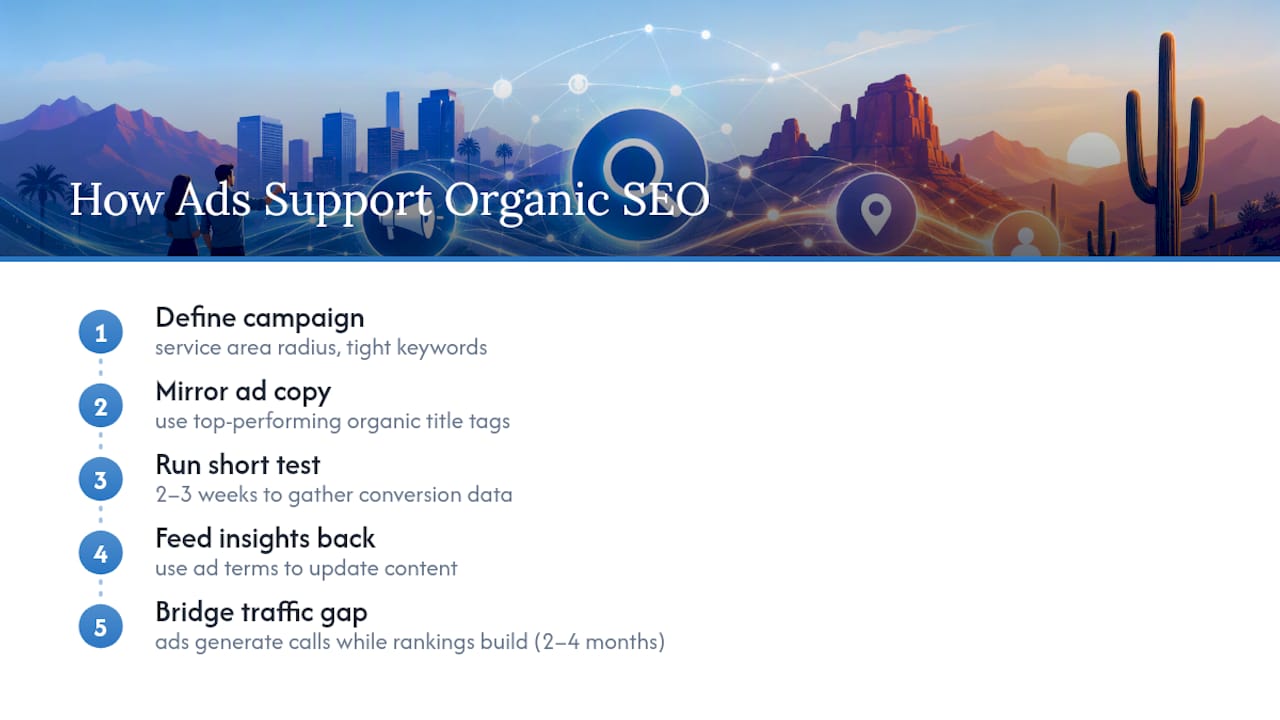
Google Ads and organic SEO aren’t competing strategies. They work best together, especially for a new location page or service that hasn’t earned organic rankings yet.

A basic local Google Ads campaign starts with a defined service area radius, a handful of tightly targeted keywords, and ad copy that mirrors your best-performing organic title tags. If “Emergency Plumbing Repair in Scottsdale, AZ” works well as an organic title, it’s usually a strong headline for a paid ad too, since it’s already proven to earn clicks.

The real integration value: Google Ads data gives you fast keyword insight that Search Console can take months to accumulate. Run a small ad campaign on a new service page for two or three weeks, and you’ll see exactly which search terms actually convert into calls or form fills, insight you can then fold back into your organic content strategy.

Ads also fill the gap while new pages are still climbing organic rankings. A freshly published location page might take two to four months to rank well organically, but a modest local ad budget can generate calls in the meantime, keeping revenue flowing while the organic work compounds.

One caution: don’t let ad spend replace the fundamentals. Businesses that pour budget into ads while ignoring GBP completeness or NAP consistency end up paying for clicks that a fully optimized organic profile would have earned for free.

Competitor Analysis for Local SEO

Look at the three businesses currently ranking above you in the local pack for your top service and city combination. That’s your real competitive set, not the biggest national brand in your industry.

Check their Google Business Profile: how many reviews do they have, how recently did they post an update, what categories are they using that you might be missing? Then look at their website: are they running dedicated location pages, or one generic page? Are their title tags more specific than yours?

This isn’t about copying competitors. It’s about spotting gaps. If every plumber ranking above you in Chandler has 80-plus reviews and you have 12, that’s your clearest priority. If none of them have a dedicated FAQ section answering “same-day service” questions, that’s an opening you can fill.

Revisit this analysis quarterly, not once and forget it. Local competitive landscapes shift as new businesses claim profiles and existing ones ramp up review requests, and a competitor who was weak six months ago might now be outranking you.

Content Marketing Strategies for Small Businesses

Content marketing for a small business doesn’t mean publishing daily blog posts. It means publishing a handful of genuinely useful pieces that answer questions your actual customers ask, then linking them naturally into your service pages.

Start with the questions you already get on the phone or in person. A roofer probably gets asked “how long does a roof replacement take” or “does insurance cover storm damage” constantly. Those questions, turned into short, clear blog posts, capture informational search intent and build topical authority around your services.

Keep a realistic publishing pace: one solid piece a month beats four rushed ones. Each post should link to a relevant service page, and each service page should occasionally link back to a related post. That internal linking structure helps both users and Google understand how your site’s content connects.

Repurpose content across formats. A blog post answering a common customer question can become a GBP post, a short social media caption, and an FAQ entry on a service page, one piece of research, three uses.

Social Media Integration to Support Local SEO

Workspace setup for social media posting

Social media doesn’t directly boost rankings the way a Google Business Profile update does, but it plays a real supporting role in local visibility.

Active social profiles reinforce the same NAP information search engines check elsewhere, and they give customers another place to find your hours, location, and recent work. A Facebook or Instagram post showing a completed job in a specific Arizona neighborhood adds another public signal that your business genuinely operates there.

Cross-post your GBP updates to your social channels instead of treating them as separate tasks. If you posted a new offer or photo to Google, share the same content on Facebook or Instagram; it takes minutes and doubles your visibility for one piece of content.

Encourage customers to tag your business location in their own posts when appropriate. A satisfied customer’s geotagged photo carries more authentic local signal than anything you could post yourself. Webtechs’ social media marketing services can help set up this cross-posting workflow if managing multiple platforms consistently isn’t realistic on top of running the business.

What Actually Moves the Needle (and What’s Overrated)

Most local SEO advice treats every checklist item as equally urgent, and that’s where small businesses waste their limited hours. It isn’t true. Reviews and Google Business Profile completeness do more heavy lifting than backlinks, schema, or blog volume for the average Arizona service business in year one.

The conventional wisdom oversells technical perfection. A flawless Core Web Vitals score on a site with eight reviews and an unclaimed GBP still loses to a slower competitor with 60 reviews and a fully built-out profile. Speed and schema matter, but they’re refinements, not foundations.

What gets underestimated: the compounding effect of consistency. A business that posts one GBP update and asks for one review every single week for three months will usually outperform a business that did a massive one-time optimization push and then went quiet. Google’s own signals reward ongoing activity, not a single burst of effort.

If you take one thing from this checklist, prioritize the two-week habit over the two-day sprint. Fix your NAP, claim your profile, ask for reviews on a schedule, and let the smaller technical items follow once that foundation is solid.

— Brett

Let WebTechs Handle Your Local SEO Checklist for You

Webtechs is the practical alternative to working through this checklist alone at night after closing up shop. As a Scottsdale-based agency that has served Arizona small businesses since 1997, Webtechs builds and manages the exact items covered here, Google Business Profile optimization, NAP cleanup, location pages, and technical fixes, so you spend your limited hours running the business instead of learning schema markup.

Webtechs

Rather than a long-term commitment with vague deliverables, Webtechs offers clear, project-based web design work and ongoing SEO management scoped to what your business actually needs. Local service providers have seen measurable jumps in organic visibility after a focused cleanup of the fundamentals outlined above. If you want a straightforward starting point, browse Webtechs’ website design pricing or get in touch about a free local SEO review and find out exactly where your profile and site stand today.

Sources

Hands performing SEO technical setup
Written by webtechs

When Do SEO Results Actually Show Up in Scottsdale?

Hands performing SEO technical setup

Most Scottsdale businesses see the first measurable movement in 3 to 6 months: rising Google Business Profile actions, a handful of local keywords climbing into the top 10, and organic sessions ticking upward. Quick technical fixes and Google Business Profile changes can show up in weeks. Competitive terms, like “Scottsdale personal injury lawyer” or “best HVAC repair Phoenix,” often take 6 to 12 months or more. “Measurable” means a tracked increase in GBP calls or direction requests, a documented ranking gain on target keywords, or a real uptick in organic leads, not a vague sense that “things feel better.” Shopify’s research backs up the 3 to 6 month window as the norm, with highly competitive verticals stretching past a year.

Here’s the rough shape of it:

  • Weeks 1 to 8: audits, tracking setup, GBP cleanup, crawl error fixes
  • Month 3: early ranking movement on lower-competition local terms
  • Month 6: steadier lead flow and visibility for target keywords
  • Month 12+: authority-building and broader keyword coverage

Key Takeaways

Most Scottsdale businesses see measurable SEO progress within a few months, with quick technical and GBP wins in weeks and competitive keyword rankings often taking a year or more.

Point Details
Quick wins come early Technical fixes and GBP optimization can show visible movement within 4 to 12 weeks.
Month 6 is the real checkpoint Organic leads and stable rankings for target terms should be visible by this point.
Competitive terms take longer High-competition Scottsdale niches often need 12 months or more to rank well.
Track five KPIs monthly Watch organic sessions, GBP actions, keyword position, leads, and conversion rate.
Webtechs offers a local track record Documented Scottsdale case studies since 1997 give a factual baseline for setting your own timeline.

Table of Contents

How Long Does SEO Take to Show Results in Scottsdale?

The honest answer depends on what you’re measuring and how much competition sits between you and page one. Search Engine Land’s guide notes that technical fixes, crawl errors, page speed, broken links, can produce visible improvement in weeks, but that’s barrier removal, not growth. Sustainable ranking gains build cumulatively through content, links, and trust signals Google needs time to verify.

Local businesses in Scottsdale have one advantage over national brands chasing broad terms: geography narrows the competition. A landscaper targeting “Scottsdale backyard landscaping” faces a much smaller field than one chasing “landscaping” nationally, which is part of why Google Business Profile improvements often show up faster than organic rankings for a business’s homepage.

Which Scottsdale SEO Agencies Should You Consider?

Scottsdale has a dense cluster of agencies competing for the same local business owners, and they’re not interchangeable. Some specialize in lead generation, some in design-led local SEO, some in AI-driven visibility work. Here’s a factual shortlist based on public specialties and review data.

Agency Google Rating Core Specialty Best For
WebTechs.Net 4.8★ (19 reviews) Local SEO, web design, documented case studies Small to mid-sized local contractors and service providers
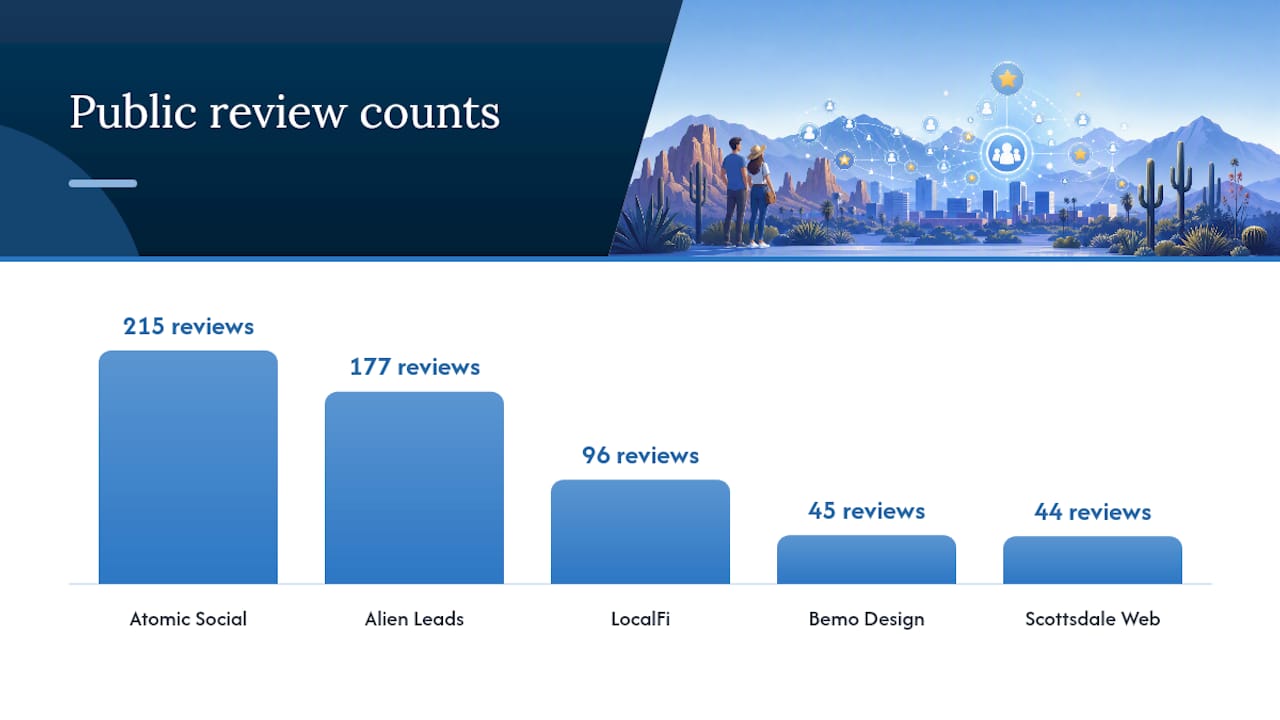
Atomic Social 4.9★ (215 reviews) Creative web design plus integrated advertising Businesses wanting design-driven local SEO with ad support
Alien Leads – Scottsdale SEO Company 5★ (177 reviews) Lead-generation-focused campaigns Businesses prioritizing direct lead volume over rankings alone
LocalFi: SEO Digital Marketing Agency 4.9★ (96 reviews) AI visibility and custom development Businesses wanting AI-enhanced search visibility
Bemo Design 4.9★ (45 reviews) GEO-targeted local SEO campaigns Small businesses needing geography-specific SEO
Scottsdale Web Design and SEO 4.9★ (44 reviews) Website design with map-pack focus Businesses wanting design plus Google Maps optimization
Widely Interactive 5★ (36 reviews) Technical SEO and site performance Businesses needing custom sites with performance-focused SEO
Plain Language Marketing Storybrand Websites & SEO 5★ (21 reviews) StoryBrand messaging integrated with SEO Businesses wanting brand clarity paired with SEO
SDARR Studios Not publicly listed Web design and marketing services Businesses researching a broader regional option

WebTechs has served Scottsdale since 1997 and backs its approach with documented case studies rather than promises, which matters more than a review count when you’re trying to predict your own timeline.

If you run a small local operation, an agency built around lead generation or a combined design-plus-map-pack approach will usually move faster than a broad, multi-service shop. If you need a full site rebuild alongside SEO, look for an agency, like WebTechs or Widely Interactive, that handles both under one roof instead of coordinating two vendors.

Which Scottsdale SEO Agencies Should You Consider? — overview diagram

What Happens Month by Month After You Start SEO?

Realistic expectations save relationships with your agency. Here’s what typically happens at each stage, based on industry data and how search engines process changes.

  1. Weeks 0 to 8: Your agency should run a full technical audit, fix crawl and indexing errors, set up analytics and call tracking, optimize your Google Business Profile, and publish at least one targeted local landing page. Google itself advises waiting a few weeks before judging whether a change worked, since some updates take hours to register and others take months.
  2. Month 3: Expect indexing of new pages and early ranking movement on lower-competition local terms. GBP visibility improvements often appear within 4 to 12 weeks for local searches, which makes this the first real checkpoint.
  3. Month 6: Organic leads should be growing and visibility for your priority terms should feel more stable. If nothing has moved by now, ask your agency to walk you through crawl logs, link acquisition, and content published, something is likely blocking progress.
  4. Month 12 and beyond: Authority builds, keyword coverage broadens, and returns compound, but only with sustained investment. Ahrefs’ study of ranking pages found that only 1.74% of new pages crack the top 10 within a year, and 72.9% of current top-10 pages are more than three years old. New content competes against an entrenched field.

Statistic Callout: Nearly three-quarters of top-ranking pages have been live for over three years, per Ahrefs. If your homepage or service page is brand new, patience isn’t optional, it’s math.

Escalate or request a deeper audit if: rankings haven’t moved at all by month 4, your agency can’t explain what content or links they’ve published, GBP metrics are flat despite “optimization,” or monthly reports repeat the same numbers without new activity behind them.

What KPIs Prove SEO Is Working, and What Should You Ask an Agency?

Track five numbers every month: organic sessions, GBP views and actions (calls, direction requests, website clicks), keyword position for your top 10 target terms, leads or bookings attributed to organic search, and conversion rate by channel. Secondary metrics worth watching include crawl errors fixed, page speed scores, backlink quality, and content published per month.

A useful monthly report shows specific work completed and its measurable effect. A useless one shows generic graphs with no explanation of what changed. Search Engine Land’s guidance on prioritizing high-impact pages, often called the 80/20 rule, is worth asking about directly: agencies that focus effort on the roughly 20% of pages driving most of your organic value tend to move faster than ones spreading thin across your entire site.

Ask any Scottsdale agency these six questions before signing anything:

  • What results have you gotten for a business like mine, with numbers?
  • What’s your link-building policy, and will you show me the sites?
  • Do I own my content and website after we part ways?
  • What milestones should I expect at 3, 6, and 12 months?
  • Will I have direct access to my analytics and reporting dashboard?
  • What are the exit terms if I want to leave the contract?

Pro Tip: Ask to see a real client’s ranking history in Google Search Console during the sales call. Agencies with genuine results will show you the graph without hesitation; ones that hesitate usually don’t have one worth showing.

Red flags include vague “guaranteed #1 rankings” promises, contracts with no exit clause, and content or backlinks the agency won’t disclose.

What Do Real Scottsdale SEO Results Look Like?

Webtechs has run local Scottsdale campaigns since 1997, long enough to have watched search algorithms change multiple times over. Two client examples illustrate how the month-by-month timeline plays out in practice.

A music-related client saw a 4,490% increase in organic traffic after a technical overhaul, content build-out, and sustained local optimization, gains that compounded over many months rather than appearing overnight. A garden nursery client saw a 353% increase following a similar pattern: audit and fixes first, then content and local signals building through the 6 to 12 month window.

These are the kinds of gains possible when a low baseline meets sustained work, not a typical month-two outcome. Most Scottsdale businesses should expect steadier, incremental growth rather than a four-digit percentage jump.

Brett, who has covered local SEO trends for Webtechs, points to these cases as proof that the timeline framework holds: quick fixes early, visible movement by month 3 to 6, and compounding authority after a year of consistent work.

What Does Local SEO Cost in Scottsdale?

Local SEO pricing in Scottsdale generally scales with competition and how much content or technical work your site needs. Small service businesses, plumbers, salons, contractors, typically pay less than businesses chasing competitive, high-value terms like legal or medical services.

Monthly retainers are the most common structure for ongoing local SEO, since ranking and visibility work isn’t a one-time project. A basic local package covering GBP management, on-page fixes, and light content usually costs less than a comprehensive package that adds link building, expanded content production, and technical audits. Businesses wanting to compete for the most contested Scottsdale keywords should expect to pay toward the higher end of any agency’s range, since it takes more content, more links, and more time to close the gap on entrenched competitors.

One-time project fees show up for standalone technical audits or website rebuilds, separate from the ongoing retainer that maintains rankings once they’re won. Webtechs publishes its SEO cost breakdown for Scottsdale so business owners can compare packages before a sales call rather than during one.

Whatever range you’re quoted, ask what’s included at that price. A $500 monthly retainer that includes only GBP posting delivers a different outcome than $500 spent partly on content and partly on technical fixes. Price without a clear deliverable list tells you nothing about what you’re actually buying.

Fixed Fee, Hourly, or Performance-Based: Which Pricing Model Fits?

Three pricing models dominate the Scottsdale SEO market, and each shifts risk differently between you and the agency.

Fixed monthly retainers are the most common. You pay a set amount for a defined scope, GBP management, content, technical fixes, and reporting, cadence stays predictable. The risk is that a vague scope leaves you paying the same fee even in a slow month.

Hourly billing shows up more often with technical audits, one-time site fixes, or consulting engagements than with ongoing SEO. It works well for a bounded project (fix crawl errors, migrate a site) but poorly for open-ended ranking work, since hours can pile up without a clear ceiling on cost.

Performance-based pricing, paying only when rankings or leads hit a target, sounds appealing but carries real risk. Agencies chasing a bonus sometimes prioritize easy, low-value keywords over the terms that actually drive revenue, and Google’s own algorithm timing means results can lag months behind effort, which makes performance triggers hard to define fairly.

Most established Scottsdale agencies, Webtechs included, favor fixed retainers because they align incentives around sustained work rather than short-term keyword targets. If a proposal offers performance pricing, ask exactly which metric triggers payment and how long the contract locks you in before either side can walk away.

How Fast Did Other Scottsdale Businesses See Results?

Timeline variation comes down mostly to starting point and competition level.

Compare that to a hypothetical Scottsdale personal injury attorney chasing the same keyword as a dozen established firms with decade-old content libraries. Ahrefs’ data on page age suggests that business should expect a 12-month-plus runway before cracking page one for its most valuable term, even with excellent execution.

The pattern holds across most Scottsdale case data: low-competition niches and clean technical starting points produce faster, sometimes dramatic, percentage gains. Crowded, high-value verticals produce slower, more linear growth that still adds up but takes longer to show on a report.

How Do You Set Realistic Timeline Expectations With Your SEO Provider?

Put your expected milestones in writing before you sign anything, not after month four when nothing looks like you hoped. Ask your agency to specify what happens by month 3, month 6, and month 12, and get those numbers into the contract or onboarding document rather than a verbal promise.

Request a monthly call, not just a report, at least for the first quarter. Reports show numbers; calls let you ask why a keyword didn’t move or what content is planned next. Agree in advance on what “on track” looks like: is it a specific ranking position, a lead count, or a traffic percentage? Vague language like “improving visibility” gives an agency room to claim success without you being able to verify it.

What Actually Speeds Up or Slows Down SEO Results?

Four variables explain most of the timeline difference between a business that sees results in 3 months and one still waiting at 9.

Competition level matters most. A niche local service with few strong competitors can rank in weeks; a saturated Scottsdale vertical, real estate, law, medical, can take a year or more regardless of budget.

Site health at the start changes everything. A site riddled with crawl errors, broken links, or slow load times needs cleanup before new content or links can do any good, Search Engine Land notes that these fixes are foundational, not optional.

Hands inspecting SEO site health materials

Backlink profile strength accelerates trust-building. Sites earning consistent, relevant backlinks tend to rank faster and hold rankings longer, a pattern Semrush’s analysis links directly to traffic gains over time.

Content volume and consistency round it out. One blog post won’t move a competitive term. Steady publishing, paired with local link building, compounds faster than sporadic bursts of content followed by silence.

What Should You Do First if You’re Ready to Start?

Confirm your analytics and call tracking are actually working, that’s the one thing most businesses skip and regret. Then fix your Google Business Profile listing yourself this week, and book an audit call before another quarter slips by without a plan.

Get a Local SEO Timeline You Can Actually Plan Around

Webtechs has tracked Scottsdale search results since 1997, longer than most local competitors have existed, and backs its timelines with documented case studies instead of guesswork. Where a national SEO tool leaves you interpreting your own dashboard, Webtechs pairs local, in-market strategy with the kind of month-by-month reporting this article recommends asking for.

Webtechs

If you want to see what realistic timelines look like for a business your size, review the Webtechs portfolio for examples across industries, then book an audit call to get a written milestone plan for month 3, 6, and 12 before you commit to anything.

Sources

Analyst manually marking website heatmap data
Written by webtechs

Website Heatmap Analysis for Scottsdale Small Businesses

Analyst manually marking website heatmap data

Website heatmap analysis shows exactly where visitors click, how far they scroll, and which sections hold their attention, so you can fix friction points instead of guessing at redesigns. It works by overlaying color on your actual pages, using real visitor sessions, not surveys or hunches.

If you run a Scottsdale business, your first move this week is simple: pick one to three high-value pages, your main landing page, your top service page, or your contact/booking form, and get a heatmap running on them before you touch anything else. Tools like Microsoft Clarity and Amplitude install with a small script, and you’ll have usable data within days. Add heatmap tracking properly and you avoid the GDPR-style privacy pitfalls that trip up US businesses collecting visitor data on booking pages, and if you’d rather hand the whole thing off, WebTechs.Net runs this locally in Scottsdale.

Your one-week quick start looks like this:

  • First days: Pull your Google Analytics data and flag pages with high traffic but low conversion.
  • Next days: Install a heatmap tool on those pages and let sessions accumulate.
  • Final days: Read the results, write one hypothesis, and plan your first test.

Pro Tip: Don’t heatmap your homepage first just because it gets the most traffic. Heatmap the page closest to the sale, your booking form or quote request, because that’s where a small fix produces the fastest revenue change.

Key Takeaways

Website heatmap analysis turns guesswork into a fixable list of friction points when you pair click and scroll data with a real hypothesis and an A/B test.

Point Details
Pick pages by data, not instinct Use GA4 to target high-traffic, low-conversion, or high-bounce pages first.
Run heatmaps for three to five days minimum Shorter windows miss patterns like rage clicks and scroll drop-off.
Always pair heatmaps with a hypothesis Turn every dead click or scroll cliff into one testable statement, then A/B test it.
Check privacy settings on booking pages Favor privacy-first tools like Cloudflare Web Analytics when collecting contact data.
Local agency option available WebTechs.Net combines heatmap analysis with implementation and testing for Scottsdale businesses.

Tools and docs to start your heatmap analysis

  • Microsoft Clarity: free heatmaps and session recordings, best starting point for any budget.
  • Amplitude Heatmaps: use when you need funnel and journey integration alongside click data.
  • Zoho PageSense: heatmaps plus built-in A/B testing in one tool.
  • Umami heatmap docs: lightweight, self-hosted option for privacy-conscious setups.
  • Contentsquare: zone-based analysis for higher-traffic enterprise sites.
  • Effective CTA design guidance for fixing the buttons your heatmaps flag as ignored.
  • WebTechs.Net’s website design services for Scottsdale businesses that want the analysis and the fix handled together.

Table of Contents

What Is the Four-Step Heatmap Analysis Workflow?

Heatmap analysis works best as a repeatable cycle, not a one-time report you glance at and forget. The standard four-step process moves from analytics to hypothesis to test, and you can run it in a single week for one page.

  1. Identify the page. Use Google Analytics or GA4 to find pages with high bounce rates, high traffic paired with low conversion, or a specific landing page tied to a paid campaign. This takes an hour or two, not days.
  2. Run the heatmap and session replay. Install your chosen tool and let it collect data for three to five days minimum. Click maps show exact tap and click locations. Scroll maps reveal how far people actually read before abandoning the page. Selector or attention maps highlight which specific elements draw the eye, and rage clicks (repeated frantic clicking) flag broken or confusing buttons.
  3. Form a hypothesis. Look for dead clicks on non-interactive elements, a classic sign visitors expect something to be clickable and it isn’t, and scroll drop-off points above key content. Write one specific, testable statement: “Moving the phone number above the fold will reduce bounce on mobile.”
  4. Implement and A/B test. Make the change, then validate it with an A/B test rather than assuming the fix worked.

Quick timeline box: One page, one week. Day 1 setup, days 2-4 data collection, day 5 analysis, days 6-7 build and launch your test. This matches the sprint approach many CRO teams already run.

Tool choice depends on your budget and complexity needs. Microsoft Clarity is free and gets you heatmaps plus session recordings immediately. Amplitude adds funnel and journey integration if you’re already tracking user paths. Zoho PageSense sits in between, offering heatmaps with built-in A/B testing. Contentsquare and similar zone-based platforms tie specific page elements directly to revenue, but that level of depth usually only pays off once you have real traffic volume to analyze.

Diagram comparing heatmap tool features and budgets

A local agency’s take on Scottsdale heatmap patterns

Across the Scottsdale service businesses we’ve worked with, the same problem shows up again and again: visitors scroll past the phone number, hover over a testimonial that isn’t clickable, then leave. Heatmaps catch that in a week; guessing at a redesign can take months. Our SEO case studies show what happens when that friction actually gets fixed instead of just noticed.

Should You Hire an Agency or Run Heatmaps Yourself?

Running heatmap tools yourself costs little beyond your own time, often nothing if you stick with Microsoft Clarity, but it demands hours each week to read sessions, spot patterns, and build tests correctly. If you’re comfortable in analytics and have a few hours weekly, DIY works fine for a single page.

Hiring out makes more sense once you’re managing several pages, running paid traffic where every day of confusion costs money, or you simply don’t have someone on staff who reads heatmap data well. WebTechs.Net handles heatmap-driven UX testing, A/B test setup, landing page redesign, and analytics integration together, so the insight and the fix happen under one roof instead of stalling between “here’s the data” and “who fixes it.”

DIY typically runs free to a few hundred dollars a month in tool costs, spread across weeks of your own time. Agency engagements move faster, usually delivering a first round of findings and a live test within two to four weeks, at a cost tied to project scope. Check the website design price list to see how that scope typically breaks down.

Should You Hire an Agency or Run Heatmaps Yourself? — overview diagram

Before you sign with anyone, ask three questions: Do they combine heatmaps with session replay and funnel data, or just hand you colored screenshots? Do they show local case studies, not just generic templates? And will they actually implement the fix, or just deliver a report and disappear? Ask about ongoing testing cadence, too. A one-time heatmap audit with no follow-up is one of the biggest wastes of a CRO budget. If a provider skips combining heatmaps with funnel data, treat that as a red flag, not a shortcut. Visit our portfolio to see completed Scottsdale projects, or check client testimonials for feedback from businesses that went the agency route. Get started by requesting a quote through Professional Web Design and tell us which pages are underperforming.

Sources

Hands connecting cable to server in data center
Written by webtechs

Does SSL Help SEO for Scottsdale Small Businesses?

Hands connecting cable to server in data center

Yes. HTTPS is a confirmed Google ranking signal, though a lightweight one that mostly acts as a tiebreaker between otherwise similar pages. The bigger risk isn’t a ranking penalty. It’s the trust and conversion damage that comes from not having it: Chrome flags plain HTTP pages as “Not secure,” which scares off visitors before they read a word of your site.

For Scottsdale businesses competing for local searches, that matters more than the algorithm technicality. TLS/SSL certificates also unlock HTTP/2 and HTTP/3, protocols that load pages faster, which feeds into Google’s Core Web Vitals scoring indirectly. A local provider like WebTechs.Net handles this migration daily, and it’s rarely a big lift when done correctly.

Quick rundown of what SSL actually buys you:

  • No browser security warnings scaring off potential customers
  • Faster page loads via HTTP/2 and HTTP/3, both of which require TLS
  • A tiebreaker edge in search results when competitors are otherwise equal
  • Encrypted customer data on contact forms, checkouts, and account logins

Pro Tip: If your site still runs on plain HTTP in 2026, treat it as a trust problem first and an SEO problem second. Both get solved the same way.

Key Takeaways

HTTPS functions as a baseline trust and technical requirement that protects rankings and conversions, while the real SEO gains come from content, links, and site performance built on top of it.

Point Details
HTTPS is a tiebreaker, not a booster Google counts it as a lightweight ranking signal that mainly breaks ties between similar pages.
DV certificates cover most small sites Domain Validated certificates meet SEO and trust needs for most Scottsdale small businesses without the OV/EV price premium.
Redirects must be one-hop Configure direct 301 redirects from HTTP to HTTPS URLs to preserve link equity, per KeyCDN’s guidance.
Canonicals and sitemaps prevent duplicates Update canonical tags and resubmit an HTTPS-only sitemap in Search Console to stop duplicate indexing.
Mixed content is the top migration failure Scan every asset URL for lingering HTTP references before flipping redirects live.

Table of Contents

Which Local Scottsdale Agencies Handle SSL Migrations and Technical SEO?

Scottsdale has a handful of established shops that handle SSL migrations and broader technical SEO work, and they differ mainly in scope and specialty.

WebTechs.Net has operated in Scottsdale since 1997, handling web design, hosting, and SEO migrations for small and mid-sized businesses. The agency’s longevity and local footprint make it a natural fit for business owners who want one team managing the certificate install, the redirects, and the ongoing SEO retainer instead of juggling three vendors.

Lewis SEO Oklahoma City focuses on SEO campaigns for businesses in the Oklahoma City market, with an emphasis on local search visibility.

IronChess Oklahoma City SEO offers technical SEO and search marketing services, positioned toward Oklahoma-based clients seeking search rankings improvements.

OK SEO Pros provides SEO consulting and campaign management, again rooted in the Oklahoma market rather than Arizona.

SEO Oklahoma City Firm rounds out that regional cluster, offering search optimization services to businesses in that area.

If you’re running a business in Scottsdale, proximity matters for site audits, in-person strategy sessions, and understanding local competition. A Scottsdale SEO company that already knows the Phoenix metro market saves you the explanation step that out-of-state agencies require before they can even start.

What Does an SSL Certificate Cost, and How Should You Budget for Migration?

Certificate pricing varies by type, and that’s the first budgeting decision. A Domain Validated (DV) certificate confirms only that you control the domain and typically costs the least, sometimes bundled free with hosting. Organization Validated (OV) certificates verify your business identity and cost more. Extended Validation (EV) certificates require the deepest vetting and carry the highest price, though browsers no longer display the green company-name bar that once made EV visually distinct.

For most Scottsdale small businesses, a DV certificate covers the SEO and trust requirements just fine. Many hosting providers now include free certificates through Let’s Encrypt as a standard feature, which is worth checking before you pay for anything separately. If you’re shopping for hosting for a small business, confirm SSL is bundled rather than sold as an add-on.

The certificate itself is rarely the expensive part. The real budget line is the migration labor: updating internal links, setting up server-level 301 redirects, fixing mixed content, and verifying Search Console and Analytics still track correctly. Shopify’s migration checklist covers these steps, and skipping any of them is what turns a simple certificate install into a week of cleanup. Budget for a few hours of technical work, or a fixed project fee if you’re hiring it out, rather than assuming the certificate cost is the whole story.

Does SSL Slow Down or Speed Up Your Website?

SSL itself adds a small handshake delay when a browser first connects. That cost is nearly invisible today, and it’s outweighed by what HTTPS unlocks: HTTP/2 and HTTP/3 protocols, both of which require an encrypted connection to function. These protocols let browsers request multiple resources over a single connection instead of opening new ones for every image and script, cutting load time on most sites.

That speed gain feeds into SEO indirectly. Google’s ranking systems weigh page experience through Core Web Vitals, and faster load times generally improve those metrics. HTTPS isn’t a speed booster on its own. It’s a gateway to the protocols that are.

Network switch with glowing lights in server room

The catch: you only get the benefit if your server and CDN are actually configured to use HTTP/2 or HTTP/3, not just serving HTTPS over the older HTTP/1.1. This is where a lot of DIY migrations leave performance on the table. Cloudflare’s guidance on encrypting traffic end to end recommends Full (strict) mode between your CDN and origin server, which keeps the entire path encrypted rather than just the visitor-facing half.

How Does HTTPS Affect Mobile Search Rankings?

Mobile matters more here than desktop, because Google indexes and ranks primarily using the mobile version of your site. Mobile users are also more sensitive to load delays and security warnings, since they’re often on public Wi-Fi or cellular connections where a “Not secure” label feels riskier.

HTTPS on mobile carries the same tiebreaker weight it does on desktop, but the performance angle hits harder. HTTP/3, built on QUIC, was specifically designed to perform better on unstable mobile networks than older protocols. A slow, insecure mobile experience compounds two problems at once: weaker Core Web Vitals scores and higher bounce rates from visitors who don’t trust the padlock icon, or lack of one.

If your site serves a mostly mobile local audience, which most Scottsdale service businesses do, HTTPS is one of the few technical fixes that improves both trust and speed in a single move.

How Do You Avoid Duplicate Content When Switching to HTTPS?

Every HTTP URL and its HTTPS counterpart look identical to Google unless you tell it otherwise, which creates a duplicate content problem the moment both versions are crawlable. Fix this with three coordinated steps, not one.

First, set server-level 301 redirects from every HTTP URL directly to its final HTTPS equivalent. KeyCDN’s migration guidance stresses one-hop redirects specifically, because redirect chains dilute link equity and slow crawling. Second, update your canonical tags so every page declares its HTTPS URL as the canonical version, even before the redirect finishes propagating. Third, submit an updated XML sitemap listing only HTTPS URLs, and resubmit it in Google Search Console.

A full migration runbook also flags HSTS as a factor here: once enabled, browsers force HTTPS automatically, which locks in the canonical version but should be rolled out gradually with a short max-age before you commit to includeSubDomains sitewide. Skip any one of these three steps and Google may keep indexing both versions, splitting your ranking signals across duplicate pages.

Why HTTPS Should Be Treated as the Floor, Not the Ceiling

WebTechs.Net treats HTTPS as non-negotiable for any professional site because it prevents avoidable losses in trust and visibility, not because it’s a ranking hack. Google confirmed it as a tiebreaker signal back in 2014, and its real value shows up indirectly through browser trust, click-through rates, and the faster protocols it enables. Anyone selling it as a shortcut to page one is misreading what it actually does.

Tools and Resources for Testing Your HTTPS Migration

Test with the SSL Labs server test, browser dev tools for mixed content, a site crawler for stray HTTP links, and Google’s Search Console indexing reports.

Frequently Asked Questions

What is SSL in SEO?

SSL, technically superseded by TLS but still the common term, is the encryption technology behind HTTPS. In SEO terms, it’s the certificate that lets your site show a padlock instead of a “Not secure” warning, and Google has counted it as a ranking signal since 2014.

Does moving from HTTP to HTTPS actually improve rankings?

It rarely produces a dramatic jump on its own, since it’s a lightweight, tiebreaker-style signal. What it reliably prevents is ranking and traffic loss from browser security warnings and the duplicate-content mess an unmanaged migration creates.

How long does an HTTPS migration take to stabilize in search results?

Most well-executed migrations settle within a few weeks. Short-term ranking fluctuation during that window is normal; long-term traffic loss almost always traces back to migration mistakes like broken redirects or mixed content, not the HTTPS switch itself.

What’s the most common mistake businesses make during migration?

Mixed content, meaning images, scripts, or stylesheets still loading over HTTP after the switch. It triggers browser warnings and breaks page functionality even when the redirect and certificate setup were done correctly.

Should I hire someone or handle the SSL migration myself?

Frequently Asked Questions — overview diagram

If you’re comfortable with server configuration, DNS, and redirect rules, a DIY migration is doable for a simple brochure site. For anything with e-commerce, multiple subdomains, or existing SEO rankings worth protecting, a local Scottsdale SEO company that handles migrations regularly reduces the risk of costly errors. WebTechs.Net’s web design services include SSL setup as part of full builds, and the portfolio page shows past migration and redesign work if you want to see the track record before you commit.

Sources

Hands arranging content strategy note cards
Written by webtechs

SEO Content Strategy for Phoenix Businesses: A Practical Plan

Hands arranging content strategy note cards

Build a pillar page surrounded by three to five cluster pages tied to one revenue-driving service, prioritize local intent over broad keywords and repurpose each piece into multiple formats before you write anything new. That is the shortest path to better local visibility for a Phoenix business. Search engines and AI answer tools now reward sites that show clear topical authority with real proof behind it, not just page count. Webtechs has built this exact structure for Scottsdale and Phoenix-area clients, and the pattern holds: focused clusters beat scattered blog posts almost every time.

Key Takeaways

A pillar page supported by three to five cluster pages, built around one revenue-driving topic and reinforced with local Phoenix signals, is the fastest reliable path to better local search visibility.

Point Details
Start with local basics Fix Google Business Profile, NAP consistency, and service-area pages before publishing new content.
Pick one revenue-tied pillar Choose a topic connected to your highest-margin service, not the highest search volume.
Publish spokes before the pillar Launching cluster pages first builds internal linking momentum for the pillar page.
Measure clusters, not single articles Track rankings, leads, GBP actions, and AI citation mentions monthly.
Webtechs builds the full structure Webtechs runs audit, cluster build, content writing, and reporting for Phoenix-area businesses.

Table of Contents

What Is an SEO Content Strategy, and Why Does It Matter in Phoenix?

An SEO content strategy is a plan for what you publish, how it connects, and how often, all built around a defined topical territory instead of random keyword chasing. It combines a pillar page (your broadest, most authoritative page on a core service) with cluster pages that answer narrower questions and link back to it. Done right, it maps directly to business outcomes:

  • Visibility: consistent publishing on one topic signals expertise to Google and AI search tools alike.
  • Local citations: content built around Phoenix neighborhoods and service areas earns mentions and links from local directories and news outlets.
  • Leads: cluster pages targeting specific problems (“emergency AC repair in Tempe”) convert better than generic service pages.

Phoenix adds real texture here. Summer heat spikes drive seasonal search demand for HVAC, pool, and roofing services, and the metro’s sprawl means “near me” and neighborhood-specific searches carry more weight than in denser markets. A small-business content strategy that ignores that seasonality wastes months of runway.

What Quick Local SEO Wins Should Phoenix Businesses Make First?

Before you write a single cluster page, tighten these local signals. They cost little and often move rankings within weeks.

  • Fully optimize your Google Business Profile: categories, service areas, photos, and weekly posts.
  • Publish dedicated service-area pages for Scottsdale, Tempe, Mesa, Chandler, or wherever you actually work.
  • Add localized FAQs that mirror how Phoenix customers phrase questions (“how much does AC repair cost in Phoenix in July?”).
  • Confirm NAP (name, address, phone) consistency across your website, GBP, and directory listings.

Watch two signals monthly: whether you hold a map pack position for your top three services, and whether your local search intent examples match what customers actually type into voice assistants and mobile search.

Pro Tip: Build a short content piece around a recurring Phoenix event or pattern, like monsoon season roof damage or holiday retail traffic, and publish it a few weeks ahead of the seasonal spike. Search demand for these topics is predictable, and early publishing gives Google time to index and rank the page before the rush.

Hands inspecting roof damage after monsoon

What Are the Core Components of an Effective Content Plan?

A working content plan has five moving parts, and skipping any one of them weakens the whole structure.

Diagram of five components in content planning

Topical territory selection comes first. Pick one or two subject areas that map directly to your highest-margin services, not everything you offer. A roofing company might choose “storm damage repair” over trying to cover every roofing topic at once.

Pillar and cluster pages follow. The pillar covers the topic broadly (2,000+ words, comprehensive); cluster pages go deep on specific angles, each one owning a distinct question or intent. Topic clusters organize this relationship so both search engines and AI tools can map how your pages relate to each other.

Internal linking connects every cluster page back to the pillar, and the pillar links out to each cluster. This passes authority between pages and helps Google understand the full scope of what you cover.

Schema and structured content (FAQ schema, LocalBusiness schema, service schema) make it easier for search engines to pull your content into rich results and AI summaries.

Editorial calendar and modular repurposing close the loop. Turn one research-heavy piece into a blog post, a short video script, and a handful of social posts instead of starting from scratch each time. That approach, sometimes called a modular content engine, keeps small teams producing consistently without burning out.

Pro Tip: Choose your pillar topic based on revenue, not search volume. A pillar on “commercial roofing Phoenix” tied to $15,000 jobs beats one on a high-traffic topic that never converts.

How Do You Build and Launch Your First Topic Cluster?

Follow this sequence for your first cluster, start to finish:

  1. Audit existing content. Find pages already ranking or getting engagement; these become your hub or an early spoke.
  2. Select one topic. Tie it to a service that drives real revenue.
  3. Map keywords and intent. Separate informational questions from ready-to-buy searches.
  4. Write content briefs. Outline headings, target questions, and internal links before drafting.
  5. Publish cluster pages first. Get three to five spokes live before the pillar goes up.
  6. Launch the pillar and interlink everything. Link every spoke to the pillar and vice versa.
  7. Promote and repurpose. Push each piece through email, social, and Google Business Profile posts.

A few tactical notes: run quick keyword checks against your GBP insights and Search Console data rather than expensive tools alone, and add FAQ schema to every cluster page during the brief stage, not after publishing.

On sequencing, publishing spoke content before the pillar isn’t just a nice-to-have. It builds internal linking signals early, so the pillar page doesn’t launch as an orphan asset with nothing pointing to it yet.

How Long Does This Take, and What Does It Cost in Phoenix?

Expect a real launch phase, not overnight rankings. Most clusters need 0 to 12 weeks to get published and indexed, another 3 to 6 months to show early ranking movement, and 6 to 12 months before you see dependable local rankings and citation growth. A comprehensive framework for topical authority recommends holding a topical territory for 12 to 18 months to fully compound results, so patience matters as much as execution.

Spend your first dollars on content quality and internal linking before chasing volume. A cost-effective SEO strategy built around fewer, better pages consistently outperforms a rushed blog dump.

Which KPIs Actually Show a Content Strategy Is Working?

Track a handful of metrics that connect to revenue, not vanity numbers.

  • Local map pack and organic rankings for your pillar and cluster keywords.
  • Organic leads and phone calls attributed to content pages.
  • Google Business Profile views, clicks, and direction requests.
  • Citation share in AI answer surfaces (does ChatGPT or Perplexity mention your business when someone asks about your service in Phoenix?).
  • Assisted conversions where content touched the customer before they called or filled out a form.

Cluster-level performance matters more than any single article’s traffic. A small-business content strategy should measure engagement and conversions across the whole cluster, since one weak spoke can still support a strong pillar. Keep your monthly dashboard simple: rankings, leads, GBP actions, and one AI citation check.

What Does a Real Phoenix-Area Result Look Like?

Webtechs ran a focused SEO campaign for a music industry client that followed this same audit, cluster, promote, measure sequence. The result was a documented 4,490% increase in organic traffic, a scale of growth that reflects a highly targeted niche and shouldn’t be read as a typical baseline for every industry.

  • Before: minimal organic visibility and inconsistent content publishing.
  • After: sustained ranking growth and a measurable jump in qualified organic traffic.
  • Methodology: full content audit, cluster architecture build-out, promotion across relevant channels, and ongoing measurement against baseline metrics.

The lesson isn’t the percentage. It’s that a structured audit-to-measurement process, applied consistently, produces compounding results over time, even in a competitive niche.

What Should Phoenix Owners Prioritize First?

Fix your Google Business Profile and local service pages before writing a single blog post. Then pick one pillar topic tied directly to revenue, and build three cluster posts around it before expanding further. Do it yourself if you have a few hours weekly and patience for a slow build. Hire help when you need speed or lack bandwidth for consistent publishing. Either way, original proof and steady consistency compound with both local search and AI answer engines over time.

How Webtechs Helps You Build This Without Doing It All Yourself

Webtechs is the alternative to hiring a full in-house content team for a Phoenix business that needs a pillar and cluster strategy built right the first time. Instead of guessing at keyword research or piecing together a content calendar between other jobs, you get a team that has already run this exact playbook for local service businesses, from audit through publishing to reporting.

Webtechs

Webtechs handles local SEO, professional content writing, topic-cluster builds, and Google Business Profile optimization under one roof, so your pillar page and cluster spokes come out of the same strategic plan instead of disconnected assignments. The music industry case study shows what a focused campaign can produce when the structure is right. If you want to see past work before committing to anything, browse the Webtechs portfolio and request a local SEO audit to find out which pillar topic makes sense for your business first.

Where to Learn More and Take the Next Step

Frequently Asked Questions

What is the 80/20 rule in content strategy?
Focus resources there instead of spreading effort evenly across every topic.

How many cluster pages do I need to start?
Three to five cluster pages per pillar is enough to launch. You can expand the cluster later as you find new customer questions worth answering.

Should I hire an agency or do this myself?
Do it yourself if you have consistent weekly time and patience for a slower build. Hire an agency like Webtechs when you need faster execution or lack the bandwidth to publish consistently.

How do I know if my content strategy is working?
Watch local rankings, organic leads, Google Business Profile actions, and whether AI tools mention your business when answering related questions in your area.

Does this work for every type of Phoenix business?
The pillar and cluster approach works for most service-based and local businesses, though timelines vary by competition density and how established your current site already is.

Sources

Hand placing location pin on local map
Written by webtechs

Best Local SEO Tools for Small Businesses in 2026

Hand placing location pin on local map

For most Scottsdale small businesses, the practical shortlist of local SEO software comes down to four starting points: Google Business Profile (free, non-negotiable), BrightLocal for all-in-one reporting and rank tracking, Whitespark when citation accuracy is the priority, and Webtechs when you’d rather have a local agency manage everything.

  • Google Business Profile: Free direct control over your Google Maps listing and local pack presence — start here before any paid tool


  • BrightLocal: Best single dashboard for rank tracking, GBP audits, review management, and white-label reports
  • Whitespark: Best when citation cleanup and manual accuracy are the main problem
  • Webtechs: Best when you want managed local SEO outcomes without running the tools yourself

Key Takeaways

Google Business Profile is the single highest-leverage starting point for local SEO — free, direct, and the foundation every paid tool builds on.
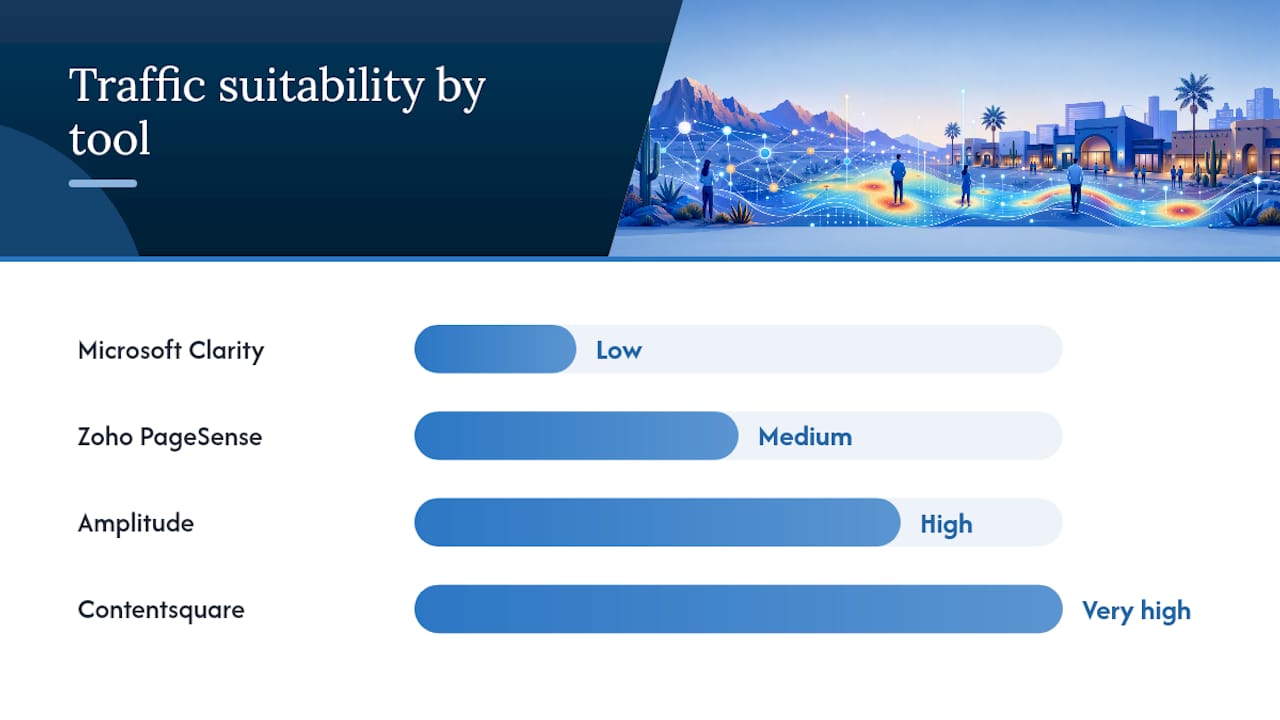
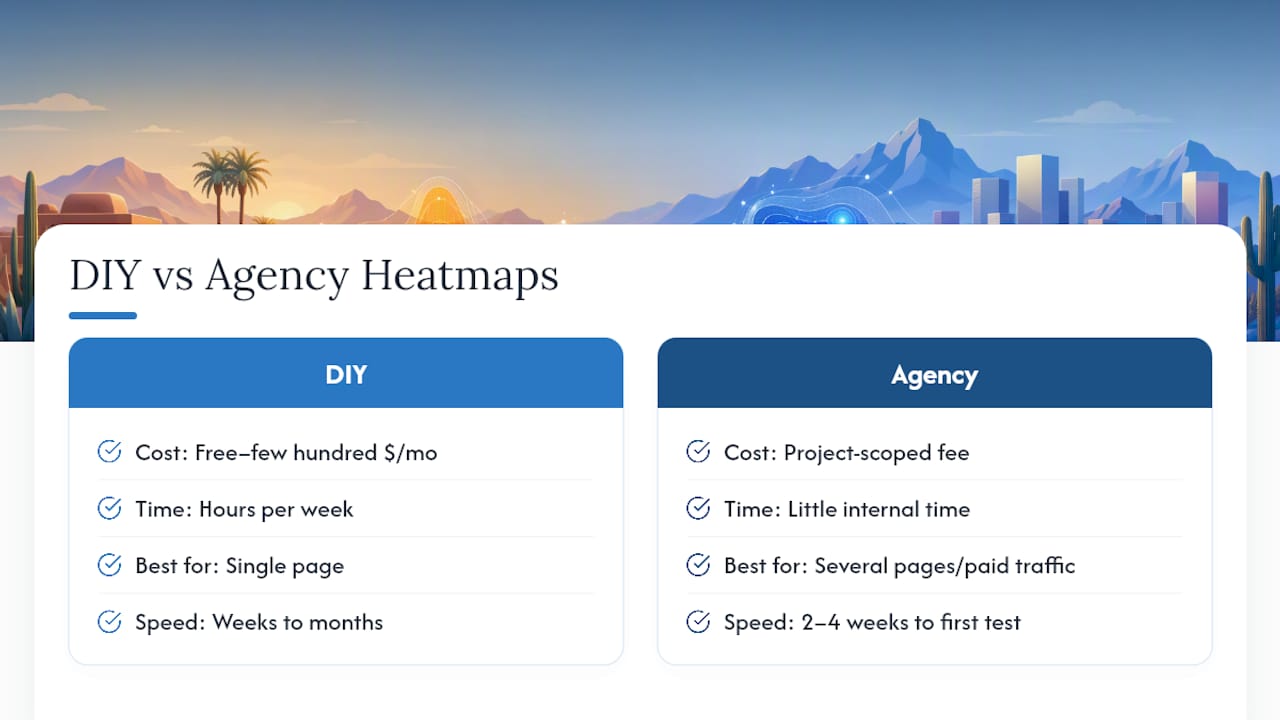
Point Details
Start with GBP Claim and fully optimize your Google Business Profile before spending on any paid tool.
BrightLocal for reporting Use BrightLocal (moderate monthly price) when you need rank tracking, GBP audits, and review management in one place.
Whitespark for citations Choose Whitespark when citation accuracy and manual cleanup are your primary problem.
Yext for enterprise scale Yext targets enterprises, not single-location small businesses.
Webtechs for managed service Webtechs handles GBP, citations, and reporting as a single retainer for Scottsdale businesses.

Table of Contents

What are the best local SEO tools for small businesses?

The seven options below cover every budget and approach, from free to enterprise to fully managed.

Pricing and trial notes:

  • Google Business Profile costs nothing and should be claimed and optimized before spending a dollar on any tool
  • BrightLocal offers plans starting at a moderate monthly price, making it an affordable all-in-one option for small businesses that need rank tracking, GBP audits, and review tools under one login, with a free trial available
  • Moz Local is among the lowest-cost paid options at roughly $14/month per location
  • Yext targets enterprises with pricing that reflects its scale; it’s not built for a single-location shop
  • GBPPromote uses flat per-location pricing that can undercut stacking multiple tools

Pro Tip: If budget allows, pair Whitespark’s citation tools with BrightLocal’s reporting dashboard. You get best-in-class citation accuracy AND polished client-ready reports without giving either up.

BrightLocal vs Whitespark: which one fits your situation?

BrightLocal is the stronger all-round pick for most SMBs; Whitespark wins when citation accuracy and manual cleanup are the actual bottleneck.

Dimension BrightLocal Whitespark
Starting price moderate monthly price Separate plans; free tier available
Citation focus Bundled builder and tracker Industry-leading Local Citation Finder and manual cleanup
Rank tracking Geo-grid (Local Search Grid) Daily rank tracking
White-label reports Yes, polished Limited
Review management Yes, with AI reply tools No
Consulting option No Yes

According to G2 user reviews, BrightLocal scores strongly for local search optimization and rank tracking, while Whitespark earns higher marks from some reviewers on ease of setup and support quality.

BrightLocal offers plans starting at a moderate monthly price, making it an affordable all-in-one option for small businesses that need rank tracking, GBP audits, and review tools under one login. making it one of the most affordable all-in-one options for small businesses that need rank tracking, GBP audits, and review tools under one login.

BrightLocal pros: single dashboard, white-label reporting, review management, geo-grid tracking
BrightLocal cons: citation accuracy is not its primary strength; costs add up with add-ons

Whitespark pros: best manual citation research in the category, daily rank tracking, expert consulting available
Whitespark cons: no review tools, no white-label reports, requires separate purchases for rank tracking and citations

Red flag: Pay-per-use citation credits can accumulate fast. Set a monthly cap before you start any citation cleanup campaign.

What most small businesses get wrong about local SEO tools

The standard advice is to pick a tool and start tracking. The problem is that most small businesses buy a tool before they’ve claimed and fully optimized their Google Business Profile, which is free and feeds every local pack result directly.

Claiming GBP, Bing Places, and Apple Business Connect costs nothing and moves the needle before any paid subscription does. A paid rank tracker showing you’re in position 14 is less useful than fixing the GBP category, hours, and photos that are keeping you there.

The other mistake: treating the BrightLocal vs Whitespark decision as either/or when the real question is what your biggest gap is. Citation mess? Whitespark. Reporting and reviews? BrightLocal. Both problems? Use both, or hire an agency that handles it as a package.

Webtechs handles local SEO so you don’t have to

There are solid tools on this list. The honest trade-off is time: learning dashboards, managing citations, responding to reviews, and reading rank reports takes hours every month that most business owners don’t have.

Webtechs

Webtechs has handled local SEO for Scottsdale small businesses since 1997, managing GBP, NAP consistency, citations, and reporting as a single retainer rather than a stack of subscriptions. You get one point of contact, consolidated ownership of your local presence, and results you can see in rankings rather than in a dashboard you have to interpret yourself. See the portfolio for documented outcomes, then get a quote for local SEO services in Scottsdale.

Sources

For next steps: set up Google Business Profile at no cost, then visit BrightLocal’s or Whitespark’s pricing pages to match a plan to your specific gap.

Small business team discussing local link building
Written by webtechs

Local Link Building for Small Businesses: A Practical Guide

Small business team discussing local link building

If you want to rank in Scottsdale’s local search results and show up in the Local Pack, start building local links now. Audit your current mentions, create locally useful content, and reach out to local partners soon. If you’d rather hand it off, two verified Scottsdale providers can help:

  • Webtechs (14300 N Northsight Blvd, Scottsdale) — a full-service SEO and web design agency operating since 1997, with local link building folded into broader SEO campaigns.
  • Link Building HQ — a link-specialist firm offering white-label and enterprise link building for businesses that need link-only execution without a full agency retainer.

Both are real, local options. Which one fits depends on whether you need a complete SEO program or just the links.

Table of Contents

Yes, and the evidence is direct. Locally relevant backlinks from local media, chambers of commerce, and community partners carry more weight for local organic results than hundreds of generic directory submissions. A handful of editorially earned local links can outrank a mass-directory approach for Local Pack visibility, and link signals consistently appear among the most important factors in local ranking studies.

The reason comes down to how Google reads authority. A link from the Scottsdale Chamber of Commerce or the Scottsdale Independent tells Google your business is genuinely embedded in the community, not just listed in it. That signal feeds both classic organic rankings and the AI-driven answer surfaces that are increasingly capturing local search traffic.

Three signals work together here:

  • Local editorial links (press, blogs, community orgs) build domain authority with geographic relevance.
  • Local citations (consistent NAP data across directories) reinforce your business’s legitimacy.
  • Mention density (how often your brand appears in local content, even without a link) influences AI-generated answers and branded search volume.

Treat all three as a system, not separate tasks.

Infographic of local link building step process

Start with a three-step micro-plan: audit where you’re already mentioned online, build locally useful assets, then do targeted outreach to multiple local sites. That sequence alone can produce measurable results within a few months.

High-impact tactics, prioritized

Local PR and press outreach is the highest-leverage move. Pitch a local angle to the Scottsdale Independent, AZ Big Media, or neighborhood blogs. A story about a community initiative, a local data point, or a business milestone gives editors something to publish. One earned editorial link from a local news site is worth more than 50 directory listings.

Marketer conducting local press outreach outdoors

Chamber of Commerce and business associations are low-hanging fruit. A Scottsdale SEO campaign almost always starts here. Join the Scottsdale Area Chamber of Commerce, get listed in their member directory, and look for sponsorship opportunities that include a website link.

Event sponsorships and community partnerships generate links from event pages, nonprofit sites, and local school or sports organization pages. These links are editorially placed, geographically relevant, and often permanent.

Local resource pages are underused. Many city government sites, neighborhood associations, and local blogs maintain “local business” or “community resource” pages. A polite, specific email asking to be included converts surprisingly well.

Broken-link reclamation is one of the most effective under-the-radar tactics available. Find authoritative local pages with dead outbound links using a tool like Ahrefs or Screaming Frog, then email the site owner with your working resource as a replacement. It helps them fix a UX problem, so the conversion rate is high.

Unlinked mention reclamation is even faster. Search for your business name in Google News and set a Google Alert. When a local outlet mentions you without linking, email them and ask for the link. Most will add it.

Local directories still matter, but only quality ones: Google Business Profile, Yelp, the Better Business Bureau, and industry-specific directories. Skip the mass-submission services.

Pro Tip: Pick one or two local Slack or Discord communities in your niche and contribute genuinely for 60 days before mentioning your business. Community-led channels produce member-generated editorial links and earned media that standard outreach never reaches.

Your first 90-day sprint

  1. Run a backlink audit using Ahrefs or Google Search Console.
  2. Identify five local sites linking to competitors but not to you.
  3. Build one linkable asset (a local guide, a data-driven post, or a short video resource).
  4. Submit to three quality local directories.
  5. Pitch one local press story.
  6. Reach out to two community organizations about resource page inclusion.
  7. Reclaim two to three broken links on local sites.
  8. Set up Google Alerts for your brand name to catch unlinked mentions.

For ongoing authority growth, hire a retained agency. For a one-off asset push or PR campaign, a project-based engagement works fine. The mistake most small businesses make is hiring the cheapest option they find on a link marketplace, then wondering why rankings don’t move.

What to look for

  • Outreach transparency: Can they show you the actual emails they send and the sites they target? If they won’t, walk away.
  • Named example placements: Ask for specific URLs of links they’ve earned for clients, not a vague “we place on high-DA sites.”
  • Reporting cadence: Monthly reports with new links, referring domains, and ranking movement are the baseline.
  • Manual outreach vs. mass marketplaces: Relationship-based outreach produces safe, long-term results. Mass-sell platforms create link patterns that can trigger negative signals.
  • Local experience: An agency that has worked in your market knows which local outlets accept pitches and which don’t.
  • References and case studies: Ask for two client references in your industry or city.

Red flags to watch for

  • Guaranteed rankings in a specific timeframe.
  • Any mention of private blog networks (PBNs).
  • Aggressive anchor-text ratios that look unnatural.
  • Pricing that seems too low to cover real manual outreach.
  • No clear answer on where links will be placed.

Pricing expectations

Retainer-based local link building in a mid-size market like Scottsdale typically costs a moderate monthly fee depending on link volume targets and competitiveness. Project-based campaigns for a single asset or PR push usually have a higher one-time fee. For local SEO cost context specific to Scottsdale, Webtechs publishes guidance on what retainers cover. Expect three to six months before link-driven ranking improvements become clearly measurable.

Scottsdale providers: a side-by-side look

Dimension Webtechs Link Building HQ
Core services Full-service SEO, web design, PPC, content, local SEO White-label link building, enterprise links, digital PR, outsourcing
Specialization Full-service agency with link building as part of SEO Link-specialist firm
Local presence Scottsdale, AZ since 1997 Not publicly listed as local to Scottsdale
Transparency & reporting Monthly SEO reporting included in retainer Not publicly listed
Pricing model Monthly retainer or project-based No public pricing listed
Track record Client testimonials and case studies on site White-label and enterprise client base
Best for Small/mid-sized businesses wanting a full SEO program Agencies or businesses needing link-only execution

Verdict: If you’re a Scottsdale small business that needs local SEO, content, and link building managed together, Webtechs is the natural fit. If you’re an agency or a business that already has SEO handled and just needs link volume, Link Building HQ covers that lane.

A typical Webtechs campaign produces measurable gains in local organic rankings and referral traffic within a few months, with Local Pack improvements often visible sooner for less competitive terms.

The process follows five stages:

  • Audit: Identify existing backlinks, unlinked mentions, broken links on local sites, and competitor link gaps.
  • Asset creation: Build one or two locally relevant content pieces (guides, local data posts, or video content) designed to attract editorial links.
  • Outreach: Manual, relationship-based outreach to local press, chambers, community organizations, and partner sites.
  • Placement: Links earned from editorially relevant local sources, with anchor text that reflects natural language.
  • Reporting: Monthly reports covering new referring domains, ranking movement, and referral traffic.

The practical lesson: link building accelerates what already exists. A business with genuine community ties earns links faster and from better sources than one starting from zero.

Key Takeaways

Local link building works best when it combines manual outreach, locally relevant assets, and relationship-driven community presence rather than mass-directory submissions.

Point Details
Quality over quantity A few editorial links from local press or chambers outperform hundreds of generic directory links.
Start with an audit Map existing mentions and competitor link gaps before any outreach begins.
90-day sprint works Eight focused actions in 90 days produce measurable referral traffic and ranking movement.
Hire for ongoing work Retained agencies suit authority-building; project engagements suit one-off asset or PR pushes.
Webtechs for Scottsdale Webtechs offers full-service local SEO with link building included, backed by 25+ years in the Scottsdale market.

Most small businesses approach link building the wrong way. They buy a package, get 50 links from sites they’ve never heard of, and wonder why nothing moves. The sites that actually influence local rankings — local newspapers, chambers, community nonprofits, neighborhood blogs — don’t sell links. They publish them because someone gave them a reason to.

That’s the whole game. Build something worth linking to, show up in the community, and make it easy for local editors and partners to reference your work. The businesses that treat this as a relationship problem, not a volume problem, consistently outperform the ones chasing link counts. A few strong local editorial links will do more for your Local Pack ranking than many directory submissions.

The community-led approach also compounds over time. Links from local sources attract more local attention, which generates more mentions, which feeds branded search volume and AI share-of-voice. Track all of it, not just dofollow counts.

Webtechs has been building local authority for small and mid-sized businesses in Scottsdale since 1997. The difference from a generic agency: every link-building campaign starts with a local backlink audit, targets editorially relevant Scottsdale-area sources, and reports monthly on new referring domains and ranking movement. No mass marketplaces. No PBNs. Just manual outreach to real local sites.

Webtechs

If you want to see what that looks like in practice, the client portfolio shows real campaigns and real results across local service industries. Ready to get started? Contact Webtechs for a local backlink audit and a clear picture of what it takes to move your rankings in Scottsdale.

Useful sources and further reading

  • BrightLocal: Local Link Building — The clearest explanation of why local editorial links outperform generic directories for Local Pack rankings.
  • Moz: Local Outreach and Link Building — Foundational overview of tactics: local PR, sponsorships, directories, and linkable assets.
  • Semrush: Local SEO Backlinks — Practical guidance on avoiding mass-sell marketplaces and building manual, relationship-based outreach.
  • Link Building Journal: Niche Slack and Discord Communities — How community channels produce editorial links that standard outreach misses.
  • Link Building Journal: Community-Led Growth — The four-surface framework for measuring community link work beyond dofollow counts.
  • Amplefound: Link Building Playbook for Community Builders — Step-by-step broken-link reclamation with outreach templates.
  • Webtechs: Scottsdale SEO Services — Local SEO service overview and Webtechs’s Scottsdale presence.
  • Link Building HQ — Provider profile for white-label and enterprise link-building services.
1 2