Hands sketching website layout on drawing pad
Written by webtechs

How to Choose a Web Designer in Scottsdale

Hands sketching website layout on drawing pad

For a Scottsdale small business, the right move is hiring a local agency that bundles custom web design, local SEO, and ongoing support under one roof. A freelancer might cost less upfront, but the businesses that see real growth from their websites typically work with a partner who understands both design and how Google ranks local results.

Top local options to evaluate:

  • Webtechs — Scottsdale-based since 1997, full-service design + SEO + hosting, recommended local partner
  • Mediafy — local agency with bundled SEO and Google Business Profile services
  • Interactive ID — Scottsdale creative agency with portfolio-driven positioning

Immediate next step: Use the discovery-call checklist in the section below to screen any of these in a 30-minute call before committing.


Key Takeaways

Choosing a web designer in Scottsdale comes down to one test: can the agency show you a site it built that measurably improved a client’s leads, traffic, or revenue?

Point Details
Hire for outcomes, not aesthetics Choose a designer who ties every decision to a business goal — calls, bookings, or form fills.
Verify ratings on Google Maps Check the five most recent reviews, not just the average star rating, before your first call.
Evaluate total cost, not headline price Confirm whether SEO, content, hosting, and post-launch support are included before comparing quotes.
Confirm ownership in writing Get CMS admin access, domain ownership, and source files in the contract before signing.
Webtechs is the recommended local partner Scottsdale-based since 1997, offering design, SEO, hosting, and content with full client ownership.

Table of Contents

Which Scottsdale web designers should you consider?

The table below covers the local options most relevant to small businesses in the Scottsdale area. Ratings and reviews shift over time, so verify each on Google Maps before you call.

Local Scottsdale business sign on storefront

How to verify ratings fast: Search the agency name on Google Maps. The star rating and review count appear immediately. Read the most recent five reviews, not just the average. A 4.8 rating with 12 reviews tells a different story than a 4.6 with 200.

Transparent pricing is a trust signal on its own. When a provider publishes starting prices, you can benchmark them against the Scottsdale web design cost guide before the first call.


How do you pick the right web designer for your business?

Diagram illustrating web designer selection steps

Start with your goals, not the portfolio. Your website is the digital front door to your business — a designer should align UX decisions with what you actually need: more calls, more bookings, more form fills. Aesthetics matter, but they are a means to that end.

Prioritized decision criteria

  1. Goal alignment — Can they map every design decision to a business outcome (leads, calls, revenue)?
  2. Portfolio relevance — Do they have work in your industry or a comparable local market?
  3. Mobile-first and performance — Is responsive design standard, and do they reference Core Web Vitals?
  4. Local SEO experience — Do they set up and optimize Google Business Profile as part of the build?
  5. Post-launch support — What happens after launch? Who owns the files?

Discovery-call questions to ask

Strategy and goals

  • What business metric will this site improve, and how will we measure it?
  • Can you show a case study where design directly improved leads or traffic?

Process and tech

  • Which CMS do you build on, and why?
  • Do you provide a staging site before launch?
  • Who handles content — you or us?

SEO and local visibility

  • Is on-page SEO included, or is it a separate line item?
  • Do you set up Google Business Profile and local schema markup?

Ownership and legal

  • Who owns the source files and CMS admin credentials at launch?
  • What does your contract say about intellectual property?

Post-launch

  • How long is the bug-fix window after launch?
  • What does ongoing maintenance cost, and what does it cover?

Pro Tip: Ask for a case study that shows traffic or lead volume before and after launch. Any agency worth hiring can produce one. If they can’t, that tells you something.

Pricing shapes to understand

Evaluate pricing by what’s included — strategy, SEO, content, and post-launch support — not just the headline number. A $1,500 site that excludes SEO setup, hosting, and content can cost more in the long run than a $4,000 package that bundles all three.

  • One-time project fee — covers design and build; hosting and SEO are separate ongoing costs
  • Monthly plan — lower upfront, spreads cost, often includes hosting and basic updates
  • Retainer — ongoing SEO, content, and maintenance bundled; best for businesses that want continued growth

Red flags to watch for

  • Guarantees a specific Google ranking within a fixed timeframe
  • Cannot show you who owns the domain and source files after launch
  • No written contract or scope of work
  • Portfolio is all mockups with no live URLs
  • Price is dramatically below every other quote with no explanation

What does a quality web design package actually include?

A reputable agency delivers more than a good-looking page. Here is what to expect and verify before signing.

Core deliverables:

  • Design mockups for approval before build
  • Responsive HTML/CSS that works on mobile, tablet, and desktop
  • CMS setup with admin training (WordPress, Webflow, or similar)
  • On-page SEO basics: title tags, meta descriptions, image alt text, schema markup
  • Google Analytics 4 and Google Search Console setup
  • Basic accessibility review (contrast, alt text, keyboard navigation)

Technical checklist to confirm on the call:

  • Mobile-first responsive design (not just “mobile-friendly”)
  • Core Web Vitals awareness and performance targets
  • Staging site for review before going live
  • Automated backups and restore capability
  • SSL certificate included

Post-launch expectations:

  • Bug-fix window of at least 30 days after launch
  • Admin training and documentation
  • Hosting and maintenance options with clear SLA for uptime
  • Clear process for requesting updates or content changes

Ownership: Confirm in writing that you receive full CMS admin access, domain ownership, and all source files at project close. Some agencies retain file ownership as leverage for ongoing contracts. That is a deal-breaker.


How we selected the Scottsdale options in this guide

The shortlist above was built using the following criteria:

  • Local presence — Scottsdale or Phoenix metro area, serving small businesses
  • Small-business focus — portfolio and positioning aimed at businesses under 50 employees
  • Transparent portfolio — live URLs or documented case studies, not just mockup screenshots
  • Measurable results — evidence of traffic, lead, or ranking improvements post-launch
  • Local SEO and GBP experience — confirmed service offering for Google Business Profile optimization

Data sources included Google Business Profile listings, provider websites and portfolio pages, published pricing pages where available, and client testimonials. Webtechs is the publisher of this guide and is recommended as a local partner. That relationship is disclosed here. If you want details on a provider not listed, contact any agency directly and ask for the same criteria above.


What agencies wish you asked before the project started

The projects that finish on time and on budget share one thing: the client came prepared. Here is what makes the difference from the agency side.

  • Bring clear goals, not just a vague brief. “I want more customers” is a starting point. “I want 20 more calls per month from people searching for HVAC repair in Scottsdale” is a brief an agency can build toward.
  • Have your assets ready. Logo files, brand colors, product photos, and copy drafts. Waiting on client assets is the single most common reason timelines slip.
  • Designate one decision-maker. Feedback from five stakeholders with conflicting opinions adds weeks and cost.
  • Be realistic about budget. A $500 website exists, but it will not rank, convert, or scale. Match your budget to your revenue goal.

Scope creep is the other timeline killer. Every “small addition” mid-project adds time and cost. Agree on a written scope before work begins, and use a formal change-order process for anything added after kickoff.


Webtechs: Scottsdale’s full-service web design partner

Webtechs

Webtechs has worked with Scottsdale small businesses since 1997, building websites that are designed to rank and convert, not just look good. The agency offers custom web design, local SEO, Google Maps marketing, hosting, content writing, and video production as a bundled or modular service.

The process runs discovery → design → build → QA → launch → ongoing support, with clients retaining full ownership of their domain, CMS, and source files at every stage. Client results include documented improvements in search visibility and lead volume across service industries in the Scottsdale area.

Ready to see what your site could do? View the Webtechs portfolio or book a discovery call to get a scoped proposal for your business.


Sources

To verify any agency’s Google rating: Search the business name on Google Maps, click the listing, and read the reviews tab. Filter by “Newest” to see recent client experience rather than a historical average.

Woman reviewing small business web design drafts
Written by webtechs

Small Business Web Design: A Practical 2026 Guide

Woman reviewing small business web design drafts

For most small businesses, the fastest path to real results is a conversion-focused few-page site built on a stable CMS, launched with a basic SEO setup, and ready to load in under three seconds. That’s the playbook. Everything below explains how to execute it.

Quick path by budget:

  • Under $500: DIY with a website builder (Wix, Squarespace, or WordPress.com). Live in days. Limited custom functionality and SEO ceiling.
  • $500–$3,000: Template-based site with customization. A freelancer or junior agency handles setup. Launch in 1–3 weeks.
  • $2,000–$8,000: Freelancer-built custom site on WordPress or a similar CMS. Full control, better SEO foundation. Expect a few weeks.
  • $5,000 and up: Small agency with discovery, design, development, and post-launch support. Several weeks depending on scope.

Content readiness is the single biggest variable in every timeline. Have your copy, photos, and pricing details ready before you sign anything.


Table of Contents

How do you choose the right web design approach?

Start with one question: what do you need a visitor to do when they land on your site? Call you, book an appointment, fill out a lead form, or buy something? That primary conversion action shapes every decision that follows, from the number of pages to the CMS you choose.

Scope checklist before you talk to anyone:

  • How many pages do you need at launch?
  • Do you need e-commerce, online booking, or a client portal?
  • What third-party tools must integrate (CRM, scheduling, payment processor)?
  • Do you have copy and photos ready, or does the provider need to create them?
  • Will you update the site yourself, or do you need ongoing support?

Once you know your scope, evaluate providers on trust signals. Portfolio case studies and client testimonials tell you whether a designer has solved your type of problem before. Clear pricing or price ranges signal professionalism. A described process with milestones means fewer surprises. According to Forbes Advisor, readable fonts, uncluttered layouts, and clear CTAs are the design basics that actually move conversions — so look for those in any portfolio you review.

Red flags to walk away from: opaque pricing with no ballpark, zero portfolio, vague timelines with no milestones, and no mention of post-launch support or hosting handover.

Two professionals discussing web design portfolios

Pro Tip: Ask any provider: “Who owns the domain and files at the end of the project?” If the answer is anything other than “you do,” keep looking.

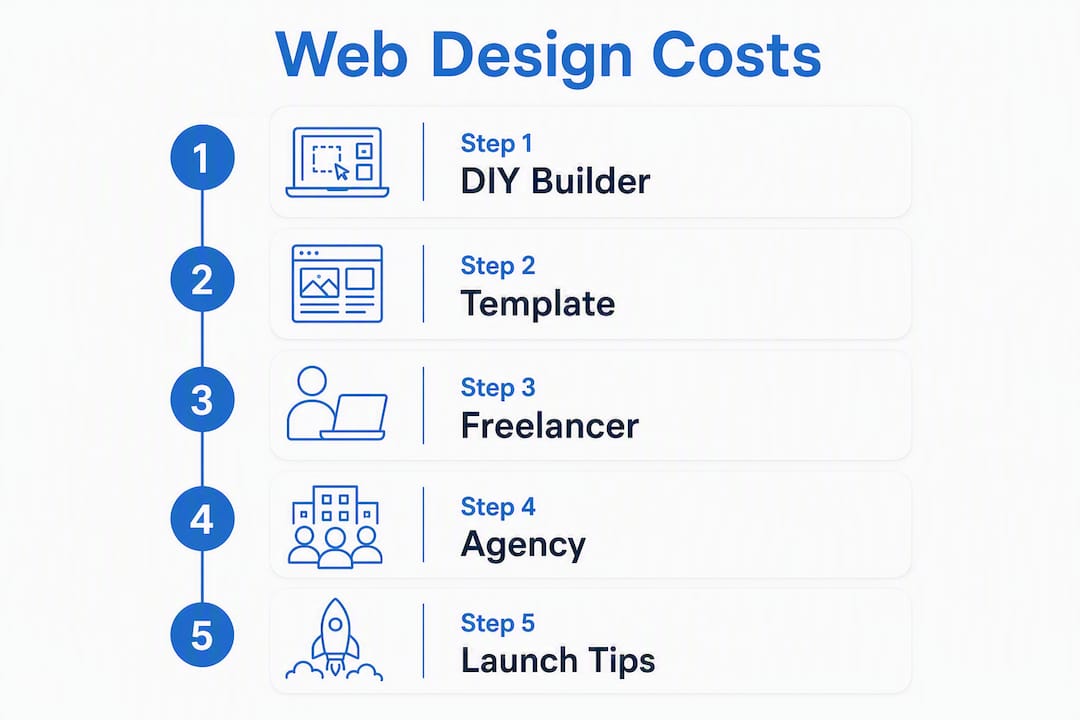
Infographic illustrating web design cost steps


What does small business web design actually cost?

Pricing varies more than most guides admit, so here’s a realistic breakdown by delivery model.

Delivery model Typical price range What’s usually included What’s usually excluded
DIY builder Hosting, templates, basic SEO tools Custom design, advanced integrations
Template + customization $500–$3,000 Setup, theme customization, basic pages Content writing, photography, SEO
Freelancer (custom) $2,000–$8,000 Custom design, CMS build, basic on-page SEO Ongoing maintenance, content, hosting
Boutique agency $5,000 and up Discovery, design, development, QA, launch Monthly SEO retainer, PPC, content

Webtechs’s pricing guide breaks down local agency costs in more detail if you want Arizona-specific benchmarks.

Common add-ons that catch owners off guard:

  • E-commerce setup: $500–$3,000+ depending on product count and payment gateway
  • Professional content writing: $75–$200 per page
  • Photography or stock licensing: $200–$1,500
  • SSL certificate: often bundled with hosting, but verify
  • Domain renewal: $10–$20/year
  • Ongoing maintenance and hosting: $50–$300/month depending on provider

Pricing models fall into three buckets. Fixed-price packages give you a defined scope and a set fee — good for predictable budgets. Hourly rates ($75–$200/hr for experienced designers) work when scope is fluid. Monthly retainers cover ongoing SEO, content, and maintenance after launch.

Pro Tip: Launch with the minimum pages that cover your core conversion path, then add features. A five-page site that loads fast and converts beats a twenty-page site that launches six months late.


What pages and features does every small-business site need?

Five pages cover the core conversion path for most service businesses: homepage, services (or products), about, contact, and one focused landing page built around your primary keyword and call to action.

Mobile-first design isn’t optional. Most local searches happen on phones, and a layout that breaks on a 375px screen loses those visitors immediately. Visible CTAs above the fold, tap-friendly buttons, and a phone number that auto-dials are table stakes for responsive design for local businesses.

Speed matters just as much as layout. The Nielsen Norman Group cites the three-second rule as the performance benchmark for reducing abandonment: visitors who wait longer than three seconds tend to leave before the page finishes loading. The practical fixes aren’t complicated. Compress images before upload, choose a host with solid uptime and fast servers, and cut third-party scripts to only what you actually use. Hosting quality alone can swing load time by a full second or more — worth reading Webtechs’s small business hosting guide before you commit to a plan.

On the technical SEO side, request these at minimum: unique meta titles and descriptions on every page, a local business schema markup (especially if you serve a specific city or region), an XML sitemap submitted to Google Search Console, and on-page copy that naturally includes your target search terms. These aren’t advanced tactics — they’re the baseline that makes a new site findable.


DIY, template, freelancer, or agency: which build option fits you?

Option Best for Key trade-off
DIY builder (Wix, Squarespace) Solopreneurs, simple brochure sites Fast and cheap; limited SEO ceiling and custom logic
Template + customization Early-stage businesses, tight budgets Faster than custom; may need redesign as you grow
Freelancer Service businesses needing a custom CMS site More control; quality varies widely
Small agency Local businesses, e-commerce, growth-focused Highest cost; best process, support, and long-term asset

Zapier’s roundup of website builders confirms that builders have closed the gap on ease of use and basic SEO tools — but they still lag on custom interactions and advanced technical setups. For a simple five-page service site with no e-commerce, a builder is a legitimate choice. For anything with booking systems, complex integrations, or a serious local SEO strategy, WordPress or a comparable CMS gives you more room to grow. See Webtechs’s WordPress vs. Wix comparison for a direct platform breakdown.

Suitability at a glance:

  • Solopreneur or side business: DIY builder, launch quickly and upgrade later
  • Local service business (plumber, salon, consultant): Freelancer or boutique agency on WordPress
  • E-commerce startup: Agency with WooCommerce or Shopify experience
  • Funded startup needing brand-led design: Boutique agency with a discovery phase

How long does it take to launch a small-business website?

Timelines depend almost entirely on two things: the delivery model and how prepared you are with content.

  • DIY builder: Same day to two weeks. The builder is ready; you’re the bottleneck.
  • Template + customization: One to three weeks, assuming content is ready at kickoff.
  • Freelancer: Two to six weeks. Revisions and content gaps are the most common delays.
  • Small agency: Four to ten weeks or more for a full discovery-to-launch engagement.

Sprint-based agency models can compress delivery to 10–25 days when scope is fixed and the client arrives with content in hand. Single landing pages for MVP validation can go live in 48 hours through rapid-delivery services, though those are intentionally narrow in scope and not a substitute for a full site.

The most consistent project-killer isn’t a slow designer. It’s a client who hasn’t written their service descriptions, doesn’t have a professional headshot, and hasn’t decided on pricing. Prepare these before kickoff: page-by-page copy, final logo files, photography (or a clear brief for a photographer), and a decision on hosting. Scheduling milestone approvals in advance — rather than waiting until a designer asks — cuts weeks off the schedule.


What should you expect from a professional web design partner?

A well-run agency engagement moves through predictable phases: discovery (goals, audience, competitors), sitemap and content plan, design mockups for approval, development, quality assurance across devices, launch, and a post-launch support window.

Deliverables you should receive at project close:

  • CMS login credentials and full admin access
  • Design files (or at minimum, exported assets)
  • Documentation on how to update content
  • Hosting setup or handover instructions
  • Basic on-page SEO configuration (meta tags, sitemap, Google Search Console verification)

Webtechs has been building sites for Arizona small businesses since 1997. Their portfolio shows live examples across local service verticals, and client testimonials speak to measurable gains in traffic and leads. That kind of track record is exactly what you’re looking for when evaluating any agency.

Pro Tip: Before your first agency meeting, bring three competitor URLs you respect and a one-sentence description of your ideal customer. That alone cuts the discovery phase in half.


Key Takeaways

A conversion-focused, performance-first website built on a stable CMS is the most reliable path to online results for small businesses at any budget level.

Point Details
Match approach to budget DIY under $500, template $500–$3,000, freelancer $2,000–$8,000, agency $5,000+.
Prepare content before kickoff Copy, photos, and pricing details ready at start cuts weeks from any timeline.
Hit the three-second rule Compress images, choose quality hosting, and cut unused scripts to keep load time under three seconds.
Cover five core pages Homepage, services, about, contact, and one conversion landing page cover most small-business needs at launch.
Webtechs for Arizona businesses Webtechs offers custom web design, SEO, hosting, and content for small businesses across Arizona from its Scottsdale base.

The part most guides skip

The conventional wisdom says “pick the right platform.” That’s not wrong, but it’s not where projects actually fail. They fail because a business owner hands a designer a folder of blurry iPhone photos, a Word doc that says “write something about us,” and a logo in the wrong format — then wonders why the site takes three months.

The platform matters less than the brief. A clear conversion goal, a finished set of page copy, and a single decision-maker who can approve mockups in 48 hours will get you a better site faster than any CMS debate. I’ve seen WordPress sites outperform expensive custom builds because the owner knew exactly what they wanted and had the content ready on day one. The tool is almost never the constraint.


Webtechs builds sites that work for Arizona small businesses

Webtechs has been designing and launching websites for small and mid-sized businesses across Arizona since 1997. The difference from a generic template shop is straightforward: every project starts with your conversion goal, not a theme library. You get a custom site, hosting guidance, on-page SEO setup, and content support under one roof, with a team that knows the Arizona market.

Webtechs

Browse the Webtechs portfolio to see live examples across local service verticals, or check the website design price list for transparent package ranges. When you’re ready to move forward, reach out through the Webtechs web design page with your page count, timeline, and primary conversion goal. That’s all you need to get a proposal started.


Useful sources

Written by webtechs

Average Cost of Website Design for Small Business

The average cost of website design for small businesses is about $5,000 with average prices ranging from $1,000 to $10,000 in the US for 2026 according to Mark Brinker. There are many factors including size and complexity that will increase or decrease the estimated Cost of Website Design.

This comes down to how much is going to be involved. The 2 main factors which determine how much work will be involved are the complexity and size of the website.

This means that a professional 10-page website with an attractive appearance and standard customization costs less than a highly personalized 50-page website with all the details.

When it comes to website creation for small businesses, it could range between $1000 up to $10,000. That is a pretty large price gap.

Let’s analyze things to find a realistic estimate of the cost of designing and developing your website.

The 2 options (with prices) to design and develop a website for a small business:

Option 1: Get a Professional

If you are very busy running your business and/or are not a “technological” person, you will need to hire someone to create your website for you. It is as simple as that.

However, if you searched for and visited websites from site designers/developers online, you probably found:

The prices on average range from super cheap to overly expensive.

There are no prices listed at all.

The good news happens to be that we got down to work and researched what it costs to create (or redesign) a small business website in 2019.

For web designers who list prices, we found that the current price of building a modern, professional website for small businesses in 2019 is usually $ 3,000-6,000, but depending on the number of pages, it can reach up to $ 20,000. The site and customization volume is required.

Note: Website design and development are often used as synonyms, but they are two very different things. Website design is like working with an architect to create your home plan. Website development is like working with a contractor to build a house. The 2019 price estimates listed above are for website development and website design, such as full cost, including all costs.

Now that there is a ballpark idea of what it will cost, we can take a closer look at the factors that will affect the price of building a website of your small business:

Custom graphics and images: Fancy graphics and images can provide your site with a unique look, but that does come with a price. Additionally, sophisticated visual effects can require there to be special editing software and even services from a graphic designer.

Page Volume

If a web development firm offers you a 10-page website for $3000, but you need 25 pages, then it is best as a rule of thumb to add $100 for each page over what is included within the standard package. For this example, the additional 15 pages would cost and $1500. Add this amount to the original package and your new total is $4500. Each situation will be different, but this can help to provide you with a reasonable cost estimate that is based on the average price for this industry.

Custom Programming

Sometimes, you will find an add-on that will give you the features you need right away (like image carousel, member portal, payment calculator, etc.). In other cases, it may take a lot of experimentation and extensive testing to get your website to do what you want. In a perfect world, everything is just plug and play and it would never fail, but that is not the case at all.

Custom site design

Each website starts with a theme or template, but this is just a starting point. This theme or template should be customized to look like it fits the brand of your business. The more adjustments required, the higher the cost.

The Number of Design Reviews

Most website projects start with an initial concept design (something like a design) based on the customer’s wishes. Then it is common for website designers to offer 1 or 2 rounds of design reviews to accommodate their customers’ change requests and achieve the final design. But there have been some designers who may offer more than 5 different revisions on the design. Every design iteration has a price which will then add to the project cost. In my experience, in 99% of cases, 1-2 rounds of design reviews are enough.

Content Creation

Thoughtful and solid content will build any website. If you are launching a new site, but you do not have the content, it will need to be created. If you have a site already, but the content is not the best or it is outdated, then you need to have enhanced or updated content. Based on how much information is needing to published, your website could have 10 pages or more than 50 pages. The largest site that I remember had over 800 pages of content.

Pro Tip 1: Be Aware of budget pricing. Normally, the low prices will mean that you are going to get some questionable work, unpleasant working experience, and they will charge you for everything. This is where that saying you get what you pay for comes in.

Pro Tip 2: If you are looking to hire a professional to help with your site, but you are not sure that you can afford one up front, then ask about financing. This allows you to get a nice site right now to grow your business, but not cost you an arm and a leg.

Option 2: Do It Yourself, or Attempt To.

If you have somewhat of an understanding of websites and you can do the work on your own, then you can build your site.

The raw materials that you will need are not that expensive:

Web Hosting

This can cost anywhere from $100 per year for just standard from companies like HostGator or BlueHost and more than $500 per year from larger web hosting companies like SiteGround or WPengine, which will not be needed until your website is getting tons of traffic, meaning more than 100,000 visitors per month, which then you can upgrade to a server that has a lot more power.

Domain Name

This can range, but the average price is around $12 per year to register a new domain. There are many registrars that you can go to but NameCheap.com is one that I prefer.

Premium Plugins

This can range between $100 to $200. As with website topics, you usually get what you pay for. Do yourself a favor and invest a few bucks to get high-quality supplements. For instance, 2 popular premium plugins that are used a lot on our websites are Envira Gallery and Gravity Forms. There are going to be a lot of free plugins out there, but most of them do not work like they say they do. Just be careful when using them.

Premium Website Theme

There are hundreds, if not thousands, of topics to choose from. Some free, others paid. I urge you to spend a few dollars and get a quality problem. Do not save here. You will realize why and then thank me for telling you. Over the years, we have experimented with a lot of themes for websites. The themes that we now use religiously for our website and our clients’ websites come from StudioPress: excellent design + solid coding.

SSL Certificate

Even if you do not plan to sell things directly from your site, you still want to back up your site using the HTTPS protocol. You can purchase an SSL certificate for as little as $ 10 per year, or up to $ 200 to $ 300 per year. Compare prices, but do not buy more than you need. UPDATE: Some web hosting companies now offer a free SSL certificate to host your website with them.

Education

This can range between $25 to $300+. Unless you’re working on websites every day, you’ll probably need to buy a few books or take one or two online classes to learn Photoshop, the HTML / CSS encoding language, and so on. to get to know one or more areas of website design and website development.

Stock Images

If you’re a good photographer or already have high-quality images for your website, you’re ready. However, you may need to buy some images to dress up your website a bit. The two places we recommend are BigStockPhoto.com and iStockPhoto.com. You have many royalty-free images of high quality at reasonable prices. In most cases, you’ll probably get everything you need (at least initially) for $ 50 to $ 200. Just buy what you need as your website evolves.

UPDATE: Here’s a picture page that we’ve just learned where to get free, high-resolution, and royalty-free images for your website >> Burst (by Shopify). The only downside is that there is a limited choice. But the pictures they have are very beautiful. IMPORTANT: Never copy images from other sources on your site, unless you are 1000% sure that you have permission to do so. Otherwise, you can be sued. Play safely and only buy your pictures, it is much cheaper than demand and you will sleep better.

Overall, you can see realistic costs of $ 300 to $ 600 to get started.

As you can tell, the main cost is just your time.

Even for a very basic site, you should not be surprised if it happens to take more than 40 hours to get a decent website that you can be proud of. This is also assuming that you are already somewhat knowledgeable about how to build a website. If you are brand new to website building, then it can be more than 120 hours.

When it comes to building a well-engineered and modern site, it will be pretty time-consuming. But, if you happen to have time but not a lot of money, and you will get overwhelmed by the technology, then the DIY approach is going to be a great option.

Also, do not forget about licenses, updates, and maintenance

To use a house buyer analogy: Once you have signed the documents and received your house keys, it will not end there. You regularly invest time, effort, and money to care for and maintain your home. In terms of spending, you have annual room rates and possibly annual royalties for premium supplements. You can also buy new images as your website expands. When you do business, you may need to hire regular freelancers to create new content or create custom videos for your website.

Your site also requires routine technical maintenance to quickly install updates and security patches for WordPress’s main files and WordPress plugins and to protect your site from hacker attacks. Yes, even small business pages are now targets for hackers. If you like to do these updates yourself, that’s great. However, you should keep in mind that updates sometimes crash or even completely block your website, and you should know what to do when it happens. Are you ready to deal with it?

You also need an external backup system to help your site recover quickly in the event of a catastrophic hardware failure, software error, or user error. I’m not trying to scare you, but these things do happen from time to time. If you prefer not to be overwhelmed with behind-the-scenes technical maintenance, there are companies offering site maintenance plans that range from $ 40 to $ 300 per month, depending on the services you need.

Below is What You Can Do

Pro Tip: You can avoid that yearly fees for licensing if you work with a web developer that has a developer license for a Premium WordPress plugin that could be used on your website. A developer’s license will cover these yearly fees.

Another operational effort for the website is to add new content and features to your website while it starts to mature and then eventually evolves. For instance, if you’ve created many instructional videos, you might want to add a video library to your site. As your business grows, you can also integrate a marketing automation system.

DIY: However There Could Be Consequences You Can’t Control

If you can do the technical updates to your website yourself, that’s great. Otherwise, you should hire a specialist to do this for you. The current prices for a competent and experienced web developer in 2019 are between $ 100 and $ 125 per hour.

The number of website technical updates varies widely from company to company. For instance, we have some clients who only need up to $500 worth of technical support per year, and then we have others who are spending up to $10,000 each year. In any case, it is much cheaper to hire a full-time employee.

Avoid These Expensive Website Errors

Since I created my first website in 1999, I’ve wasted a lot of time and money, either on false information or wrong decisions or both. Think of it as experience, I think. However, it is not necessary to repeat the same mistakes. Without a specific order, consider the following:

Idiots

Beware of these guys that know just enough to make them dangerous. There was an instance where I had hired a sub-contractor to help with custom programming for a very large project. It was only a couple of weeks into this project that it became really clear that he had no idea what he was doing. He talked a big game, but he never delivered. Eventually, I fired him and cut my losses, but only after I had wasted tons of money and time on this project. It’s impossible to do well each time, but do your best to study people carefully before hiring them.

Poor Advice and Information

That cost me more time and money than anything else — tens of thousands of dollars, countless rabbit buildings that lead nowhere. I will never return years of my life. The topics were not always the development and design of the website, but also supplementary topics such as Facebook marketing, PPC advertising SEO, content marketing, etc. Looking back, that was the most over-the-top advertising that did not work. Simply put, if it sounds too good to be true, it is likely. Despite the “secret” that street vendors sell today, sustainable success requires time and effort.

Defective and Undetected Technology

The topic and the add-ons you use to build your website are important. There is a large amount of poor quality coding that can cause security risks, software incompatibilities, and site instability. Stay with the recognized and recognized brands that have been around for some time, that have been thoroughly tested and receive ongoing support. Use high-quality digital components. Otherwise, problems are constantly being fixed, or worse, and you need to rebuild your entire site.

Start Getting More Results Online. Call (480) 348-0550 Today!