Technician verifying a website backup restore
Written by webtechs

Prove Your Backups Work: Arizona Website Maintenance Plans

Technician verifying a website backup restore

Yes, your Arizona small business needs a website maintenance plan, whether that means a paid provider or a disciplined DIY routine you actually follow. The three non-negotiables are tested off-site backups with real restore drills, staged updates before anything goes live, and continuous uptime and security monitoring. Typical maintenance costs for a brochure or service-business site vary widely depending on how much of the work you outsource.


TL;DR:

  • Regular testing of backups through restore drills is essential to confirm data safety and prevent data loss during emergencies.
  • Security monitoring must be ongoing, including malware scans, incident response readiness, and off-site encrypted backups with a tested restore process.
  • Maintenance tasks should follow a strict schedule, with staged updates, speed audits, and vulnerability scans performed weekly and quarterly.
  • Costs for website maintenance range from free DIY solutions to over $500 per month for complex or high-traffic sites, depending on services included.
  • Before hiring, verify providers can demonstrate recent tested restores, detailed SLAs, and clear incident response procedures to ensure reliable recovery.

Table of Contents

What Should a Website Maintenance Checklist Cover?

A maintenance plan is really just a schedule of recurring tasks, grouped by how often each one needs attention. Skip a task long enough and it stops being a maintenance issue and becomes an emergency. Without regular updates, monitoring, and tested backups, sites accumulate malware risk, lose search rankings to slow load times, and lose data permanently when something finally breaks.

Here’s how the work breaks down by cadence.

Daily or ongoing:

  • Uptime monitoring with instant alerts if the site goes down
  • Automated backup success checks (not just “did it run,” but “did it complete without errors”)
  • Basic firewall and traffic anomaly logging

Weekly:

  • Malware and vulnerability scans across the full site, not just the homepage
  • Off-site backup verification
  • A test update applied to a staging copy of the site, never straight to production

Monthly:

  • Core software, plugin, and theme updates pushed live after staging tests pass
  • Page speed audit and database cleanup (old revisions, spam comments, orphaned data)
  • Broken link and 404 check

Quarterly and annual:

  1. Full security audit, including a review of user accounts and access permissions
  2. Hosting and PHP version review to confirm you’re not running on something about to lose support
  3. A complete restore drill: pull a backup and rebuild the site on a staging server from scratch
  4. Legal and compliance review (accessibility, privacy policy, contact form data handling)

The backup strategy underneath all of this should follow the 3-2-1 rule: three copies of your data, on two different types of storage, with one copy off-site. A backup nobody has ever restored is a guess, not a safety net. That’s why the Securing treats restore testing as a required line item, not an optional extra.

Pro Tip: Keep a one-page log with the date, who checked what, what they found, and what they fixed. This single habit is what separates a maintenance plan from a folder of good intentions, and it’s the first thing worth asking a provider to show you.

If you’re weighing DIY against hiring help, this is the section to use as your baseline. Anything less frequent than what’s listed here and you’re accepting real risk, whether or not you notice it right away.

What Does Website Security and Recovery Actually Look Like?

Security isn’t a setting you configure once. Certificates expire, plugins introduce new vulnerabilities with every release, and DNS records get changed by people who forget to document it. Cloudflare’s security guidance frames this correctly: it’s a recurring verification process, revisited monthly or quarterly, not a checkbox you tick during launch week.

A trustworthy plan includes a few concrete layers:

  • A web application firewall (WAF) and CDN filtering traffic before it reaches your server
  • Malware scanning that goes beyond a surface-level check
  • A defined incident response process, so an infected site gets triaged within hours, not days
  • Encrypted, off-site backup storage with a defined retention window (30 to 90 days is common for small business sites)
  • Restore-to-staging testing on a regular schedule, so you know the backup actually works before you ever need it

Statistic Callout: Free remote scanners like Sucuri SiteCheck can flag visible malware symptoms, but they can’t see what’s happening at the server level. Full protection requires server-side scanning plus a managed cleanup service, which is exactly the gap most DIY security setups leave open.

For response times, a reasonable small-business SLA looks like: acknowledgment within one business hour for a confirmed breach, and a restored, cleaned site within 24 to 48 hours. Anything vaguer than that in a contract is a warning sign.

Pro Tip: Before signing with any provider, ask them to show you a restore drill, not describe one. A provider who can pull up a log of a staging restore they ran last quarter is proving the recovery guarantee actually works. One who says “we have backups” and stops there hasn’t proven anything.

Verification steps worth requesting from any provider: a sample of their monthly security report, their backup retention policy in writing, and their documented incident response time. If they hesitate on any of the three, keep looking.

How Does Maintenance Affect Page Speed and Local Search Rankings?

Speed and security aren’t separate conversations. A slow, poorly maintained site loses both rankings and customers, especially in local search where Arizona residents are often searching on mobile while driving between appointments. Google’s Core Web Vitals (Largest Contentful Paint, Cumulative Layout Shift, and Interaction to Next Paint) are ranking signals, and they degrade quietly as plugins pile up and images go unoptimized.

Ongoing maintenance is what keeps those metrics healthy:

  • Caching configuration reviewed after major updates, since a plugin change can silently disable it
  • CDN delivery for images and static assets
  • Image compression and modern format conversion (WebP over JPEG, for instance)
  • Deferred loading for non-critical scripts like chat widgets and social embeds
  • Page speed audits run monthly rather than only after a redesign

Uptime matters just as much as speed. A Scottsdale plumber whose site is down for even twenty minutes during a Saturday emergency call loses that customer to whoever ranks next. Slow load times, meanwhile, don’t just frustrate visitors, they directly damage SEO performance because Google factors speed into how it ranks pages.

A monthly report worth reading should show: LCP under 2.5 seconds, CLS under 0.1, INP under 200 milliseconds, uptime above 99.9%, and average load time trending flat or down. If a report doesn’t include these numbers, ask why.

What Do Monthly Maintenance Plans Typically Cost?

Pricing scales with how much responsibility you’re handing off. Four bands cover most small business situations in Arizona:

  1. DIY or monitoring-only ($0 to $50/month): You handle updates yourself; a low-cost tool just alerts you to downtime or failed scans.
  2. Basic managed ($50 to $199/month): Core and plugin updates, weekly backups, basic uptime monitoring, minimal edit hours included.
  3. Pro or business tier ($199 to $499/month): Staged updates, tested restores, monthly performance and security reporting, a handful of content edit hours, faster response SLA.
  4. High-availability or ecommerce ($500+/month): 24/7 monitoring, priority incident response, PCI compliance considerations for stores, more generous edit hours.

Those ranges track closely with what agencies commonly advertise for tiered small business packages, where entry-level plans often start around $95 and business tiers push toward $395 to $499 depending on included features.

What pushes a bill higher than the baseline:

  • E-commerce functionality, which adds security and PCI scope
  • Custom-coded plugins or integrations that need specialized troubleshooting
  • 24/7 support versus business-hours-only response
  • Industry compliance requirements, like HIPAA considerations for a medical practice’s contact forms

One detail that trips people up: monthly billing versus annual billing can change your effective cost by 10 to 20%, since many providers discount annual commitments. Read the fine print on what counts as an “edit hour,” too. Some plans exclude emergency fixes or content updates from the base price entirely, turning an advertised $199/month plan into something considerably more expensive once real work starts.

DIY, Freelancer, or Agency: How Do You Choose?

The right choice depends on three honest questions: Do you or someone on staff actually have the technical skill to update software safely? How much downtime can your business tolerate if something breaks? And how complex is your site, really, a five-page brochure site versus an appointment-booking system with online payments?

If you answered “no,” “very little,” and “more complex than I’d like,” you’re a strong candidate for a managed plan rather than DIY.

When vetting a freelancer or agency, run through this checklist:

  1. Ask for proof of a recent tested restore, not just a description of their backup policy.
  2. Confirm they use a staging environment before pushing updates live.
  3. Get their SLA in writing, including response time for security incidents.
  4. Ask how often you’ll receive a report, and what it includes.
  5. Clarify contract length, exit terms, and whether you retain full ownership of your domain, hosting, and code if you leave.

Red flags that should end the conversation fast: no staging environment mentioned at all, vague answers about backup testing, unclear language about who owns your assets, and pricing that seems to grow every time you ask a follow-up question.

Pro Tip: Ask any provider this one direct question: “Can you show me a log of the last restore drill you ran for a client like me?” A provider who can produce a real answer, like WebTechs.Net’s approach of testing restores to staging on a recurring schedule, is showing you proof instead of a sales pitch.

What Should Happen During Onboarding?

The first 90 days with a new maintenance plan determine whether your site is actually protected or just theoretically covered. Start with a full inventory: domain registrar, hosting account, DNS records, every plugin and third-party script, and every form connected to your site.

From there, the provider should complete initial tasks quickly:

  • A verified baseline backup, tested against a staging restore
  • A performance baseline (current Core Web Vitals scores, load time, uptime history)
  • A full security scan to catch anything inherited from before the handoff

Before any of this starts, your contract should spell out the SLA and response windows, included hours per month, how backups are handed over to you if you cancel, exit and cancellation terms, and explicit confirmation that you retain ownership of your domain, hosting account, and code.

A realistic onboarding timeline looks like this: days 1 to 30 cover inventory, baseline backups, and the first staging test. Days 30 to 60 bring the first full update cycle and initial performance fixes. By day 90, you should have at least one completed restore drill and a full monthly report in hand, proving the monitoring and cadence checklist is actually running, not just promised on a sales call.
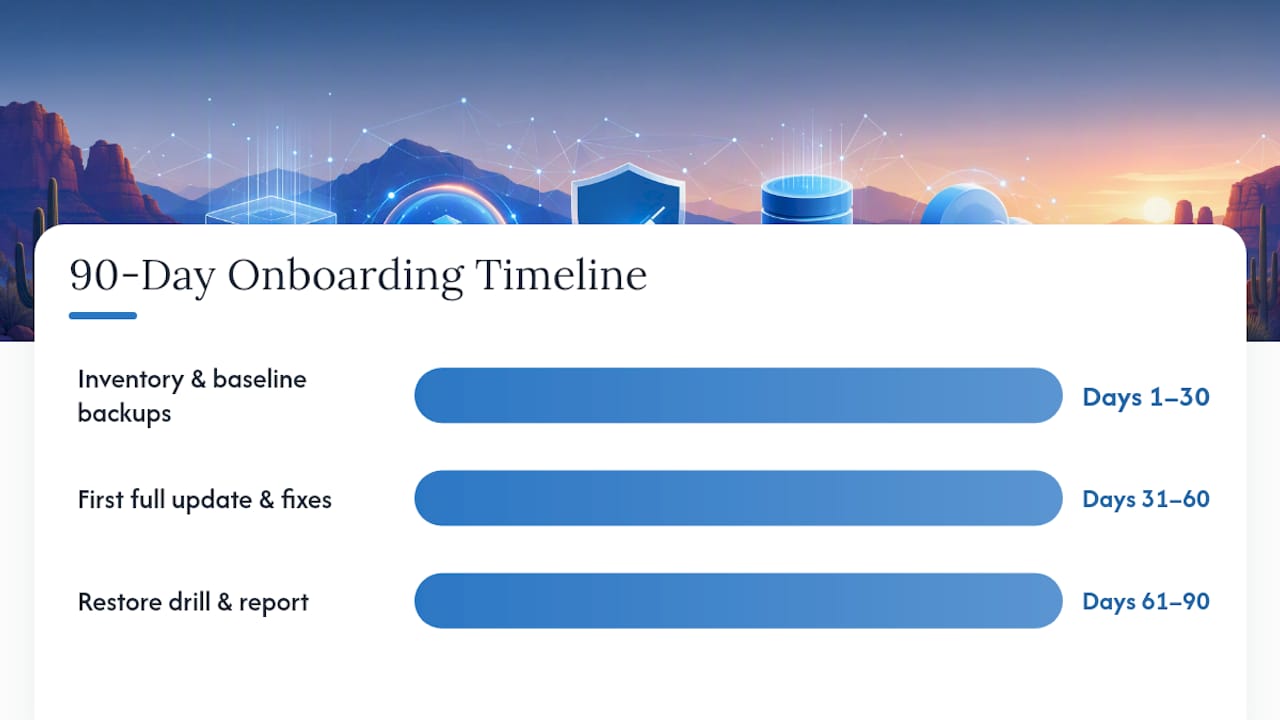
90-day website maintenance onboarding timeline

What Does WebTechs.Net Bring to Arizona Website Maintenance?

Webtechs has worked with small to mid-sized businesses in Scottsdale and across Arizona since 1997, long enough to have watched maintenance standards evolve from “update it when it breaks” to the tested, cadence-driven approach this guide lays out. That history shapes how the team approaches every retainer: personalized service backed by current technology, not a one-size template applied to every client.

The value in a maintenance plan isn’t the update itself. It’s proof that if something breaks tomorrow, the restore actually works, because someone already tested it.

Clients working with WebTechs.Net have seen measurable gains in traffic and search visibility over time, the kind of result that comes from pairing steady technical maintenance with ongoing SEO attention rather than treating them as separate services—much like how an effective music marketing plan for indie artists integrates multiple elements into a cohesive strategy. Brett, who covers web development, SEO, and digital marketing for WebTechs.Net, wrote this guide with that same philosophy: recovery readiness and search performance are the same conversation, not two different budgets.

What Most Guides Get Wrong About Maintenance Plans
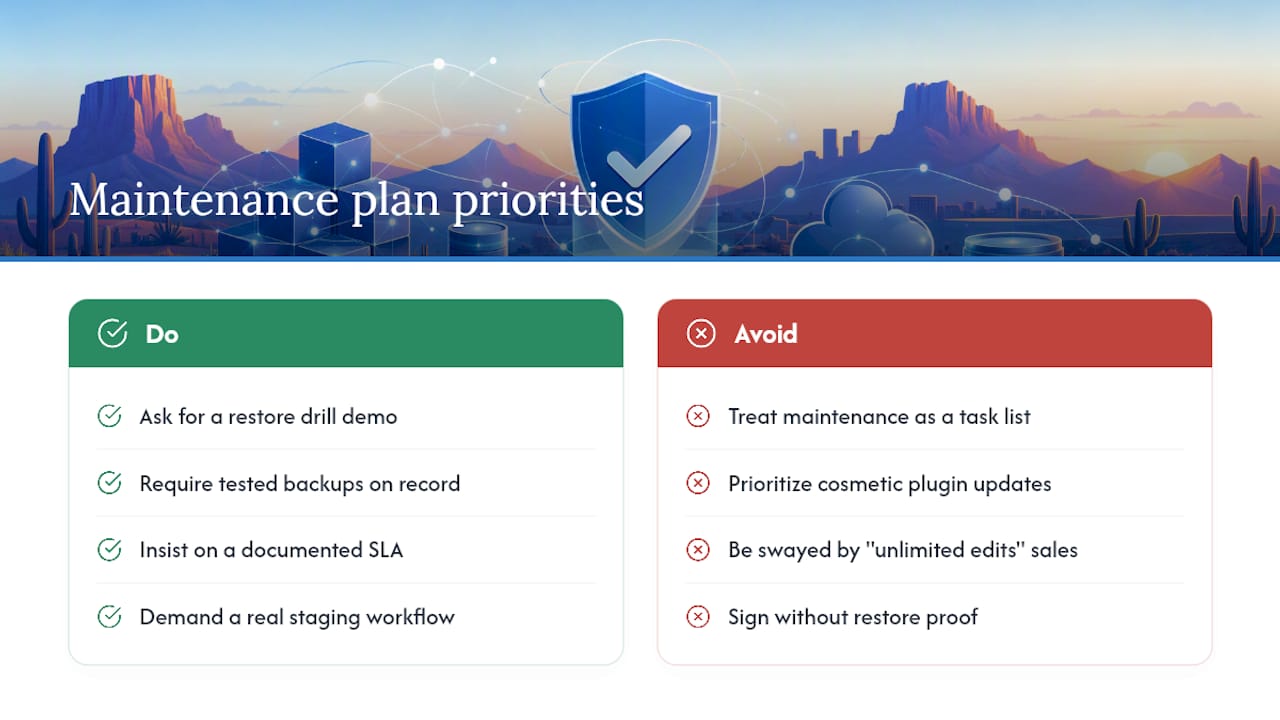
What Most Guides Get Wrong About Maintenance Plans — overview diagram

Most advice on this topic treats maintenance as a list of tasks to check off. That’s backwards. The real value is in what those tasks prove, not what they do. A monthly plugin update matters less than whether the provider can show you a restore that actually worked last quarter.

Arizona business owners get pitched heavily on “unlimited edits” and flashy dashboards, when the boring stuff, tested backups, a documented SLA, a real staging workflow, is what actually prevents a bad week. If you take one thing from this guide, make it this: before you sign anything, ask to see proof of a restore drill. Everything else in a maintenance contract is negotiable. That one item is not.

— Brett

Get a Free Website Audit From WebTechs.Net

WebTechs.Net offers managed maintenance retainers built around exactly the practices covered in this guide: staged updates, tested off-site backups, uptime monitoring, and a real incident response process, plus hosting and emergency recovery if your current setup can’t keep up. Rather than guessing whether your current plan (or lack of one) is protecting you, request a free website audit and get a straight answer about what’s missing and what it would cost to fix.

Webtechs

The audit covers your current backup situation, security exposure, page speed, and uptime history, then translates that into a proposal with clear pricing tiers, no vague “call for quote” runaround. If you’re comparing WebTechs.Net against a freelancer or a DIY setup, browse the portfolio of completed Arizona client work to see the kind of sites and results behind these recommendations, then request your professional web design and maintenance proposal to see exact pricing for your site’s size and complexity.

Sources

Small business owner working on laptop hosting setup
Written by webtechs

Managed WordPress Hosting for Small Business: Agency Guide

Small business owner working on laptop hosting setup

For most small and mid-sized businesses that want a reliable, professionally managed web presence, managed WordPress hosting is the right call — especially when it’s bundled with web design and SEO through a single agency. The core reasons are straightforward: WordPress-specialist support, automated security, and predictable uptime reduce the operational risk that quietly kills small business websites. The trade-offs are real too: you’ll pay more than shared hosting, and some environments restrict plugins or lock you into specific configurations. Before signing anything, request a written scope document that covers hosting, design, and SEO together, and ask the agency for their onboarding checklist.

Table of Contents

What does “managed WordPress hosting” actually mean?

Managed WordPress hosting is a hosting plan built specifically for WordPress that bundles server-level tuning with varying degrees of application support. The word “managed” covers a wide spectrum, and that range is where most confusion starts.

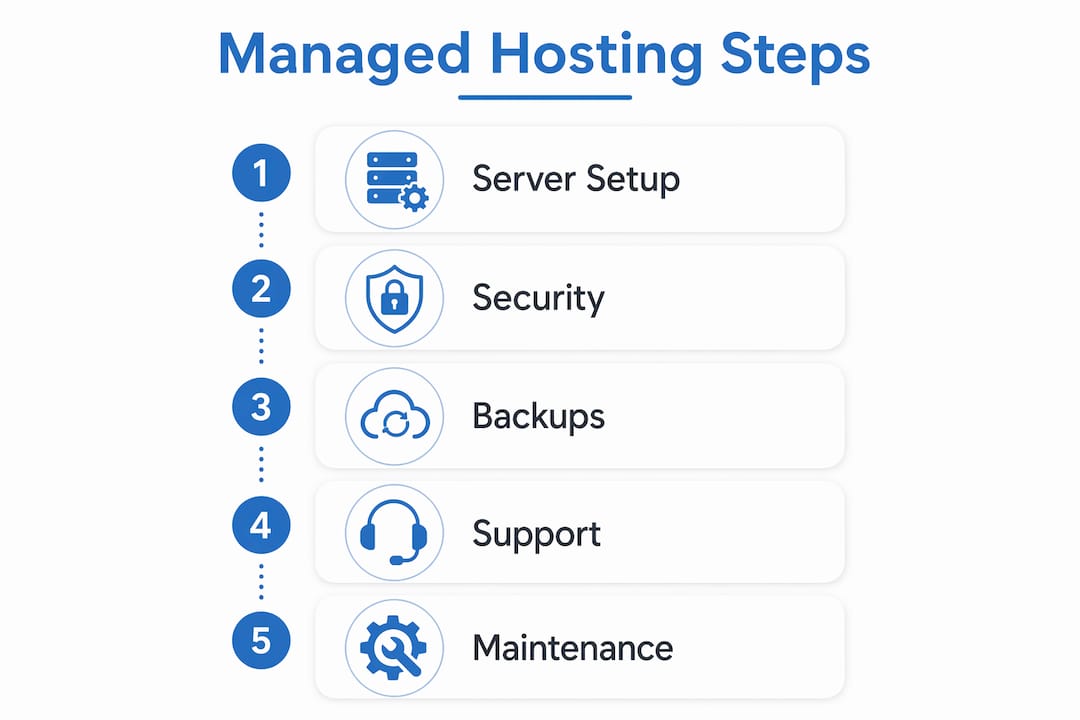
Infographic illustrating managed WordPress hosting process

At the entry end, a provider handles server patching, automated backups, and basic security updates. Move up the spectrum and you get platform-level work: server-side caching, CDN integration, PHP version management, and staging environments. At the top end, full application management includes update testing, plugin conflict resolution, and proactive monitoring of your WordPress installation itself.

Common restrictions come with the territory. Managed environments often block certain plugins — typically caching plugins that conflict with the host’s own layer, or resource-heavy tools that degrade shared performance. Non-WordPress applications generally can’t share the same account. These aren’t dealbreakers, but they’re worth confirming before you migrate.

Canonical features to look for in any managed plan:

  • Staging environment (test changes before they go live)
  • Automated daily backups with tested restore points
  • Web Application Firewall (WAF) and malware scanning
  • WordPress-expert support (not generic helpdesk)
  • Server-level caching and CDN integration
  • Automatic core, theme, and plugin updates

Pro Tip: Ask the provider directly: “Is plugin troubleshooting included in my plan, or is it billed separately?” If they hesitate or redirect you to a support tier page, it’s an upsell.

Why managed WordPress hosting matters for your business

Managed hosting materially reduces operational risk for SMBs that depend on their website for leads, bookings, or reputation. A hacked or slow site doesn’t just cost you visitors — it damages local search rankings and erodes the trust you’ve spent years building.

WordPress powers roughly 43% of all websites on the internet. That market share makes it the most targeted CMS for attacks and also the platform with the deepest ecosystem of specialist support. A host that understands WordPress core files, theme conflicts, and plugin interactions resolves problems in minutes rather than days.

Page speed and uptime connect directly to SEO. Google’s Core Web Vitals use load performance as a ranking signal, and a site that goes down during business hours loses both traffic and credibility. Specialist WordPress support is often the real differentiator between a shared plan and a managed one — not raw server specs.

Business benefits at a glance:

  • Reduced downtime from proactive patching and monitoring
  • Faster troubleshooting from support teams who know WordPress
  • Consolidated vendor responsibility (one agency, one point of contact)
  • Predictable maintenance windows instead of surprise emergencies
  • WAF and daily backups that protect your local search presence

What should a good managed WordPress host actually provide?

A credible managed host delivers secure infrastructure and WordPress-aware operational processes. Infrastructure alone isn’t enough.

Operational minimums worth demanding:

  • Daily automated backups with documented restore testing
  • Staging environment for safe update and design testing
  • Server-level caching (not just a plugin)
  • CDN integration for Arizona visitors and beyond
  • Versioned deployments or rollback capability

On the security side, expect a WAF, scheduled malware scans, and a defined patch cadence for WordPress core. Daily automated backups and restore tools are standard at the managed tier — if a provider treats them as an add-on, that’s a red flag.

Support scope deserves its own conversation. Expert WordPress support should cover theme and plugin debugging, guidance on conflicts, and triage of performance regressions. It typically does not include content edits, custom feature development, or redesign work. Get that boundary in writing.

Two IT specialists debugging WordPress plugins

Pro Tip: Before signing, ask the provider to walk you through a restore test on a staging copy. A host confident in their backup system will do this without hesitation.

Questions to ask a managed WordPress host before you commit

Ask these questions on every sales call. The answers reveal true scope and expose limits that marketing pages bury.

  1. What does “expert WordPress support” include — plugin debugging, theme conflicts, performance issues?
  2. How often are backups taken, where are they stored, and how long is retention?
  3. How are updates tested before they reach production — is staging mandatory?
  4. What is your uptime SLA, and what is the remediation if you miss it?
  5. What does the migration process look like, and who handles DNS cutover?
  6. Which plugins are restricted or blocked on your platform?
  7. How is pricing structured — per site, pooled sites, or traffic-based overages?
  8. What is the minimum contract term and cancellation policy?

Score each answer 0–2: green (clear, written commitment), yellow (verbal only, ask for documentation), red (vague or deflected). Any two reds in the support, backup, or SLA categories should stop the conversation.

Request written SLA documentation and evidence of a recent restore test before signing anything.

How agency-bundled hosting changes the workflow

An agency-managed bundle reduces vendor friction by putting hosting, deployment, and SEO work under one operating process. You’re not coordinating between a hosting company and a separate agency when something breaks at 2 AM.

A typical workflow runs: discovery and scope agreement → staging build → SEO and design QA → staged update testing → scheduled production push → ongoing monitoring and monthly maintenance windows. Complex or high-traffic sites should always run a full staging test and a restore validation before DNS cutover to avoid PHP version or module mismatches.

Ownership terms matter. Get clarity in writing on who owns the content, code, backups, and DNS records. If the agency holds your DNS and you part ways, a poorly written contract can make a simple transfer take weeks.

Escalation paths should be defined before you need them. When a plugin conflict breaks a checkout page or a security incident triggers a WAF block, you want a named contact and a response-time commitment, not a generic support queue.

Contract items to request explicitly: monthly maintenance hours, incident response time, and backup retention period.

Migration timeline and pricing: what to expect

Most SMB migrations take a few days to two weeks, depending on site complexity and how much custom configuration is involved.

Phase Typical Duration Key Owner Action
Staging setup and testing 2–5 days Review staging site, flag issues
Content and database migration 1–3 days Confirm data integrity
SEO baseline audit 1–2 days Approve redirect map
DNS cutover Hours to 1 day Approve go-live timing
Post-migration QA 1–3 days Test forms, payments, speed

On pricing, per-site vs. pooled-site models affect total cost significantly if you manage multiple domains. Entry-level agency-managed packages typically run in a moderate price range per site; mid-tier plans with staging, priority support, and SEO monitoring run higher. Premium configurations for high-traffic or multi-site setups scale further. Always request a written quote with line items.

Watch for additional costs: premium plugin licenses, large-media migrations, custom integrations, and traffic overage fees. Budget for SEO and content work alongside hosting — they’re separate line items even in a bundled agency engagement. For a detailed look at small business hosting options, Webtechs has a dedicated comparison resource.

Contract terms, cancellation policies, and vendor lock-in

Most managed WordPress hosts and agencies use annual contracts, with monthly options available at a premium. Month-to-month flexibility generally costs significantly more in most cases, though exact figures vary by provider.

Lock-in risk is real and often underestimated. The three areas where it shows up: proprietary control panels that don’t export cleanly, DNS held by the agency rather than the client, and backup formats tied to the host’s own restore tools. Before you sign, confirm that your backups are exportable in a standard format (a full file + database dump) and that DNS access stays with you.

Cancellation policies vary. Some providers offer prorated refunds; others charge a full remaining term. Read the termination clause before the contract is signed, not after you’ve decided to leave.

Minimum terms of 12 months are common for agency bundles. That’s reasonable for a project that includes migration, design, and SEO setup — those services have real upfront costs. What’s not reasonable is a contract that makes it difficult to retrieve your own files and data. Any reputable agency will hand over a full site export on request, regardless of contract status.

Webtechs delivers managed hosting, web design, and SEO together

Webtechs, based in Scottsdale and serving Arizona businesses since 1997, bundles managed WordPress hosting with professional web design and SEO into a single, accountable engagement. It’s built for small and mid-sized businesses that want one agency responsible for the whole stack, not three vendors pointing fingers at each other.

Webtechs

The onboarding process runs: discovery and scope agreement → staging migration → SEO baseline audit → go-live checklist → ongoing monthly maintenance. Every engagement includes hosting, staging, automated backups, security monitoring, and SEO tracking. Real client results back the claims — case studies across industries show measurable gains in rankings and organic traffic.

Webtechs’s web design portfolio shows the range of projects delivered, from local service businesses to multi-location operations. If you’re ready to evaluate whether the bundle fits your situation, request a quote or schedule a discovery call directly through the site.

Key Takeaways

Managed WordPress hosting is worth the investment for SMBs when it’s paired with specialist support, clear SLAs, and an agency that owns the full stack from design through SEO.

Point Details
Confirm support scope in writing “Expert WordPress support” should cover plugin and theme debugging, not just server uptime.
Demand daily backups with restore tests Daily automated backups are standard; ask for proof of a recent restore before signing.
Audit plugin restrictions early Managed environments often block certain plugins — confirm compatibility before migrating.
Budget for migration time Most SMB migrations take a few days to two weeks depending on site complexity.
Webtechs bundles the full stack Webtechs delivers managed hosting, web design, and SEO together for Arizona SMBs from one accountable agency.

Why managed hosting is a strategic investment, not a commodity

Most business owners treat hosting as a utility — pick the cheapest plan, set it, forget it. That works until it doesn’t, and when it fails, it usually fails at the worst possible moment: a product launch, a busy season, a Google algorithm update.

The agencies and businesses that get the most from managed WordPress hosting treat it as part of their risk management posture. Uptime, restore success rates, load time, and SEO performance are metrics worth tracking monthly, not just checking when something breaks. A hosting environment that’s actively maintained by people who understand WordPress isn’t overhead. It’s the foundation everything else is built on. Webtechs has operated on that principle since 1997, and it shows up in the outcomes clients actually see.

Useful sources and further reading

  • WordPress.org Hosting Recommendations — WordPress’s own curated list of recommended hosts, with context on what the platform requires.
  • WPBeginner: Managed WordPress Hosting — Thorough overview of features, spectrum of services, and evaluation criteria.
  • WP Engine: What Is Managed Hosting? — Detailed breakdown of managed hosting components including security, backups, and performance.
  • Webtechs: Best Website Hosting for Small Business — Webtechs’s own comparison guide for SMBs weighing shared, VPS, and managed options.
  • Webtechs: Website Migration Service — Details on agency-managed migration processes and cutover planning.
  • Webtechs: SEO Case Studies — Real-world results from integrated hosting, design, and SEO engagements.
Website Hosting Cost In Scottsdale
Written by webtechs

Best Website Hosting For Small Business

Website Hosting Cost In Scottsdale

For many companies, a website is at the core of their digital marketing efforts. Breakdown and Comparison: Godaddy and Network Solutions have fairly similar services and features they offer while WebTechs.Net offers a list of features included with their hosting that almost no company online offers. Along with Unlimited storage space and email accounts you get Website maintenance which includes: WordPress Updates, Software Updates, Graphic Changes and Creation, Content Changes, Source code changes and auto backups of your site that goes back 10 days.

If your site ever crashes just give WebTechs a call and they can put your site back to how it was before the crash. There pricing is much more expensive but is taylored towards business owners who don’t like to make site changes themselves or don’t want to hire a website management company. Webtechs combines website management with web hosting for simplicity of use for the customer.

Website Hosting Introduction

Just about every business-even if it’s a small company with 1 employee-needs a website, and if even if you’re not a business owner you might still want a personal site or blog. Thanks to the plethora of services and options available, getting a website started with your own domain name (www.yoursitesname.com) is easy and affordable.

One of the first steps in building a website is buying your domain name and find a reliable Web host (the company who will store your website files on their server). Web hosts have different options, bandwidths, storage capacities, email features, prices and applications.

What Are Hosting Servers?

While web hosts have the availability to offer dedicated hardware and virtual private servers, this list focuses on shared packages (the most affordable and common way to set up a website). For you information, though, it doesn’t matter in this case because you will be the only one with access to your files, you can’t access other peoples files or vice versa.

Your Web Hosting Needs/Requirements

Before you decide which web hosting package to buy, you need to figure out what requirements you need. The shared servers are affordable, but if you need performance and speed, you need to be looking at virtual or dedicated servers.

Starter Hosting Packages

Most web hosts offer limited features for their starter packages, and then expand upon that for higher-tier plans. Read the small print to make sure the plan you select offers the requirements you need.

If you need a site builder (easy to use software or online applications that help you build sites easily – Not SEO friendly) to design your Website, make sure that the low-cost web host you are selecting comes with a site builder (if not you can add it on at an extra cost, usually around $5 bucks a month).

How Much Does Website Hosting Cost?

Here is a quick list of typical website hosting costs:

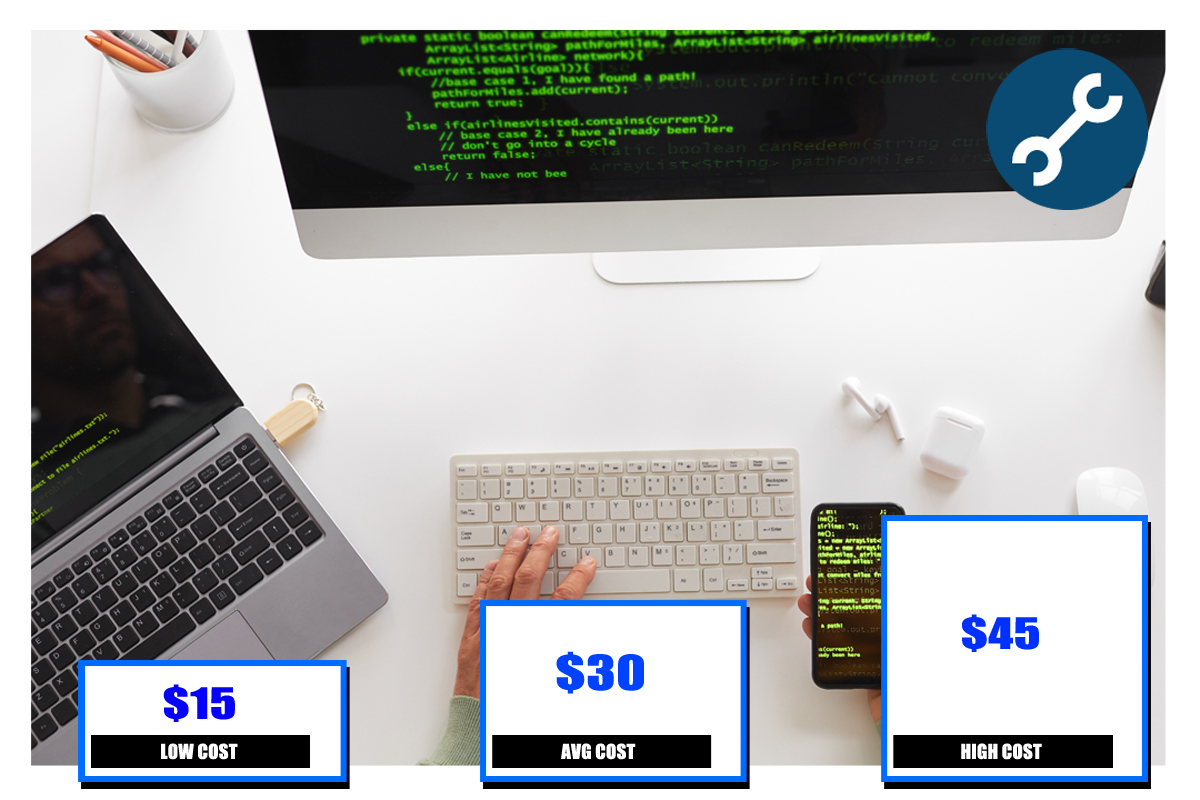
  • Website hosting: $15-$45
  • Domain name purchase: $0.95-$12
  • SEO: $500-$2,500 (per month)
  • Design: $2,000-$9,000
  • Maintenance: $400-$1,200
  • Website marketing: $2,500-$12,000 (per month)

*All costs will vary based on specific company needs and the provider chosen to host the website. Contact the experienced team at WebTechs for more information!

Not All Hosting Packages Are The Same

Although, these packages seem very similar, they are not the same. Some are more security optimized, offering antimalware and antispam tools. Others may offer a variety of email marketing tools. Before selecting a plan, consider how much you expect your company to grow in the future or just select a plan that is 1 year or less.

WebTechs.Net In Scottsdale

For a Free SEO consultation in Scottsdale, Phoenix, Tempe, or Mesa, Arizona areas, contact WebTechs.Net today.

Written by webtechs

How Long Does It Take To Build A Website?

How Long Does It Take To Build A Website

Building a new website for a small to mid-size business will take anywhere from 3-6 weeks to complete. It’s no secret that building a site from the ground up can take time, so make sure you are prepared for all the steps that are going to come with this project.

Building A Website In 3 Steps

How long your website takes to build can vary based on several factors, including the size of the company building the site and the scope of your project. Typically, any new build can be broken down into a three-step process. So, How Long Does It Take To Build A Website? Also Hoe Much Does Cost To Build A Website?

Step 1. Plan And Strategy Development

Preparation is a vital part of any website development. Knowing what you want your website to look like and what its goals should be is half the battle with this process. Without this information, the website development team you hire has to start from scratch, which will only extend the project timeline. Any experienced designer should be able to offer ideas that you might not come up with in the original mockup.

For instance, the development team could explain why a particular feature may not work within your site’s design. They can offer alternatives that make the mobile user experience better. Always consider the insight these professionals can offer, but ultimately final design and features are your call.

The best case scenario for this part of the process is a total timeline of 1-2 weeks. This step will generally consist of a lot of back and forth over email, phone or even video calls. Top developers will always ask questions and offer feedback throughout this step.

Estimated Timeline: 1-2 weeks.

Step 2. Design And Develop

Once the plan of action is in place, it’s time to start on the website’s design. In most cases, the dedicated designers will be able to provide you with detailed mockups of how your website will look before it goes live. Mockups are provided for client approval before beginning the next step of the process. Since development has yet to begin, any suggestions or revisions shouldn’t set the process back much.

Be sure to ask for mockups of all pages during this step; not just the homepage. Layout is very important for most new websites, and at this stage of development the site will really start coming to life.

The development stage is where the magic truly happens. Your hired team will now take the mockups and turn them into a fully working website. This part of the process can take a little bit of time, as setbacks can occur. Either way, the development of site shouldn’t take more than a couple weeks, overall. Most teams will overestimate the needed time to give themselves breathing room for any hiccups along the way. Good developers should always keep customers in the loop, even during this step.

Estimated Timeline: 1-2 weeks.

Step 3. Final Review

Every site will undergo one final round of revisions before going live. You’ll want to take a close look at how everything within the site works. Generally, there are always corrections or adjustments to make during the final review. Any issues should be caught and fixed before the site is finalized. You can expect this stage to take no longer than a few weeks.

Estimated Timeline: 1-2 weeks.

Building A Website

How Much Does It Cost To Build A Website?

A simple website built for small to mid-size businesses can cost between $1,000-$2,000. The first step in the process involves purchasing a domain name. Most domains come with a simple annual fee of $14.99, according to MonsterInsights.

Website Development In Scottsdale 

Located in Scottsdale, AZ, WebTechs.net has been providing website design and hosting services in the area since 1997. So, the question you’re asking is:The hosting services at WebTechs guarantee that servers will never become overloaded. Additionally, dedicated fiber-optic lines, advanced security and unlimited space is provided to customers.

Constant monitoring and maintenance is just part of the package that gives your site little to no downtime whatsoever. Keep your local business in the area with WebTechs serving all your online needs. These packages are perfect for small to mid-sized businesses.

Are you looking for more than website hosting? With WebTechs you will also be able to find expert content writing services and an SEO campaign that best serves your company/product goals. Top-notch web design will help your site stand out above the competition! Whether you are looking for custom website design, a re-design or design for your personal and/or ecommerce site, WebTechs is here to help. Don’t just take our word for it, though. Check out these reviews from some of current customers right here.

WebTechs.Net In Scottsdale

For a Free SEO consultation in Scottsdale, Phoenix, Tempe, or Mesa, Arizona areas, contact WebTechs.Net  and find out how much it cost to build you a website today.

Written by webtechs

Website Hosting Cost In Scottsdale

Website Hosting Cost In Scottsdale

What is Website Hosting Cost In Scottsdale? The average cost to host a website in Scottsdale, Arizona is $30 per month, with prices ranging from $15$45. Costs will vary based on website hosting service provider and amount of maintenance needed on the site. If you are searching online for “website hosting cost” or “how much does website hosting cost,” then this post is for you!

Which Kind of Cost is Associated With Starting A Website?

There are a number of costs associated with starting and running a website, beyond the simple hosting fees. Here are the seven typical costs one must budget for when starting a website:

  • Purchase domain
  • Hosting
  • Design
  • Web development
  • Content/SEO
  • Marketing costs
  • Site maintenance

Website hosting is by far the most important aspect of your site’s livelihood. When you invest in a website hosting service, this can affect the overall performance of the site and the costs associated with ownership. Expect to pay for hosting services for as long as your site is up and running. The lowest possible price you’ll pay for website hosting in Scottsdale is $15. This price, though, simply includes hosting. There will be no maintenance, design or content creation included. Other hosting costs that are closer to the $30$45 range can include design, hosting and maintenance. Put simply, if you are paying the lowest possible price, design and build of the site will be your task.

There are numerous types of servers to host websites, and these servers will come at various price points. Find the server with the ideal features and price range before committing to a provider. Of course, choosing the best possible server and provider will help your site grow and prosper. Meanwhile, the wrong choice in server and provider can turn into a constant headache and lead to more unexpected costs.

Website Cost Calculator

Now that you have your average price range for hosting, it’s time to factor in other costs that may come with your website. Most domains can be purchased for a low price, especially if it is an expiring domain or brand new site name. Generally, a domain name can cost anywhere between $0.95$12, according to Webfx.com. Add in the average expected hosting cost of $30 per month and you are looking at an average of about $365 for the year.

A local SEO campaign is crucial for every site. SEO strategies involving content services, local links and citations can cost between $500$2,500 per month in Scottsdale. Strong SEO will help you accomplish many goals as a company, including the building of strong brand awareness. Exposing your brand/product to a large audience will undoubtedly lead to long-term success.

Scottsdale SEO Costs

Of course, the larger costs will come in after the domain name and hosting services. Small business will typically pay at least $2,000 for web design. Maintenance costs over the year can range anywhere from $400$1,200, depending on the site’s issues. If you’re looking to boost your site or company’s exposure even more, many hosting services will offer marketing packages for an additional cost. Expect to pay at least $2,500 per month for marketing services.

Average Website Hosting Cost

Here is a quick list of typical website hosting costs:

  • Website hosting: $15-$45
  • Domain name purchase: $0.95-$12
  • SEO: $500-$2,500 (per month)
  • Design: $2,000-$9,000
  • Maintenance: $400-$1,200
  • Website marketing: $2,500-$12,000 (per month)

*All costs will vary based on specific company needs and the provider chosen to host the website. 

Website Hosting In Scottsdale

Located in Scottsdale, AZ, WebTechs.net has been providing website hosting services in the area since 1997. The hosting services at WebTechs guarantee that servers will never become overloaded. Additionally, dedicated fiber-optic lines, advanced security and unlimited space is provided to customers. Constant monitoring and maintenance is just part of the package that gives your site little to no downtime whatsoever. Keep your local business in the area with WebTechs serving all your online needs. These packages are perfect for small to mid-sized businesses.

Are you looking for more than website hosting? With WebTechs you will also be able to find expert content writing services and an SEO campaign that best serves your company/product goals. Top-notch web design will help your site stand out above the competition! Whether you are looking for custom website design, a re-design or design for your personal and/or ecommerce site, WebTechs is here to help. Don’t just take our word for it, though. Check out these reviews from some of current customers right here.

WebTechs.Net In Scottsdale, Arizona

To request a quote for website hosting services in Scottsdale, Phoenix, Tempe, or Mesa, Arizona areas, contact WebTechs.Net today.