

Managed WordPress Hosting for Small Business: Agency Guide

For most small and mid-sized businesses that want a reliable, professionally managed web presence, managed WordPress hosting is the right call — especially when it’s bundled with web design and SEO through a single agency. The core reasons are straightforward: WordPress-specialist support, automated security, and predictable uptime reduce the operational risk that quietly kills small business websites. The trade-offs are real too: you’ll pay more than shared hosting, and some environments restrict plugins or lock you into specific configurations. Before signing anything, request a written scope document that covers hosting, design, and SEO together, and ask the agency for their onboarding checklist.
Table of Contents
- What does “managed WordPress hosting” actually mean?
- Why managed WordPress hosting matters for your business
- What should a good managed WordPress host actually provide?
- Questions to ask a managed WordPress host before you commit
- How agency-bundled hosting changes the workflow
- Migration timeline and pricing: what to expect
- Contract terms, cancellation policies, and vendor lock-in
- Webtechs delivers managed hosting, web design, and SEO together
- Key Takeaways
- Why managed hosting is a strategic investment, not a commodity
- Useful sources and further reading
What does “managed WordPress hosting” actually mean?
Managed WordPress hosting is a hosting plan built specifically for WordPress that bundles server-level tuning with varying degrees of application support. The word “managed” covers a wide spectrum, and that range is where most confusion starts.
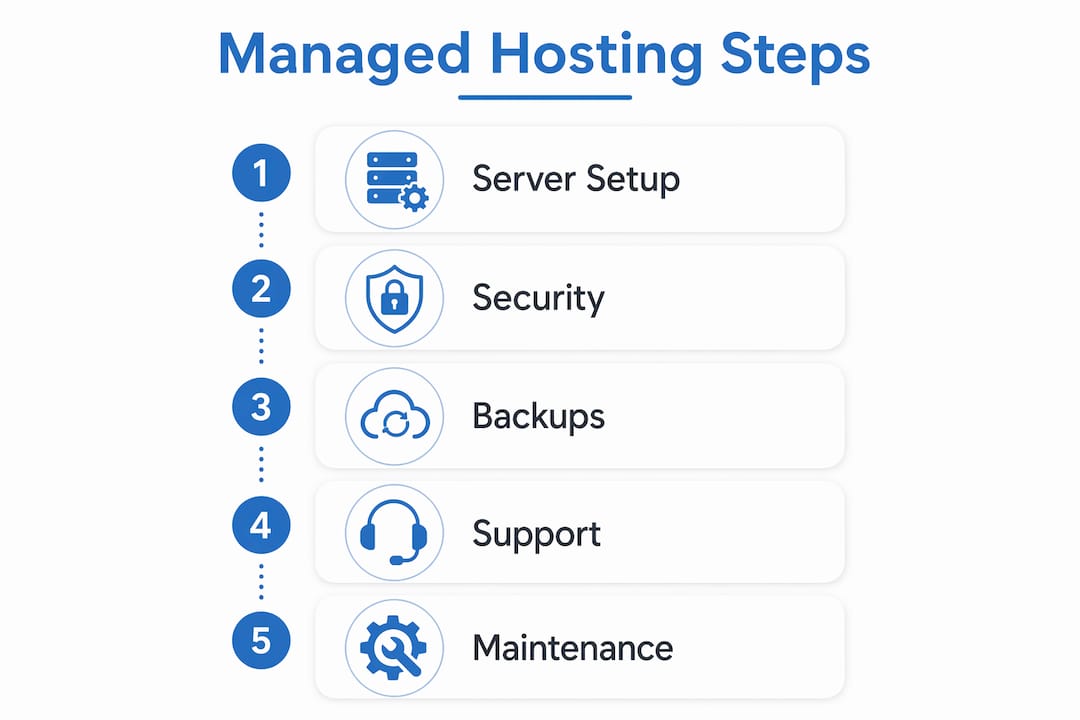
At the entry end, a provider handles server patching, automated backups, and basic security updates. Move up the spectrum and you get platform-level work: server-side caching, CDN integration, PHP version management, and staging environments. At the top end, full application management includes update testing, plugin conflict resolution, and proactive monitoring of your WordPress installation itself.
Common restrictions come with the territory. Managed environments often block certain plugins — typically caching plugins that conflict with the host’s own layer, or resource-heavy tools that degrade shared performance. Non-WordPress applications generally can’t share the same account. These aren’t dealbreakers, but they’re worth confirming before you migrate.
Canonical features to look for in any managed plan:
- Staging environment (test changes before they go live)
- Automated daily backups with tested restore points
- Web Application Firewall (WAF) and malware scanning
- WordPress-expert support (not generic helpdesk)
- Server-level caching and CDN integration
- Automatic core, theme, and plugin updates
Pro Tip: Ask the provider directly: “Is plugin troubleshooting included in my plan, or is it billed separately?” If they hesitate or redirect you to a support tier page, it’s an upsell.
Why managed WordPress hosting matters for your business
Managed hosting materially reduces operational risk for SMBs that depend on their website for leads, bookings, or reputation. A hacked or slow site doesn’t just cost you visitors — it damages local search rankings and erodes the trust you’ve spent years building.
WordPress powers roughly 43% of all websites on the internet. That market share makes it the most targeted CMS for attacks and also the platform with the deepest ecosystem of specialist support. A host that understands WordPress core files, theme conflicts, and plugin interactions resolves problems in minutes rather than days.
Page speed and uptime connect directly to SEO. Google’s Core Web Vitals use load performance as a ranking signal, and a site that goes down during business hours loses both traffic and credibility. Specialist WordPress support is often the real differentiator between a shared plan and a managed one — not raw server specs.
Business benefits at a glance:
- Reduced downtime from proactive patching and monitoring
- Faster troubleshooting from support teams who know WordPress
- Consolidated vendor responsibility (one agency, one point of contact)
- Predictable maintenance windows instead of surprise emergencies
- WAF and daily backups that protect your local search presence
What should a good managed WordPress host actually provide?
A credible managed host delivers secure infrastructure and WordPress-aware operational processes. Infrastructure alone isn’t enough.
Operational minimums worth demanding:
- Daily automated backups with documented restore testing
- Staging environment for safe update and design testing
- Server-level caching (not just a plugin)
- CDN integration for Arizona visitors and beyond
- Versioned deployments or rollback capability
On the security side, expect a WAF, scheduled malware scans, and a defined patch cadence for WordPress core. Daily automated backups and restore tools are standard at the managed tier — if a provider treats them as an add-on, that’s a red flag.
Support scope deserves its own conversation. Expert WordPress support should cover theme and plugin debugging, guidance on conflicts, and triage of performance regressions. It typically does not include content edits, custom feature development, or redesign work. Get that boundary in writing.

Pro Tip: Before signing, ask the provider to walk you through a restore test on a staging copy. A host confident in their backup system will do this without hesitation.
Questions to ask a managed WordPress host before you commit
Ask these questions on every sales call. The answers reveal true scope and expose limits that marketing pages bury.
- What does “expert WordPress support” include — plugin debugging, theme conflicts, performance issues?
- How often are backups taken, where are they stored, and how long is retention?
- How are updates tested before they reach production — is staging mandatory?
- What is your uptime SLA, and what is the remediation if you miss it?
- What does the migration process look like, and who handles DNS cutover?
- Which plugins are restricted or blocked on your platform?
- How is pricing structured — per site, pooled sites, or traffic-based overages?
- What is the minimum contract term and cancellation policy?
Score each answer 0–2: green (clear, written commitment), yellow (verbal only, ask for documentation), red (vague or deflected). Any two reds in the support, backup, or SLA categories should stop the conversation.
Request written SLA documentation and evidence of a recent restore test before signing anything.
How agency-bundled hosting changes the workflow
An agency-managed bundle reduces vendor friction by putting hosting, deployment, and SEO work under one operating process. You’re not coordinating between a hosting company and a separate agency when something breaks at 2 AM.
A typical workflow runs: discovery and scope agreement → staging build → SEO and design QA → staged update testing → scheduled production push → ongoing monitoring and monthly maintenance windows. Complex or high-traffic sites should always run a full staging test and a restore validation before DNS cutover to avoid PHP version or module mismatches.
Ownership terms matter. Get clarity in writing on who owns the content, code, backups, and DNS records. If the agency holds your DNS and you part ways, a poorly written contract can make a simple transfer take weeks.
Escalation paths should be defined before you need them. When a plugin conflict breaks a checkout page or a security incident triggers a WAF block, you want a named contact and a response-time commitment, not a generic support queue.
Contract items to request explicitly: monthly maintenance hours, incident response time, and backup retention period.
Migration timeline and pricing: what to expect
Most SMB migrations take a few days to two weeks, depending on site complexity and how much custom configuration is involved.
| Phase | Typical Duration | Key Owner Action |
|---|---|---|
| Staging setup and testing | 2–5 days | Review staging site, flag issues |
| Content and database migration | 1–3 days | Confirm data integrity |
| SEO baseline audit | 1–2 days | Approve redirect map |
| DNS cutover | Hours to 1 day | Approve go-live timing |
| Post-migration QA | 1–3 days | Test forms, payments, speed |
On pricing, per-site vs. pooled-site models affect total cost significantly if you manage multiple domains. Entry-level agency-managed packages typically run in a moderate price range per site; mid-tier plans with staging, priority support, and SEO monitoring run higher. Premium configurations for high-traffic or multi-site setups scale further. Always request a written quote with line items.
Watch for additional costs: premium plugin licenses, large-media migrations, custom integrations, and traffic overage fees. Budget for SEO and content work alongside hosting — they’re separate line items even in a bundled agency engagement. For a detailed look at small business hosting options, Webtechs has a dedicated comparison resource.
Contract terms, cancellation policies, and vendor lock-in
Most managed WordPress hosts and agencies use annual contracts, with monthly options available at a premium. Month-to-month flexibility generally costs significantly more in most cases, though exact figures vary by provider.
Lock-in risk is real and often underestimated. The three areas where it shows up: proprietary control panels that don’t export cleanly, DNS held by the agency rather than the client, and backup formats tied to the host’s own restore tools. Before you sign, confirm that your backups are exportable in a standard format (a full file + database dump) and that DNS access stays with you.
Cancellation policies vary. Some providers offer prorated refunds; others charge a full remaining term. Read the termination clause before the contract is signed, not after you’ve decided to leave.
Minimum terms of 12 months are common for agency bundles. That’s reasonable for a project that includes migration, design, and SEO setup — those services have real upfront costs. What’s not reasonable is a contract that makes it difficult to retrieve your own files and data. Any reputable agency will hand over a full site export on request, regardless of contract status.
Webtechs delivers managed hosting, web design, and SEO together
Webtechs, based in Scottsdale and serving Arizona businesses since 1997, bundles managed WordPress hosting with professional web design and SEO into a single, accountable engagement. It’s built for small and mid-sized businesses that want one agency responsible for the whole stack, not three vendors pointing fingers at each other.

The onboarding process runs: discovery and scope agreement → staging migration → SEO baseline audit → go-live checklist → ongoing monthly maintenance. Every engagement includes hosting, staging, automated backups, security monitoring, and SEO tracking. Real client results back the claims — case studies across industries show measurable gains in rankings and organic traffic.
Webtechs’s web design portfolio shows the range of projects delivered, from local service businesses to multi-location operations. If you’re ready to evaluate whether the bundle fits your situation, request a quote or schedule a discovery call directly through the site.
Key Takeaways
Managed WordPress hosting is worth the investment for SMBs when it’s paired with specialist support, clear SLAs, and an agency that owns the full stack from design through SEO.
| Point | Details |
|---|---|
| Confirm support scope in writing | “Expert WordPress support” should cover plugin and theme debugging, not just server uptime. |
| Demand daily backups with restore tests | Daily automated backups are standard; ask for proof of a recent restore before signing. |
| Audit plugin restrictions early | Managed environments often block certain plugins — confirm compatibility before migrating. |
| Budget for migration time | Most SMB migrations take a few days to two weeks depending on site complexity. |
| Webtechs bundles the full stack | Webtechs delivers managed hosting, web design, and SEO together for Arizona SMBs from one accountable agency. |
Why managed hosting is a strategic investment, not a commodity
Most business owners treat hosting as a utility — pick the cheapest plan, set it, forget it. That works until it doesn’t, and when it fails, it usually fails at the worst possible moment: a product launch, a busy season, a Google algorithm update.
The agencies and businesses that get the most from managed WordPress hosting treat it as part of their risk management posture. Uptime, restore success rates, load time, and SEO performance are metrics worth tracking monthly, not just checking when something breaks. A hosting environment that’s actively maintained by people who understand WordPress isn’t overhead. It’s the foundation everything else is built on. Webtechs has operated on that principle since 1997, and it shows up in the outcomes clients actually see.
Useful sources and further reading
- WordPress.org Hosting Recommendations — WordPress’s own curated list of recommended hosts, with context on what the platform requires.
- WPBeginner: Managed WordPress Hosting — Thorough overview of features, spectrum of services, and evaluation criteria.
- WP Engine: What Is Managed Hosting? — Detailed breakdown of managed hosting components including security, backups, and performance.
- Webtechs: Best Website Hosting for Small Business — Webtechs’s own comparison guide for SMBs weighing shared, VPS, and managed options.
- Webtechs: Website Migration Service — Details on agency-managed migration processes and cutover planning.
- Webtechs: SEO Case Studies — Real-world results from integrated hosting, design, and SEO engagements.