

Google Business Profile Services: What They Are and What to Do
“Google Business Profile services” means two different things, and people searching the phrase want one or the other. The first is the services section inside your profile, the list of jobs you offer that Google can match to searches. The second is professional help: someone who sets up, verifies, optimizes or maintains the profile for you. This guide covers both, so you can fix your services list this afternoon and decide whether outside help is worth paying for.
The profile itself costs nothing. Google describes it as a free Business Profile that you control on Search and Maps. What costs money is the time to build it correctly and keep it accurate, or the fee of an agency that does it for you.
TL;DR
- Your Business Profile is free. Paid “services” are really setup, optimization and ongoing management.
- The services editor is where you list what you do. Use Google’s predefined options first, then add accurate custom ones.
- Service-area businesses must hide their street address and define areas served. Prices, promotions and links in the description can get a profile rejected.
- Since July 31, 2024, chat and call history are gone from the dashboard, so you need your own call tracking.
- Hire help when verification fails, you have duplicates or several locations, or nobody has time to maintain the profile.
Table of Contents
- What counts as a Google Business Profile service
- How to add services to your Google Business Profile
- The rules that get profiles suspended
- Service-area, storefront or hybrid: pick the right type
- What reviews do for service businesses
- Measuring results, and the call history gap
- Do it yourself or hire help?
- Perspective: what we see after years of local SEO
- Where Webtechs fits
- A 30-day plan for a clean profile
- FAQ
- Sources
What counts as a Google Business Profile service
Inside the profile, “services” is a specific feature. Google says businesses in certain categories, like service businesses, may have the option to showcase their offerings directly on the profile. Not every category gets it, and what you see depends on the primary category you picked.
Outside the profile, “services” is a market. Typical offers fall into four groups:
- Setup and verification: creating a new profile, claiming an existing one, getting past verification.
- Optimization: categories, services, descriptions, photos, attributes, a clean business name.
- Ongoing management: posting, review replies, monitoring edits, reporting.
- Cleanup: merging duplicates, recovering suspended profiles, fixing wrong addresses.
Knowing which group your problem sits in saves money. A plumber with a brand new profile needs group 1 and 2. A dentist with two listings for one office needs group 4.
How to add services to your Google Business Profile
The steps are short. Google’s own instructions run like this: go to your Business Profile, select Edit services, choose the services you want to add, and select Save.
The quality of the result depends on choices you make along the way.
Start with predefined services
Google offers predefined services tied to your category. Use them wherever one fits your work. Google links the services list to how businesses appear in relevant searches, so matching its vocabulary gives the system something it already understands. A plumber who picks “water heater installation” from the list is easier to match to that search than one who types a creative variation.
Add custom services only for real gaps
If you do something the predefined list misses, add a custom service. Keep it plain and factual: a name, and a short description of what the job includes. Skip adjectives like “best” or “affordable.”
What to leave out of these fields is covered in Google’s service guidance: prices and phone numbers are prohibited in these fields to keep the profile compliant. If you want to show cost ranges, put them on your website where you control the page.
Check your categories first
Services depend on categories. If your primary category is wrong, the services you can choose will be wrong too. Choose the category that describes the core of the business, then add secondary categories for real, distinct lines of work. A garage door company that also does gate repair might add a second category. One that once installed a single fence should not.
A worked example
Take a Scottsdale HVAC contractor. The primary category is HVAC contractor. The predefined list offers items such as AC repair and furnace installation. The owner selects the ones her crew performs every week, drops the ones they refer out, and adds one custom entry for “ductless mini-split installation” with a two-sentence description of what a visit involves. No prices, no “call now” language, no link. That profile is accurate, which is what Google rewards.
The rules that get profiles suspended
Most trouble comes from owners treating the profile like an ad. Google’s guidelines say the profile should represent your business as it is known in the real world. A short list of mistakes causes most of the pain:
- Marketing in the business name. The name should match your storefront, website and stationery. Stuffing keywords or a city into it is a common reason for suspension.
- Promotions, prices and links in the description. Text like “50% off” or a link to a landing page can lead to rejection.
- Several profiles for one location. One business, one profile. Duplicates compete with each other and can trigger suspensions.
- Showing a home address when you do not serve customers there. More on this below.
If you already have duplicates, our walkthrough on merging duplicate Google Business Profiles lays out the steps for U.S. firms.
Service-area, storefront or hybrid: pick the right type
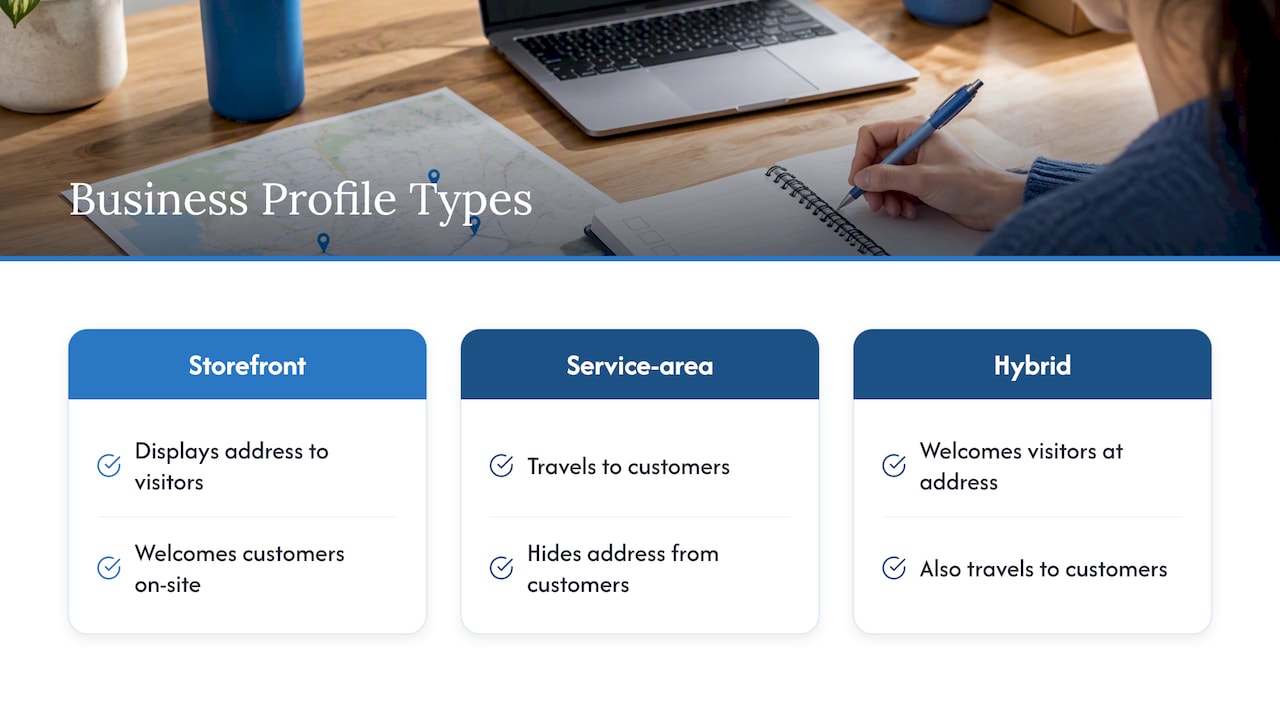
Google sorts businesses by how they meet customers. A storefront shows its address and welcomes visitors. A service-area business goes to the customer. A hybrid business does both, like an auto repair shop with a garage that also offers roadside help.
For a service-area business the rule is blunt. Google’s guidelines say to hide your address from customers, using the example of a plumber who operates from a home address and should clear that address from the profile. You then define the areas you serve, which should be places you can realistically reach, not an inflated map.
This trips up real companies. In a Google Business Profile Community thread, a long-established plumbing business struggled with repeated verification failures, and a responder pointed out that a plumber should be set up as a service-area business under the guidelines. Setting the wrong type can be part of why verification stalls.
Google also has a page on Business Profiles for service businesses that helps you decide which type you are. If you work from a home office and drive to jobs, read it before you touch any settings. For the ranking side of this problem, see our piece on service-area SEO problems in Scottsdale.
What reviews do for service businesses
Service businesses get an extra layer in reviews. Customers can rate specific aspects of their experience, such as price or professionalism, and Google shows a combined rating on the profile. You cannot pick or change those aspects. They come from what customers write.
The useful move is to read them. If several customers mark you down on one aspect, that is a process problem to fix and a reason to reply to those reviewers directly. A reply that acknowledges a late arrival and explains what changed will do more than another request for five stars.
Measuring results, and the call history gap
The dashboard reports views, clicks, direction requests and website visits. Performance data is available only for verified profiles, and figures are counted per day, so repeat visits by one person on the same day count once. That is why dashboard totals can look smaller than the notifications you receive.
Two changes matter for anyone tracking leads:
- Google removed chat and call history from the Business Profile on July 31, 2024. You can no longer chat with customers there or look up call history in the dashboard.
- You can link your profile to Google Analytics to see local listing interactions next to your website and app data.
The practical answer is to track calls yourself. A dedicated tracking number or a CRM that logs inbound calls gives you the record Google no longer keeps. We cover the setup in phone call tracking in GA4 and, for the analytics side, Google Analytics 4 setup for phone leads. If you run ads that send calls, call tracking for ads explains how to attribute them.
Do it yourself or hire help?
A do-it-yourself setup is a reasonable choice for a single-location business with a clear category, a real address or a clean service area, and an owner willing to spend a couple of hours then a few minutes weekly.
| Situation | DIY works | Outside help makes sense |
|---|---|---|
| One location, straightforward category | Yes | Optional |
| Verification keeps failing | Try the appeal steps once | Yes, if it drags on |
| Duplicate or inherited listings | Risky | Yes |
| Service-area business with unclear address setup | Possible with care | Yes, to avoid suspension |
| Several locations | Time-consuming | Yes |
| No one to reply to reviews or monitor edits | No | Yes |
When you evaluate any provider, ask these questions:
- Will the profile stay in your name, with you as owner? It should.
- How do they handle service-area rules and the address question?
- What do they change in the services list, and can you see it?
- Do they report calls with a method that survives Google’s removal of call history?
- Do they promise rankings? Nobody controls Google’s results, so a guarantee is a warning sign.
- What is the monthly fee, and what exactly does it cover?
Be careful with low flat-fee setup offers that skip the questions above. A cheap setup can still produce a suspended profile if the name, address type or categories break the rules.
Perspective: what we see after years of local SEO
We have been working with small and mid-sized businesses since 1997, and the profile problems we see repeat. Owners rush to publish, copy a competitor’s description, add a promotional phrase, and then wonder why the profile is rejected or buried. The profile is not a billboard. It is a record of your business that Google tries to verify against the real world.
So we start with accuracy: the right type, the right categories, the real services, a consistent name and phone number that match your website. Then we connect the profile to the rest of the picture. A profile that points to a slow, outdated site, or has no tracking behind the phone number, wastes the visibility it earns. That is why we like to handle design, SEO, content and measurement under one roof, and why we answer calls and emails quickly when something breaks.
Our advice if you are a service business owner: spend your first hour on categories and services, your second on the address and service-area setup, and your third on setting up call tracking. Everything fancy comes after those three.
— Brett
Where Webtechs fits
If you would rather not carry this yourself, our team handles local search for Scottsdale and Arizona businesses, including Google Maps marketing, local SEO, and the content and website work that supports the profile. See the details on our local SEO and Google Maps services page. Pricing is not published, so you will get a quote based on your business, and we do not use pressure sales. If you want to learn the craft first, our guide to Google Business Profile optimization goes deeper into the Scottsdale details, and the small business SEO checklist puts the profile in context with the rest of your site.
A 30-day plan for a clean profile
Week 1: foundation. Confirm there is one profile for the business. Decide whether you are storefront, service-area or hybrid. Fix the business name to match your signage and website. Verify.
Week 2: services. Choose the primary category. Select predefined services that match your work. Add a few custom services with plain descriptions. Remove anything you do not actually offer.
Week 3: proof. Add real photos of your work, team and vehicles. Write a description without links, prices or promotions. Ask recent customers for reviews, and reply to each one.
Week 4: measurement. Set up a tracking phone number or CRM logging. Link the profile to Google Analytics. Note your baseline views, calls and direction requests so you can compare next month. Individual search terms can take a few days to show up, and monthly totals update monthly, so give changes time before judging them.
If you also want to reach customers beyond organic listings, Google Local Services Ads and Google Maps ads are paid options that work alongside a healthy profile, not instead of one.
FAQ
How much does a Google Business Profile cost?
Nothing. Google offers the profile for free, and you do not pay Google to create or edit it. Any cost comes from the time you spend or from a provider you hire to set up or manage it.
How do I list services on my Google Business Profile?
Open your profile, choose Edit services, select the services that apply and save. Pick predefined options first, then add custom ones for what is missing. Keep descriptions factual and leave out prices, promotions and links.
Should a service-area business show its address?
No. If you travel to customers and do not serve them at your location, Google’s guidelines say to hide the address and list the areas you serve. Showing a home address can put the profile at risk of suspension. Hybrid businesses, which also serve customers at a location, can show an address.
Can I see who called me from my Business Profile?
Not in the dashboard anymore. Google ended call history and chat on July 31, 2024. Use a tracking number or a CRM that logs inbound calls, and link your profile to Google Analytics for the rest of the picture.
Sources
- Manage your services on your Business Profile, Google Business Profile Help
- Guidelines for representing your business on Google
- Business Profile for service businesses overview
- About reviews for service businesses
- Understand your Business Profile performance and insights
- Changes to Google Business Profile chat and call history
- Connect your Business Profile to Google Analytics
- Google Business Profile Community: verification thread for a plumbing company
- Get Listed on Google, Google Business Profile