

Website Requirements Document: How to Write One That Works
A website requirements document is a written agreement about what your site must do, who it is for, what goes on it and how everyone will know it is finished. It is the one file that keeps you and your web team working from the same picture. A web design brief is the shorter, business-focused version of the same idea, and a questionnaire is the tool that gathers the raw answers. This guide shows you what to put in the document, how to write it step by step, and what a filled-in example looks like for a local service business.
TL;DR
- A requirements document covers goals, audience, content, design, features, technical needs, budget and timeline. A brief is the short version, and a questionnaire is how you collect the answers.
- Start with the one action you want visitors to take, then work backward to pages, features and content.
- Write requirements so they can be checked: “the quote form emails us within a minute” beats “easy contact.”
- Decide who supplies content, who approves each stage and how fast, before design starts.
- Accessibility is a requirement, not an extra. Put a standard such as WCAG 2.1 AA in writing.
Table of Contents
- Requirements document, brief and questionnaire: what is the difference?
- Start with the questionnaire
- How to write a website requirements document, step by step
- A sample brief for a local service business
- Our perspective: what we see go wrong
- Common mistakes to avoid
- Want help turning this into a plan?
- FAQ
- Sources
Requirements document, brief and questionnaire: what is the difference?
The three terms overlap, and agencies use them loosely. Here is a practical way to separate them.
| Document | Length | Who writes it | What it answers |
|---|---|---|---|
| Web design questionnaire | 1 to 4 pages of questions | Agency sends, owner answers | What does the business need and what already exists? |
| Web design brief | 2 to 5 pages | Owner, often with the agency | Why are we building this, for whom, and what does success look like? |
| Website requirements document | 5 to 20+ pages | Owner and agency together | Exactly what must the site contain, do and meet, and in what order? |
For a five-to-fifteen-page small business site, you rarely need three separate files. A good questionnaire, turned into a brief and then extended with a feature and technical list, becomes your requirements document. One file, built in layers.
The reason to bother is simple. One design-focused guide argues that every choice left undefined becomes open to interpretation, which is a leading cause of projects running over budget. You pay for that interpretation twice: once when the first draft misses, and again when it is fixed.
Start with the questionnaire
If you have never written one of these, begin by answering questions rather than staring at a blank page. A solid small business questionnaire gathers the visitor’s main desired action, your target customers, domain and email details, content responsibilities, and required forms or integrations. Those are the items that most often surface late and derail a launch.
Keep the language plain. Owners rarely speak design jargon, so questions work better in plain language with examples. Instead of “Describe your information architecture,” ask “If a customer visited only three pages, which three would you want them to see?”
If you want a ready-made starting file, there is a downloadable questionnaire in Google Docs and Word you can edit. Whatever template you use, cut every question that does not change a decision, and add questions about your own business that no template will think of, such as service areas, licensing or seasonal rushes.
Discovery questions worth asking in the first meeting
A discovery call or kickoff meeting should settle the things a form cannot. These are the questions we find move a project forward fastest:
- What do you want a visitor to do within 30 seconds of arriving? Call, book, buy, request a quote?
- Which three competitors do customers compare you with, and what do you do better?
- What does your current site get right, and what do you want gone?
- Who has the final say on design and wording, and how many people review each stage?
- What systems must connect: scheduling software, CRM, payment processor, email marketing?
- What deadline is real (a trade show, a season) and what deadline is just a preference?
- Who owns your domain name and hosting logins today?
Question 7 sounds minor. It is the one that causes the most launch-week panic.
How to write a website requirements document, step by step
1. State the purpose and the single main goal
One paragraph. What is the site for, and what is the primary conversion? A plumber’s primary goal is phone calls and booked jobs. A boutique’s is completed checkouts. Secondary goals (newsletter signups, job applications) come after. If you list six “main” goals, none of them is.
Make the goal measurable. “More leads” is a wish. “Increase quote requests from the website from the current monthly number to a target we agree on” is a requirement you can track in analytics.
2. Describe your audience
Write two or three short customer profiles: who they are, what they search for, what device they use, what worries them before they buy. Include where they are. A Scottsdale service business is mostly talking to people in a handful of nearby cities, on phones, often in a hurry. If that sounds like you, our notes on mobile-first design for Scottsdale businesses show how that shapes the page layout.
3. Map the site structure and content
List every page you expect, with its purpose and one line on what it must contain. A typical small business site includes:
- Home
- One page per core service (not one page listing everything)
- About and team
- Service area or location pages
- Reviews or portfolio
- Contact and quote request
- Blog or resources, if you plan to publish regularly
Then assign content responsibility, page by page: who writes the text, who supplies photos, who approves. Content is the most common cause of delay. If you want professional writers on the job, say so in the document and decide whether the copy is written for search from the start. Our SEO content writing services page explains how that works, and the guide to content writing covers the basics.
4. Specify design direction
You do not need to design the site in the document. You need to remove guesswork. Include:
- Brand assets: logo files, colors, fonts, photography style
- Three sites you like and one specific thing you like about each
- Two sites you dislike and why
- Tone: formal, friendly, technical, playful
- Devices that matter most, and whether the layout should be built for phones first
If you are unsure how layout should respond to different screens, our overview of responsive web design benefits for Arizona small businesses is a good primer.
5. List functional requirements
This is the part that makes a requirements document different from a brief. Write each feature as something that can be tested. Compare:
- Vague: “Contact form.”
- Testable: “Contact form with name, phone, service type and message; required fields validated; submission sends an email to two addresses and shows a confirmation message; spam protection included.”
Typical functional items: forms, online booking, payments, live chat, maps and directions, click-to-call buttons, user accounts, product filters, search, review feeds, and integrations with the tools you already use. For an online store, add inventory, shipping rules, tax handling and order emails.
6. Set technical and non-functional requirements
These describe how well the site must work, not what it does. A requirements checklist should define mobile behavior, browser support, accessibility standards such as WCAG 2.1, third-party integrations, SEO metadata and schema rules, CMS functionality and performance targets. Spell out:
- Platform and CMS: which system, and who will edit pages after launch. If you are still deciding, our comparison of WordPress and Wix for small businesses lays out the trade-offs.
- Hosting: uptime expectations, backups, security, SSL certificate, who handles updates. See our notes on hosting for small businesses.
- Performance: a target load time on mobile, and the tool you will use to measure it.
- Browsers and devices: the current versions of the major browsers plus iOS and Android.
- Analytics and tracking: which analytics, call tracking and conversion events to set up.
- SEO basics: page titles and descriptions, clean URLs, heading structure, image alt text, sitemap, schema markup for local business.
7. Add accessibility and legal requirements
Write these in, plainly, because they are easier to build in than to retrofit. The Web Content Accessibility Guidelines are published by the W3C, and WCAG 2.1 is the version most policies reference. A simple line in your document, such as “the site will conform to WCAG 2.1 Level AA,” gives your team a clear target.
What the law requires depends on who you are. The Americans with Disabilities Act protects disability rights and equal opportunity in areas that include state and local government services and telecommunications. The Department of Justice finalized a rule in April 2024 requiring state and local governments to meet WCAG 2.1 AA, with compliance deadlines since extended. That rule applies to public entities, so a private business should not assume it is covered or exempt by reading it alone. If you are unsure how the ADA applies to your business, ask an attorney who handles ADA matters in your state. For the practical build steps, use our web accessibility checklist.
Also list the policies your site needs by your own circumstances: a privacy policy if you collect personal data, terms for online sales, and any licensing or disclosure language your trade requires.
8. Fix the budget, timeline and approvals
State a budget range, even if it is wide. Agencies can scope far more accurately when they know whether you are planning for a simple brochure site or a custom build with integrations. Our website design price list is one place to start getting a sense of scope.
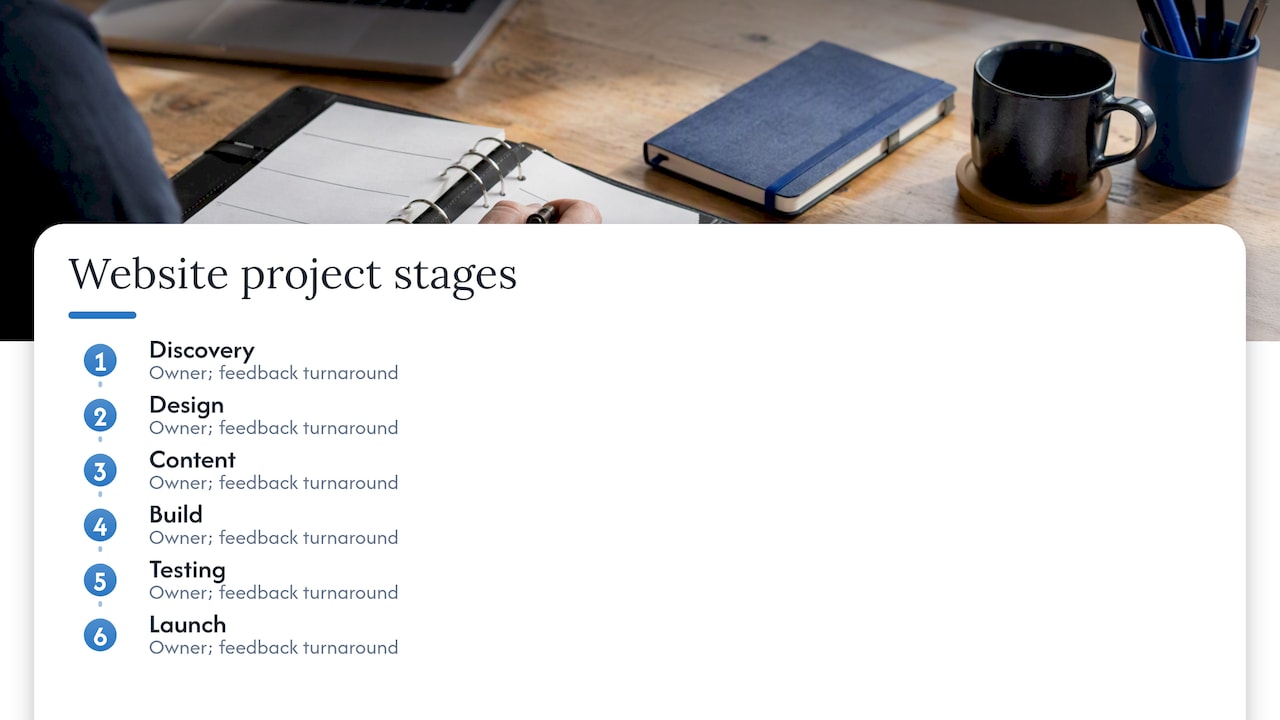
For the timeline, list the stages (discovery, design, content, build, testing, launch), the owner of each, and how many business days you will take to give feedback. Slow approvals are what stretch schedules, not slow designers. Our website design timeline guide shows three schedules built around that reality.
9. Define success and handoff
Finish with acceptance criteria: how you will decide the site is done. A short list works. All pages live and proofread, forms tested, redirects in place, analytics verified, and training given on editing. If you are replacing an existing site, add redirect and URL mapping requirements, and read our site migration SEO checklist before you change a single address.
A sample brief for a local service business
Here is an illustrative example, not a real client, showing the level of detail that works. Imagine an HVAC company serving the Scottsdale area.
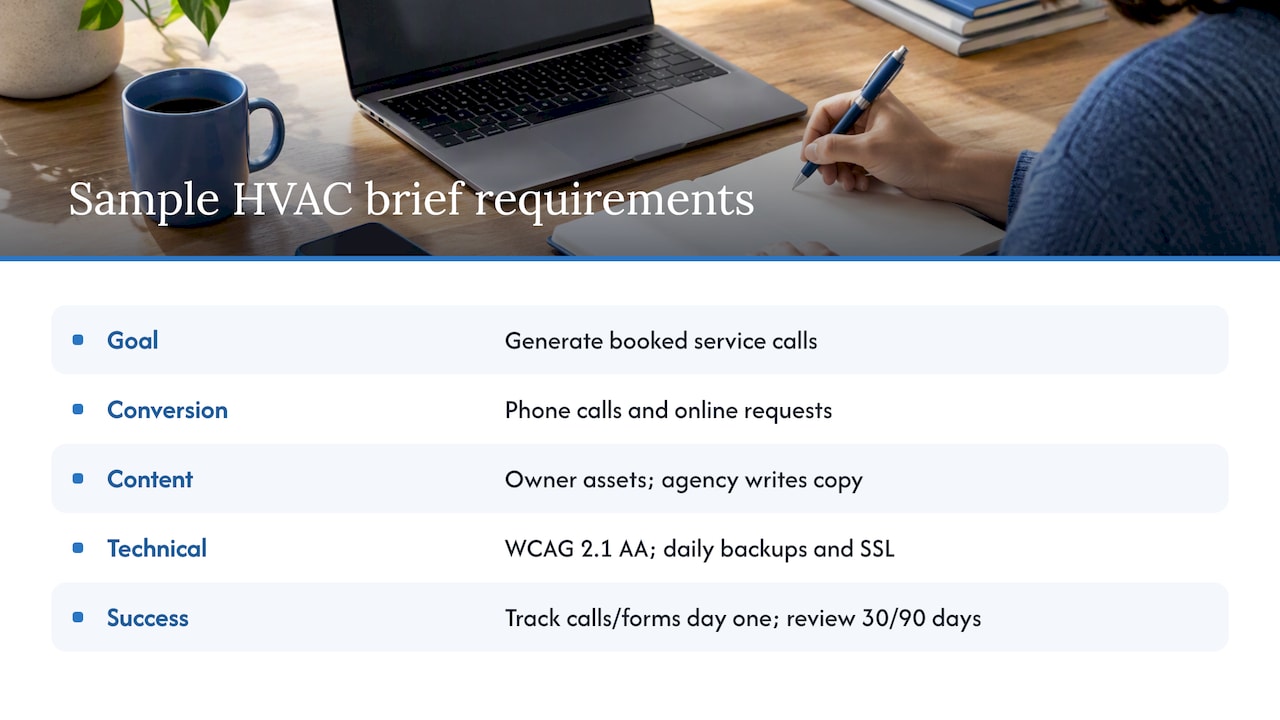
Purpose and goal. Replace a five-year-old site with one that generates booked service calls. Primary conversion: phone calls and online service requests. Secondary: maintenance plan signups.
Audience. Homeowners in Scottsdale and nearby cities, usually searching on a phone when the air conditioning fails. Property managers needing recurring service.
Pages. Home, Air Conditioning Repair, Installation, Maintenance Plans, Commercial, Service Areas (one page per city served), Reviews, About, Contact, Emergency Service.
Content. The owner supplies licenses, team photos and a list of services. The agency writes all page copy. Owner reviews within three business days of each delivery.
Design. Existing logo and blue and white palette stay. Clean, trustworthy, no stock-photo clutter. Click-to-call button fixed on mobile screens.
Functions. Service request form with address, issue type and preferred time, emailed to the office and dispatcher. Scheduling software integration. Review feed from Google. Maps embed with service area.
Technical. CMS the office manager can edit. Hosting with daily backups and SSL. WCAG 2.1 AA target. Local business schema, optimized page titles, and 301 redirects from every old URL.
Budget and timeline. Range agreed before design begins. Launch targeted before the hot season, working backward from that date with approval deadlines for each stage.
Success. Calls and form submissions tracked in analytics from day one, with a review at 30 and 90 days.
Notice what it does not contain: adjectives without tests. Every line tells somebody what to build or check.
Our perspective: what we see go wrong
We have been building sites for small and mid-sized businesses since 1997, and the pattern is consistent. Projects rarely fail because of design talent. They fail because two people imagined different things and nobody wrote either down.
Three habits separate smooth projects from painful ones. First, owners who name one primary goal get sites that convert, because every page decision has a tiebreaker. Second, owners who settle content and approvals up front launch on time, because the schedule is built around their real availability. Third, owners who involve search from day one avoid a costly rebuild later, since page structure, URLs and copy are all SEO decisions.
We would also say this: do not feel you need to produce a perfect document alone. A good agency should walk you through the questions in plain language and turn your answers into the requirements for you. If a team hands you a long technical form on day one and disappears, that is a warning sign. Our approach is personal, with no pressure to sign, and the document is a shared working tool, not a hurdle.
— Brett
Common mistakes to avoid
- Describing solutions instead of problems. “We need a slider” is a solution. “We need to show three services above the fold” is a requirement the designer can solve better.
- Skipping content ownership. Pages sit empty because everyone assumed someone else was writing them.
- Forgetting what exists. Old URLs, ranking pages, email on the current domain and tracking codes all need a plan.
- Leaving SEO until after launch. Structure and keywords shape the build. Our small business SEO checklist and local SEO checklist show what to settle early.
- Treating the document as frozen. Changes will come. Add a simple change process: written request, impact on cost and timeline, approval, then work.
- Too many reviewers. Name one decision maker.
Want help turning this into a plan?
If you would rather not write this alone, we can run the discovery with you and put the requirements into a document your whole team signs off on. We design custom sites, handle hosting, write the content and build the search strategy under one roof, so your requirements are not passed between vendors. See our website design services or contact us through our site to start a conversation. For a feel of the scope, our small business web design guide walks through a typical project.
FAQ
What should a website requirements document include?
At minimum: the purpose and main goal, target audience, site map, content plan and owners, design direction, functional features, technical needs (platform, hosting, performance, SEO, accessibility), budget, timeline, approval process and acceptance criteria. Write each item so someone could test it.
How long should a website brief be?
For a small business site, two to five pages is usually enough for the brief itself. The fuller requirements document can run longer if you have e-commerce, integrations or many page types. Length matters less than clarity: a short, specific document beats a long vague one.
Who writes the requirements document, the client or the agency?
Ideally both. You know your customers, services and goals. The agency knows what is technically involved and which questions to ask. Many agencies, including ours, lead you through a discovery conversation and write up the answers for your review.
Is accessibility a legal requirement for my business website?
It depends on your situation. Public entities face specific federal rules, while private businesses can face ADA-related claims depending on facts and jurisdiction. Because the details vary, ask an ADA attorney in your state about your own exposure, and build to WCAG 2.1 AA in the meantime, as it is a widely used benchmark.
Can I use a free template?
Yes. Templates are a useful starting skeleton. Customize them heavily, delete questions that do not apply, and add your own business-specific requirements, such as service areas, licensing or seasonal peaks.
Sources
- Website Design Requirements: How to Brief Your Design Team
- Website Client Questionnaire
- Website Questionnaire for Small Business Owners
- A Website Design Questionnaire for Clients
- Web Content Accessibility Guidelines (WCAG) 2.1
- Your rights under the Americans with Disabilities Act
- Fact Sheet: New Rule on the Accessibility of Web Content