

One Hour Content Calendar Ideas for Arizona Small Businesses

Build your calendar around three or four content pillars, a repeatable weekly pattern, and an 80/20 mix of helpful-to-promotional posts. That structure turns a blank month into a fillable grid instead of a staring contest. Prioritize short video, carousels, and one blog or email piece per week, then multiply each into three or more spinoffs. The sections below give you a template example, a one-hour monthly sprint, and a review checklist to keep the whole thing honest.
TL;DR:
- Focusing on four content pillars like Teach, Tools, Stories, and Offers ensures variety and relevance based on customer questions.
- Using a structured one-hour monthly sprint simplifies planning and helps create a balanced, repeatable content schedule.
- A good content mix should match the 70-20-10 or 80-20 rule, emphasizing helpful content over promotional posts while tracking key metrics.
- Prioritizing high-effort ideas for repurposing through multiplication maximizes content output without overloading production capacity.
- Hiring an agency can streamline management, guarantee consistency, and improve KPI tracking without adding extra workload.
Table of Contents
- Content Calendar Ideas Organized by Pillar and Channel
- Content Calendar Template Fields You Can Copy Today
- Picking Pillars and a Cadence Your Team Can Actually Keep Up
- The One-Hour Sprint That Fills Your Whole Month
- Monthly Review Checklist: Balance, Effort, and Three KPIs
- What a Scottsdale Service Business Would Actually Do With This
- Why Most Content Calendar Advice Skips the Part That Matters
- Get Your Calendar Built and Managed Without Adding It to Your Own Plate
- Sources
Content Calendar Ideas Organized by Pillar and Channel
Pillars are the four or five buckets your content lives in, so you never stare at a blank page wondering what to post. Most small businesses do fine with four: Teach (how-to and tips), Tools (behind-the-scenes of what you use or sell), Stories (customers, staff, local moments), and Offers (promotions, availability, community shoutouts). Each pillar answers a different question a customer already has, which is why it works better than posting whatever comes to mind that morning.
Here are ideas you can drop straight into a calendar, grouped by pillar:
Teach:
- A 3-step how-to Reel solving one small problem your customer faces
- A “mistakes to avoid” carousel with five slides
- A myth-busting post correcting a common misconception in your industry
- A quick FAQ answer pulled from a real customer question
- A blog post expanding on your most-asked question
Tools:
- A walkthrough of one piece of equipment, software, or material you rely on
- A “day in the life” story showing your actual workflow
- A before/after post showing your process, not just the result
- A comparison post: option A vs. option B, and why you pick one
Stories:
- A customer spotlight (with permission) told in their words
- A team introduction post for a new hire or long-tenured staffer
- A local-event tie-in showing up at something happening in your area
- A “why we started this business” post, told in under 100 words
Offers and community:
- A limited-time promotion tied to a slow week on your calendar
- A referral-program reminder
- A local partnership or collaboration announcement
- A poll or question sticker asking followers what they want next
Mark each idea as low effort (a phone photo, a quick caption, a repost) or high effort (scripted video, design work, a full blog draft) before it goes on the calendar. That single flag prevents overloading one week with everything that needs a camera crew. And whenever you produce a high-effort piece, run it through the multiplier method: one blog post becomes a short video, a carousel, an email blurb, and two social captions, instead of one asset that gets used once and forgotten.
Content Calendar Template Fields You Can Copy Today
A content calendar only works if it tracks the right fields, not every field. Skip the ones that just add clutter to your Google Sheet or Notion board.
- Date: when it publishes, not when it’s due
- Platform: Instagram, TikTok, LinkedIn, blog, email
- Pillar: which bucket it falls under (Teach, Tools, Stories, Offers)
- Format: Reel, carousel, static post, blog, newsletter
- Title/hook: the first line or headline, written out in full
- CTA: what you want the viewer to do next
- Asset link: where the file, draft, or design lives
- KPI: the one metric this post is meant to move
- Status: idea, in progress, ready, published
Columns like pillar, hook, and asset link are what separate a real working template from a bare list of dates. Here’s what one filled row looks like:
| Date | Platform | Pillar | Format | Title/Hook | CTA | KPI | Status |
|---|---|---|---|---|---|---|---|
| March | Instagram Reel | Teach | Short video | “3 signs your AC needs service before summer” | Book a checkup | Reach | Ready |
Picking Pillars and a Cadence Your Team Can Actually Keep Up
Choose your three or four pillars by listing the questions customers ask most, then matching each one to a business goal (awareness, trust, sales). If nobody’s asking about your equipment, drop that pillar and give the slot to something they do ask about.
Cadence should match your actual capacity, not an influencer’s schedule:
- One short video weekly (Reels or TikTok)
- Two to three feed posts weekly (carousels or static)
- One blog or email monthly minimum, weekly if you can sustain it
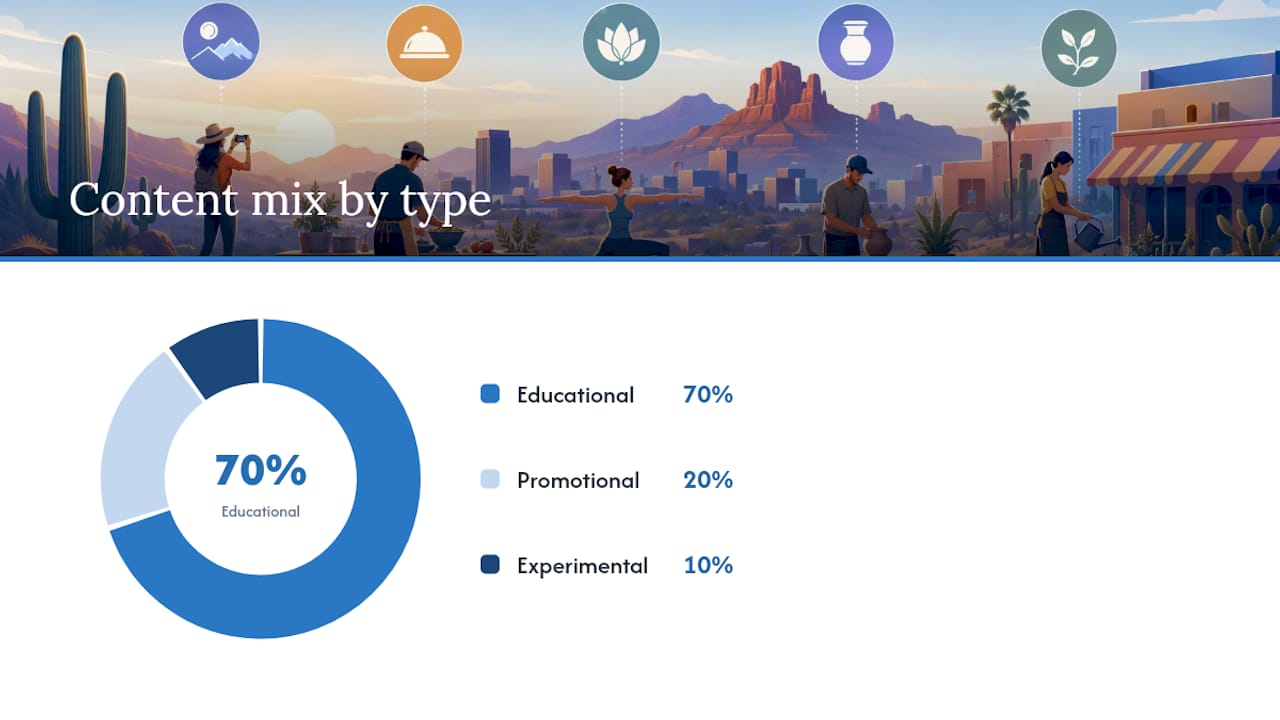
Track your ratio against the 70-20-10 rule: 70% educational, 20% promotional, 10% experimental, or a simpler 80/20 split favoring helpful content. Count your posts at month’s end.
Pro Tip: Tag each post with its pillar in the calendar’s dropdown or color code. At a glance, you’ll see if “Offers” quietly took over your month.
The One-Hour Sprint That Fills Your Whole Month
Set a timer and run this once a month instead of scrambling weekly. A structured one-hour sprint beats a dozen scattered fifteen-minute sessions because you stay in planning mode the entire time.
- Setup (10 minutes): Pick your channels, posting pace, and confirm your pillars. Note any deadlines, holidays, or launches this month.
- Idea fill (35 minutes): For each calendar slot, apply pillar plus pain point plus format plus promise. Example: Teach pillar, “AC breaking down mid-summer,” Reel format, “3 signs before it fails.”
- Realism pass (15 minutes): Mark each idea’s effort level and slot it against your actual bandwidth for that week.
Once you’ve drafted one long-form piece, run it through the multiplier: blog post becomes short video becomes carousel becomes email snippet becomes two social captions, scheduled the same week instead of spread across a quarter.
Pro Tip: Do the sprint the same day every month, like the first Monday. Recurring habits survive busy seasons better than “whenever I get to it” habits.
Monthly Review Checklist: Balance, Effort, and Three KPIs
Run two passes before you close out the month. First, a balance pass: count posts per pillar and check your promotional percentage against your 80/20 or 70-20-10 target. Second, an effort pass: did low-effort posts carry the month while high-effort pieces sat untouched, or the reverse?
Then check three numbers:
- Reach or impressions: is content getting seen at all?
- Engagement rate: are people reacting, commenting, sharing?
- Website traffic or conversions from social: is any of this turning into business?
If engagement is strong but website traffic is flat, add a clearer CTA next month instead of adding more posts. If reach is low across every pillar, the fix usually isn’t more content, it’s better hooks on the content you already have. One weak KPI tells you exactly which lever to pull, not which pillar to abandon.
What a Scottsdale Service Business Would Actually Do With This
A Scottsdale HVAC or landscaping company running four pillars would map its 30-day plan around obvious seasonal pain points: AC failures before summer, irrigation timing before the heat sets in, or holiday lighting in November. That’s Teach and Offers doing most of the heavy lifting, with Stories filling in customer spotlights once or twice monthly.
The businesses that stick with a calendar past month two are the ones that made it boring on purpose. Boring means repeatable. Repeatable means it survives a busy week.
If you’re hiring an agency or freelancer to run this for you, ask specifically what deliverables you get each month, what cadence they commit to per channel, and which three KPIs they’ll report against. Vague answers on any of those three points are a red flag before you sign anything.
Why Most Content Calendar Advice Skips the Part That Matters
Most guides oversell the ideas part and undersell the maintenance part. The real failure point is month three, when nobody’s checking whether the mix actually holds or whether the “quick” Reel format turned into a two-hour production nightmare nobody has time for anymore.
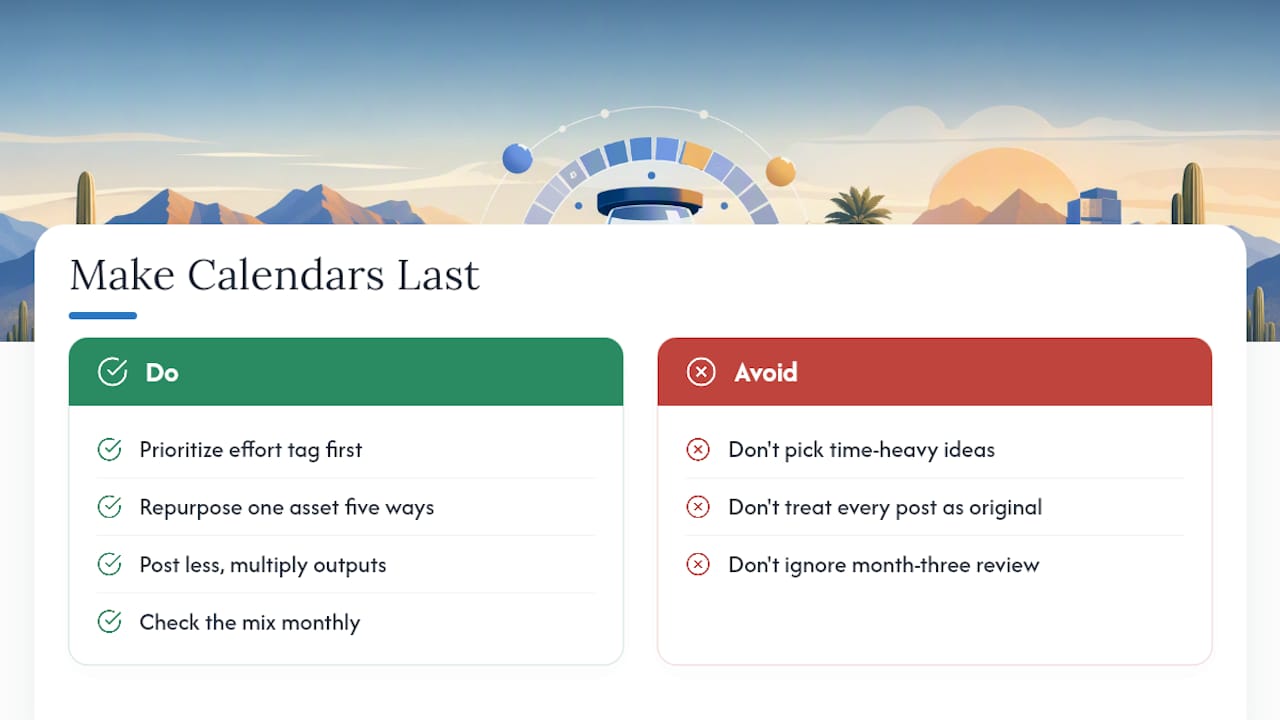
The conventional wisdom says post more. The better move, based on how these calendars actually survive past a quarter, is post less but multiply harder. One solid long-form asset repurposed five ways beats five separate scrambles to invent five separate ideas. Small teams that treat the calendar like a factory line, one input, several outputs, outlast the teams treating every post as an original creative act.
If you’re prioritizing anything first, prioritize the effort tag on every idea before you fall in love with the idea itself. A brilliant concept that needs four hours you don’t have isn’t a content idea. It’s a resentment waiting to happen.
Get Your Calendar Built and Managed Without Adding It to Your Own Plate
Consider hiring an agency to manage the pillars, the weekly pattern, and the sprint described above, freeing up your own schedule. Social media management at Webtechs covers scheduling, content creation, and monthly reporting against the same KPIs covered here: reach, engagement, and traffic from social.

Deliverables typically include a monthly content calendar, produced posts across your priority channels, and a report showing what moved and what didn’t. If you’d rather see what that work looks like before committing, check our portfolio of past client projects or read through client testimonials from other Scottsdale-area businesses we’ve worked with. When you’re ready to hand this off, request a consult and we’ll map your first 30-day calendar together.
Sources
- What is a content calendar? Complete guide
- Using the 70-20-10 rule in marketing
- 30-Day Content Calendar In 1 Hour (Template, 2026)