Small business owner reviewing ad settings
Written by webtechs

Fix Google Ads Quality Score in 1–3 Weeks: Scottsdale SMB Checklist

Small business owner reviewing ad settings

Quality Score is a diagnostic rating on a scale that sums up how well your expected click-through rate, ad relevance, and landing page experience stack up against other advertisers. For Scottsdale small businesses, the fastest and most reliable way to improve it is not to chase the number itself but to tighten the match between your ad copy and your landing page. Fix that connection first with proven account-based marketing strategies to tighten your message and audience targeting.


TL;DR:

  • Improving Quality Score requires addressing expected CTR, ad relevance, and landing page experience, with early fixes focused on ad copy and message match.
  • High-spend keywords with below-average component statuses, especially on expected CTR and landing page experience, should be prioritized for quick testing and adjustments.
  • Device and match type differences significantly influence score components, making mobile optimization and narrowing broad match keywords essential for better results.
  • Quality Score mainly guides troubleshooting relevance and landing page issues; it should not replace metrics like conversion rate and cost per conversion for performance evaluation.
  • Most improvements happen within 1 to 4 weeks, with ad copy and message match fixes yielding faster results than large account restructures or redesigns.

Webtechs
Make Your Ads Work Harder
WebTechs helps small businesses improve online visibility through tailored web design, SEO strategies, and PPC support.

Explore WebTechs

Table of Contents

What determines your Quality Score

Quality Score is reported at the keyword level and built from three separate signals that Google tracks and grades individually. According to Google’s own documentation, each component gets a status of Above average, Average, or Below average, which tells you exactly where the problem sits instead of leaving you guessing at one blended number.

  • Expected CTR estimates how likely your ad is to get clicked when shown, compared with other ads for the same keyword.
  • Ad relevance measures how closely your ad’s message matches the intent behind the searcher’s keyword.
  • Landing page experience judges whether the page a click lands on is relevant, fast, easy to navigate, and usable on a phone.

Here is the part most advertisers miss: the score you see in your account is a diagnostic tool, not the same calculation Google runs at auction time. The Google whitepaper on Quality Score is direct about this, warning advertisers against “chasing” the account-level number since auction-time quality uses a more granular, real-time calculation. Treat the visible score as a signpost toward what to fix, not a KPI to inflate.

How to find your Quality Score and its history in Google Ads

You do not need a third-party tool to see any of this. It is sitting inside your account, just hidden behind a few clicks.

  1. Open your campaign, click Keywords, and go to the keyword list view.
  2. Click Columns, then Modify columns, and open the Attributes section.
  3. Add Quality Score, Expected CTR, Ad relevance, and Landing page experience to your column view.
  4. For trend data, add the historical versions: Quality Score (hist.), Landing Page Exp. (hist.), and the other hist. columns under the same menu.
  5. Save the column set so it loads automatically on future visits.

As Factors, a dash in any of these columns usually means Google has not collected enough impression data yet, common on new or low-volume keywords, and broad match terms sometimes report components differently than exact match equivalents because of how search queries get grouped. Don’t panic over a dash. Wait for volume.

What counts as a good Quality Score

There is no fixed cutoff where a specific number is bad or good. Expected CTR is relative to other advertisers competing for the same search, which means a 5 in a brutally competitive industry can represent solid performance, while a 7 in a low-competition niche might still be underperforming its potential. Shopify’s breakdown of CTR benchmarks makes the same point from a different angle: a single universal “good” CTR percentage does not exist because intent, industry, device, and brand recognition all shift the baseline.

  • Judge performance by conversion rate and cost per conversion, not the Quality Score number alone.
  • A low score only demands attention when it sits on a high-value keyword or when its components show “Below average” status.
  • If conversions are strong and cost per acquisition is reasonable, a mediocre Quality Score is rarely worth touching.

Google’s own guidance confirms this stance: the Quality Score whitepaper states that Quality Score should guide where to diagnose problems in relevance, CTR, or landing pages, not serve as a primary performance metric on its own.

How to improve Quality Score, component by component

Each component responds to a different fix, and the order you tackle them in matters more than most advertisers assume. Start with changes you can make this week before touching anything structural.

Expected CTR improves fastest through better ad copy. Write headlines that state a clear, specific offer instead of a generic claim, add a direct call to action, and layer in ad extensions like sitelinks, call buttons, and location information so your ad takes up more space and gives searchers more reasons to click. Run two or three headline variations against each other and measure the lift in both CTR and conversion rate, since a higher CTR that does not convert is not actually progress.

Ad relevance comes down to tight organization. Split loosely themed ad groups into narrower clusters built around a single topic or service, then write responsive search ad headlines that echo the exact language searchers use. An ad group mixing “emergency plumber Scottsdale” with “bathroom remodel quotes” will always struggle here because one ad can’t speak to both intents convincingly. Narrow the theme and the relevance score tends to follow.

Landing page experience is where factors.ai’s practitioner notes are worth repeating: restructuring your account or moving keywords between campaigns without changing the ad text or the landing page itself will not move this number. The page has to actually change. Match the headline on your landing page to the promise in your ad, strip out slow-loading scripts and oversized images, confirm the layout works cleanly on mobile, and keep your primary call to action visible without scrolling. WebTechs’ practical playbook on PPC landing pages walks through this message-match process in more depth.

  • Test ad copy and landing page headlines before touching campaign structure.
  • Reserve full landing page rebuilds or CMS migrations for keywords that still underperform after copy fixes.
  • Track conversion rate and cost per conversion weekly to confirm a fix is working, not just assumed to be.

Pro Tip: Change one variable at a time between ad copy and landing page tests, or you won’t know which fix actually moved the needle.

A diagnostic checklist for Scottsdale small businesses

With limited hours and limited ad budget, the goal is triage, not a full account overhaul. Work through keywords in this order.

  1. Pull your keyword list with Quality Score and component columns visible, then sort by spend.
  2. Flag any high-spend keyword with a “Below average” status on any component.
  3. For Below average Expected CTR, rewrite ad copy and test for one to two weeks.
  4. For Below average Ad relevance, split the ad group into a tighter theme.
  5. For Below average Landing page experience, fix message match and page speed first, defer redesigns.
  6. Recheck conversion rate and cost per conversion, not just the Quality Score number, after each change.
Fix type Effort Typical timeline
Ad copy rewrite Low 1 to 2 weeks
Landing page message match Low to medium 1 to 3 weeks
Ad group restructure Medium 2 to 4 weeks
Full landing page or site redesign High 4 to 8 weeks

Give each change enough time for Google to recollect impression data before judging the result. Quality Score components can lag behind an actual conversion improvement, so watch CTR and conversions together rather than refreshing the Quality Score column daily.

How WebTechs approaches Quality Score for local clients

For Scottsdale accounts, we start the same way every time: pull the component breakdown, flag the highest-spend keywords with weak statuses, and fix landing page relevance before anything else. Local intent signals, like naming Scottsdale or a specific service area in the headline and on the page, often move ad relevance and landing page experience together because they answer the searcher’s real question faster.

  • We prioritize call tracking setup early so phone-based conversions get counted toward optimization decisions.
  • Ad copy tests usually run before any landing page rebuild, since copy changes are faster to validate.
  • Our landing page design guide for Arizona businesses outlines the local-specific patterns that tend to perform.

Quality Score across match types and devices

Quality Score does not behave identically across every setting, and assuming it does leads to wrong conclusions. Broad match keywords pull in a wider, less predictable set of search queries, so their Expected CTR and Ad relevance components can look weaker simply because the keyword is matching to more tangential searches. Phrase and exact match keywords tend to show steadier components because the traffic feeding them is closer to the literal keyword, which gives Google’s algorithm a cleaner signal to score against.
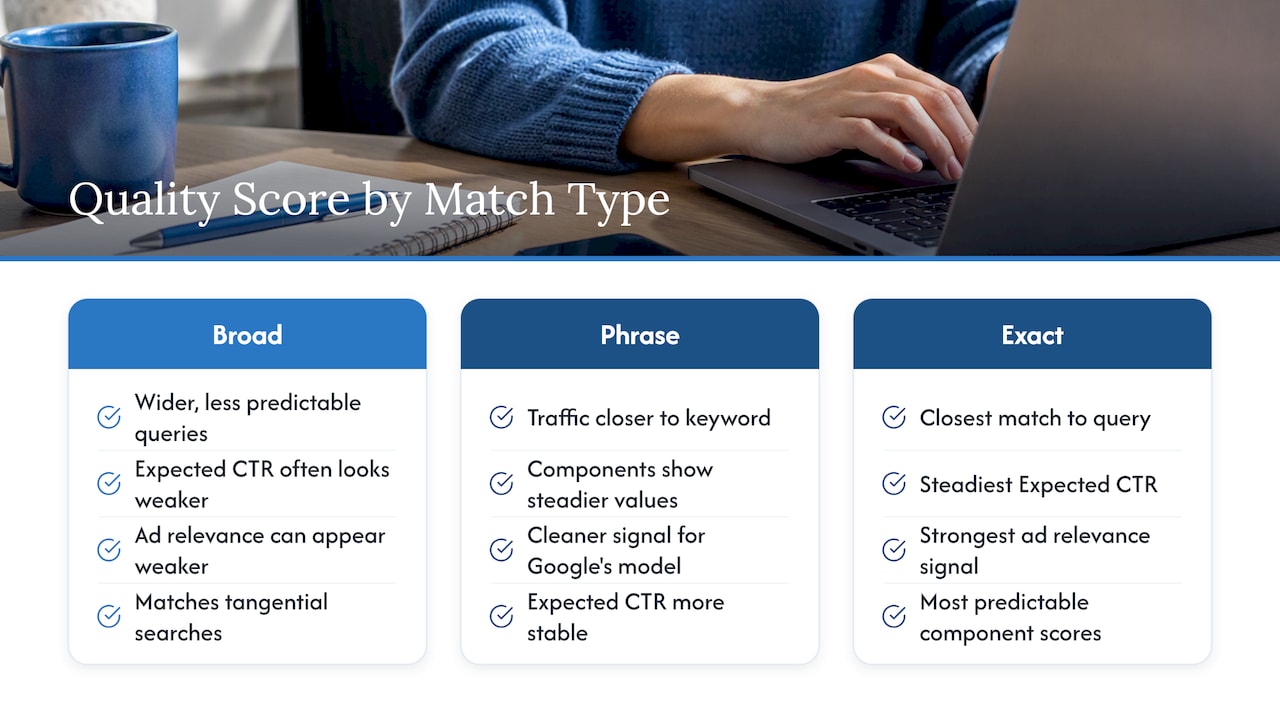
Quality Score comparison by match type and device

Device matters too. A landing page that scores well on desktop can show a weaker landing page experience status on mobile if load time lags or buttons are hard to tap, since Google factors mobile usability into that component separately. If your Scottsdale business gets a meaningful share of clicks from phones in a parking lot or a job site, a mobile-first layout is not optional, it is the main lever on that component.

When you review your keyword list, check whether low scores cluster on broad match terms or on mobile traffic before assuming your ad copy or landing page is the universal problem. Sometimes the fix is narrowing match type, not rewriting anything.

A straight take on chasing the number

Most advertisers waste hours trying to push a Quality Score from 6 to 8 instead of asking whether that keyword is actually converting at a cost they can live with. Fix the user experience and the score tends to follow on its own. If you want a second set of eyes on your account, reach out to a professional PPC service for a look at what’s actually happening.

How WebTechs.Net can help you fix what’s actually holding your ads back

Webtechs

Scottsdale business owners usually don’t lack the knowledge to improve Quality Score, they lack the time to run the copy tests, rebuild landing pages, and track the conversion data week over week. That’s the gap an agency closes. WebTechs offers Google AdWords & PPC Services built around the same diagnostic approach covered above: component-level review, ad copy testing, and landing pages built for message match from the start.

  • Our team sets up and manages campaigns with the component checklist already built into the process.
  • We build and test landing pages specifically for PPC traffic using the same playbook referenced earlier in this article.
  • Local market knowledge means we know what Scottsdale searchers respond to without guessing from scratch.

Check our PPC management services to see how we structure engagements for small and mid-sized businesses.

FAQ

Where can I see the Quality Score in Google Ads?

Open your campaign, click Keywords, then use Columns and Modify columns to add Quality Score and its three component columns under Attributes. Historical versions are available in the same menu if you want to track trends over time.

What is a good Quality Score considered to be in Google Ads?

There is no fixed number that counts as universally good, since Expected CTR and the other components are judged relative to other advertisers competing for the same keyword. Judge your actual performance by conversion rate and cost per conversion alongside the component statuses, not the single digit alone.

What is considered a good CTR for Google Ads?

No single CTR percentage applies across every industry or keyword, because expected click-through rate depends on search intent, competition, device, and brand recognition, according to Shopify’s CTR guidance. Compare your CTR against your own account history and conversion results rather than an outside benchmark.

How can I raise my Quality Score in Google Ads?

Focus on the three components directly: tighten ad copy to lift Expected CTR, narrow ad group themes so ads match search intent more closely, and fix landing page message match and load speed. Restructuring an account without changing the ad text or landing page itself typically will not move the score, as practitioner analysis notes.

Sources

Owner reviewing blurred GA4 conversion dashboard
Written by webtechs

Capture More Scottsdale Phone Leads with Google Analytics 4 Setup

Owner reviewing blurred GA4 conversion dashboard

Create a Google Analytics account and a GA4 property, add a web data stream, then install the Google tag through your CMS, Google Tag Manager, or a manual gtag.js snippet. Enable enhanced measurement and mark a few key conversions that matter, like a contact form or a phone click. Verify everything with Tag Assistant or GA4 DebugView before you call the job done, and expect real data within about 30 minutes of a clean install.


TL;DR:

  • Setting up GA4 with a single web data stream, enhanced measurement, and key conversions generally takes about 30 minutes to start delivering data.
  • Assigning user roles carefully is crucial, with only administrators able to manage user access, while outside vendors should be granted the minimal necessary permissions at the property level.
  • Extending data retention to 14 months improves analysis of long-term trends, and disabling Google Signals or adjusting cookie settings helps ensure compliance with privacy laws.
  • Building audience segments based on visitor behavior, source, or device enables effective remarketing, but audiences need time to populate before they can be used in campaigns or reports.
  • Implementing cross-domain tracking is essential only for businesses with multiple domains or embedded booking and payment systems, preventing misattribution of conversions.

Webtechs
Turn Analytics Into More Leads
WebTechs helps small businesses improve online visibility through tailored web design and advanced SEO strategies.

Explore WebTechs services

Table of Contents

How Do You Configure User Permissions in GA4?

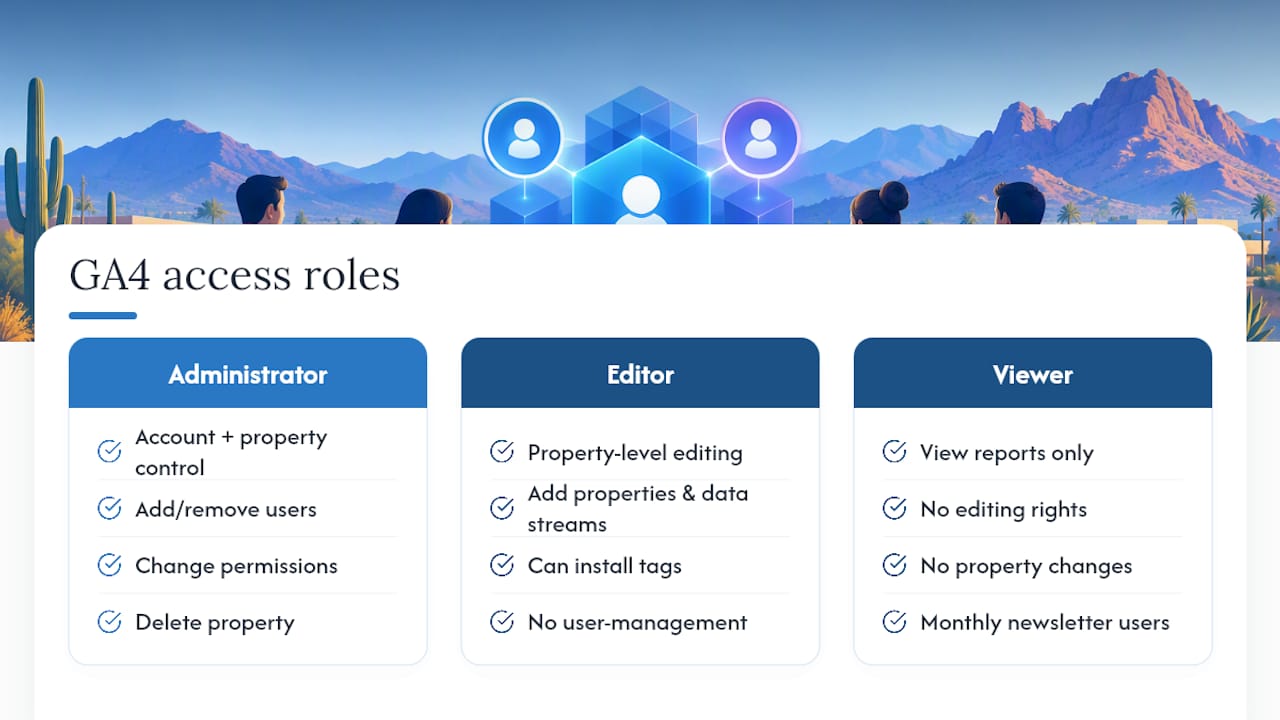
GA4 controls access through five roles: Administrator, Editor, Marketer, Analyst, and Viewer. Only Administrator can add or remove users, change permissions, or delete the property, so hand that role out sparingly, especially if you work with contractors or a rotating cast of freelancers.

For a typical Scottsdale small business, the setup looks like this: the owner or in-house marketer holds Administrator, a web developer or agency contact gets Editor to add properties and data streams, and anyone pulling reports for a monthly newsletter gets Viewer. You need Editor role to add new properties or data streams, so if your web contractor says they can’t install the tag, check their permission level first. That’s the most common access snag agencies run into.

Permissions live at the account level and the property level separately, and they don’t automatically inherit downward. A user with account-level Viewer access can still be denied access to a specific property if you set it up that way. If you’ve hired an outside firm to run your SEO or ads, grant them Editor at the property level rather than Administrator at the account level. That way they can build what they need without touching billing, other properties, or your Google Ads links. Review the user list every few months. Former employees and past vendors are the most overlooked security gap in small business analytics setups.

GA4 roles and account property access hierarchy

What Data Retention and Privacy Settings Should You Use?

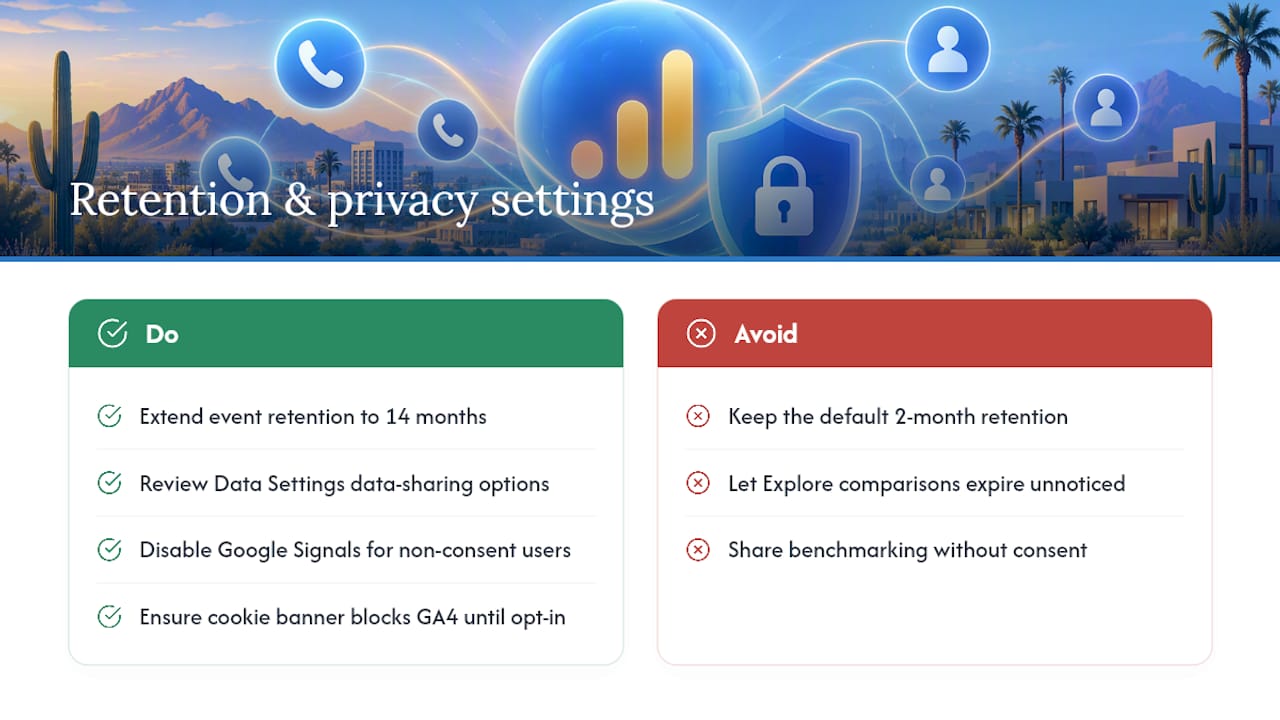
GA4’s default retention period for event-level data used in exploration reports is two months, but you can extend it to 14 months under Admin, Data Settings, Data Retention. Most small businesses should switch to 14 months immediately. Standard reports like the acquisition overview aren’t affected by this setting, but anything you build in Explore mode, comparing this quarter to the same quarter last year, for instance, disappears once data ages past the retention window you chose.

Privacy settings deserve equal attention, particularly with Arizona businesses serving customers across state lines. Under Data Settings, you can adjust Google’s data-sharing options with Google products and services, technical support, and benchmarking. Turn off benchmarking sharing if you’d rather your data not contribute to industry-wide comparisons; leave it on if you want that context for your own reports.

If you collect any personal information through forms, disable Google Signals granular location and device data collection for users who haven’t consented, and double-check your cookie consent banner actually blocks GA4 firing until a user opts in. This matters more every year as state-level privacy laws expand, and it’s far easier to build in correctly at setup than to retrofit later.

What Data Retention and Privacy Settings Should You Use? — overview diagram

How Do You Build Audiences and User Segments?

Audiences in GA4 group users by behavior, source, or device, and they feed directly into remarketing and reporting. Go to Admin, then Audiences, to build one from scratch or use a Google-suggested template like “Purchasers” or “Users who viewed a specific page.”

For a Scottsdale service business, useful audiences include people who visited your contact page but never submitted the form, past customers who might be due for a repeat service, and visitors from a specific ZIP code cluster if you serve a defined local area. Build an audience of everyone who clicked a phone number link but didn’t otherwise convert; that group tells you a lot about where your funnel leaks.

Audiences take a little time to populate after you create them since GA4 applies the definition going forward, not retroactively. Don’t expect a fully built segment the moment you save it. Once populated, push these audiences into Google Ads for remarketing, or use them inside GA4’s comparison tool to see how repeat visitors behave differently from first-timers. That comparison alone often reveals which pages actually earn a second look.

What Are Custom Dimensions and Metrics in GA4?

Custom dimensions and metrics let you track details GA4 doesn’t capture by default, things specific to how your business actually operates. A landscaping company might track “service area requested,” a dental practice might track “appointment type,” and a retailer might track “loyalty tier.”

You create these under Admin, Custom Definitions, after the underlying data is already flowing in through an event parameter. That order matters: GA4 can’t register a custom dimension for data it hasn’t seen yet, so the parameter needs to fire through your tag setup first, whether through Google Tag Manager’s data layer or a modified gtag.js event.

Keep the list short. GA4 caps standard properties at 50 custom dimensions and 50 custom metrics, but most small businesses need fewer than ten to answer their actual questions. Every dimension you add is one more thing to maintain if your site structure or form fields change down the line. Start with whatever single piece of information would most change how you spend your marketing budget, then build from there.

Do You Need Cross-Domain Tracking for Your Website?

Cross-domain tracking matters only if your business operations span more than one domain, a main site plus a separate booking platform, or a checkout hosted on a different domain than your storefront. Without it, GA4 sees a visitor bounce from siteone.com to booking-siteone.com as two different people, which wrecks your conversion attribution and inflates your bounce rate.

Configure it under Admin, Data Streams, selecting your web stream, then Configure Tag Settings, then Configure Your Domains. List every domain the same visitor might cross during a single session. If you’re using Google Tag Manager, this list needs to match across every domain’s container for the linking to work correctly.

Most Scottsdale small businesses running a single WordPress or Squarespace site with no separate booking or payment domain can skip this step entirely. If you use a third-party scheduling tool like Calendly embedded via iframe, or a payment processor that redirects off-domain for checkout, cross-domain tracking is worth the ten minutes it takes to set up. Skipping it when you need it is one of the quieter reasons GA4 conversion numbers look lower than actual bookings or sales.

What Are the Best Practices for GA4 Reporting?

Check Realtime and Reports snapshot weekly at minimum, not just when something breaks. GA4’s interface rewards regular small glances over occasional deep dives, since trends in traffic source or conversion rate show up faster than most owners expect.

Build one custom Exploration report tied to your top two or three conversion events rather than relying only on the default reports. The default reporting is fine for a general pulse check, but it wasn’t built around your specific business goals. A funnel exploration tracking visitors from homepage to contact form submission, broken down by traffic source, tells you far more about where your ad spend or SEO effort is actually paying off.

Compare against a previous period every time you review data, never look at numbers in isolation. A 20% jump in users means little without knowing whether that’s seasonal, tied to a specific campaign, or simply a fluke week. Set a recurring calendar reminder to review GA4 monthly alongside your Google Search Console and Google Ads accounts if you run paid campaigns, since linking GA4 to Ads and Search Console surfaces cost-per-conversion and keyword data the standalone GA4 interface won’t show you.

WebTechs.Net Perspective: What We Prioritize for Local SMBs

When an agency sets up GA4 for a client, phone calls and form submissions come first. Most local service businesses win or lose on the phone, not the checkout page, so we build call tracking into GA4 before we touch anything else. Local ad measurement matters just as much: a Google Ads campaign only proves its value once its conversions actually land inside GA4, not before. We treat tracking as one piece of a larger bundle, alongside hosting, site updates, and ongoing conversion rate work, because a tidy GA4 setup with no follow-through is just a dashboard nobody checks.

Get Your GA4 Setup Done Right the First Time

Some agencies offer a full service alternative to piecing together GA4 yourself from scattered YouTube videos and CMS plugin settings. Instead of guessing whether your tag fired correctly or your conversions are counting the right actions, they handle the install, the event configuration, and the ongoing checkups as part of a bundled service, alongside SEO, hosting, and site updates.

Webtechs

Business owners may benefit from working with a local team that understands what conversions matter for service businesses, retailers, and professional practices in their market, and can iterate on setups quickly when something changes. That includes phone-call tracking wired directly into GA4, so calls generated by your website or Google Ads campaigns actually show up as conversions instead of vanishing into a blind spot. If your current setup is missing data, miscounting conversions, or was never built with your business goals in mind, visit the Webtechs services page to get GA4 configured properly and start turning that data into decisions instead of dashboards nobody opens.

FAQ

How Long Does GA4 Setup Take?

Basic setup, account, property, data stream, and tag install usually can be completed quickly for a single-domain website. Full configuration with conversions, audiences, and custom dimensions can take a few hours spread across a week, and data typically starts appearing within about 30 minutes of a clean install.

Can I Install GA4 Without Google Tag Manager?

Yes. Many CMS platforms, including WordPress, Shopify, Wix, and Squarespace, let you paste your Measurement ID directly into a native analytics field, no GTM required. Manual gtag.js installation works too, but GTM makes future event changes easier without touching site code.

How Do I Know If GA4 Is Tracking Correctly?

Open GA4’s Realtime report and browse your own site in another tab. If your visit shows up within a minute or two, the tag is firing. For deeper verification, use Tag Assistant or GA4 DebugView to confirm specific events like form submissions or phone clicks are recording.

Does Webtechs Set Up GA4 for Scottsdale Businesses?

Yes, Webtechs configures GA4, including tag installation, conversion setup, and phone-call tracking, as part of its web design and SEO services for Scottsdale small businesses. Pricing depends on the scope of work, so current details are available through the Webtechs services page.

What Conversions Should a Small Business Track First?

Start with the two to five actions that most directly connect to revenue: contact form submissions, phone clicks, appointment bookings, or purchases. Prioritizing a short list keeps reporting focused on decisions you can actually act on instead of drowning in metrics that don’t move the business.

Customer browsing local website on smartphone
Written by webtechs

Stop Losing Calls in Scottsdale: Responsive Web Design That Converts

Customer browsing local website on smartphone

Yes, for most small and mid-sized Scottsdale businesses, a mobile-first responsive site is still the right default in 2026. It handles phones, tablets, and desktops from one codebase, and it remains the layout Google’s crawler expects. If your site isn’t passing that test today, the next step is a quick mobile audit or a discovery call with a local agency like Webtechs.


TL;DR:

  • Responsive web design remains essential for local SEO and user experience, as it ensures your site passes Google’s mobile crawler and avoids ranking penalties.
  • Building or auditing a responsive site should focus on mobile-first design, content-based breakpoints, optimized images, and thorough device testing to improve performance and usability.
  • Most small and mid-sized businesses benefit from responsive layouts over adaptive ones due to lower maintenance costs and cleaner URL structures, with exceptions for specific performance needs.
  • Budget for a responsive website varies by scope, with small brochure sites costing less and ecommerce features increasing expenses; planning should include ongoing maintenance and SEO.
  • Hiring a local, experienced agency like Webtechs guarantees better communication, full-service support, and a portfolio of proven projects tailored to Scottsdale SMBs.

Webtechs
Build a Website That Converts
WebTechs combines tailored web design and SEO strategies to help Scottsdale businesses improve online visibility and attract more website traffic.

Visit WebTechs

Table of Contents

What Is Responsive Web Design, Really?

Responsive web design means a website automatically adjusts its layout, images, and text to fit whatever screen it’s loaded on, whether that’s an iPhone at a coffee shop on Camelback Road or a 27 inch monitor in an office off Scottsdale Road. No separate mobile site, no separate app. One set of code that reshapes itself.

Three technical pieces make that happen, and understanding them helps you evaluate a developer’s proposal instead of just trusting their sales pitch.

  • Fluid grids. Modern layout tools like CSS Grid and Flexbox let sections resize and reflow based on available space rather than fixed pixel widths.
  • Flexible images. Techniques such as srcset and the <picture> element serve a smaller image file to a phone and a larger one to a desktop, so mobile visitors aren’t downloading a desktop-sized photo they’ll never fully see.
  • Media queries and the viewport meta tag. CSS media queries trigger layout changes at specific screen widths, and the viewport meta tag tells the browser to render the page at the device’s actual width instead of zooming out to a fake “desktop view.” MDN’s guide to responsive design walks through all three in detail.

Newer CSS features like container queries and subgrid are starting to show up in current builds too, letting individual components respond to their own container size rather than just the browser window. If a developer mentions these, it’s a decent signal they’re working with current tools rather than a five-year-old template.

Why Responsive Design Matters for Your Bottom Line

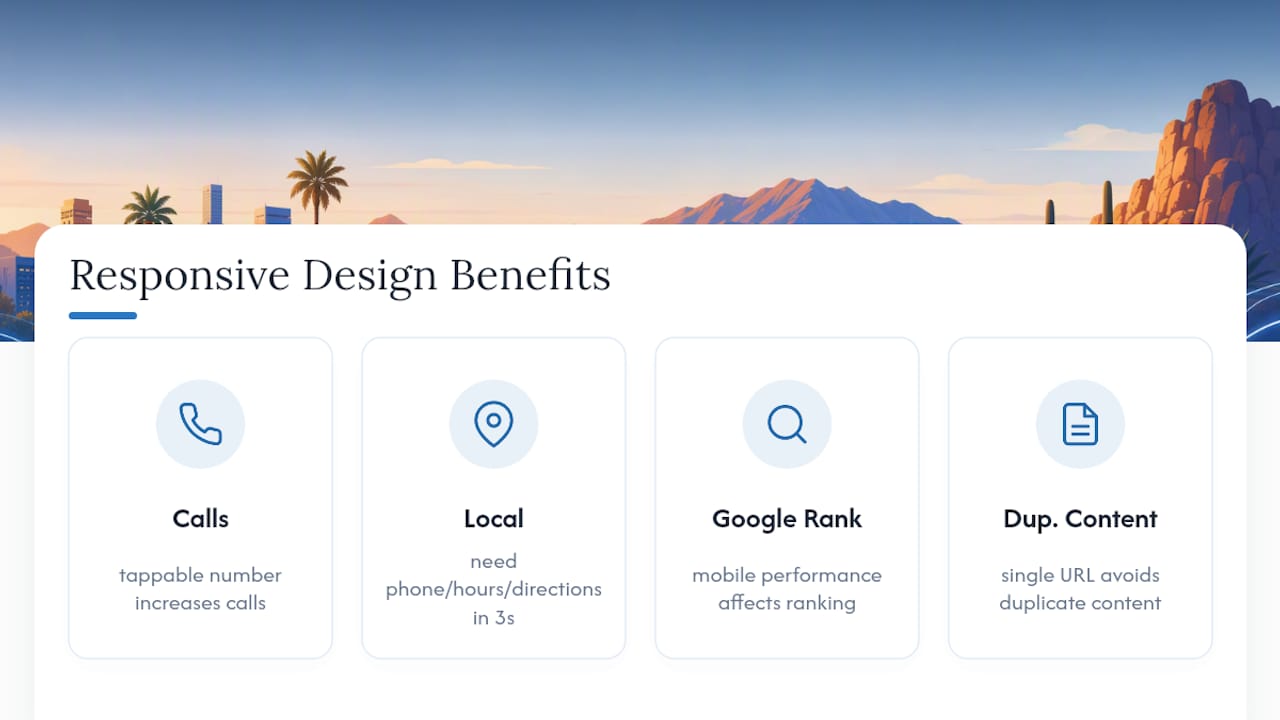
A responsive layout is a conversion tool disguised as a technical spec. When a visitor searching “plumber near me” on their phone lands on a site where the phone number is tappable and the contact form doesn’t require pinching and zooming, they’re far more likely to actually call. When the layout breaks and text runs off the screen, most people just leave and try the next result.

Local search behavior makes this sharper in Scottsdale specifically. Someone standing outside a restaurant on Old Town’s main strip is searching on a phone, not a laptop, and they want directions, hours, or a phone number in three seconds, not thirty.

There’s also a search visibility angle that a lot of business owners miss. Google indexes and ranks sites primarily by how they perform on mobile, which means a clunky mobile experience doesn’t just lose you the visitor in front of you. It can quietly suppress your ranking for every visitor after that. A single responsive URL also avoids the duplicate content headaches that separate “m.yoursite.com” mobile sites used to create, which is one reason those setups have mostly disappeared.

Why Responsive Design Matters for Your Bottom Line — overview diagram

How to Build or Audit a Responsive Site: A Step-by-Step Checklist

Whether you’re briefing a developer or reviewing what you already have, work through these steps in order.

  1. Start mobile-first. Design the phone layout before the desktop layout. It forces you to prioritize what actually matters on the page instead of cramming a desktop design into a smaller box.
  2. Set content-driven breakpoints. Rather than designing for specific device widths, resize your browser and add a media query exactly where the layout visually breaks. That approach ages better than chasing device presets, since new phone sizes come out every year.
  3. Optimize images and loading. Use srcset for responsive images, lazy load anything below the fold, and trim the amount of CSS and JavaScript the browser has to process before the page becomes usable.
  4. Build in accessibility from the start. Tap targets should be at least 44 pixels, text needs to stay readable without zooming, and every interactive element should be reachable without a mouse.
  5. Test across real devices, not just a resized browser window. Testing on actual phones and tablets catches touch and performance issues that browser emulators miss entirely, including things like a button that’s technically visible but sits half a centimeter too close to another one.
  6. Run a Lighthouse audit before launch. Check performance, accessibility, and SEO scores, and fix anything flagged as a mobile usability error.
  7. Confirm the SEO basics are in place. Verify the viewport meta tag is correctly set, confirm there’s one canonical URL per page, and make sure content is actually crawlable, not hidden behind JavaScript that search engines can’t render.

Pro Tip: When you brief a developer or agency, ask for specific performance targets in the contract, not just a finished design. A load time under three seconds on mobile and a Lighthouse performance score above 80 are reasonable numbers to hold a vendor to.

Responsive vs Adaptive Design: Which One Does Your Business Actually Need?

Responsive design uses fluid, flexible layouts that reshape continuously across screen sizes. Adaptive design uses a handful of fixed layouts, one for phone, one for tablet, one for desktop, that swap in based on detected screen width. CSS-Tricks breaks down the mechanics of both if you want the deeper technical version.

For most Scottsdale SMBs, responsive wins on practicality alone:

  • One codebase to maintain instead of several fixed templates.
  • Naturally SEO-friendly with a single URL structure.
  • Lower long-term maintenance costs since there’s nothing extra to keep in sync.

Adaptive or hybrid approaches earn their place in narrower situations: a performance-critical checkout flow that needs pixel-level control on specific devices, or a legacy site being modernized in stages where a full rebuild isn’t in the budget yet. UXPin’s 2026 comparison lands on responsive as the sensible default for most projects while acknowledging those exceptions. Unless you have a specific performance bottleneck a developer has already diagnosed, responsive is the safer bet.

What Should a Responsive Website Cost You?

Pricing depends heavily on scope, but a few patterns hold across most projects. A simple brochure site with five to ten pages typically costs less than a lead-generation site with forms, booking tools, and CRM integration. Small ecommerce builds run higher still, since product catalogs and payment processing add real development time. Webtechs’ website design pricing page breaks down ranges by project type.

Timelines usually run in phases: discovery and planning, design mockups, development, quality assurance, and launch. A straightforward brochure site might move through all five phases in four to six weeks. A lead-gen site with custom features often takes longer.

Budget beyond launch too:

  • Hosting and security maintenance
  • Ongoing content updates
  • SEO work to keep rankings from sliding

Why Local Experience Matters When You Hire for This

An agency experienced since 1997 has built through several complete redesign cycles of the web, not just the current one. That kind of tenure matters in a field where “best practice” from five years ago is sometimes actively bad practice today.

Relevant services for a responsive project include:

  • Custom website design built around mobile-first layouts
  • Complete website hosting, so performance and security aren’t an afterthought
  • Local SEO work that pairs naturally with a new responsive build

The agency’s portfolio shows completed projects for local businesses, which is worth reviewing before you commit to any vendor. This piece is written from Webtechs’ side of that work.

Progressive Enhancement vs. Graceful Degradation: Which Approach Fits Your Site?

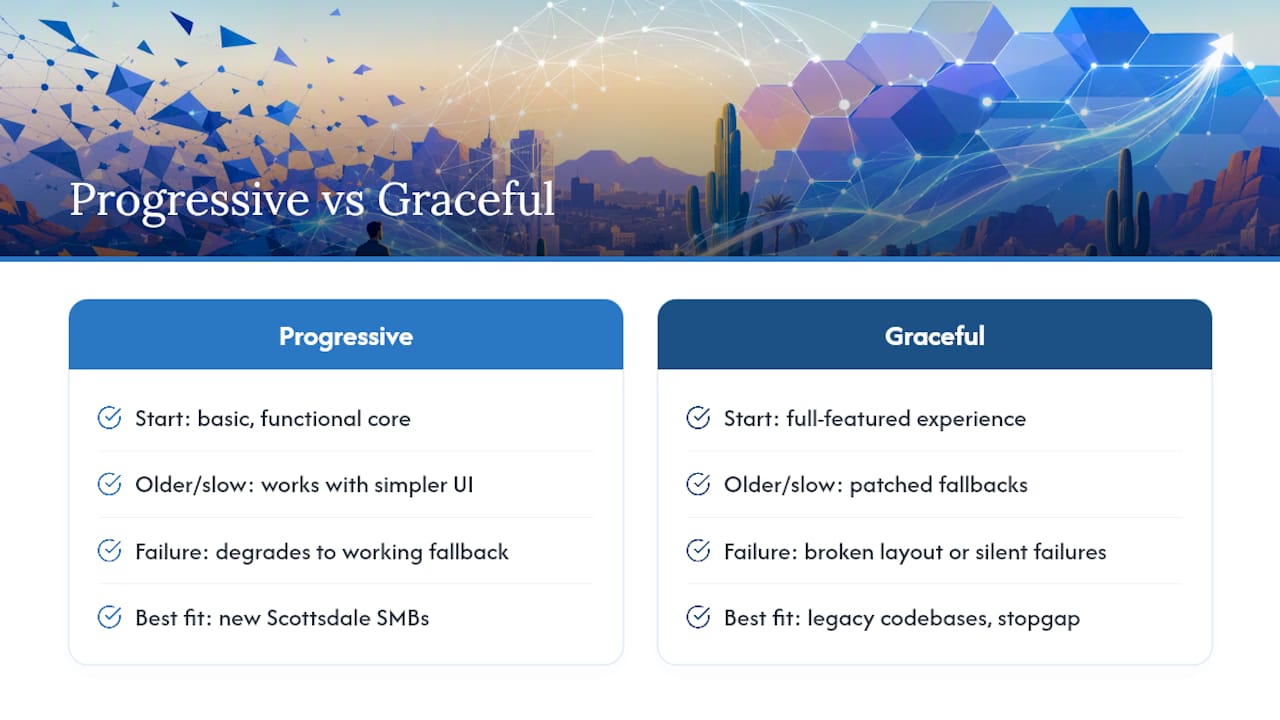
Progressive enhancement starts with a basic, functional experience that works everywhere, then layers on richer features for browsers and devices that support them. Graceful degradation starts at the opposite end: build the full-featured experience first, then add fallbacks so older or less capable browsers don’t break entirely.

Progressive enhancement versus graceful degradation comparison

The practical difference shows up the moment something fails. With progressive enhancement, a slow connection or an older phone still gets a working site, just a simpler one, maybe without a fancy image carousel. With graceful degradation, that same visitor might see a broken layout or a feature that silently fails, because the fallback was patched on after the fact instead of planned from the start.

For most Scottsdale SMB sites, progressive enhancement is the more reliable strategy. It matches naturally with a mobile-first approach: you build the core experience for a phone on a mediocre connection first, then add enhancements for larger screens and faster connections. That order tends to produce faster, more resilient sites than starting big and hoping the fallbacks hold up.

Graceful degradation still has a place, particularly for sites carrying legacy code that can’t be fully rebuilt at once. In that case, layering in fallbacks for specific known problem areas is a reasonable stopgap while a larger modernization happens in stages. It’s a patch, not a foundation, and most businesses starting fresh in 2026 don’t need one.

When Should You DIY and When Should You Call In Help?

Simple one-page sites or basic booking pages with a modern builder are reasonable DIY territory. Once you’re dealing with ecommerce, custom booking logic, multiple content editors, or a real performance target tied to revenue, hire an agency. When vetting proposals, ask for a live example on a phone, not just screenshots, and check for how they price the work before you sign anything.

Ready to Fix Your Mobile Experience?

Webtechs is the alternative to guessing your way through a DIY builder or gambling on a freelancer who disappears after launch. As a Scottsdale agency built specifically for small and mid-sized businesses, an agency handling custom website design, hosting, and local SEO under one roof can help ensure a responsive rebuild doesn’t turn into three separate vendor relationships that don’t communicate.

Webtechs

Reach out and you can expect a straightforward process: a look at your current site’s mobile performance, examples from the portfolio relevant to your industry, and a clear quote before any work starts. There’s no pressure sales, just a direct answer about what a responsive rebuild would take for your specific site.

If your current site is hard to use on a phone, that’s costing you calls and bookings right now. Visit the website design page to request a quote and get a specific answer for your business instead of a generic estimate.

Sources

FAQ

Is Responsive Web Design Still a Thing in 2026?

Yes. It remains the standard approach for most business websites because it uses one flexible codebase across phones, tablets, and desktops instead of separate builds. Google’s mobile-focused indexing also continues to favor sites that work well on phones, which reinforces responsive design as the default choice.

Is Web Design Still in Demand in 2026?

Web design demand has held steady, driven by businesses replacing outdated sites, adding ecommerce, and fixing mobile usability problems that hurt conversions. As long as customers keep searching for local businesses on their phones, there’s ongoing need for sites that actually work on those phones.

How Much Does It Cost to Have a Website Designed?

Cost depends on scope: a basic brochure site costs less than a lead-generation site with forms and integrations, and small ecommerce builds run higher due to catalog and payment setup. Webtechs’ pricing page lists specific ranges by project type rather than a single flat number.

What Are the Best Companies to Work for in Scottsdale?

For website design specifically, look for a local agency with a long operating history and a visible portfolio of Scottsdale clients, since that combination shows both staying power and relevant local experience. Webtechs has served small and mid-sized businesses in the area since 1997 and maintains a portfolio of completed local projects worth reviewing directly.

Hand tapping a business call link
Written by webtechs

Capture Calls in GA4 in a Day: Arizona SMB GTM to Vendor Roadmap

Hand tapping a business call link

Yes, GA4 can capture phone call activity, but not automatically. GA4 doesn’t recognize tel: link clicks out of the box, so you need to build the tracking yourself through Google Tag Manager, Google Ads forwarding numbers, or a third-party vendor. Which one you pick depends on whether you just want a volume count or full call metadata like duration and caller intent for real attribution.


TL;DR:

  • GA4 requires manual setup for phone call tracking, either through Google Tag Manager, Google Ads forwarding numbers, or third-party vendors, as it does not detect tel: clicks automatically.
  • For basic call click tracking, enabling click variables and creating a delegated listener trigger in GTM reliably captures tel: link clicks and sends them to GA4 with useful parameters.
  • To avoid overcounting accidental taps, adding a minimum duration filter or debounce logic is recommended before marking call events as conversions in GA4.
  • Using Google Ads forwarding numbers adds the ability to track call duration and thresholds, but is limited by country coverage and may require technical setup.
  • Third-party vendors like Invoca or CallRail improve attribution by providing unique numbers, call recordings, and detailed analytics, which can be integrated into GA4 via server-to-server events.

Webtechs
Turn More Calls Into Visibility
WebTechs helps small and mid-sized businesses improve online visibility through tailored web design and advanced SEO strategies.

Visit WebTechs

Table of Contents

GA4 Phone Call Tracking: What to Confirm Before You Build Anything

Before you touch a GTM container, get your accounts and access lined up. Skipping this step is the number one reason setups stall halfway through or produce broken data three weeks later.

Start by confirming what you’re actually trying to measure. A restaurant that just wants to know “did the ad drive a call” needs something very different from a home services company tracking lead value by job type. Here’s what to check first:

  • Confirm you have admin or edit access to your GA4 property and know your Measurement ID
  • Verify you have publish rights (or a container admin who does) in Google Tag Manager
  • Check whether your Google Ads account is already linked to GA4, since that link matters for the forwarding-number approach later
  • Decide upfront: do you need a simple click count, or call-level outcomes like recordings, dispositions, and lead quality scores?
  • Determine if your website uses dynamic number insertion or a page builder that injects phone numbers after the page loads, because that changes how your tracking trigger has to work
  • Confirm whether someone on your team (or your developer) can install a small JavaScript snippet, since Google Ads forwarding numbers require one

If you’re running paid search and want ad-level attribution, you’ll eventually want the Google Ads forwarding number setup alongside GTM, not instead of it. The two approaches solve different problems and often run in parallel.

This is the foundation almost every business should build first, regardless of budget or call volume. It costs nothing beyond setup time and gives you a working conversion signal within a day.

GA4’s Enhanced Measurement doesn’t include click-to-call tracking, which is why manual GTM configuration is required for any tel: link on your site, according to Nimbata’s GA4 call tracking documentation. Here’s the sequence that works reliably:

  1. Turn on Click variables. In your GTM workspace, go to Variables, click Configure, and enable Click URL, Click Text, and Click Element under the Clicks section.
  2. Build the trigger. Create a new trigger of type “Just Links” or “All Elements,” firing on Click, with the condition Click URL “starts with” tel:. If your phone numbers are injected after page load by a booking widget or dynamic number insertion script, use a delegated document-level listener instead. A delegated click listener that checks a[href^='tel:'] at click time catches numbers that don’t exist in the DOM when the page first renders, which a standard trigger will miss entirely.
  3. Create the GA4 event tag. Add a GA4 Event tag, name the event something consistent like phone_click or phone_call, and point it at your GA4 configuration tag or Measurement ID.
  4. Attach event parameters. Pass page_location, page_title, click_url (the phone number itself), and link_text so you can later tell which page and which button triggered the call.
  5. Publish and test. Push the container live, then open GTM Preview mode and click a phone number on your site to confirm the trigger fires and the event lands in GA4.

Here’s a simplified version of the logic GTM applies under the hood when using a delegated listener:

document.addEventListener('click', function(e) {
  var link = e.target.closest("a[href^='tel:']");
  if (link) {
    dataLayer.push({
      'event': 'phone_click',
      'click_url': link.getAttribute('href'),
      'link_text': link.textContent
    });
  }
});

Practical guides on GA4 call tracking from Ruler Analytics recommend testing this exact pattern with GTM’s built-in preview tool before publishing, since a mistyped trigger condition is the most common failure point.

One thing nobody mentions enough: raw click events overcount. Someone tapping a phone number by accident on a crowded mobile menu still fires your event. A few fixes help:

  • Add a minimum time-on-page condition before the trigger is allowed to fire, filtering out reflex clicks from users who just landed
  • Consider debounce logic so a double-tap doesn’t register as two separate calls
  • Separate your “Call Now” button from decorative phone numbers in your footer, since footer clicks tend to be lower intent

Pro Tip: Don’t mark raw phone_click events as conversions the day you launch them. Watch a week of data first. If your click-to-call volume looks suspiciously high relative to your traffic, you’re probably picking up accidental taps, and you’ll want a duration filter before that number reaches your CPA reports.

How Do You Set Up Google Ads Website Call Conversions?

Click tracking tells you someone tapped a number. It does not tell you whether that call turned into ten seconds of dead air or a five-minute booking conversation, and that gap is exactly what Google Ads website call conversions are built to close.

The setup relies on Google forwarding numbers, a JavaScript snippet, and a call-length threshold you define. Here’s the process:

  • In Google Ads, go to Goals, then Conversions, and create a new conversion action of type “Calls to a phone number on your website.”
  • Set a minimum call-length threshold, typically 60 seconds, so a call that connects and immediately disconnects doesn’t count as a lead.
  • Download the phone snippet Google Ads generates and install it on any page displaying your phone number.
  • Configure phone_conversion_number to specify the number to display, phone_conversion_callback if you need JavaScript to fire when the number is swapped in, and phone_conversion_css_class if you’re targeting specific elements on the page.
  • Alternatively, use GTM to inject the snippet or fire the Google Ads conversion tag, which keeps all your tracking logic in one place instead of scattered across page templates.

The way this works, according to Google’s own support documentation, is that Google dynamically swaps your displayed number for a unique forwarding number tied to that visitor’s session, then forwards the call to your real line while logging the connection. Google counts the call as a conversion once it clears your duration threshold.

A few limitations catch people off guard. Forwarding numbers are only available in certain eligible countries, so confirm coverage if you serve international customers. The duration threshold is a proxy for lead quality, not a guarantee: a 90-second call about business hours counts the same as a 90-second call that becomes a $5,000 job. And international phone number formatting inconsistencies can break the snippet if your site pulls numbers from a CMS field that doesn’t enforce a consistent format.

When Should You Add a Third-Party Call-Tracking Vendor?

GTM and Google Ads forwarding numbers get you volume and basic ad attribution. Neither tells you who called, how long the conversation actually ran, or whether the call turned into revenue. That’s the gap third-party call-tracking platforms exist to fill.

Vendors like Invoca, CallRail, and Nimbata assign unique tracking numbers to different channels or campaigns, then record and analyze the resulting calls. The data they typically pass includes:

  • A unique call_id for every recorded call
  • tracking_number and source attribution, so you know exactly which campaign or page drove the call
  • A first_time_caller flag to separate new leads from repeat customers
  • Call duration, in seconds, tied to the actual conversation, not a proxy threshold
  • Disposition data (booked, spam, wrong number) and, in some platforms, conversation analytics that flag keywords or sentiment

To get this into GA4, you generally create a Measurement Protocol API secret inside your GA4 data stream settings, then configure the vendor to POST structured phone_call events server to server. This is a real integration step, not a checkbox: your vendor’s support team usually has a specific field mapping guide, similar to the Measurement Protocol integration pattern documented by Call Tracker, and it’s worth having a developer confirm the payload lands correctly before you trust the reports.

The payoff is real attribution. You can tie a specific call to the campaign, keyword, and landing page that generated it, then follow that thread through to whether the call became a paying customer. Nimbata’s own guidance on GA4 call tracking frames click tracking as a useful baseline metric, but notes that click volume alone tends to overstate conversions since accidental taps get counted the same as genuine leads. That’s the core argument for upgrading once your call volume or ad spend justifies the cost.

How Do You Test and Debug GA4 Call Tracking?

Before you trust a single number in your reports, confirm the plumbing actually works. This takes ten minutes and saves you from making budget decisions on broken data.

  1. Open GTM Preview mode and click your phone number link on the live site. Confirm the trigger fires and check that all your variables (click URL, page location, link text) show the values you expect.
  2. Switch to GA4 Realtime or DebugView and watch for your event name to appear, typically within about 30 seconds of the click, according to device emulation testing guidance from Napkyn.
  3. Use your browser’s dev tools to switch into mobile device emulation mode, then click the tel: link. This triggers the event without placing an actual phone call, which matters if you’re testing repeatedly and don’t want to tie up your sales line.
  4. If nothing fires, check the timing: numbers injected by a dynamic number insertion script after page load won’t be caught by a static trigger, only by a delegated listener.

Common failure points worth checking first: phone numbers formatted inconsistently (tel:+1-480-555-0100 versus tel:4805550100) can break trigger conditions that rely on exact matches. Tag firing order matters too. If your GA4 configuration tag fires after your event tag, the event has nowhere to attach. And callback timeouts on the Google Ads snippet can silently drop conversions if your page loads slowly on mobile.

Pro Tip: Test on an actual mobile device, not just desktop emulation, before you launch. Real phones handle tel: link behavior differently across browsers, and a trigger that works perfectly in Chrome DevTools sometimes misfires in Safari on iOS.

How Do You Mark Calls as Conversions and Report on Them?

Once your events are firing cleanly, the last step is telling GA4 which ones actually matter for your business goals, then building a view that shows you cost per acquisition by channel.

Head to Configure, then Events, find your phone_click or phone_call event, and toggle it on as a conversion. GA4 marks conversions this way rather than through a separate conversion-tracking system, as Ruler Analytics documents in its GA4 setup walkthrough.

Before you flip that toggle, decide what counts. A few things worth capturing as parameters on the event:

  • tracking_number or phone_number, so you can segment by which line was called
  • call_id, if you’re pulling data from a vendor, so calls can be joined back to CRM records
  • duration, either the real conversation length from a vendor or the Google Ads threshold proxy
  • gclid and UTM parameters, so campaign-level attribution survives into your reports
  • page_location, to identify which landing page drove the call

Document whatever call-length threshold you settle on, whether that’s the 60 second default in Google Ads or something you’ve customized, because that number directly shapes what “quality” means in your CPA calculations. A tighter threshold produces fewer, more reliable conversions; a looser one inflates volume but dilutes signal.

From there, build a GA4 Exploration showing calls broken out by source and medium, campaign, and landing page. That view is what actually lets you compare cost per call across channels and decide where to shift budget.

What Does WebTechs Check Before Building Call Tracking for Arizona Businesses?

Before touching a GTM container for a client, Webtechs verifies three things: whether the Google Ads account is properly linked to GA4, whether the GTM container has the access and permissions needed to publish, and whether the site’s page builder or CMS injects phone numbers dynamically, which determines whether a standard trigger or a delegated listener is required.

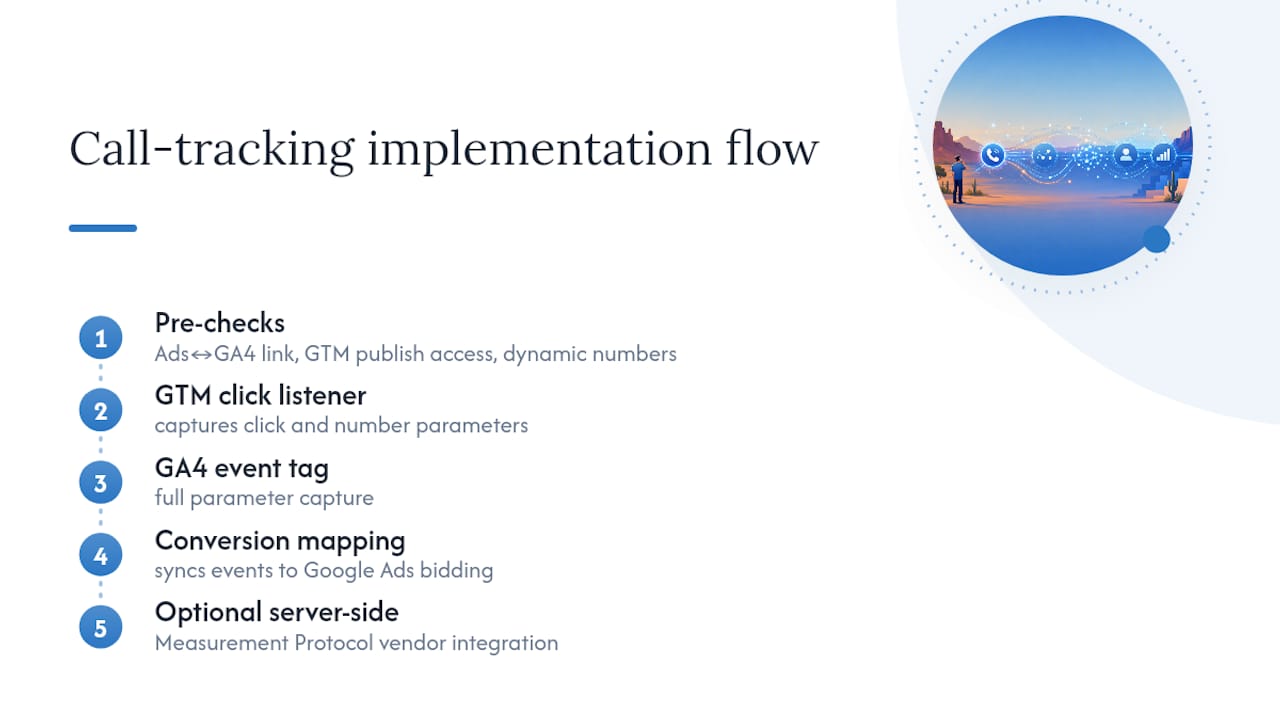
A typical setup includes a GTM container with the appropriate click listener, a GA4 event tag with full parameter capture, and conversion mapping that syncs back into Google Ads for bidding. For businesses handling higher call volume, that scope sometimes expands to a server-side vendor integration using Measurement Protocol.

Call tracking implementation flow diagram

Most Scottsdale service businesses (plumbers, dentists, contractors) don’t need conversation analytics on day one. They need reliable click tracking and accurate CPA numbers first. The upgrade to a paid vendor makes sense once call volume is high enough, or revenue per call is large enough, that the cost of missing attribution outweighs the vendor’s monthly fee.

Which Call-Tracking Approach Should You Actually Start With?

Most marketing teams overthink the sequencing here, and it costs them weeks. Start with GTM click events. It’s free, it takes an afternoon to build correctly, and it gives you directional data on call intent almost immediately.

Layer in Google Ads forwarding numbers next, once you’re running paid search and need to know which keywords and ads actually generate calls, not just clicks. Hold off on a paid vendor until your call volume or average deal size makes conversation analytics and CRM-level attribution worth the monthly cost. For a lot of local service businesses, that threshold never actually arrives, and GTM plus forwarding numbers covers the job permanently.

The one warning worth repeating: watch your click-to-call event volume in the first two weeks. If it looks too good, it probably is. Accidental taps inflate raw click counts before you’ve added any duration filtering, and teams that mark that raw event as a conversion on day one end up making budget decisions on inflated numbers.

— Brett

Get GA4 Call Tracking Set Up Right the First Time

Webtechs is the alternative to guessing your way through GTM triggers and Measurement Protocol payloads. With over 25 years working with Scottsdale and Arizona small businesses, Webtechs builds the GTM container, the GA4 event tag, and the Google Ads conversion mapping as one connected system instead of three disconnected pieces that quietly break six months later.

Webtechs

A proper audit checks your account links, your GTM container’s readiness, and whether your site injects phone numbers dynamically before a single trigger gets built. That matters more than it sounds. A misconfigured trigger looks fine in testing and then silently misses half your real calls once traffic scales. For businesses running paid search through Local Services Ads or standard search campaigns, getting the call data right is what makes your cost-per-acquisition numbers trustworthy enough to actually act on.

If you want your call tracking built once and built correctly, request a call-tracking audit from Webtechs and get a straight answer on what your setup needs.

Where to Learn More About GA4 Call Tracking

For the official rules on forwarding numbers and conversion thresholds, see Google’s website call conversions guide. For vendor-side Measurement Protocol field mapping, check your call-tracking provider’s integration docs directly.

Sources

FAQ

How Do I Check If Phone Call Tracking Is Working?

Open GTM Preview mode, click your tel: link, and confirm the trigger fires with the correct variable values. Then check GA4 Realtime or DebugView for your event name to appear, which usually happens within about 30 seconds of the click.

How Much Does Call Tracking Cost?

Basic GTM-based click tracking costs nothing beyond setup time, since it uses tools you already have through GA4 and Google Tag Manager. Third-party vendors that provide call recordings, dispositions, and Measurement Protocol integration charge ongoing platform fees, and Webtechs can quote setup costs based on your specific tracking needs during an audit.

Can I Track Phone Call Conversions in Google Ads?

Yes. Google Ads supports a “Calls to a phone number on your website” conversion action using forwarding numbers and a phone snippet, with a configurable minimum call-length threshold to filter out low-quality calls. You can also import a GA4 phone-click event as a conversion if you’d rather manage tracking through GTM.

How Do I See Where Call Traffic Is Coming From in Google Analytics?

Capture gclid and UTM parameters as event parameters on your phone-click or phone-call event, then build a GA4 Exploration segmented by source and medium, campaign, and landing page. This shows you exactly which channels and pages are driving calls, not just website visits.

Does GA4 Track Phone Calls Automatically?

No. GA4’s Enhanced Measurement does not include tel: link tracking by default, according to Nimbata’s GA4 documentation, so you need to configure a GTM trigger and event tag, add Google Ads forwarding numbers, or integrate a vendor to capture call activity.

Developer reviewing local business schema code
Written by webtechs

One Homepage Change to Fix Scottsdale Local Business Schema

Developer reviewing local business schema code

LocalBusiness schema is a JSON-LD code block that translates your name, address, phone number, and hours into a format search engines can read directly. The single highest-impact move for any Scottsdale business is adding a validated LocalBusiness JSON-LD block to your homepage that matches your Google Business Profile field for field. Get that one thing right before touching anything else.


TL;DR:

  • Adding a validated LocalBusiness JSON-LD block that matches your Google Business Profile is the most impactful step to improve local search visibility in 2026.
  • Key properties include the business subtype, name, address with five decimal geo coordinates, and telephone; omitting any of these disqualifies you from rich results.
  • Ensure schema matches your Google profile exactly and validate it using both Google’s Rich Results Test and the Schema.org validator to avoid common errors like NAP mismatches or syntax issues.
  • Schema reinforces your Google Business Profile and citations but does not replace them; consistency across all local signals is essential for rapid results.
  • For multiple locations, each address needs its own schema block, and updates should be made immediately following any change to hours, address, or contact details.

Webtechs
Strengthen Your Local Search Presence
WebTechs helps Scottsdale businesses improve online visibility through tailored web design and advanced SEO strategies.

Explore WebTechs

Table of Contents

What Is Local Business Schema and Why Does It Matter?

LocalBusiness schema is a specific vocabulary within Schema, built to describe brick-and-mortar and service-area companies in code that machines parse instantly instead of guessing at from paragraph text. It comes with subtypes for almost every trade: Restaurant, Dentist, Plumber, ProfessionalService, and dozens more. Picking the closest match to your actual business, rather than defaulting to the generic LocalBusiness type, sharpens the signal you send.

This matters more in 2026 than it did five years ago because schema markup for GMB style data now feeds AI-generated summaries and knowledge panels, not just the classic blue links. Search engines pull from structured data to build those quick-answer boxes, and an unmarked page simply doesn’t get invited to that party.

For Scottsdale business owners, three things ride on this:

  • Entity clarity. Search engines need to confirm you’re a real, locatable business, not a directory listing or a scraped mention.
  • Map-pack relevance. Accurate geo and address data help tie your website to your Google Business Profile location.
  • Citation consistency. Schema gives every other local citation something authoritative to match against.

Four properties are non-negotiable. Skip any of these and your local business structured data won’t qualify for rich results at all, according to Google’s developer documentation.

Required:

  1. @type (the specific subtype, like Plumber or ProfessionalService)
  2. name
  3. address (a nested PostalAddress with street, city, state, postal code, and country)
  4. telephone

Strongly recommended, and this is where most sites leave value on the table: url, at least one image, geo coordinates, openingHoursSpecification, and priceRange. Google explicitly flags telephone, geo, url, image, and openingHoursSpecification as properties that improve eligibility for richer displays.

Pro Tip: List your geo coordinates with at least five decimal places. Google’s own guidance notes that rounded coordinates (two or three decimals) can shift your pin by dozens of yards, which is enough to confuse a map-pack algorithm trying to match you to a physical location.

Illustration of precise business map coordinates

Two more properties are worth adding if you have the material: sameAs (links to your verified social profiles and directory listings) and aggregateRating or review, but only if the reviews are genuinely yours and up to date. Fabricated or stale review markup is one of the fastest ways to get flagged.

How Do You Implement Local Business Schema Step by Step?

Building the block is straightforward once you have your facts lined up. Here’s the order that actually works:

  1. Gather your authoritative facts first. Pull your exact business name, address, phone number, and hours straight from your Google Business Profile. Don’t retype from memory. Add your homepage URL, at least one high-quality image, and your geo coordinates.
  2. Choose the right subtype and generate the JSON-LD. Use a validated template or a generator built for local business schema examples across more than 100 subtypes, and pick the one that fits your trade rather than settling for generic LocalBusiness.
  3. Place the block correctly. The full JSON-LD block belongs in the <head> of your homepage. Inner pages, like service or about pages, only need a lightweight identity snippet with name, url, and telephone, according to structured data implementation guides. A full block on every page creates duplication risk.
  4. Decide plugin versus manual insertion. On WordPress, an SEO plugin with a schema module (many of the popular ones include one) handles the technical formatting for you but can conflict with other plugins generating overlapping schema. Manual insertion through your theme’s header file or a custom code snippet gives you more control but requires someone comfortable editing template files.
  5. Handle multiple locations correctly. Every physical address gets its own URL and its own schema block. Never bundle two addresses into one LocalBusiness entry. Bundling confuses search engines about which hours, phone number, and reviews belong to which storefront.
  6. Maintain it. Update the schema the same day your hours, address, or phone number changes, and keep a version-controlled copy of your snippets so a theme update doesn’t silently wipe them out.

For businesses juggling more than one Scottsdale location, this 30-day local SEO checklist walks through sequencing the rest of your local signals alongside schema.

How Do You Validate Local Business Schema and Avoid Common Errors?

Two tools do different jobs, and you need both. Google’s Rich Results Test tells you whether your markup qualifies for enhanced search features. The Schema.org validator and standalone JSON-LD linters check pure structural correctness, catching broken syntax the Rich Results Test might not flag as an eligibility issue.

Run both before you consider the job finished. The mistakes that show up most often:

  • NAP mismatch. Your schema says “123 Main St.” and your Google Business Profile says “123 Main Street.” That inconsistency erodes the trust search engines place in both listings.
  • Broken JSON syntax. A missing comma or unclosed bracket can invalidate the entire block silently.
  • Vague geo coordinates. Two decimal places instead of five.
  • Stale hours. Holiday closures or new hours that never made it into the code.
  • Wrong subtype fields. Using generic LocalBusiness properties when your chosen subtype supports more specific ones.

The fix sequence is simple: match your Google Business Profile exactly, correct the JSON, re-run both validators, and request re-indexing if the page was already crawled with the broken version.

Where Does Schema Fit With Your Google Business Profile and Citations?

Schema doesn’t replace your Google Business Profile. It reinforces it. Search engines cross-check your homepage markup against your GBP listing, and experts note that agreement between the two raises entity confidence across the board.

The order of operations that gets Scottsdale businesses results fastest:

  1. Lock down GBP accuracy first. Nothing else matters if this is wrong.
  2. Add homepage schema that mirrors GBP exactly.
  3. Build out location pages with their own schema blocks.
  4. Keep citations consistent everywhere and keep collecting genuine reviews.

Pro Tip: If you’ve fixed your schema twice in the last year because it kept drifting out of sync with GBP, that’s usually a sign your update process needs a single owner, not another patch.

Bring in outside help once you’re managing more than a couple of locations, once validation keeps failing for reasons you can’t pin down, or once you simply don’t have the hours to babysit it. The local link building guide covers how citations and schema work together once the technical foundation is solid.

What Webtechs Has Learned Fixing Schema for Scottsdale Businesses

Since 1997, Webtechs has watched the same pattern repeat: businesses add schema once, then forget it exists. Hire help once you’re past one location, once mismatches keep resurfacing, or once you’d rather spend the hour on customers. Done right, expect map-pack and rich-result improvements to show up over weeks, not overnight.

Where to Verify Local Business Schema Details

Check your work against Google’s structured data documentation and the schema.org LocalBusiness reference for the full property list. Use the Rich Results Test and a JSON-LD linter to confirm your block passes both eligibility and syntax checks.

Sources

FAQ

What Is a Local Business Schema?

It’s a JSON-LD structured data block that tells search engines your business name, address, phone number, hours, and other facts in a machine-readable format rather than plain text.

Can You Give an Example of a Local Business Schema?

A basic example includes @type: "Plumber", name, a nested address with street and city, telephone, geo coordinates, and openingHoursSpecification, all wrapped in a single JSON-LD script tag placed in the homepage’s header.

Arizona’s local business landscape spans restaurants, dental and medical practices, home service trades like plumbing and HVAC, real estate agencies, and professional service firms, many of which qualify for a specific LocalBusiness subtype rather than the generic type.

What Is the Main Industry in Scottsdale, Arizona?

Scottsdale’s economy centers heavily on tourism, hospitality, and resort services, alongside a strong base of professional services, healthcare, and technology companies that support the local economy.

Do I Need a Developer to Add Local Business Schema?

Not always. WordPress sites can often add schema through an SEO plugin’s schema module, but manual theme insertion or multi-location setups usually benefit from someone comfortable editing code directly, which is where services like Scottsdale SEO come in.

Designer organizing website navigation hierarchy
Written by webtechs

Three Click Rule: Website Navigation Design Playbook for Designers

Designer organizing website navigation hierarchy

Good website navigation design answers two questions instantly: “Where am I?” and “Where can I go?” If a visitor has to think about either one, the menu has already failed. The fastest fix for most sites isn’t a redesign. It’s auditing the information architecture and making sure the paths to your primary conversions are visible, not buried three clicks deep.


TL;DR:

  • Primary navigation should be limited to four to six clear categories, with a shallow hierarchy to prevent user disorientation.
  • Navigation patterns must suit screen size and content type, with mobile users favoring bottom tabs and desktop users benefiting from top bars or mega menus.
  • Testing navigation with real users through card sorting, tree testing, and accessibility checks helps identify and fix structural issues early.
  • Accessibility features like focus states, skip links, and click-activated submenus are essential to meet WCAG 2.1 standards and ensure everyone can navigate effectively.
  • Structuring information architecture correctly before designing menus leads to better usability and conversion, avoiding the temptation to fix issues with visual polish alone.

Webtechs
webtechs.net
Build Navigation That Supports Growth
WebTechs creates tailored websites and SEO strategies that help small businesses improve online visibility and guide visitors toward action.

Explore WebTechs

Table of Contents

Core Principles Every Navigation Menu Should Follow

Navigation is not a design layer you add after the site is built. It’s a direct reflection of your information architecture, and if the IA is a mess, no amount of clever menu styling will fix it. Get the structure right first, then design the interface for it.

Core Principles Every Navigation Menu Should Follow — overview diagram

A few numbers guide that structure. Aim for a small number of primary categories in your top-level menu, and keep the hierarchy fairly shallow to maintain user orientation. Beyond that, users lose track of where they are, and WCAG 2.1’s location guidance exists precisely because deep, disorienting structures are a documented accessibility failure.

Group items the way users think, not the way your org chart is arranged. A visitor searching for “return policy” doesn’t care if it lives under “Customer Service” internally. It needs to live where they’d look for it.

  • Base categories on user tasks and search behavior, not internal department names
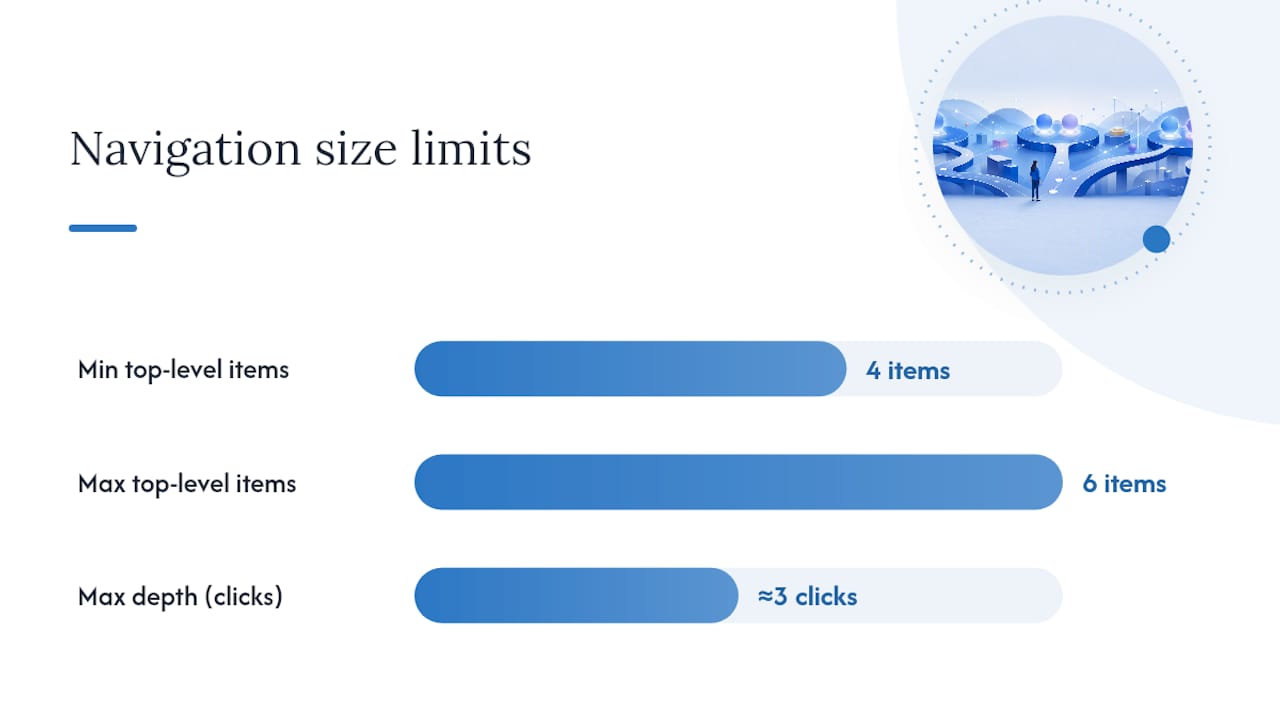
  • Cap top-level items at 4 to 6; if you need more, you likely have an IA problem, not a navigation problem
  • Limit depth to about three clicks from homepage to any page
  • Build in a search bar and hub pages as secondary discovery paths, especially for large catalogs

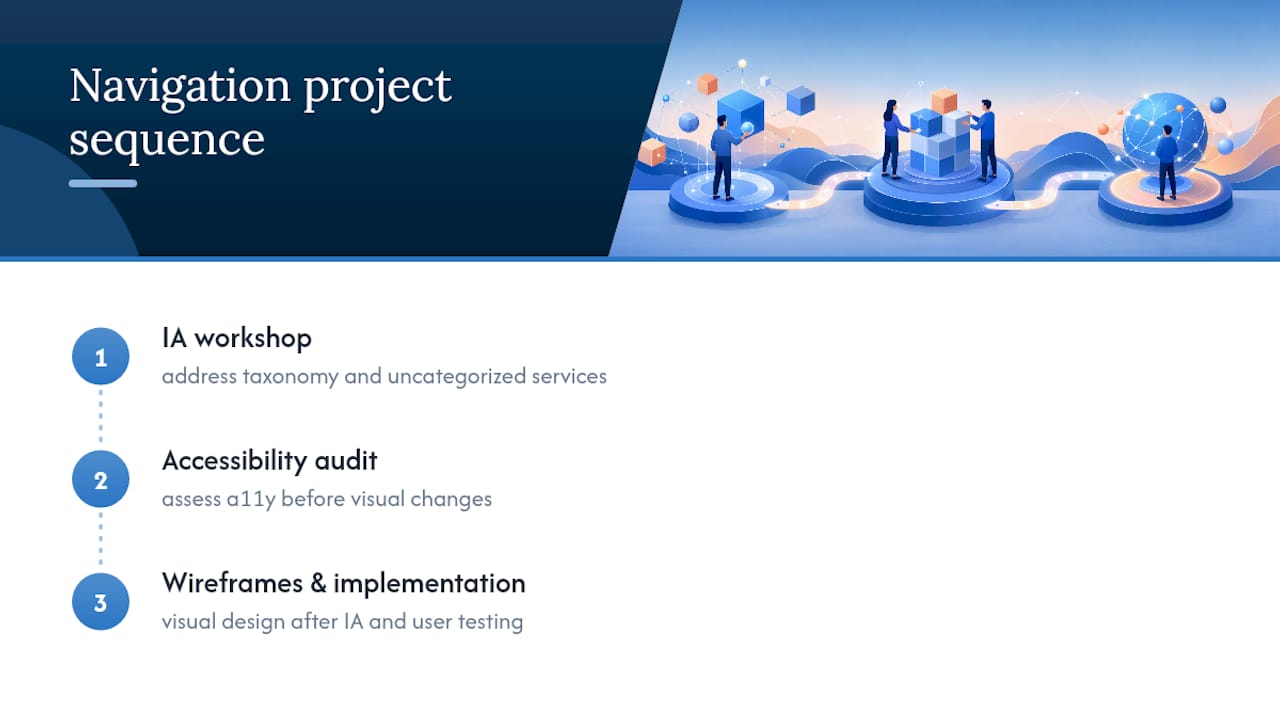
Pro Tip: Before you touch a wireframe, write your top-level labels on index cards and sort them the way a first-time visitor would. If you can’t group them cleanly into 4 to 6 buckets, your IA needs work before your nav does.

Choosing Navigation Patterns for Desktop, Mobile, and Large Sites

The right pattern depends on screen size, content volume, and how often users need to jump across sections. Here’s how to choose:

  1. Top navigation bar. Works well for most desktop sites with a moderate number of primary sections. Keep it persistent so users always know where they can go.
  2. Mega menu. Use this for large catalogs or content-heavy sites where a single dropdown needs to expose subcategories at a glance, e-commerce is the classic case.
  3. Sidebar navigation. Fits app-like interfaces and dashboards where users move between related tools or sections repeatedly, not one-off page visits.
  4. Bottom tab bar (mobile). Reserve this for your core most-used destinations, since it sits in the thumb zone and stays visible without extra taps.
  5. Hamburger menu (mobile). Use only for overflow items, not primary navigation. Nielsen Norman Group’s research shows hidden menus consistently hurt discoverability and task completion compared to visible options.

Hybrid patterns work well at scale. Sites like Amazon combine a persistent top bar with a mega menu and a search-first mobile layout, because no single pattern handles both breadth and depth alone. Whatever you choose, respect touch target sizing on mobile (44px minimum is the common baseline) and never hide a primary conversion path behind a hamburger just to save vertical space.

Turning Information Architecture Into a Navigation Users Can Actually Find

Good IA on paper doesn’t guarantee a usable menu. You have to test it with real people before you ship it. The sequence that works:

  • Card sort first. Let users group your content their way, before you impose a structure.
  • Tree test second. Give them a task (“find the return policy”) and watch where they click in a stripped-down version of your proposed IA.
  • Review analytics third. Page views and existing search-query data tell you which links deserve top billing and which ones can move down a level.
  • Label test last. Run quick, task-based checks: show a label alone and ask what a user expects to find behind it.

Navigation problems are almost always IA problems wearing a different hat, which is why card sorting and tree testing early saves you from bolting on navigation “fixes” later that never really solve the root issue.

Prioritize top-level links by combining page-view data with stated user goals, not just internal priorities. And when a section has too much to fit in a flat menu, build a hub page instead of stacking another submenu level. Hub pages and progressive disclosure keep large sites navigable without forcing users through four nested dropdowns.

Pro Tip: If a label needs a tooltip to explain what it means, it’s the wrong label. Rewrite it in the words your users actually typed into your site search.

Accessibility Requirements Every Navigation Bar Needs

Accessible navigation isn’t a bolt-on feature, it’s a baseline requirement, and WCAG 2.1’s Success Criterion 2.4.8 specifically calls out location awareness as a compliance requirement. Human Standards frames the same idea more simply: users need to know where they are and what’s available, every screen, every time.

A simple pre-launch QA checklist catches most of what goes wrong:

  • Use semantic HTML: <nav>, <header>, <main>, with unique aria-label values when multiple nav regions exist on one page
  • Add a skip link so keyboard users can bypass repeated navigation blocks
  • Keep focus states visible; never strip default outlines without replacing them
  • Make submenus click-activated, not hover-only. Hover-dependent menus fail on touchscreens and for anyone using a keyboard
  • Build with progressive enhancement so core links still work if JavaScript fails to load

One checklist covering keyboard flow, screen reader behavior, skip links, and visible focus states catches roughly 80% of navigation accessibility issues before a site ever reaches launch. That’s a strong return for a QA pass that takes an afternoon.

Pro Tip: For single-page apps, prefer click-activated menus with explicit focus management over retrofitted ARIA roles. Complex ARIA patched onto existing markup is one of the most common sources of fragile accessibility bugs.

How to Test Navigation Decisions Before and After Launch

Testing navigation isn’t optional if you want data instead of guesses. Run both qualitative and quantitative checks before calling any menu final.

  1. Tree testing to confirm users can find target content in your proposed structure without visual design distracting them.
  2. First-click testing to see whether the very first click a user makes is the right one, since a wrong first click predicts task failure most of the time.
  3. Moderated usability sessions for anything high-stakes, like checkout flows or account settings.
  4. A/B tests on label wording, run directly on high-traffic landing pages, which is an efficient way to measure discovery lift without a full lab study.

Track these metrics after launch:

Metric What it tells you
Task success rate Whether users complete the target action at all
Average click depth How many clicks to reach key pages
Search utility rate How often users abandon nav for site search
Landing-page bounce rate Whether the entry point matches user expectations

Before launch, run through keyboard-only navigation, screen reader flow, mobile tap targets, and breadcrumb accuracy one more time. Our web accessibility checklist walks through each of those checks in more detail.

A few small patterns solve big problems, and you’ll see them reused across well-designed sites for good reason.

  • Sticky header with active-state highlighting. Keeps users oriented on long-scroll pages without repeating the “where am I” question every scroll.
  • Left sidebar for app-like tools. Works because users switch sections frequently and expect the sidebar to stay put, unlike a marketing site where a top bar suits one-off visits.
  • Bottom tab bar for mobile e-commerce. Cart, search, account, and home, four destinations, zero ambiguity.
  • Hub pages instead of nested dropdowns. A “Services” hub with clear subcategories beats a four-level dropdown every time.
  • Label rewrites that cut confusion. “Solutions” becomes “Pricing Plans.” “Resources” becomes “Guides & Templates.” Specific beats vague, always.

Small hover animations or active-state color shifts help too, but they only support orientation. They can’t substitute for a menu structure that already makes sense. Clear content organization upstream is what makes those labels easy to write in the first place.

The Gap Between Trendy Navigation and Navigation That Works

Most navigation redesigns fail for a reason nobody wants to say out loud: they’re solving a visual problem when the real problem is structural. A client comes in wanting a “cleaner” mega menu, and the actual issue is that their IA has 40 uncategorized services stuffed into six generic buckets nobody would search for.

The Gap Between Trendy Navigation and Navigation That Works — overview diagram

We sequence every navigation project the same way: IA workshop first, accessibility audit second, wireframes and implementation last. Tools that help automate taxonomy and content-tagging work, like AmmarAI’s marketing planning tools, can speed up the labeling and categorization grind, but they don’t replace testing with real users.

The overlooked truth in most navigation debates is that visual polish gets blamed for structural failures. A site with an ugly but well-organized menu will outperform a gorgeous one built on bad IA every time. Our portfolio has more than a few examples where the fix wasn’t a new nav bar, it was rebuilding the categories underneath it.

Get Your Navigation Structure Right the First Time

If you’d rather not run the card sorts, tree tests, and accessibility audits yourself, there are agencies that handle navigation design and audits to ensure functionality and accessibility. Some agencies offer IA workshops, wireframing based on user search behavior, and accessibility audits before launch to avoid retrofitting fixes later.

Webtechs

Our professional web design process starts with your site structure, not your color palette, because a navigation menu built on solid IA converts better and costs less to maintain long term. If you want to see how that plays out on real projects, browse our portfolio or check our website design pricing to get a sense of what an IA-first rebuild involves for a business your size.

Standards and Research Behind This Guide

This guide draws on WCAG 2.1’s location and navigation guidance, Nielsen Norman Group’s menu design research, and Human Standards’ navigation interaction patterns. For a deeper dive into related implementation work, see our internal linking strategy guide and responsive design benefits for Arizona small businesses.

Sources

FAQ

What Makes Website Navigation Design “Good”?

Good navigation instantly answers “Where am I?” and “Where can I go?” using clear labels, a shallow hierarchy of about three levels, and visible primary links rather than hidden menus.

How Many Items Should a Main Navigation Menu Have?

Stick to 4 to 6 primary categories. More than that usually signals an information architecture problem rather than a navigation problem.

Should I Use a Hamburger Menu on Desktop?

No. Hamburger menus are best reserved for mobile overflow items, since research shows hidden navigation reduces discoverability and task success compared to visible menus.

What’s the Difference Between Card Sorting and Tree Testing?

Card sorting lets users group your content into categories that make sense to them, while tree testing gives them a specific task to complete within a proposed structure to see if they can find it.

Does Navigation Design Actually Affect Conversion Rates?

Yes. Confusing navigation increases bounce rate and abandons tasks before conversion, while clear labeling and shallow hierarchies keep users moving toward checkout or contact pages. Agencies like Webtechs treat IA and accessibility audits as a core part of web design projects for exactly this reason.

Hands researching Arizona local search areas
Written by webtechs

Target the Map Pack in 90 Days with Local Keyword Research for Arizona

Hands researching Arizona local search areas

Local keyword research means finding the exact phrases nearby customers type when they need a business like yours, then confirming Google treats those phrases as local before you build a page around them. Start today by writing down ten seed phrases built from your services and neighborhoods, then run one through Google to see if a map or Local Pack shows up. That single check tells you more than any tool report, and the full process below usually takes a focused afternoon per service category.


TL;DR:

  • Verifying local search intent in Google’s SERP is crucial, as tool data alone may suggest targeting terms with no actual local relevance.
  • Focusing on neighborhood-level keywords often reduces competition and justifies pages, even if search volume appears low or zero.
  • Utilizing real customer language from reviews and social platforms helps identify keywords that actual searchers use, increasing local relevance.
  • Proper placement of keywords in dedicated service or location pages, along with unique local content, boosts rankings and avoids penalties from templated pages.
  • Monitoring local rankings, GBP actions, and traffic monthly guides ongoing optimization, rather than relying solely on search volume or daily fluctuations.

Webtechs
Strengthen Your Local Search Visibility
WebTechs helps small and mid-sized businesses improve online visibility through tailored web design and advanced SEO strategies.

Explore WebTechs

Table of Contents

What Is Local Keyword Research, and How Do You Start?

Local keyword research is the process of finding, verifying, and prioritizing the search terms people in a specific city, neighborhood, or zip code use to find a business like yours. It differs from general SEO keyword research because every phrase gets tested against one extra question: does Google actually show local results for it? Skip that check and you’ll build pages targeting terms Google treats as purely informational, no matter how the tool labels them.

Here’s a workflow that works whether you’re a Scottsdale plumber or a Tempe hair salon, broken into six steps you can repeat for every service you offer.

  1. Brainstorm seed keywords. List every service you offer, then pair each one with local modifiers: your city, your neighborhood (“Old Town Scottsdale,” “Arcadia”), your zip code, and phrases like “near me” or “open now.” Add the words your customers actually use on the phone. A homeowner doesn’t say “residential HVAC repair services.” They say “AC guy” or “my air conditioner stopped working.”
  2. Expand with tools and location filters. Feed your seed list into Google Keyword Planner, Semrush’s Keyword Magic Tool, or Ahrefs, and set the location filter to your city or metro. These tools surface variations you’d never think of, and long-tail phrases with three or four words tend to convert better because they signal a searcher closer to hiring someone.
  3. Verify local intent in the live SERP. This step gets skipped more than any other, and it’s the one that saves the most wasted effort. Open an incognito window, search the exact phrase, and look for a Local Pack, a map, or local business listings in the results. If Google shows a Local Pack or map for a query, that’s confirmation the term carries local intent worth targeting.
  4. Prioritize by relevance, difficulty, and intent. Rank your verified list by three factors: how directly the phrase matches a service you offer, how tough the competition looks in that Local Pack, and how close the searcher seems to hiring someone versus just browsing.
  5. Map each keyword to one page or GBP field. Assign every high-priority phrase to a single service page, location page, or a specific field in your Google Business Profile. Trying to rank one page for five unrelated phrases dilutes your relevance signals and confuses both Google and the reader.
  6. Set a monitoring cadence. Check rankings and conversions monthly at minimum, then adjust. Keyword research isn’t a one-time project. Search language shifts with seasons, new competitors, and even how Google’s AI Overview features summarize local results.

Pro Tip: Don’t trust tool data alone. A tool might show “roofer Chandler AZ” at low search volume, but if three of your last five leads used that exact phrase on the phone, it’s worth a dedicated page regardless of what the software says. Combining tool output with real local knowledge is what separates a useful keyword list from a generic one copied from a template.

Where Do You Find the Phrases Local Customers Actually Use?

Tools give you volume estimates. They don’t give you voice. To capture the actual words your customers use, you need sources that reflect real conversations, not just search algorithms guessing at intent.

Start with free discovery methods before you touch a paid tool:

  • Google Autocomplete and “related searches.” Type a partial phrase into Google and watch what it suggests. These predictions reflect real aggregate search behavior, including how people phrase location-based needs.
  • People Also Ask boxes. These reveal the follow-up questions customers have right after searching for your service, which makes them useful for FAQ content and blog topics.
  • Google Business Profile reviews, Yelp, and Nextdoor. Read through your own reviews and your competitors’ reviews for repeated phrases. If five reviewers mention “same-day appointment” or “fixed my sink in an hour,” that language belongs on your site.
  • Google’s Place Topics. These auto-generated tags on business listings surface commonly referenced attributes and services that customers associate with a business type, which doubles as a content idea list.

Inside the tools themselves, run comparisons you might otherwise skip. Compare a broad city term against a hyperlocal one, like “Scottsdale plumber” against “Old Town Scottsdale plumber” or a specific zip code such as 85251. The neighborhood-level term usually shows far less competition, even when the raw volume looks small.

That low volume number scares off a lot of small business owners, and it shouldn’t. If a keyword tool reports zero or near-zero search volume for your specific town or neighborhood, that doesn’t mean nobody searches there. It usually means the sample size is too small for the tool to report reliably. If you have a physical location or service area there, build the page anyway. Low-volume neighborhood keywords often justify a dedicated page simply because the people who do search them are close to ready to buy.

Where Do Local Keywords Belong on Your Website?

Finding the right phrases only helps if you put them somewhere Google and customers can both see clearly. The placement decision comes down to matching content type to search intent.

Build a dedicated service page when a keyword pairs one clear service with location intent, like “emergency water heater repair Mesa.” Build a location page when you serve multiple distinct areas and each one deserves its own local proof points, like nearby landmarks or service area boundaries. Reserve FAQ or blog content for question-based searches that don’t map cleanly to a transaction, such as “how much does a roof replacement cost in Arizona.”

Once you know the page type, apply the keyword across the elements that actually carry ranking weight:

  • Title tags and H1s that combine the service and the location naturally, not just stuffed side by side.
  • Meta descriptions that repeat the phrase once while still reading like something a person wrote.
  • LocalBusiness schema markup that reinforces your service area, address, and business category in a format search engines parse directly.
  • Google Business Profile fields, including the services list, business description, and applicable attributes, all echoing the same core phrases you’ve verified.

The mistake most small businesses make here is duplicating one location page fifty times with only the city name swapped out. Google recognizes templated content fast, and it rarely ranks. Every location page needs unique local content: a real photo, a specific neighborhood detail, a testimonial from that area, or service notes unique to that market.

Which Local SEO Metrics Actually Tell You It’s Working?

Search volume tells you almost nothing about whether local keyword research is paying off. What matters is whether you show up in the map results and whether that visibility turns into phone calls.

Build a minimal tracking stack: a rank tracker that checks positions from a location grid or specific zip codes (not your office’s IP address), Google Business Profile Insights, and call tracking on your website and GBP listing. Location-specific rank tracking paired with GBP Insights and call tracking gives small businesses the clearest picture of real local performance.

Metric What it tells you Where to find it
3-Pack position Visibility in the top local map results Local rank tracker
GBP actions (calls, directions) Direct customer intent from your profile GBP Insights
Local organic clicks Website traffic from local search Search Console (filtered by query)
Review velocity Ongoing trust signal and keyword source GBP dashboard

Pro Tip: Check rankings and GBP actions monthly, not daily. Local rankings fluctuate day to day for reasons outside your control, but a month-over-month trend tells you whether your changes are working. Set a simple target, like moving into the top three map results for two priority phrases within 90 days, and measure against that instead of a vague hope for “more traffic.”

What Local Keyword Mistakes Cost You the Most?

Most local keyword research problems trace back to four repeatable errors, and each one has a fast fix.

  • Skipping SERP verification. If you never check whether Google shows a Local Pack for your target phrase, you might optimize a page for a term with no local intent at all. Fix: check the live SERP before writing a single word of content.
  • Publishing thin, templated location pages. Swapping city names on an otherwise identical page rarely ranks. Fix: add genuinely unique local content to every page, at minimum a specific detail no other page on your site repeats.
  • Ignoring GBP fields and reviews. A profile with a generic description and no keyword-rich services list wastes free ranking real estate. Fix: rewrite your GBP description and services list using verified local phrases.
  • Trusting national volume data for small towns. Fix: treat low reported volume as inconclusive, not disqualifying, and build the page if you have real presence there.

How Webtechs Applies This Workflow for Arizona Clients

Webtechs has spent years building web design and SEO strategy for small and mid-sized businesses across Arizona, and this six-step keyword workflow reflects how that work actually gets done in practice, not how it looks in a slide deck.

  • We start every local SEO engagement by mapping a client’s real service area against seed keywords pulled from their own customer language, not just tool suggestions.
  • We verify local intent in the live SERP before recommending any page build, which avoids wasted content spend on terms that don’t actually surface local results.
  • We use the best available local SEO tools for filtering and expansion, then cross-check output against Google Business Profile data specific to Scottsdale, Phoenix, and Tempe markets.
  • We optimize Google Business Profiles directly, following the same field-by-field approach covered in our Google Business Profile optimization guide.

(Client case study and performance data placeholder: local Arizona ranking results pending final approval.)

What Most Guides Get Wrong About Local Keyword Research

The conventional advice treats local keyword research as a tool exercise: plug a seed phrase into a keyword planner, sort by volume, done. That approach misses the part that actually determines whether a page ranks, which is whether Google’s own SERP confirms local intent for that phrase in the first place. A keyword tool can hand you a number with confidence and still be pointing you at a term Google treats as purely informational.

Three-step local keyword validation process

The bigger blind spot is small-town bias. Business owners in smaller Arizona communities see “0 search volume” and assume nobody’s looking, then abandon a page that would have brought in steady, low-competition business. Volume data undercounts thin markets constantly. If you have a real location or service area somewhere, that beats a national number every time.

Prioritize verification over volume, and prioritize your Google Business Profile over another blog post. Most small businesses have more unclaimed opportunity sitting in an underoptimized GBP listing than in any keyword they have not targeted yet.

Get a Local Keyword Audit Built for Your Arizona Business

Webtechs is the practical alternative to piecing this together yourself with a stack of free tools and guesswork. A local keyword audit from our team delivers a finished keyword-to-page map, a Google Business Profile optimization checklist built around your actual services, and a tracking setup so you know within weeks whether it’s working, not months.

Webtechs

This fits single-location small businesses and service-area providers across Scottsdale, Phoenix, and Tempe who need a plan that reflects how their real customers search, not a templated report. You can see how this plays out in practice in our portfolio of local client work, including case studies with measurable ranking gains. If you’re ready to see where your business currently stands, request a local keyword audit and get a clear roadmap instead of another spreadsheet of untested guesses.

Sources

A few resources worth bookmarking as you build out your own process:

FAQ

Is SEO Dead Now With AI Overviews and Chatbots?

No. AI Overviews and chat-based search still pull from indexed, well-structured local content, so pairing specific service and location phrasing with strong local signals actually improves your odds of being cited.

How Much Should I Pay for Local SEO Services?

Costs vary widely based on how competitive your market and service are, and local SEO services are typically structured as ongoing monthly services rather than one-time fees, since rankings require continued monitoring and adjustment.

Can I Do Local Keyword Research Myself?

Yes, especially for a single service and location using free tools like Google Autocomplete, Keyword Planner, and your own Google Business Profile reviews. The process gets more time-consuming with multiple locations or services, which is when many owners bring in outside help.

What Are Some Local Companies in Arizona Doing Local SEO Well?

Small businesses across Scottsdale, Phoenix, and Tempe that combine verified local keywords with a fully optimized Google Business Profile and consistent NAP information tend to see stronger Local Pack visibility than those relying on website content alone.

How Do I Handle Local Keywords for a Multi-Location Business?

Build a separate, uniquely written page for each location rather than one generic page with swapped city names, and map distinct keyword sets to each based on that specific area’s search behavior and competition.

Administrator securing a business website login
Written by webtechs

Five Website Security Basics That Stop Most Attacks for Arizona SMBs

Administrator securing a business website login

Five controls stop most attacks against small business websites: sitewide HTTPS with valid TLS, multi-factor authentication on every admin account, prompt patching of your CMS and plugins, backups you’ve actually tested by restoring them, and basic input validation on every form. Get these five right and you’ve closed the doors that most attackers walk through. The checklist below breaks each one into steps you can hand to yourself, your host, or an agency.


TL;DR:

  • Enabling automated TLS across your site and using HSTS minimizes the risk of browser warnings and secures data transmission.
  • Regularly updating all CMS components and testing backups ensures rapid recovery from attacks and reduces entry points for automated threats.
  • Implementing multi-factor authentication on all admin accounts significantly decreases the chance of credential theft, especially if passkeys or authenticator apps are used.
  • Securing admin access with least privilege, session cookies, rate limiting, and quarterly review prevents unauthorized logins and access creep.
  • Proper configuration of security headers, input validation, and plugin management blocks common injection and supply chain attacks effectively.

Webtechs
Strengthen Your Website’s Visibility
WebTechs helps small and mid-sized businesses improve online visibility through tailored web design and advanced SEO strategies.

Visit WebTechs

Table of Contents

Your Website Security Checklist, Ranked by Impact

Start at the top of this list and work down. The first few items take an afternoon; the last few might need a developer.

  1. Turn on sitewide HTTPS with auto-renewing TLS. Most hosts do this free now. A short time, DIY or host-managed.
  2. Enable MFA on your host, CMS admin, and domain registrar. This alone blocks a large share of account takeovers, according to Cloudflare’s security checklist. A short time per account, DIY.
  3. Update your CMS core, plugins, and themes. Outdated software is the number one entry point for automated attacks. A regular monthly effort, DIY or maintenance plan.
  4. Back up files and databases, then actually restore one to test it. A backup you’ve never restored is a guess, not a plan. A few hours the first time, host or agency.
  5. Sanitize form inputs and use parameterized database queries. This is developer work if you’re running custom code. A few hours, developer or agency.
  6. Remove unused plugins, themes, and staff accounts. Every dormant login and dead plugin is an unmonitored door. One hour, DIY.
  7. Add basic security headers like Content-Security-Policy and X-Content-Type-Options. Under an hour, developer.
  8. Set up a web application firewall through your CDN. Usually a checkbox in your hosting dashboard. Thirty minutes, host-managed.
  9. Turn on uptime and certificate-expiry alerts. Free with most hosting or CDN accounts. Fifteen minutes, DIY.
  10. Schedule a quarterly review of who has access to what. An hour every three months, owner-led.

Before hiring anyone for ongoing help, ask three questions: How often do you test backup restores? Who’s responsible for patching, you or me? Is MFA required for every admin login? If the answers are vague, that’s your red flag.

What Are the Most Common Website Attacks?

Small business sites face a narrower set of threats than the headlines suggest, and each one has a direct countermeasure.

  • SQL injection lets an attacker slip database commands through a form field, potentially exposing customer data. Parameterized queries and input validation shut this down.
  • Cross-site scripting (XSS) injects malicious scripts into pages other visitors load, often through comment fields or search boxes. Input sanitization and a Content-Security-Policy header are your defense, per MDN’s web security guidance.
  • Credential stuffing uses leaked password lists to break into admin panels. MFA neutralizes this even when a password gets compromised.
  • DDoS and basic denial-of-service attacks flood a site until it goes offline, costing a local business real sales during the outage. A CDN or WAF absorbs the traffic before it reaches your server.
  • Supply-chain risk from plugins happens when a compromised or abandoned third-party component becomes a backdoor. Keeping an inventory and removing unused plugins closes that gap.

A defaced homepage or a leaked customer list does more than embarrass a small business. It costs the phone calls and search rankings that took years to build.

How Do You Secure Admin Access and Login Sessions?

Your admin login is the single most attractive target on your entire site, and it deserves more than a strong password.

Enable MFA on every account that touches your hosting, CMS, domain registrar, and email. Passkeys or an authenticator app like Google Authenticator or Authy are both stronger than SMS codes, which can be intercepted through SIM-swapping. Beyond MFA, audit who actually needs access. A former contractor’s login that never got revoked is a live risk sitting untouched for months.

  • Disable or delete accounts for former employees and contractors immediately.
  • Apply least privilege: give each user only the permission level their job requires, not full admin by default.
  • Set session cookies to Secure, HttpOnly, and SameSite so they can’t be stolen through script injection or sent across sites.
  • Add rate limiting on login attempts and a reasonable session timeout so abandoned logged-in sessions don’t linger.

Pro Tip: Set a recurring calendar reminder to review admin accounts every quarter. Access creep, where old logins pile up unnoticed, is one of the quietest ways small sites get breached.

Do You Need HTTPS, HSTS, and a CDN?

Yes, and the setup matters as much as flipping the switch. HTTPS without the right configuration still leaves gaps.

Confirm your certificate renews automatically. A lapsed certificate throws browser warnings that scare away visitors and tank trust instantly. Ask your host whether they support TLS 1.3 and have retired older, weaker cipher suites. Once HTTPS is solid sitewide, HSTS tells browsers to never load your site over an insecure connection again, but roll it out carefully. Turning it on before every page and asset loads over HTTPS can lock out visitors with mixed-content errors.

  • Check for mixed content warnings after any HTTPS migration.
  • Route traffic through a CDN or WAF to absorb DDoS attempts and hide your origin server’s IP address.
  • Secure your domain registrar account with MFA, and enable DNSSEC if your registrar supports it.
  • Set calendar alerts for certificate expiration dates as a backup to automated renewal.

If you’re mid-migration or switching hosts, review your site migration security checklist before you touch DNS or certificates, since a rushed cutover is where HSTS misconfigurations tend to happen.

What Configuration Changes Actually Prevent Breaches?

Following the guidance from CISA’s website security recommendations, the highest-value fixes live in code and configuration, not just settings toggles.

Every form field, URL parameter, and file upload is a potential entry point until you treat it that way. Never trust data coming from a visitor’s browser, even data from your own forms. Sanitize it, validate its type and length, and use parameterized queries so a malicious string can’t be interpreted as a database command.

  • Apply security headers: Content-Security-Policy, X-Content-Type-Options, and frame-ancestors (or X-Frame-Options) to block clickjacking and script injection.
  • For sites relying on a handful of trusted CDNs, start your CSP by allowlisting just those domains, then tighten from there.
  • Keep a written inventory of every plugin and third-party script running on your site, and remove anything not actively used.

Pro Tip: A dormant plugin you installed two years ago and forgot about is exactly the kind of common vulnerability automated scanners look for first.

If your forms are a frequent target for spam or injection attempts, a dedicated fix like hardening your contact forms closes one of the most exploited entry points on small business sites.

How Often Should You Back Up and Test Restores?

Back up your files, your database, and your DNS zone records, since losing DNS configuration can be as disruptive as losing the site itself. Daily automated backups are standard for active sites; store copies offsite and encrypted, separate from your live server.

  1. Confirm backup frequency matches how often your content changes.
  2. Schedule a restore test at least quarterly, not just a backup check.
  3. Document the restore steps so anyone on your team can execute them under pressure.
  4. Turn on uptime monitoring, certificate-expiry alerts, and admin-login notifications.

Restore-readiness gets skipped constantly, according to practitioner security guides, because a backup that exists but was never restored is an assumption dressed up as a safety net.

Who Should Handle Each Security Task?

Not every item belongs on your plate. Patching plugins and monitoring uptime are reasonable DIY tasks if you set calendar reminders. Restore testing and header configuration usually work better with a host or developer who does it routinely. Domain and DNS security should sit with whoever controls the registrar account, locked down with MFA.

Website security tasks by responsible owner

For Arizona businesses that want this handled without the guesswork, Webtechs include backup verification and patching cadence as standard, an approach built on decades serving Scottsdale-area small businesses since 1997. Before hiring anyone, ask how often they test restores and who owns the patching schedule in writing. If a vendor can’t answer clearly, treat that as a warning sign, not a minor gap.

Your 30- and 90-Day Website Security Plan

You don’t have to fix everything this week. Spread it out and the workload stays manageable.

  1. Days 1 through 30: Enable sitewide HTTPS, turn on MFA everywhere, update all plugins and themes, verify backups exist, and run one test restore.
  2. Days 31 through 90: Add security headers and a basic CSP, schedule quarterly access and plugin audits, and set up uptime and login alerts.
  3. If you get stuck: contact your host’s support team for TLS or backup questions, or bring in a developer for header and CSP work you can’t configure yourself.

Getting through the 30-day list alone eliminates the majority of opportunistic attacks small sites face.

Pragmatism Beats Perfection on Website Security

Perfect security doesn’t exist, and chasing it burns time better spent on the handful of controls that actually matter. The real risk for most small sites isn’t a sophisticated attacker. It’s configuration drift, the quiet way settings, permissions, and forgotten plugins accumulate over months until nobody remembers what’s actually running. Fix the high-impact items first, set a recurring check on your calendar, and get comfortable knowing “good enough, checked regularly” beats “perfect, checked never.”

— Brett

Ready to stop guessing about your site’s security setup? Webtechs reviews SSL configuration, backup verification, and remediation for sites that have already been compromised. If your site needs more than a security patch, whether that’s a rebuild, a redesign, or a fresh set of hosting recommendations, browse Webtechs to see the kind of work small and mid-sized Arizona businesses have trusted since 1997.

Sources

Customer completing a service quote form
Written by webtechs

Prioritize Fixes: Conversion Rate Optimization for Arizona Businesses

Customer completing a service quote form

Conversion rate optimization is the practice of turning more of your existing website visitors into customers, leads, or subscribers, without spending another dollar on traffic. The single biggest lever most Arizona business owners are ignoring: an audit of your highest-friction pages, usually the landing page a Google ad points to or the checkout flow itself. Fix that first, and everything else, testing, tools, personalization, gets easier.


TL;DR:

  • Prioritize fixing page speed, checkout friction, and revealing total costs early to achieve measurable conversion improvements within two to four weeks.
  • Focus on message match, social proof placement, and shortening forms to maximize landing page impact without complex testing.
  • Use sufficient sample sizes and run full testing durations to avoid false positives, especially if monthly traffic is under 1,000 visits.
  • Rely on qualitative feedback, session recordings, and user surveys to identify why visitors abandon pages when traffic is too low for statistical significance.
  • Implement a hypothesis library, regular reporting, and dedicated accountability to develop a systematic, long-term CRO process.

Webtechs
Turn More Visitors Into Customers
WebTechs combines tailored web design and advanced SEO strategies to help Arizona businesses improve visibility and online engagement.

Explore WebTechs

Table of Contents

What Is Conversion Rate Optimization and How Do You Calculate It?

A conversion is whatever counts as a win on a given page: a purchase, a form submission, a demo request, a free trial signup. The math behind conversion rate optimization is simple: divide total conversions by total visitors, then multiply by 100. A landing page converts by dividing the number of completed purchases by visitors; for example, with 4,000 visitors and 120 purchases, the conversion rate is the result of that calculation without specifying the exact percentage.

Industry benchmarks are useful for context, not for setting goals. Unbounce’s data shows a median landing page conversion rate around the mid single digits, but that number blends every industry and traffic source imaginable. Your own historical baseline, last quarter’s rate on that same page, tells you far more about whether a change actually worked.

Typical conversion events look different by business model:

  • Ecommerce: completed purchase, add to cart, email signup for a discount
  • Lead generation: contact form submission, quote request, phone call click
  • SaaS: free trial start, demo booking, paid plan upgrade

A Repeatable CRO Framework: Audit, Hypothesis, Prioritize, Test, Iterate

Random testing wastes budget. A structured loop doesn’t.

  1. Audit. Pull analytics, heatmaps, and session recordings to find where visitors drop off. The deliverable is a list of specific friction points, not a vague impression that “the site feels off.”
  2. Hypothesis. Write a testable statement: “Adding customer reviews above the checkout button will increase completed purchases because visitors are hesitating overtrust, not price.”
  3. Prioritize. Score each idea using a framework like ICE (Impact, Confidence, Ease) or PIE (Potential, Importance, Ease). A checkout fix scoring high on all three beats a homepage color change that only feels urgent.
  4. Test, learn, iterate. Run the experiment, record the outcome regardless of result, and feed it back into your next hypothesis.

Leadpages recommends running message match and QA checks before spending on traffic at all, since a broken or mismatched page will sink even the best ad campaign.

Pro Tip: If your site gets under roughly 1,000 monthly visits, skip formal A/B testing entirely and rely on session recordings, surveys, and direct customer feedback instead. You simply won’t hit statistical significance fast enough for a valid test.

Landing Page Optimization: Message Match, CTAs, and Social Proof

The fastest wins in conversion optimization techniques usually live on the landing page, not the homepage.

Message match means the headline and imagery a visitor lands on should mirror the ad, email, or search result that sent them there. A visitor who clicks “Scottsdale roof repair, same day quote” and lands on a generic “Contact Us” page will bounce.

  • Keep the value proposition and a single primary call-to-action visible without scrolling.
  • Cut every element competing for attention, extra navigation links, autoplay videos, unrelated offers.
  • Shorten forms to only the fields you truly need to qualify a lead.
  • Place a testimonial, review score, or trust badge close to the CTA button, not buried in a footer.

This lines up with what Shopify’s landing page guidance calls the core trio: message match, mobile-first layout, and social proof positioned where the decision actually happens.

A/B Testing Best Practices: Sample Size and Avoiding False Positives

A/B testing strategies only produce trustworthy data when you respect a few rules that most small business marketing calendars skip.

  • Write one hypothesis per test and pick a single primary metric before launch, not conversion rate one week and revenue per visitor the next.
  • Use a sample-size calculator to determine how long the test needs to run before you look at results; stopping early because a variant is “winning” on day three is the most common way programs generate false positives.
  • Below roughly 1,000 monthly visits, structured A/B testing rarely reaches significance in a reasonable window, qualitative research fills that gap better.
  • Avoid testing five variants at once unless your traffic can support it; multiple comparisons inflate your odds of a false winner.
  • Let the test run the full planned duration, including a full business cycle, before declaring a result.

A/B testing and structured experimentation are foundational to reliable conversion rate optimization, but only when the sample size and stopping rules are respected.

Which Tools and Metrics Actually Matter for CRO?

You don’t need a dozen platforms. You need the right handful, watching the right numbers.

  • Core metrics: conversion rate by page and traffic source, funnel drop-off rate, average order value, customer acquisition cost, lifetime value, and statistical confidence on any live test.
  • Analytics: GA4 for funnel and source-level tracking.
  • Behavior tools: heatmaps and session recordings to see where visitors hesitate or abandon.
  • Experiment platforms: dedicated A/B testing software to manage variants and calculate significance.
  • Speed tools: page-speed testing to catch the technical drag that kills conversions before a visitor even sees your offer.

Tie every test result back to revenue and lead quality, not just raw conversion count. A form that generates more submissions but worse leads isn’t a win.

Prioritized Checklist: What to Fix First

Not every fix deserves equal attention. Rank by impact against effort.

  1. Page speed. Even small load-time improvements correlate with meaningful conversion lift; compress images and defer non-critical scripts first.
  2. Checkout and form friction. Cut unnecessary fields and add guest checkout; Baymard’s research identifies form length and forced account creation as among the largest single lift opportunities in checkout UX.
  3. Surface total costs early. Hidden shipping or fees at the final step is one of the most common reasons carts get abandoned.
  4. Message match. Align every ad and landing page headline before you spend another dollar on traffic.
  5. Social proof near the CTA. Move your best review or trust signal next to the button, not below the fold.

Statistic Callout: Improving your conversion rate from 2% to 4% doesn’t just double leads, it doubles output from the same ad spend, directly lowering your cost per acquisition.

Expect visible movement on speed and checkout fixes within two to four weeks of launch; message match and social proof changes often show impact faster since they affect first impression, not deeper flow.

Real-World CRO in Practice for Arizona Businesses

Many agencies have built and optimized websites for small and mid-sized businesses, and the pattern holds across nearly every project: structural fixes beat cosmetic ones. The RV insurance case study shows the kind of compounding growth possible when SEO and conversion work move together rather than in isolation.

A typical audit looks at:

  • Page speed and mobile rendering across the funnel
  • Checkout or form friction points, using session recordings and heatmap data
  • Message match between ad copy, search intent, and the landing page it points to
  • A prioritized backlog scored by impact versus effort, not gut feeling

Arizona business owners can request a practical audit that documents these friction points and builds a testing roadmap around them, without promising overnight miracles. Reviewing past project results is a reasonable next step before committing budget to any changes.

Segmentation and Personalization Strategies That Improve Conversion Rates

Not every visitor deserves the same landing page. A first-time visitor from a Google search and a returning customer clicking an email link are at completely different points in the decision process, and treating them identically wastes the advantage you already have.

Start with the segments you can measure cleanly: traffic source, device type, new versus returning visitor, and geographic location. A Scottsdale HVAC company can serve a different headline to someone searching “AC repair near me” during a July heat wave versus someone browsing maintenance plans in February. That’s segmentation doing the heavy lifting before personalization even enters the picture.

Personalization layers on top once the fundamentals work. Dynamic content blocks that swap based on referral source, location-aware offers, or product recommendations based on browsing behavior can meaningfully lift conversion once your core page already converts well. AI-driven personalization tends to add somewhere in the range of 5% to 15% in incremental revenue when layered on top of a page that already has solid message match and a fast load time. It does nothing for a page that’s slow or confusing to begin with.

The mistake most businesses make is reaching for personalization tools before fixing the basics. Segmenting your email list by purchase history is worthless if the landing page it points to still takes six seconds to load. Sequence the work: get the fundamentals right for every visitor first, then layer segmentation and personalization on top for the segments that show the clearest behavioral differences.

Beyond the Dashboard: Understanding Why Visitors Actually Leave

Analytics tells you where people drop off. It rarely tells you why.

Session recordings show you the mouse hovering over a shipping cost field right before someone abandons a cart, but you still have to infer the reason. Closing that gap takes direct input from real visitors, not just aggregate numbers.

A short on-exit survey, “What stopped you from completing your purchase today?”, captures friction that no dashboard will surface. Even a 5% response rate on a low-traffic page can reveal a pattern: three separate visitors mentioning confusing pricing tells you more than a funnel report showing a 40% drop at that step.

User interviews go deeper still. Watching five real customers try to complete a purchase or fill out a quote form, without any prompting, exposes friction points that internal teams stop noticing because they’ve seen the page a hundred times. It’s uncomfortable to watch someone struggle with something you built. It’s also the fastest way to find the fix.

Heatmaps and click-tracking fill the middle ground between raw analytics and full interviews. They show where attention concentrates on a page and, just as usefully, where it doesn’t. A CTA button that nobody’s cursor ever reaches is a design problem heatmap data will catch before a single A/B test confirms it.

None of these qualitative methods replace testing. They tell you what to test in the first place, which is often the harder problem.

Beyond the Dashboard: Understanding Why Visitors Actually Leave — overview diagram

How CRO Fits Into Your Broader Marketing and UX Strategy

Conversion rate optimization doesn’t work well as an isolated project bolted onto a marketing calendar. It works best woven into how SEO, paid campaigns, and site design already operate.

SEO and CRO share a natural feedback loop. Organic traffic that lands on a poorly optimized page wastes months of ranking work; a page optimized for conversions but invisible in search results wastes the opposite investment. The two need to move together, particularly for local service businesses in Scottsdale competing for the same handful of high-intent searches.

PPC campaigns depend on conversion optimization even more directly, since every wasted click has a hard dollar cost attached. A landing page that improves from 2% to 4% conversion cuts effective cost per lead in half without touching the ad budget at all, which is why message match between ad copy and landing page headline deserves attention before adjusting bids.

UX and CRO overlap almost entirely at the tactical level, but they diverge in mindset. UX designers often optimize for a pleasant, frictionless experience broadly. CRO asks a narrower question: does this specific change move a specific metric. The best programs let UX principles guide the direction of a test while letting data decide whether it actually worked. A redesign that looks better in a mockup but performs worse in a live test still loses.

Content strategy plugs in too. Blog posts, case studies, and service pages that build trust upstream often show up as improved conversion rates downstream, even when nobody directly measures the connection. Treating content, SEO, PPC, and CRO as separate departments with separate goals is how businesses end up optimizing one channel while quietly undermining another.

Post-Test Analysis: How to Act on Results Without Fooling Yourself

Ending a test is not the same as understanding it. This is where most conversion optimization techniques quietly fall apart.

The first check: did the test run long enough to reach the sample size calculated before launch. A test stopped early because a variant looked like it was winning is the single most common source of false positives in CRO programs. Statistical significance calculated on partial data isn’t significance, it’s noise that happened to look like a pattern.

The second check: segment the results before trusting the headline number. A variant that wins overall but loses among your highest-value traffic source, say, direct visitors who already know your brand, isn’t actually a win. Break results down by device, traffic source, and new versus returning visitor before declaring victory.

The third check: look past the primary metric to the metric that actually pays the bills. A form redesign that increases submissions but drags down lead quality has failed even if the dashboard shows green. Tie every test back to revenue or qualified leads before rolling it out sitewide.

When a test wins cleanly across the segments that matter, document the result in a shared record, what was tested, what changed, by how much, and roll the winning variant out permanently. When a test loses or shows no clear signal, resist the urge to quietly ignore it. A documented loss still tells you something about your visitors that the next hypothesis should account for. Programs that only log wins end up repeating the same losing ideas in new packaging.

Post-Test Analysis: How to Act on Results Without Fooling Yourself — overview diagram

Author Perspective: The Governance Gap Nobody Talks About

Most CRO programs don’t fail from bad ideas. They fail from no system to catch bad decisions. Ad-hoc testing without a hypothesis library means teams retest the same failed idea eighteen months later. Ignoring lead quality in favor of raw conversion count optimizes for the wrong outcome entirely.

A working program needs three things: a written hypothesis library so nobody repeats a dead idea, a fixed reporting cadence so results don’t vanish into a Slack thread, and one person accountable for the testing calendar. Start with your highest-friction, highest-traffic pages. Everything else can wait.

— Brett

How Webtechs Helps Scottsdale Businesses Turn Traffic Into Customers

Webtechs is the practical alternative to guessing your way through conversion fixes: instead of a generic redesign, you get an audit built around where your specific visitors actually drop off, checkout friction, message mismatch, slow load times, then a prioritized roadmap to fix it.

Webtechs

Since 1997, Webtechs has worked with small and mid-sized businesses across Scottsdale and the broader Arizona market on projects ranging from full website design to ongoing SEO and PPC management. The RV Insurance case study shows the kind of measurable lift possible when conversion work and search visibility are handled together instead of as separate line items.

A conversion audit from Webtechs looks at page speed, checkout or form friction, message match between your ads and landing pages, and a prioritized list of what to fix first, the same framework covered above, applied to your actual site and your actual traffic. If you’re ready to see where your site is losing conversions, browse the Webtechs portfolio and request an audit to get a roadmap built around your numbers, not industry averages.

Sources

Business owner composing a review response
Written by webtechs

30 Second Review Replies for Arizona Businesses, 4 Move Framework

Business owner composing a review response

When a customer posts a review, reply promptly with a short, human message that thanks them, mirrors a specific detail from what they wrote, addresses the substance without admitting fault, and invites them offline if there’s a real problem to solve. That single habit protects your reputation with future customers browsing Google Business Profile, Yelp, or Trustpilot, and it often shapes their decision more than the review itself.


TL;DR:

  • Respond to negative reviews on the same day, using a brief, personalized message that thanks the reviewer and references specific details they mentioned.
  • Maintain a clear four-move response framework by thanking the reviewer, mirroring their detail, addressing the impact, and inviting offline communication.
  • Use careful, non-argumentative wording when replying to negative reviews, always apologizing for the customer’s feelings rather than admitting fault or making legal claims.
  • Reply to positive reviews with personalized references to their comments, reinforcing your business values and encouraging future engagement without offering incentives.
  • Implement a review response workflow with clear ownership, response approval rules, tracking, and response time SLAs to ensure timely and consistent engagement across platforms.

Webtechs
Strengthen Your Local Online Presence
WebTechs helps Arizona businesses improve visibility through tailored web design and advanced SEO strategies for competitive markets.

Table of Contents

How Fast Should You Respond to Reviews?

Every new review needs a 30 second triage before you write a word. Sort it first, then act.

  • Negative reviews: reply promptly the same day.
  • Positive reviews: reply within a couple of days, in batches if you’re busy.
  • Suspicious reviews: flag first, respond second (or not at all until you know it’s real).
  • Buy-time script: “Thanks for flagging this. We’re looking into it and will follow up shortly.” Post that immediately if you can’t write a full reply yet.
  • Escalation trigger: legal threats, false claims about safety, or reviews naming an employee by name go straight to a manager, not the front-line staffer checking alerts.

Speed matters because Google Business Profile publicly timestamps your reply, and reviewers get notified the moment you respond, so silence reads as indifference even when you’re simply behind on notifications, according to Google’s own guidance on managing customer reviews.

The 4-Move Framework for Replying to Any Review

Every reply, regardless of star rating, follows the same four moves. Skip one and the response feels either cold or defensive.

  1. Thank them by name. “Thanks, Maria” beats “Thank you for your review.”
  2. Mirror a specific detail. Reference the actual thing they mentioned, not a generic phrase.
  3. Address the substance. Apologize for the impact on their experience, never for a legal fault you haven’t confirmed.
  4. Close forward. Invite them to call, email, or return, rather than continuing the debate publicly.

Keep replies to 2 to 4 sentences, under roughly 150 words. Longer replies read as defensive, and most readers skim past them anyway.

Pro Tip: Never copy-paste the same reply twice in a row. Personalization signals genuine attention, and it’s the detail that keeps your responses from reading like a bot wrote them.

Quick examples by star level:

  • 5-star: “Thanks, James! Glad the team got your AC fixed same-day during that July heat wave. We appreciate you taking the time to write this.”
  • 3-star: “Thanks for the honest feedback, Lisa. Sounds like the wait time on your visit wasn’t up to our usual standard. We’d like to make it right. Can you call our office this week?”
  • 1-star: “We’re sorry your visit didn’t go the way it should have, David. We’d like to understand what happened. Please call us at [number] so we can address this directly.”
  • Silent 1-star (no text, just a rating): “We’re sorry to see this rating. If something went wrong, we’d genuinely like to hear about it. Feel free to reach us at [number] anytime.”

Treat every one of these as a marketing opportunity, not paperwork. A well-written reply reinforces your brand values for the hundreds of people who read it without ever posting themselves, a point Bazaarvoice makes well in its guidance on responding to negative reviews.

What’s the Safest Way to Respond to a Bad Review?

The words you choose in a negative review reply can either calm a situation or hand a lawyer ammunition. The fix is simple: apologize for how the customer felt, never for a fault you haven’t verified.

  • Say this: “I’m sorry your experience didn’t meet our usual standard.”
  • Not this: “We’re sorry we messed up your order” or “That was our mistake.”
  • Offer a concrete next step. A phone number or direct email beats “please reach out,” which sounds like a brush-off.
  • Never argue in public. If a customer replies again, one calm acknowledgment is enough. Move the real conversation to a call.
  • Loop in a manager or legal counsel when the review alleges discrimination, injury, fraud, or names an employee in a way that could invite a defamation claim.

Pro Tip: *Draft your apology language once, get a second set of eyes on it, and reuse the pattern rather than the exact wording.

This distinction, sympathy without admission, is the single most useful skill in effective apology wording for businesses, and it works whether the complaint is about a late plumber in Tempe or a cold entree in Scottsdale.

How Should You Reply to Positive Reviews?

Positive reviews are the easiest wins you’ll get all week, so don’t waste them on a generic “thanks for your review.”

  • Reference something specific they wrote about, a product, a staff member, a detail about their visit.
  • Thank them by name and reinforce what your business actually stands for.
  • Invite a next step: a return visit, a referral, or sharing their experience with friends. Never offer anything in exchange for the review itself.
  • Batch these replies once or twice a day rather than reacting to each notification, since positives don’t carry the same urgency as complaints.

A sample reply: “Thanks so much, Karen! We’re glad Miguel got your kitchen remodel done ahead of schedule. Hope to see you again for the next project.”

How Do You Spot and Report Fake Reviews?

Fake reviews tend to share a pattern: vague language with no specific details, an account with no other review history, a rating posted right after a competitor launches a promotion, or language that doesn’t match anything your business actually offers.

Once you spot one, documentation matters more than outrage. Screenshot the review, note the date and reviewer profile, and log any correspondence before you report it.

Platform How to report What to expect
Google Business Profile Flag as inappropriate from the review menu in your profile dashboard Google reviews the flag against its policies; removal can take anywhere from minutes to 30 days
Yelp Use the “Report Review” link inside Yelp for Business Owners Yelp’s moderation team investigates; outcomes vary by case
Trustpilot Flag through Trustpilot Business tools and submit supporting evidence Trustpilot Business documents the exact reporting steps in its help center

Removal isn’t guaranteed on any platform, so pair reporting with a calm public reply that doesn’t confirm or deny the specifics, according to legal guidance on responding to fake online reviews. Trustpilot’s own process for flagging and replying is laid out clearly in its business help documentation.

How Do You Build a Review-Response Workflow That Scales?

One person forgetting to check their alerts shouldn’t be your entire review strategy. A simple workflow fixes that.

  • Assign ownership. One person (owner, office manager, or marketing lead) checks alerts daily; a second person backs them up during vacations.
  • Set approval rules. Anything involving a refund, legal language, or an angry multi-paragraph complaint needs manager sign-off before posting.
  • Track it. A shared spreadsheet or ticket with columns for date, platform, star rating, response status, and resolution outcome keeps nothing falling through the cracks.
  • Set SLAs. Same-day replies for negatives, 48 hours for positives, no exceptions during busy seasons.
  • Rotate phrasing. Keep two or three variations of each template so replies don’t read as copy-pasted across dozens of reviews, a detail that matters both to human readers and to how naturally your business comes across in search results.

How Does WebTechs.Net Help Arizona Businesses With This?

Small businesses across Scottsdale and the greater Valley often skip review replies simply because nobody owns the task. A common recommendation is to use automated alerts so reviews never sit unanswered for days, and to have a single designated approver for anything sensitive. Pairing a steady reply habit with a plan to generate more Google reviews tends to do more for local visibility than either tactic alone.

Review alert and response workflow

An Arizona Perspective on Review Replies

An Arizona Perspective on Review Replies — overview diagram

Arizona’s small-business market runs on word of mouth more than most owners admit. A slow or defensive reply to a negative review in a market where Nextdoor groups and neighborhood Facebook pages amplify local news spreads faster than most owners expect. A calm, prompt reply, even to a rough one-star review, tends to read as more credible to a new customer scrolling Google Business Profile than a wall of five-star reviews with zero owner engagement.

Two things to do this week: set a firm reply SLA (same day for negatives, 48 hours for positives) and draft three reusable templates now, not after the next bad review lands. Having the language ready removes the hesitation that turns a five-minute task into a three-day delay.

— Brett

There are ways to handle this yourself with a spreadsheet and a calendar reminder, and plenty of Arizona business owners do exactly that. If you’d rather hand it off, Some agencies build the reply workflow into broader local SEO plans, pairing Google Business Profile management with consistent visibility work that keeps reviews and rankings moving in the same direction. That means someone else is watching for alerts, drafting on-brand replies, and flagging suspicious reviews before they sit unanswered for a week.

Take a look at our portfolio of local Arizona work to see how this fits into a full local SEO plan, or reach out for a consult to get review monitoring set up before your next slow response costs you a customer.

Sources

1 2 3