

Capture Calls in GA4 in a Day: Arizona SMB GTM to Vendor Roadmap

Yes, GA4 can capture phone call activity, but not automatically. GA4 doesn’t recognize tel: link clicks out of the box, so you need to build the tracking yourself through Google Tag Manager, Google Ads forwarding numbers, or a third-party vendor. Which one you pick depends on whether you just want a volume count or full call metadata like duration and caller intent for real attribution.
TL;DR:
- GA4 requires manual setup for phone call tracking, either through Google Tag Manager, Google Ads forwarding numbers, or third-party vendors, as it does not detect
tel:clicks automatically.- For basic call click tracking, enabling click variables and creating a delegated listener trigger in GTM reliably captures
tel:link clicks and sends them to GA4 with useful parameters.- To avoid overcounting accidental taps, adding a minimum duration filter or debounce logic is recommended before marking call events as conversions in GA4.
- Using Google Ads forwarding numbers adds the ability to track call duration and thresholds, but is limited by country coverage and may require technical setup.
- Third-party vendors like Invoca or CallRail improve attribution by providing unique numbers, call recordings, and detailed analytics, which can be integrated into GA4 via server-to-server events.
Table of Contents
- GA4 Phone Call Tracking: What to Confirm Before You Build Anything
- How Do You Track
tel:Link Clicks in GTM and Send Them to GA4? - How Do You Set Up Google Ads Website Call Conversions?
- When Should You Add a Third-Party Call-Tracking Vendor?
- How Do You Test and Debug GA4 Call Tracking?
- How Do You Mark Calls as Conversions and Report on Them?
- What Does WebTechs Check Before Building Call Tracking for Arizona Businesses?
- Which Call-Tracking Approach Should You Actually Start With?
- Get GA4 Call Tracking Set Up Right the First Time
- Where to Learn More About GA4 Call Tracking
- Sources
- FAQ
GA4 Phone Call Tracking: What to Confirm Before You Build Anything
Before you touch a GTM container, get your accounts and access lined up. Skipping this step is the number one reason setups stall halfway through or produce broken data three weeks later.
Start by confirming what you’re actually trying to measure. A restaurant that just wants to know “did the ad drive a call” needs something very different from a home services company tracking lead value by job type. Here’s what to check first:
- Confirm you have admin or edit access to your GA4 property and know your Measurement ID
- Verify you have publish rights (or a container admin who does) in Google Tag Manager
- Check whether your Google Ads account is already linked to GA4, since that link matters for the forwarding-number approach later
- Decide upfront: do you need a simple click count, or call-level outcomes like recordings, dispositions, and lead quality scores?
- Determine if your website uses dynamic number insertion or a page builder that injects phone numbers after the page loads, because that changes how your tracking trigger has to work
- Confirm whether someone on your team (or your developer) can install a small JavaScript snippet, since Google Ads forwarding numbers require one
If you’re running paid search and want ad-level attribution, you’ll eventually want the Google Ads forwarding number setup alongside GTM, not instead of it. The two approaches solve different problems and often run in parallel.
How Do You Track tel: Link Clicks in GTM and Send Them to GA4?
This is the foundation almost every business should build first, regardless of budget or call volume. It costs nothing beyond setup time and gives you a working conversion signal within a day.
GA4’s Enhanced Measurement doesn’t include click-to-call tracking, which is why manual GTM configuration is required for any tel: link on your site, according to Nimbata’s GA4 call tracking documentation. Here’s the sequence that works reliably:
- Turn on Click variables. In your GTM workspace, go to Variables, click Configure, and enable Click URL, Click Text, and Click Element under the Clicks section.
- Build the trigger. Create a new trigger of type “Just Links” or “All Elements,” firing on Click, with the condition Click URL “starts with”
tel:. If your phone numbers are injected after page load by a booking widget or dynamic number insertion script, use a delegated document-level listener instead. A delegated click listener that checksa[href^='tel:']at click time catches numbers that don’t exist in the DOM when the page first renders, which a standard trigger will miss entirely. - Create the GA4 event tag. Add a GA4 Event tag, name the event something consistent like
phone_clickorphone_call, and point it at your GA4 configuration tag or Measurement ID. - Attach event parameters. Pass
page_location,page_title,click_url(the phone number itself), andlink_textso you can later tell which page and which button triggered the call. - Publish and test. Push the container live, then open GTM Preview mode and click a phone number on your site to confirm the trigger fires and the event lands in GA4.
Here’s a simplified version of the logic GTM applies under the hood when using a delegated listener:
document.addEventListener('click', function(e) {
  var link = e.target.closest("a[href^='tel:']");
  if (link) {
    dataLayer.push({
      'event': 'phone_click',
      'click_url': link.getAttribute('href'),
      'link_text': link.textContent
    });
  }
});
Practical guides on GA4 call tracking from Ruler Analytics recommend testing this exact pattern with GTM’s built-in preview tool before publishing, since a mistyped trigger condition is the most common failure point.
One thing nobody mentions enough: raw click events overcount. Someone tapping a phone number by accident on a crowded mobile menu still fires your event. A few fixes help:
- Add a minimum time-on-page condition before the trigger is allowed to fire, filtering out reflex clicks from users who just landed
- Consider debounce logic so a double-tap doesn’t register as two separate calls
- Separate your “Call Now” button from decorative phone numbers in your footer, since footer clicks tend to be lower intent
Pro Tip: Don’t mark raw phone_click events as conversions the day you launch them. Watch a week of data first. If your click-to-call volume looks suspiciously high relative to your traffic, you’re probably picking up accidental taps, and you’ll want a duration filter before that number reaches your CPA reports.
How Do You Set Up Google Ads Website Call Conversions?
Click tracking tells you someone tapped a number. It does not tell you whether that call turned into ten seconds of dead air or a five-minute booking conversation, and that gap is exactly what Google Ads website call conversions are built to close.
The setup relies on Google forwarding numbers, a JavaScript snippet, and a call-length threshold you define. Here’s the process:
- In Google Ads, go to Goals, then Conversions, and create a new conversion action of type “Calls to a phone number on your website.”
- Set a minimum call-length threshold, typically 60 seconds, so a call that connects and immediately disconnects doesn’t count as a lead.
- Download the phone snippet Google Ads generates and install it on any page displaying your phone number.
- Configure
phone_conversion_numberto specify the number to display,phone_conversion_callbackif you need JavaScript to fire when the number is swapped in, andphone_conversion_css_classif you’re targeting specific elements on the page. - Alternatively, use GTM to inject the snippet or fire the Google Ads conversion tag, which keeps all your tracking logic in one place instead of scattered across page templates.
The way this works, according to Google’s own support documentation, is that Google dynamically swaps your displayed number for a unique forwarding number tied to that visitor’s session, then forwards the call to your real line while logging the connection. Google counts the call as a conversion once it clears your duration threshold.
A few limitations catch people off guard. Forwarding numbers are only available in certain eligible countries, so confirm coverage if you serve international customers. The duration threshold is a proxy for lead quality, not a guarantee: a 90-second call about business hours counts the same as a 90-second call that becomes a $5,000 job. And international phone number formatting inconsistencies can break the snippet if your site pulls numbers from a CMS field that doesn’t enforce a consistent format.
When Should You Add a Third-Party Call-Tracking Vendor?
GTM and Google Ads forwarding numbers get you volume and basic ad attribution. Neither tells you who called, how long the conversation actually ran, or whether the call turned into revenue. That’s the gap third-party call-tracking platforms exist to fill.
Vendors like Invoca, CallRail, and Nimbata assign unique tracking numbers to different channels or campaigns, then record and analyze the resulting calls. The data they typically pass includes:
- A unique
call_idfor every recorded call tracking_numberand source attribution, so you know exactly which campaign or page drove the call- A
first_time_callerflag to separate new leads from repeat customers - Call duration, in seconds, tied to the actual conversation, not a proxy threshold
- Disposition data (booked, spam, wrong number) and, in some platforms, conversation analytics that flag keywords or sentiment
To get this into GA4, you generally create a Measurement Protocol API secret inside your GA4 data stream settings, then configure the vendor to POST structured phone_call events server to server. This is a real integration step, not a checkbox: your vendor’s support team usually has a specific field mapping guide, similar to the Measurement Protocol integration pattern documented by Call Tracker, and it’s worth having a developer confirm the payload lands correctly before you trust the reports.
The payoff is real attribution. You can tie a specific call to the campaign, keyword, and landing page that generated it, then follow that thread through to whether the call became a paying customer. Nimbata’s own guidance on GA4 call tracking frames click tracking as a useful baseline metric, but notes that click volume alone tends to overstate conversions since accidental taps get counted the same as genuine leads. That’s the core argument for upgrading once your call volume or ad spend justifies the cost.
How Do You Test and Debug GA4 Call Tracking?
Before you trust a single number in your reports, confirm the plumbing actually works. This takes ten minutes and saves you from making budget decisions on broken data.
- Open GTM Preview mode and click your phone number link on the live site. Confirm the trigger fires and check that all your variables (click URL, page location, link text) show the values you expect.
- Switch to GA4 Realtime or DebugView and watch for your event name to appear, typically within about 30 seconds of the click, according to device emulation testing guidance from Napkyn.
- Use your browser’s dev tools to switch into mobile device emulation mode, then click the
tel:link. This triggers the event without placing an actual phone call, which matters if you’re testing repeatedly and don’t want to tie up your sales line. - If nothing fires, check the timing: numbers injected by a dynamic number insertion script after page load won’t be caught by a static trigger, only by a delegated listener.
Common failure points worth checking first: phone numbers formatted inconsistently (tel:+1-480-555-0100 versus tel:4805550100) can break trigger conditions that rely on exact matches. Tag firing order matters too. If your GA4 configuration tag fires after your event tag, the event has nowhere to attach. And callback timeouts on the Google Ads snippet can silently drop conversions if your page loads slowly on mobile.
Pro Tip: Test on an actual mobile device, not just desktop emulation, before you launch. Real phones handle tel: link behavior differently across browsers, and a trigger that works perfectly in Chrome DevTools sometimes misfires in Safari on iOS.
How Do You Mark Calls as Conversions and Report on Them?
Once your events are firing cleanly, the last step is telling GA4 which ones actually matter for your business goals, then building a view that shows you cost per acquisition by channel.
Head to Configure, then Events, find your phone_click or phone_call event, and toggle it on as a conversion. GA4 marks conversions this way rather than through a separate conversion-tracking system, as Ruler Analytics documents in its GA4 setup walkthrough.
Before you flip that toggle, decide what counts. A few things worth capturing as parameters on the event:
tracking_numberorphone_number, so you can segment by which line was calledcall_id, if you’re pulling data from a vendor, so calls can be joined back to CRM recordsduration, either the real conversation length from a vendor or the Google Ads threshold proxygclidand UTM parameters, so campaign-level attribution survives into your reportspage_location, to identify which landing page drove the call
Document whatever call-length threshold you settle on, whether that’s the 60 second default in Google Ads or something you’ve customized, because that number directly shapes what “quality” means in your CPA calculations. A tighter threshold produces fewer, more reliable conversions; a looser one inflates volume but dilutes signal.
From there, build a GA4 Exploration showing calls broken out by source and medium, campaign, and landing page. That view is what actually lets you compare cost per call across channels and decide where to shift budget.
What Does WebTechs Check Before Building Call Tracking for Arizona Businesses?
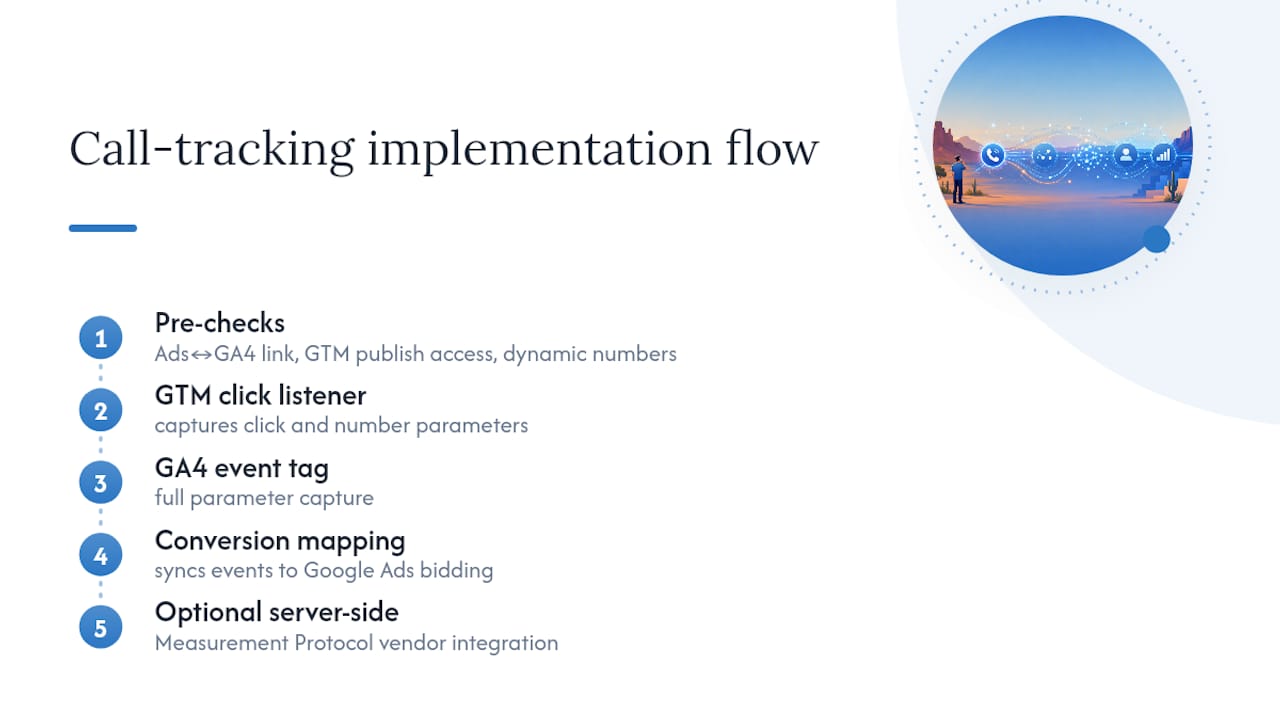
Before touching a GTM container for a client, Webtechs verifies three things: whether the Google Ads account is properly linked to GA4, whether the GTM container has the access and permissions needed to publish, and whether the site’s page builder or CMS injects phone numbers dynamically, which determines whether a standard trigger or a delegated listener is required.
A typical setup includes a GTM container with the appropriate click listener, a GA4 event tag with full parameter capture, and conversion mapping that syncs back into Google Ads for bidding. For businesses handling higher call volume, that scope sometimes expands to a server-side vendor integration using Measurement Protocol.
Most Scottsdale service businesses (plumbers, dentists, contractors) don’t need conversation analytics on day one. They need reliable click tracking and accurate CPA numbers first. The upgrade to a paid vendor makes sense once call volume is high enough, or revenue per call is large enough, that the cost of missing attribution outweighs the vendor’s monthly fee.
Which Call-Tracking Approach Should You Actually Start With?
Most marketing teams overthink the sequencing here, and it costs them weeks. Start with GTM click events. It’s free, it takes an afternoon to build correctly, and it gives you directional data on call intent almost immediately.
Layer in Google Ads forwarding numbers next, once you’re running paid search and need to know which keywords and ads actually generate calls, not just clicks. Hold off on a paid vendor until your call volume or average deal size makes conversation analytics and CRM-level attribution worth the monthly cost. For a lot of local service businesses, that threshold never actually arrives, and GTM plus forwarding numbers covers the job permanently.
The one warning worth repeating: watch your click-to-call event volume in the first two weeks. If it looks too good, it probably is. Accidental taps inflate raw click counts before you’ve added any duration filtering, and teams that mark that raw event as a conversion on day one end up making budget decisions on inflated numbers.
— Brett
Get GA4 Call Tracking Set Up Right the First Time
Webtechs is the alternative to guessing your way through GTM triggers and Measurement Protocol payloads. With over 25 years working with Scottsdale and Arizona small businesses, Webtechs builds the GTM container, the GA4 event tag, and the Google Ads conversion mapping as one connected system instead of three disconnected pieces that quietly break six months later.

A proper audit checks your account links, your GTM container’s readiness, and whether your site injects phone numbers dynamically before a single trigger gets built. That matters more than it sounds. A misconfigured trigger looks fine in testing and then silently misses half your real calls once traffic scales. For businesses running paid search through Local Services Ads or standard search campaigns, getting the call data right is what makes your cost-per-acquisition numbers trustworthy enough to actually act on.
If you want your call tracking built once and built correctly, request a call-tracking audit from Webtechs and get a straight answer on what your setup needs.
Where to Learn More About GA4 Call Tracking
For the official rules on forwarding numbers and conversion thresholds, see Google’s website call conversions guide. For vendor-side Measurement Protocol field mapping, check your call-tracking provider’s integration docs directly.
Sources
- GA4 call tracking tutorial — Nimbata
- Set up Tracking calls to a phone number on a website – Google Ads Help
FAQ
How Do I Check If Phone Call Tracking Is Working?
Open GTM Preview mode, click your tel: link, and confirm the trigger fires with the correct variable values. Then check GA4 Realtime or DebugView for your event name to appear, which usually happens within about 30 seconds of the click.
How Much Does Call Tracking Cost?
Basic GTM-based click tracking costs nothing beyond setup time, since it uses tools you already have through GA4 and Google Tag Manager. Third-party vendors that provide call recordings, dispositions, and Measurement Protocol integration charge ongoing platform fees, and Webtechs can quote setup costs based on your specific tracking needs during an audit.
Can I Track Phone Call Conversions in Google Ads?
Yes. Google Ads supports a “Calls to a phone number on your website” conversion action using forwarding numbers and a phone snippet, with a configurable minimum call-length threshold to filter out low-quality calls. You can also import a GA4 phone-click event as a conversion if you’d rather manage tracking through GTM.
How Do I See Where Call Traffic Is Coming From in Google Analytics?
Capture gclid and UTM parameters as event parameters on your phone-click or phone-call event, then build a GA4 Exploration segmented by source and medium, campaign, and landing page. This shows you exactly which channels and pages are driving calls, not just website visits.
Does GA4 Track Phone Calls Automatically?
No. GA4’s Enhanced Measurement does not include tel: link tracking by default, according to Nimbata’s GA4 documentation, so you need to configure a GTM trigger and event tag, add Google Ads forwarding numbers, or integrate a vendor to capture call activity.