

Capture More Scottsdale Phone Leads with Google Analytics 4 Setup
Create a Google Analytics account and a GA4 property, add a web data stream, then install the Google tag through your CMS, Google Tag Manager, or a manual gtag.js snippet. Enable enhanced measurement and mark a few key conversions that matter, like a contact form or a phone click. Verify everything with Tag Assistant or GA4 DebugView before you call the job done, and expect real data within about 30 minutes of a clean install.
TL;DR:
- Setting up GA4 with a single web data stream, enhanced measurement, and key conversions generally takes about 30 minutes to start delivering data.
- Assigning user roles carefully is crucial, with only administrators able to manage user access, while outside vendors should be granted the minimal necessary permissions at the property level.
- Extending data retention to 14 months improves analysis of long-term trends, and disabling Google Signals or adjusting cookie settings helps ensure compliance with privacy laws.
- Building audience segments based on visitor behavior, source, or device enables effective remarketing, but audiences need time to populate before they can be used in campaigns or reports.
- Implementing cross-domain tracking is essential only for businesses with multiple domains or embedded booking and payment systems, preventing misattribution of conversions.
Table of Contents
- How Do You Configure User Permissions in GA4?
- What Data Retention and Privacy Settings Should You Use?
- How Do You Build Audiences and User Segments?
- What Are Custom Dimensions and Metrics in GA4?
- Do You Need Cross-Domain Tracking for Your Website?
- What Are the Best Practices for GA4 Reporting?
- WebTechs.Net Perspective: What We Prioritize for Local SMBs
- Get Your GA4 Setup Done Right the First Time
- Sources
- FAQ
How Do You Configure User Permissions in GA4?
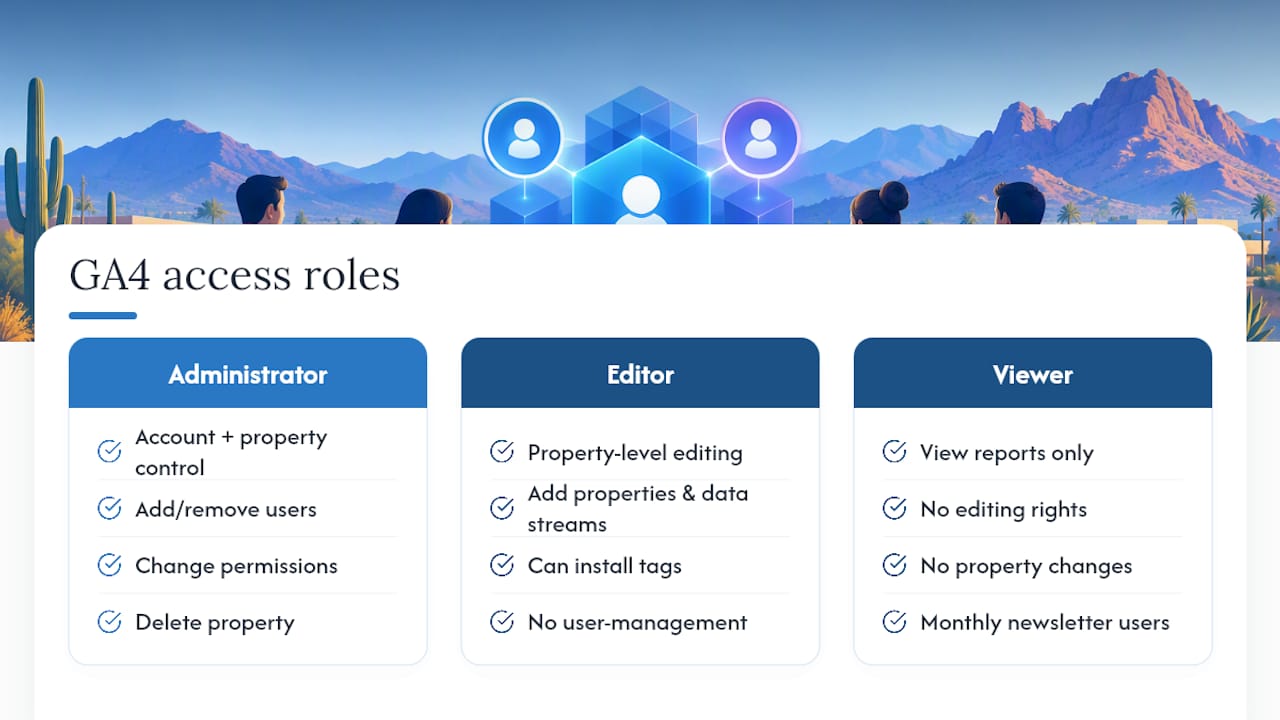
GA4 controls access through five roles: Administrator, Editor, Marketer, Analyst, and Viewer. Only Administrator can add or remove users, change permissions, or delete the property, so hand that role out sparingly, especially if you work with contractors or a rotating cast of freelancers.
For a typical Scottsdale small business, the setup looks like this: the owner or in-house marketer holds Administrator, a web developer or agency contact gets Editor to add properties and data streams, and anyone pulling reports for a monthly newsletter gets Viewer. You need Editor role to add new properties or data streams, so if your web contractor says they can’t install the tag, check their permission level first. That’s the most common access snag agencies run into.
Permissions live at the account level and the property level separately, and they don’t automatically inherit downward. A user with account-level Viewer access can still be denied access to a specific property if you set it up that way. If you’ve hired an outside firm to run your SEO or ads, grant them Editor at the property level rather than Administrator at the account level. That way they can build what they need without touching billing, other properties, or your Google Ads links. Review the user list every few months. Former employees and past vendors are the most overlooked security gap in small business analytics setups.
What Data Retention and Privacy Settings Should You Use?
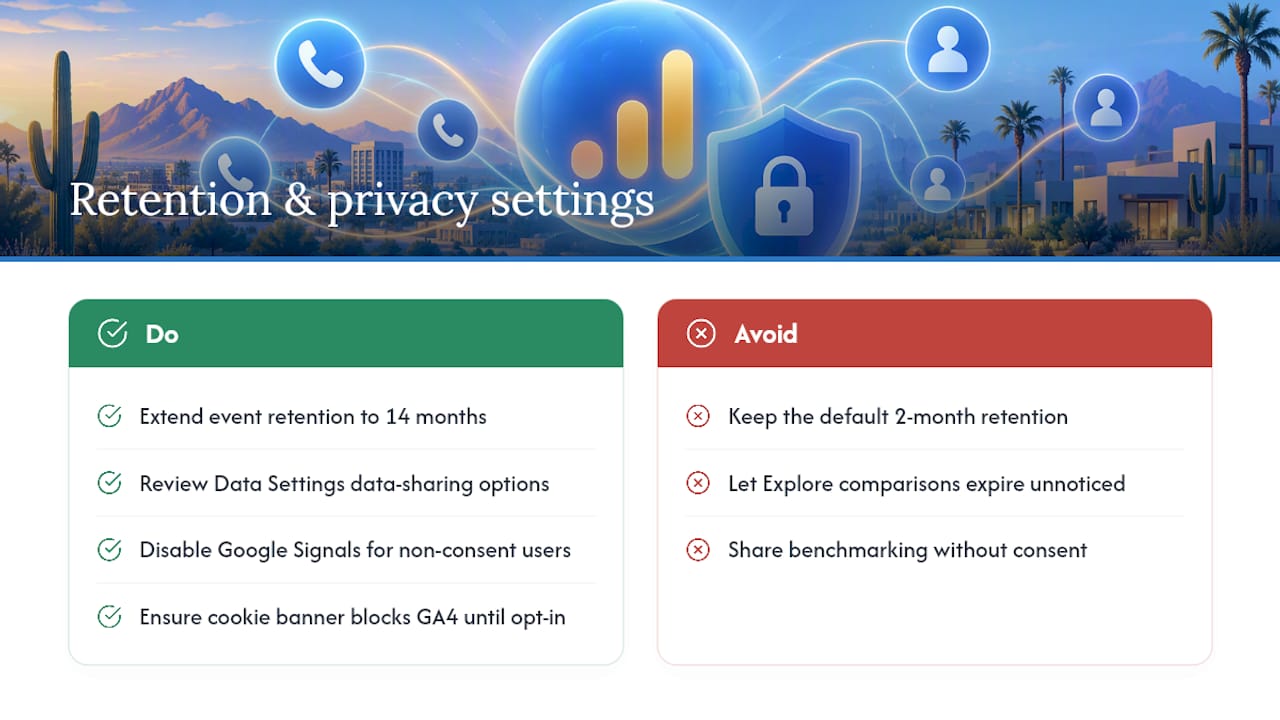
GA4’s default retention period for event-level data used in exploration reports is two months, but you can extend it to 14 months under Admin, Data Settings, Data Retention. Most small businesses should switch to 14 months immediately. Standard reports like the acquisition overview aren’t affected by this setting, but anything you build in Explore mode, comparing this quarter to the same quarter last year, for instance, disappears once data ages past the retention window you chose.
Privacy settings deserve equal attention, particularly with Arizona businesses serving customers across state lines. Under Data Settings, you can adjust Google’s data-sharing options with Google products and services, technical support, and benchmarking. Turn off benchmarking sharing if you’d rather your data not contribute to industry-wide comparisons; leave it on if you want that context for your own reports.
If you collect any personal information through forms, disable Google Signals granular location and device data collection for users who haven’t consented, and double-check your cookie consent banner actually blocks GA4 firing until a user opts in. This matters more every year as state-level privacy laws expand, and it’s far easier to build in correctly at setup than to retrofit later.
How Do You Build Audiences and User Segments?
Audiences in GA4 group users by behavior, source, or device, and they feed directly into remarketing and reporting. Go to Admin, then Audiences, to build one from scratch or use a Google-suggested template like “Purchasers” or “Users who viewed a specific page.”
For a Scottsdale service business, useful audiences include people who visited your contact page but never submitted the form, past customers who might be due for a repeat service, and visitors from a specific ZIP code cluster if you serve a defined local area. Build an audience of everyone who clicked a phone number link but didn’t otherwise convert; that group tells you a lot about where your funnel leaks.
Audiences take a little time to populate after you create them since GA4 applies the definition going forward, not retroactively. Don’t expect a fully built segment the moment you save it. Once populated, push these audiences into Google Ads for remarketing, or use them inside GA4’s comparison tool to see how repeat visitors behave differently from first-timers. That comparison alone often reveals which pages actually earn a second look.
What Are Custom Dimensions and Metrics in GA4?
Custom dimensions and metrics let you track details GA4 doesn’t capture by default, things specific to how your business actually operates. A landscaping company might track “service area requested,” a dental practice might track “appointment type,” and a retailer might track “loyalty tier.”
You create these under Admin, Custom Definitions, after the underlying data is already flowing in through an event parameter. That order matters: GA4 can’t register a custom dimension for data it hasn’t seen yet, so the parameter needs to fire through your tag setup first, whether through Google Tag Manager’s data layer or a modified gtag.js event.
Keep the list short. GA4 caps standard properties at 50 custom dimensions and 50 custom metrics, but most small businesses need fewer than ten to answer their actual questions. Every dimension you add is one more thing to maintain if your site structure or form fields change down the line. Start with whatever single piece of information would most change how you spend your marketing budget, then build from there.
Do You Need Cross-Domain Tracking for Your Website?
Cross-domain tracking matters only if your business operations span more than one domain, a main site plus a separate booking platform, or a checkout hosted on a different domain than your storefront. Without it, GA4 sees a visitor bounce from siteone.com to booking-siteone.com as two different people, which wrecks your conversion attribution and inflates your bounce rate.
Configure it under Admin, Data Streams, selecting your web stream, then Configure Tag Settings, then Configure Your Domains. List every domain the same visitor might cross during a single session. If you’re using Google Tag Manager, this list needs to match across every domain’s container for the linking to work correctly.
Most Scottsdale small businesses running a single WordPress or Squarespace site with no separate booking or payment domain can skip this step entirely. If you use a third-party scheduling tool like Calendly embedded via iframe, or a payment processor that redirects off-domain for checkout, cross-domain tracking is worth the ten minutes it takes to set up. Skipping it when you need it is one of the quieter reasons GA4 conversion numbers look lower than actual bookings or sales.
What Are the Best Practices for GA4 Reporting?
Check Realtime and Reports snapshot weekly at minimum, not just when something breaks. GA4’s interface rewards regular small glances over occasional deep dives, since trends in traffic source or conversion rate show up faster than most owners expect.
Build one custom Exploration report tied to your top two or three conversion events rather than relying only on the default reports. The default reporting is fine for a general pulse check, but it wasn’t built around your specific business goals. A funnel exploration tracking visitors from homepage to contact form submission, broken down by traffic source, tells you far more about where your ad spend or SEO effort is actually paying off.
Compare against a previous period every time you review data, never look at numbers in isolation. A 20% jump in users means little without knowing whether that’s seasonal, tied to a specific campaign, or simply a fluke week. Set a recurring calendar reminder to review GA4 monthly alongside your Google Search Console and Google Ads accounts if you run paid campaigns, since linking GA4 to Ads and Search Console surfaces cost-per-conversion and keyword data the standalone GA4 interface won’t show you.
WebTechs.Net Perspective: What We Prioritize for Local SMBs
When an agency sets up GA4 for a client, phone calls and form submissions come first. Most local service businesses win or lose on the phone, not the checkout page, so we build call tracking into GA4 before we touch anything else. Local ad measurement matters just as much: a Google Ads campaign only proves its value once its conversions actually land inside GA4, not before. We treat tracking as one piece of a larger bundle, alongside hosting, site updates, and ongoing conversion rate work, because a tidy GA4 setup with no follow-through is just a dashboard nobody checks.
— Brett
Get Your GA4 Setup Done Right the First Time
Some agencies offer a full service alternative to piecing together GA4 yourself from scattered YouTube videos and CMS plugin settings. Instead of guessing whether your tag fired correctly or your conversions are counting the right actions, they handle the install, the event configuration, and the ongoing checkups as part of a bundled service, alongside SEO, hosting, and site updates.

Business owners may benefit from working with a local team that understands what conversions matter for service businesses, retailers, and professional practices in their market, and can iterate on setups quickly when something changes. That includes phone-call tracking wired directly into GA4, so calls generated by your website or Google Ads campaigns actually show up as conversions instead of vanishing into a blind spot. If your current setup is missing data, miscounting conversions, or was never built with your business goals in mind, visit the Webtechs services page to get GA4 configured properly and start turning that data into decisions instead of dashboards nobody opens.
FAQ
How Long Does GA4 Setup Take?
Basic setup, account, property, data stream, and tag install usually can be completed quickly for a single-domain website. Full configuration with conversions, audiences, and custom dimensions can take a few hours spread across a week, and data typically starts appearing within about 30 minutes of a clean install.
Can I Install GA4 Without Google Tag Manager?
Yes. Many CMS platforms, including WordPress, Shopify, Wix, and Squarespace, let you paste your Measurement ID directly into a native analytics field, no GTM required. Manual gtag.js installation works too, but GTM makes future event changes easier without touching site code.
How Do I Know If GA4 Is Tracking Correctly?
Open GA4’s Realtime report and browse your own site in another tab. If your visit shows up within a minute or two, the tag is firing. For deeper verification, use Tag Assistant or GA4 DebugView to confirm specific events like form submissions or phone clicks are recording.
Does Webtechs Set Up GA4 for Scottsdale Businesses?
Yes, Webtechs configures GA4, including tag installation, conversion setup, and phone-call tracking, as part of its web design and SEO services for Scottsdale small businesses. Pricing depends on the scope of work, so current details are available through the Webtechs services page.
What Conversions Should a Small Business Track First?
Start with the two to five actions that most directly connect to revenue: contact form submissions, phone clicks, appointment bookings, or purchases. Prioritizing a short list keeps reporting focused on decisions you can actually act on instead of drowning in metrics that don’t move the business.