Small business owner working on laptop hosting setup
Written by webtechs

Managed WordPress Hosting for Small Business: Agency Guide

Small business owner working on laptop hosting setup

For most small and mid-sized businesses that want a reliable, professionally managed web presence, managed WordPress hosting is the right call — especially when it’s bundled with web design and SEO through a single agency. The core reasons are straightforward: WordPress-specialist support, automated security, and predictable uptime reduce the operational risk that quietly kills small business websites. The trade-offs are real too: you’ll pay more than shared hosting, and some environments restrict plugins or lock you into specific configurations. Before signing anything, request a written scope document that covers hosting, design, and SEO together, and ask the agency for their onboarding checklist.

Table of Contents

What does “managed WordPress hosting” actually mean?

Managed WordPress hosting is a hosting plan built specifically for WordPress that bundles server-level tuning with varying degrees of application support. The word “managed” covers a wide spectrum, and that range is where most confusion starts.

Infographic illustrating managed WordPress hosting process

At the entry end, a provider handles server patching, automated backups, and basic security updates. Move up the spectrum and you get platform-level work: server-side caching, CDN integration, PHP version management, and staging environments. At the top end, full application management includes update testing, plugin conflict resolution, and proactive monitoring of your WordPress installation itself.

Common restrictions come with the territory. Managed environments often block certain plugins — typically caching plugins that conflict with the host’s own layer, or resource-heavy tools that degrade shared performance. Non-WordPress applications generally can’t share the same account. These aren’t dealbreakers, but they’re worth confirming before you migrate.

Canonical features to look for in any managed plan:

  • Staging environment (test changes before they go live)
  • Automated daily backups with tested restore points
  • Web Application Firewall (WAF) and malware scanning
  • WordPress-expert support (not generic helpdesk)
  • Server-level caching and CDN integration
  • Automatic core, theme, and plugin updates

Pro Tip: Ask the provider directly: “Is plugin troubleshooting included in my plan, or is it billed separately?” If they hesitate or redirect you to a support tier page, it’s an upsell.

Why managed WordPress hosting matters for your business

Managed hosting materially reduces operational risk for SMBs that depend on their website for leads, bookings, or reputation. A hacked or slow site doesn’t just cost you visitors — it damages local search rankings and erodes the trust you’ve spent years building.

WordPress powers roughly 43% of all websites on the internet. That market share makes it the most targeted CMS for attacks and also the platform with the deepest ecosystem of specialist support. A host that understands WordPress core files, theme conflicts, and plugin interactions resolves problems in minutes rather than days.

Page speed and uptime connect directly to SEO. Google’s Core Web Vitals use load performance as a ranking signal, and a site that goes down during business hours loses both traffic and credibility. Specialist WordPress support is often the real differentiator between a shared plan and a managed one — not raw server specs.

Business benefits at a glance:

  • Reduced downtime from proactive patching and monitoring
  • Faster troubleshooting from support teams who know WordPress
  • Consolidated vendor responsibility (one agency, one point of contact)
  • Predictable maintenance windows instead of surprise emergencies
  • WAF and daily backups that protect your local search presence

What should a good managed WordPress host actually provide?

A credible managed host delivers secure infrastructure and WordPress-aware operational processes. Infrastructure alone isn’t enough.

Operational minimums worth demanding:

  • Daily automated backups with documented restore testing
  • Staging environment for safe update and design testing
  • Server-level caching (not just a plugin)
  • CDN integration for Arizona visitors and beyond
  • Versioned deployments or rollback capability

On the security side, expect a WAF, scheduled malware scans, and a defined patch cadence for WordPress core. Daily automated backups and restore tools are standard at the managed tier — if a provider treats them as an add-on, that’s a red flag.

Support scope deserves its own conversation. Expert WordPress support should cover theme and plugin debugging, guidance on conflicts, and triage of performance regressions. It typically does not include content edits, custom feature development, or redesign work. Get that boundary in writing.

Two IT specialists debugging WordPress plugins

Pro Tip: Before signing, ask the provider to walk you through a restore test on a staging copy. A host confident in their backup system will do this without hesitation.

Questions to ask a managed WordPress host before you commit

Ask these questions on every sales call. The answers reveal true scope and expose limits that marketing pages bury.

  1. What does “expert WordPress support” include — plugin debugging, theme conflicts, performance issues?
  2. How often are backups taken, where are they stored, and how long is retention?
  3. How are updates tested before they reach production — is staging mandatory?
  4. What is your uptime SLA, and what is the remediation if you miss it?
  5. What does the migration process look like, and who handles DNS cutover?
  6. Which plugins are restricted or blocked on your platform?
  7. How is pricing structured — per site, pooled sites, or traffic-based overages?
  8. What is the minimum contract term and cancellation policy?

Score each answer 0–2: green (clear, written commitment), yellow (verbal only, ask for documentation), red (vague or deflected). Any two reds in the support, backup, or SLA categories should stop the conversation.

Request written SLA documentation and evidence of a recent restore test before signing anything.

How agency-bundled hosting changes the workflow

An agency-managed bundle reduces vendor friction by putting hosting, deployment, and SEO work under one operating process. You’re not coordinating between a hosting company and a separate agency when something breaks at 2 AM.

A typical workflow runs: discovery and scope agreement → staging build → SEO and design QA → staged update testing → scheduled production push → ongoing monitoring and monthly maintenance windows. Complex or high-traffic sites should always run a full staging test and a restore validation before DNS cutover to avoid PHP version or module mismatches.

Ownership terms matter. Get clarity in writing on who owns the content, code, backups, and DNS records. If the agency holds your DNS and you part ways, a poorly written contract can make a simple transfer take weeks.

Escalation paths should be defined before you need them. When a plugin conflict breaks a checkout page or a security incident triggers a WAF block, you want a named contact and a response-time commitment, not a generic support queue.

Contract items to request explicitly: monthly maintenance hours, incident response time, and backup retention period.

Migration timeline and pricing: what to expect

Most SMB migrations take a few days to two weeks, depending on site complexity and how much custom configuration is involved.

Phase Typical Duration Key Owner Action
Staging setup and testing 2–5 days Review staging site, flag issues
Content and database migration 1–3 days Confirm data integrity
SEO baseline audit 1–2 days Approve redirect map
DNS cutover Hours to 1 day Approve go-live timing
Post-migration QA 1–3 days Test forms, payments, speed

On pricing, per-site vs. pooled-site models affect total cost significantly if you manage multiple domains. Entry-level agency-managed packages typically run in a moderate price range per site; mid-tier plans with staging, priority support, and SEO monitoring run higher. Premium configurations for high-traffic or multi-site setups scale further. Always request a written quote with line items.

Watch for additional costs: premium plugin licenses, large-media migrations, custom integrations, and traffic overage fees. Budget for SEO and content work alongside hosting — they’re separate line items even in a bundled agency engagement. For a detailed look at small business hosting options, Webtechs has a dedicated comparison resource.

Contract terms, cancellation policies, and vendor lock-in

Most managed WordPress hosts and agencies use annual contracts, with monthly options available at a premium. Month-to-month flexibility generally costs significantly more in most cases, though exact figures vary by provider.

Lock-in risk is real and often underestimated. The three areas where it shows up: proprietary control panels that don’t export cleanly, DNS held by the agency rather than the client, and backup formats tied to the host’s own restore tools. Before you sign, confirm that your backups are exportable in a standard format (a full file + database dump) and that DNS access stays with you.

Cancellation policies vary. Some providers offer prorated refunds; others charge a full remaining term. Read the termination clause before the contract is signed, not after you’ve decided to leave.

Minimum terms of 12 months are common for agency bundles. That’s reasonable for a project that includes migration, design, and SEO setup — those services have real upfront costs. What’s not reasonable is a contract that makes it difficult to retrieve your own files and data. Any reputable agency will hand over a full site export on request, regardless of contract status.

Webtechs delivers managed hosting, web design, and SEO together

Webtechs, based in Scottsdale and serving Arizona businesses since 1997, bundles managed WordPress hosting with professional web design and SEO into a single, accountable engagement. It’s built for small and mid-sized businesses that want one agency responsible for the whole stack, not three vendors pointing fingers at each other.

Webtechs

The onboarding process runs: discovery and scope agreement → staging migration → SEO baseline audit → go-live checklist → ongoing monthly maintenance. Every engagement includes hosting, staging, automated backups, security monitoring, and SEO tracking. Real client results back the claims — case studies across industries show measurable gains in rankings and organic traffic.

Webtechs’s web design portfolio shows the range of projects delivered, from local service businesses to multi-location operations. If you’re ready to evaluate whether the bundle fits your situation, request a quote or schedule a discovery call directly through the site.

Key Takeaways

Managed WordPress hosting is worth the investment for SMBs when it’s paired with specialist support, clear SLAs, and an agency that owns the full stack from design through SEO.

Point Details
Confirm support scope in writing “Expert WordPress support” should cover plugin and theme debugging, not just server uptime.
Demand daily backups with restore tests Daily automated backups are standard; ask for proof of a recent restore before signing.
Audit plugin restrictions early Managed environments often block certain plugins — confirm compatibility before migrating.
Budget for migration time Most SMB migrations take a few days to two weeks depending on site complexity.
Webtechs bundles the full stack Webtechs delivers managed hosting, web design, and SEO together for Arizona SMBs from one accountable agency.

Why managed hosting is a strategic investment, not a commodity

Most business owners treat hosting as a utility — pick the cheapest plan, set it, forget it. That works until it doesn’t, and when it fails, it usually fails at the worst possible moment: a product launch, a busy season, a Google algorithm update.

The agencies and businesses that get the most from managed WordPress hosting treat it as part of their risk management posture. Uptime, restore success rates, load time, and SEO performance are metrics worth tracking monthly, not just checking when something breaks. A hosting environment that’s actively maintained by people who understand WordPress isn’t overhead. It’s the foundation everything else is built on. Webtechs has operated on that principle since 1997, and it shows up in the outcomes clients actually see.

Useful sources and further reading

  • WordPress.org Hosting Recommendations — WordPress’s own curated list of recommended hosts, with context on what the platform requires.
  • WPBeginner: Managed WordPress Hosting — Thorough overview of features, spectrum of services, and evaluation criteria.
  • WP Engine: What Is Managed Hosting? — Detailed breakdown of managed hosting components including security, backups, and performance.
  • Webtechs: Best Website Hosting for Small Business — Webtechs’s own comparison guide for SMBs weighing shared, VPS, and managed options.
  • Webtechs: Website Migration Service — Details on agency-managed migration processes and cutover planning.
  • Webtechs: SEO Case Studies — Real-world results from integrated hosting, design, and SEO engagements.
Woman optimizing Google Business Profile on laptop
Written by webtechs

Google Business Profile Optimization: Scottsdale 2026 Guide

Woman optimizing Google Business Profile on laptop

Claim your profile, fix your NAP, choose the right primary category, and add at least five quality photos. Do those four things today and you will outperform most of your local competitors before you spend a dollar on paid help. If you would rather hand it off, Webtechs has been doing exactly this for Scottsdale small businesses since 1997. Google’s own documentation confirms that local rankings turn on three factors: relevance, distance, and prominence. Distance is fixed. Relevance and prominence are yours to control.

Start here, in this order:

  • Claim and verify your listing at business.google.com
  • Correct NAP and primary category so Google knows exactly what you do
  • Add photos, services, and a business description to signal an active, complete profile

Pro Tip: Businesses with photos receive significantly more direction requests and website clicks than those without. Upload at least five real photos before you do anything else.


Table of Contents

Which Scottsdale providers are worth hiring for Google Business Profile optimization?

The table below covers seven local and regional providers. Pricing models are described as shapes, not exact figures, because most agencies quote after a discovery call.

Infographic showing five key steps for GBP optimization

Provider Primary service Pricing model Core deliverables Specialization Trust signals
Webtechs Full-service local SEO + GBP management Monthly retainer or project Profile claim, NAP, photos, citations, posts, reporting Small/mid-sized businesses, Scottsdale Operating since 1997; documented case studies
Scale Up Marketing AI-driven local SEO systems Monthly retainer GBP optimization, AI Smart Websites, local SEO Tech-forward SMBs AI tooling, local SEO systems
Coded Formula SEO, web design, PPC Transparent upfront pricing Web design, SEO, consulting Local and national campaigns Upfront pricing published
BusinessSEO.io Done-for-you local SEO packages Monthly subscription GBP setup, ongoing management, coaching Local service businesses Affordable entry-level packages
LeadUp Solutions Reputation and review management Monthly retainer Google review management, lead-gen web design Review-heavy industries Review management focus
Vinio Marketing Broad digital marketing bundle Monthly retainer SEO, paid ads, reputation management, web design Businesses wanting one vendor Multi-service bundle
Google Business Profile Professionals GBP setup and optimization Project or retainer Profile claim, category setup, photo upload GBP-only specialists Specialist positioning

Quick picks:

  • Best for transparent pricing: Coded Formula publishes rates upfront, which cuts the back-and-forth on proposals.
  • Best for AI-driven local SEO: Scale Up Marketing integrates AI Smart Websites with GBP systems, a fit for owners who want technology doing more of the heavy lifting.
  • Best for monthly review management: LeadUp Solutions centers its entire model on Google review management and lead-gen design, useful when your reputation is the bottleneck.

Before you sign anything, run these quick checks:

  • Google rating and total review count (look for consistency over time, not a single burst)
  • Published case studies or before/after snapshots
  • Transparent pricing or at least a clear package description
  • Google Partner badge or equivalent certification
  • Sample reports on request

Pro Tip: Sample deliverables are the single most reliable trust signal. Any agency that will not show you an example report before you sign is hiding something.


Marketing team consulting on local SEO deliverables

How do you choose the right GBP optimizer and what should it cost?

What to ask on the first call

Ask every candidate these five questions before you commit:

  1. Who owns the profile after the engagement ends? (It must stay yours.)
  2. Can you show me a sample monthly report?
  3. How exactly do you request reviews from clients? (Automated bulk emails violate Google policy.)
  4. What is your citation cleanup process?
  5. What are the cancellation terms?

Red flags that should end the conversation

Keyword stuffing a business name, such as “Joe’s Plumbing Scottsdale Best Plumber AZ,” is a common policy violation that can get a profile suspended. Walk away from any vendor who suggests it. The same goes for promises of instant top-3 rankings, offers to generate fake reviews, or refusal to share sample reports.

What does GBP optimization actually cost?

Service tier Typical scope Realistic timeline to results
One-time setup Claim, NAP, category, photos, services, description 1–2 weeks for quick wins
Entry monthly management Posts, review responses, monthly reporting
Full monthly management Above + citation cleanup, Q&A, advanced posting

For Scottsdale-specific pricing context, Webtechs publishes local SEO cost guidance that breaks down what each tier typically includes.

Can a Google Business Profile actually generate $100–$200 per day?

Yes, but the math has to work. Revenue from Maps traffic comes down to three variables: how many local search impressions your profile earns, what percentage of those convert to calls or visits, and what your average job or transaction is worth. A plumber with a $350 average ticket needs fewer than one new call per day to hit $200. A coffee shop needs far more foot traffic to reach the same number. The profile itself does not generate revenue. It generates visibility. Visibility generates leads. Leads close at whatever rate your sales process allows. Optimize the profile first, then track calls and direction requests in your GBP dashboard to measure actual lead volume.


Webtechs handles your GBP so you can run your business

Webtechs

Webtechs is the local alternative to a generic national SEO agency for Scottsdale small businesses. The difference is specificity: every engagement starts with a full profile audit, not a templated checklist. A typical Webtechs GBP engagement covers profile claim and verification, NAP correction, primary and secondary category selection, photo upload and optimization, services and description copy, weekly posting, review response management, and monthly reporting with ranking snapshots.

The results speak for themselves. A garage door repair client saw a 1,620% increase in search visibility. A garden nursery grew organic traffic by 353%. Both started with the same foundation: a fully optimized local profile backed by on-site SEO. Webtechs works on a monthly retainer for ongoing management or a one-time project fee for setup and handoff. No long-term lock-in required. See the full client portfolio and reach out for a free profile audit.


Key Takeaways

A fully optimized Google Business Profile is the highest-return local marketing activity available to Scottsdale small businesses, and most profiles are using less than half their potential.

Point Details
Claim and complete first Fix NAP, primary category, photos, and services before any other tactic.
Reviews drive prominence Review volume and recency are the strongest ranking variable you can control.
Avoid policy risks Keyword-stuffed business names and fake reviews can get a profile suspended.
Realistic cost tiers One-time setup, entry monthly management, and full monthly management each deliver different timelines to results.
Webtechs as local partner Webtechs offers Scottsdale businesses full GBP management with documented case studies and no mandatory long-term contract.
0
Small business team discussing local link building
Written by webtechs

Local Link Building for Small Businesses: A Practical Guide

Small business team discussing local link building

If you want to rank in Scottsdale’s local search results and show up in the Local Pack, start building local links now. Audit your current mentions, create locally useful content, and reach out to local partners soon. If you’d rather hand it off, two verified Scottsdale providers can help:

  • Webtechs (14300 N Northsight Blvd, Scottsdale) — a full-service SEO and web design agency operating since 1997, with local link building folded into broader SEO campaigns.
  • Link Building HQ — a link-specialist firm offering white-label and enterprise link building for businesses that need link-only execution without a full agency retainer.

Both are real, local options. Which one fits depends on whether you need a complete SEO program or just the links.

Table of Contents

Yes, and the evidence is direct. Locally relevant backlinks from local media, chambers of commerce, and community partners carry more weight for local organic results than hundreds of generic directory submissions. A handful of editorially earned local links can outrank a mass-directory approach for Local Pack visibility, and link signals consistently appear among the most important factors in local ranking studies.

The reason comes down to how Google reads authority. A link from the Scottsdale Chamber of Commerce or the Scottsdale Independent tells Google your business is genuinely embedded in the community, not just listed in it. That signal feeds both classic organic rankings and the AI-driven answer surfaces that are increasingly capturing local search traffic.

Three signals work together here:

  • Local editorial links (press, blogs, community orgs) build domain authority with geographic relevance.
  • Local citations (consistent NAP data across directories) reinforce your business’s legitimacy.
  • Mention density (how often your brand appears in local content, even without a link) influences AI-generated answers and branded search volume.

Treat all three as a system, not separate tasks.

Infographic of local link building step process

Start with a three-step micro-plan: audit where you’re already mentioned online, build locally useful assets, then do targeted outreach to multiple local sites. That sequence alone can produce measurable results within a few months.

High-impact tactics, prioritized

Local PR and press outreach is the highest-leverage move. Pitch a local angle to the Scottsdale Independent, AZ Big Media, or neighborhood blogs. A story about a community initiative, a local data point, or a business milestone gives editors something to publish. One earned editorial link from a local news site is worth more than 50 directory listings.

Marketer conducting local press outreach outdoors

Chamber of Commerce and business associations are low-hanging fruit. A Scottsdale SEO campaign almost always starts here. Join the Scottsdale Area Chamber of Commerce, get listed in their member directory, and look for sponsorship opportunities that include a website link.

Event sponsorships and community partnerships generate links from event pages, nonprofit sites, and local school or sports organization pages. These links are editorially placed, geographically relevant, and often permanent.

Local resource pages are underused. Many city government sites, neighborhood associations, and local blogs maintain “local business” or “community resource” pages. A polite, specific email asking to be included converts surprisingly well.

Broken-link reclamation is one of the most effective under-the-radar tactics available. Find authoritative local pages with dead outbound links using a tool like Ahrefs or Screaming Frog, then email the site owner with your working resource as a replacement. It helps them fix a UX problem, so the conversion rate is high.

Unlinked mention reclamation is even faster. Search for your business name in Google News and set a Google Alert. When a local outlet mentions you without linking, email them and ask for the link. Most will add it.

Local directories still matter, but only quality ones: Google Business Profile, Yelp, the Better Business Bureau, and industry-specific directories. Skip the mass-submission services.

Pro Tip: Pick one or two local Slack or Discord communities in your niche and contribute genuinely for 60 days before mentioning your business. Community-led channels produce member-generated editorial links and earned media that standard outreach never reaches.

Your first 90-day sprint

  1. Run a backlink audit using Ahrefs or Google Search Console.
  2. Identify five local sites linking to competitors but not to you.
  3. Build one linkable asset (a local guide, a data-driven post, or a short video resource).
  4. Submit to three quality local directories.
  5. Pitch one local press story.
  6. Reach out to two community organizations about resource page inclusion.
  7. Reclaim two to three broken links on local sites.
  8. Set up Google Alerts for your brand name to catch unlinked mentions.

For ongoing authority growth, hire a retained agency. For a one-off asset push or PR campaign, a project-based engagement works fine. The mistake most small businesses make is hiring the cheapest option they find on a link marketplace, then wondering why rankings don’t move.

What to look for

  • Outreach transparency: Can they show you the actual emails they send and the sites they target? If they won’t, walk away.
  • Named example placements: Ask for specific URLs of links they’ve earned for clients, not a vague “we place on high-DA sites.”
  • Reporting cadence: Monthly reports with new links, referring domains, and ranking movement are the baseline.
  • Manual outreach vs. mass marketplaces: Relationship-based outreach produces safe, long-term results. Mass-sell platforms create link patterns that can trigger negative signals.
  • Local experience: An agency that has worked in your market knows which local outlets accept pitches and which don’t.
  • References and case studies: Ask for two client references in your industry or city.

Red flags to watch for

  • Guaranteed rankings in a specific timeframe.
  • Any mention of private blog networks (PBNs).
  • Aggressive anchor-text ratios that look unnatural.
  • Pricing that seems too low to cover real manual outreach.
  • No clear answer on where links will be placed.

Pricing expectations

Retainer-based local link building in a mid-size market like Scottsdale typically costs a moderate monthly fee depending on link volume targets and competitiveness. Project-based campaigns for a single asset or PR push usually have a higher one-time fee. For local SEO cost context specific to Scottsdale, Webtechs publishes guidance on what retainers cover. Expect three to six months before link-driven ranking improvements become clearly measurable.

Scottsdale providers: a side-by-side look

Dimension Webtechs Link Building HQ
Core services Full-service SEO, web design, PPC, content, local SEO White-label link building, enterprise links, digital PR, outsourcing
Specialization Full-service agency with link building as part of SEO Link-specialist firm
Local presence Scottsdale, AZ since 1997 Not publicly listed as local to Scottsdale
Transparency & reporting Monthly SEO reporting included in retainer Not publicly listed
Pricing model Monthly retainer or project-based No public pricing listed
Track record Client testimonials and case studies on site White-label and enterprise client base
Best for Small/mid-sized businesses wanting a full SEO program Agencies or businesses needing link-only execution

Verdict: If you’re a Scottsdale small business that needs local SEO, content, and link building managed together, Webtechs is the natural fit. If you’re an agency or a business that already has SEO handled and just needs link volume, Link Building HQ covers that lane.

A typical Webtechs campaign produces measurable gains in local organic rankings and referral traffic within a few months, with Local Pack improvements often visible sooner for less competitive terms.

The process follows five stages:

  • Audit: Identify existing backlinks, unlinked mentions, broken links on local sites, and competitor link gaps.
  • Asset creation: Build one or two locally relevant content pieces (guides, local data posts, or video content) designed to attract editorial links.
  • Outreach: Manual, relationship-based outreach to local press, chambers, community organizations, and partner sites.
  • Placement: Links earned from editorially relevant local sources, with anchor text that reflects natural language.
  • Reporting: Monthly reports covering new referring domains, ranking movement, and referral traffic.

The practical lesson: link building accelerates what already exists. A business with genuine community ties earns links faster and from better sources than one starting from zero.

Key Takeaways

Local link building works best when it combines manual outreach, locally relevant assets, and relationship-driven community presence rather than mass-directory submissions.

Point Details
Quality over quantity A few editorial links from local press or chambers outperform hundreds of generic directory links.
Start with an audit Map existing mentions and competitor link gaps before any outreach begins.
90-day sprint works Eight focused actions in 90 days produce measurable referral traffic and ranking movement.
Hire for ongoing work Retained agencies suit authority-building; project engagements suit one-off asset or PR pushes.
Webtechs for Scottsdale Webtechs offers full-service local SEO with link building included, backed by 25+ years in the Scottsdale market.

Most small businesses approach link building the wrong way. They buy a package, get 50 links from sites they’ve never heard of, and wonder why nothing moves. The sites that actually influence local rankings — local newspapers, chambers, community nonprofits, neighborhood blogs — don’t sell links. They publish them because someone gave them a reason to.

That’s the whole game. Build something worth linking to, show up in the community, and make it easy for local editors and partners to reference your work. The businesses that treat this as a relationship problem, not a volume problem, consistently outperform the ones chasing link counts. A few strong local editorial links will do more for your Local Pack ranking than many directory submissions.

The community-led approach also compounds over time. Links from local sources attract more local attention, which generates more mentions, which feeds branded search volume and AI share-of-voice. Track all of it, not just dofollow counts.

Webtechs has been building local authority for small and mid-sized businesses in Scottsdale since 1997. The difference from a generic agency: every link-building campaign starts with a local backlink audit, targets editorially relevant Scottsdale-area sources, and reports monthly on new referring domains and ranking movement. No mass marketplaces. No PBNs. Just manual outreach to real local sites.

Webtechs

If you want to see what that looks like in practice, the client portfolio shows real campaigns and real results across local service industries. Ready to get started? Contact Webtechs for a local backlink audit and a clear picture of what it takes to move your rankings in Scottsdale.

Useful sources and further reading

  • BrightLocal: Local Link Building — The clearest explanation of why local editorial links outperform generic directories for Local Pack rankings.
  • Moz: Local Outreach and Link Building — Foundational overview of tactics: local PR, sponsorships, directories, and linkable assets.
  • Semrush: Local SEO Backlinks — Practical guidance on avoiding mass-sell marketplaces and building manual, relationship-based outreach.
  • Link Building Journal: Niche Slack and Discord Communities — How community channels produce editorial links that standard outreach misses.
  • Link Building Journal: Community-Led Growth — The four-surface framework for measuring community link work beyond dofollow counts.
  • Amplefound: Link Building Playbook for Community Builders — Step-by-step broken-link reclamation with outreach templates.
  • Webtechs: Scottsdale SEO Services — Local SEO service overview and Webtechs’s Scottsdale presence.
  • Link Building HQ — Provider profile for white-label and enterprise link-building services.
Marketer reviewing call tracking reports at desk
Written by webtechs

Call Tracking for Ads: A 2025 Guide for Marketers

Marketer reviewing call tracking reports at desk

Call tracking for ads is the practice of attributing inbound phone calls directly to the specific campaigns, keywords, or channels that generated them. The core mechanism is dynamic number insertion (DNI), a JavaScript-based technique that swaps the phone number displayed on your website based on how a visitor arrived. Someone clicking a Google Ads campaign sees one number; someone from a Facebook post sees another. Both route to the same business, but each carries a distinct attribution trail.

Without this, phone calls are a black hole in your analytics. You know the call happened. You have no idea which ad paid for it.

Key capabilities call tracking delivers:

  • Attribution at the session level: DNI ties each call to the exact source, campaign, and keyword, not just the page.
  • Conversion counting: Set a minimum call duration (say, 90 seconds) and count only those as conversions.
  • Bid strategy input: Feed call conversion data directly into Google’s automated bidding to optimize for calls, not just clicks.
  • AI-driven lead scoring: Platforms like Invoca analyze call content and sentiment, not just duration, to score lead quality.
  • CRM integration: Push call data into HubSpot, Salesforce, or similar tools to enrich contact records automatically.

Table of Contents

How does call tracking for ads work with Google Ads?

The DNI mechanism

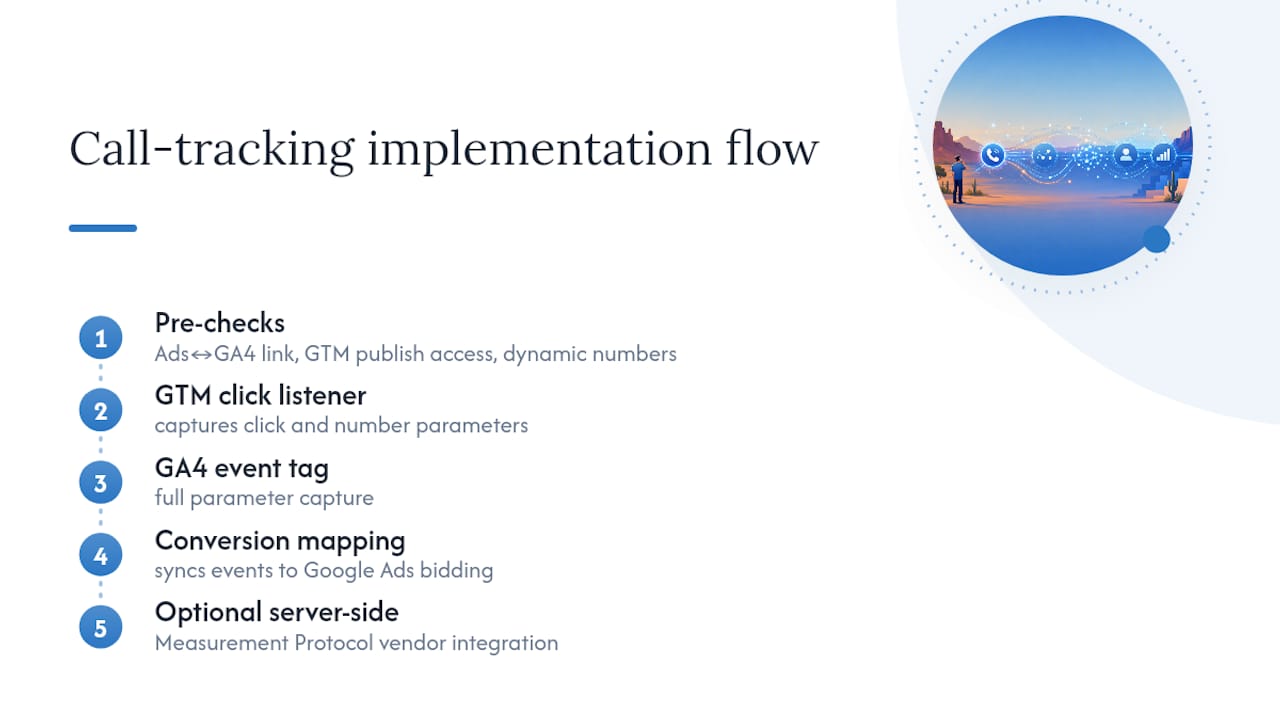
DNI assigns a tracking number at the visitor session level, not the page view. That distinction matters. If a visitor clicks your Google Ad, browses three pages, then calls, the attribution stays pinned to the original ad source throughout the session. Without session-level tracking, multi-page journeys break the attribution chain.

Infographic illustrating call tracking process steps

One technical detail most guides skip: number pool sizing. If two visitors arrive simultaneously and your pool only has one tracking number, both calls get logged to the same number, corrupting your data. Your pool needs to cover your maximum expected concurrent visitors, not just your average.

Script placement matters too. Place your DNI script in the HTML head tag rather than the body or footer. A script loaded late causes the default number to flash visibly before being replaced, which degrades both user experience and data quality.

Setting up call tracking in Google Ads

  1. Enable Call Reporting at the account level under Account Settings. This tells Google to assign forwarding numbers to your ads.
  2. Install the Google tag on every page of your site. Use Google Tag Manager if you want to avoid touching code directly.
  3. Add the phone snippet to pages displaying your business number. This is the code that triggers the number swap when a visitor arrives from a Google Ad.
  4. Configure a call conversion action in your Conversions settings. Set the minimum call duration that counts as a conversion for your business.
  5. Enable call recording (US and Canada only). Google AI analyzes call recordings to evaluate lead quality beyond simple duration, which sharpens automated bidding decisions.
  6. Verify forwarding numbers are live by running a test click from your ad and confirming the swapped number appears.

Eligibility and privacy notes: Google forwarding numbers are available in the United States and a range of other countries. Caller ID still works for routed calls. Google Ads charges only when a user clicks the forwarding number shown in the ad, not when someone manually dials it. If you prefer to show your own business number or use a third-party platform, you can disable Call Reporting in account settings without losing ad functionality.

Troubleshooting checklist:

  • Number flicker on load: move the script higher in the <head>.
  • Attribution gaps: check that the Google tag fires on all pages, not just the homepage.
  • Pool collisions: increase your number pool if concurrent traffic spikes during campaigns.
  • Conversion undercounting: confirm your minimum call duration threshold is realistic for your sales cycle.

What are the real benefits of call tracking in ad campaigns?

Phone calls convert at a higher rate than digital form submissions for most service businesses. Tracking them closes the attribution gap between your online ad spend and the offline conversations that actually close deals, giving you a complete picture of ROI rather than a partial one.

The practical gains stack up quickly:

  • Accurate attribution: Know which campaign, ad group, and keyword drove each call. Stop funding ad groups that generate clicks but no conversations.
  • Smarter bidding: Google’s automated bidding strategies improve when fed call conversion data alongside form and purchase conversions.
  • AI-powered lead scoring: AI call scoring systems analyze conversation content and sentiment, flagging high-intent callers in real time rather than waiting for a sales rep to manually qualify them.
  • CRM enrichment: Every call can auto-create or update a contact record, tag the marketing source, and trigger a follow-up task.
  • Multi-channel clarity: Third-party platforms extend attribution beyond Google Ads to cover Facebook, email, direct mail, and organic search in a single dashboard.

Common challenges: Many teams underestimate the setup time for CRM integrations, or set call duration thresholds too low, counting short wrong-number calls as conversions. Start conservative on thresholds and adjust based on actual sales data.

Pro Tip: Set up custom AI outcome fields in your call tracking platform to detect specific phrases like “schedule an appointment” or “what’s your price?” These signals are far more predictive of deal quality than call duration alone, and they feed directly into bid optimization.

Which Arizona providers offer call tracking for your ad campaigns?

The providers below serve the Arizona market with varying degrees of specialization. Some are full-service digital agencies; others focus on specific niches like AI-driven local lead generation or data analytics.

Provider Services Offered Specializations Local Presence Pricing & Contracts Rating
GPS and Track GPS and tracking systems, supplier services GPS/tracking hardware and solutions Scottsdale area Not publicly listed 4.8★ (105 reviews)
Cyber Controller AI Local Dominance, Google Maps marketing, AI Lead-to-Job automation, Generative SEO Local service businesses, Phoenix metro lead generation Phoenix metro Month-to-month after 90-day initial period 5★ (28 reviews)
WebTechs.Net Full-service SEO, PPC management, web design, local SEO, Google Maps marketing Contractors and local businesses, affordable SEO Scottsdale, AZ Project-based and monthly retainers 4.8★ (19 reviews)
Ads With Excellence Advertising services Professional ad services, local reputation Glendale, AZ Not publicly listed 5★ (6 reviews)
Az Mobile Ads Mobile and digital advertising Mobile advertising, Phoenix-area campaigns Phoenix, AZ Not publicly listed 3★ (8 reviews)
eDataTalk Data analytics, conversion tracking support Marketing analytics, call tracking insights Phoenix, AZ Not publicly listed 5★ (2 reviews)

Cyber Controller is the strongest fit for local service businesses in the Phoenix metro that want AI-driven lead generation without a long-term contract commitment. Its Lead-to-Job automation and Google Maps focus are genuinely differentiated, not just marketing language.

Webtechs suits contractors and small-to-mid-sized businesses that need call tracking integrated into a broader Scottsdale SEO and PPC strategy. The agency has managed PPC campaigns and local SEO since 1997, and its client testimonials document measurable traffic and lead growth.

GPS and Track operates as a supplier of GPS and tracking hardware in the Scottsdale area. It serves businesses needing physical tracking systems rather than ad attribution software.

eDataTalk is worth considering when you need analytics support to interpret call tracking data alongside other conversion metrics. It is a thin-profile provider with limited public detail, but its local Phoenix presence and analytics focus make it a reasonable complement to a primary tracking platform.

Ads With Excellence and Az Mobile Ads are local advertising services. Neither publishes detailed service breakdowns publicly, so treat them as options to evaluate directly for fit.

How do you choose the right call tracking service?

The decision comes down to what you actually need to measure and how much of the setup you want to own.

Questions to ask before committing to a provider:

  • Does the platform support DNI for every channel you run ads on, including paid search, social, and display?
  • How does it integrate with your CRM? Native connector or API only?
  • What is the pricing model: monthly subscription, per-call, or per-minute? Pricing structures vary significantly and affect cost predictability at different call volumes.
  • Is the contract month-to-month or annual? What are the exit terms?
  • Does it offer AI call scoring and transcription, or just duration-based reporting?
  • Can it handle multi-channel attribution across both online and offline sources?

Match the platform to your campaign complexity. A single-location business running Google Ads can start with Google’s native call reporting at no additional cost. Once you need cross-channel attribution, CRM sync, or AI lead scoring, third-party platforms like CallRail, CallTrackingMetrics, or Invoca earn their subscription fees.

Budget matters too. Start with your highest-spend channel, prove the attribution model works, then expand tracking to secondary channels. Trying to instrument everything at once usually means instrumenting nothing well.

Professionals discussing call tracking services in office

Why tracking missed calls and call duration changes your ROI picture

Duration and outcome data are where call tracking shifts from a reporting tool to a revenue tool. A 12-second call is almost certainly a wrong number or a hang-up. A 4-minute call from someone who found you through a specific ad group is a qualified lead. Treating both as “calls” in your conversion data produces a misleading cost-per-lead figure.

Hands holding phone showing call durations

Missed calls deserve equal attention. If a campaign drives 40 calls on a Tuesday afternoon and your team misses 15 of them, that is not a tracking problem. That is a staffing and response-time problem that your call data just surfaced. Many platforms flag missed calls in real time and can trigger automated follow-up sequences via SMS or email.

Voicemail tracking adds another layer. A caller who leaves a voicemail is expressing higher intent than one who hangs up immediately. Segmenting voicemails by source lets you identify which campaigns attract callers willing to wait, a signal that often correlates with purchase intent.

The practical move: build separate conversion actions in Google Ads for calls over 2 minutes, missed calls, and voicemails. Weight them differently in your bidding strategy. That granularity is what separates a campaign optimized on real revenue signals from one optimized on raw call volume.

Webtechs brings SEO and PPC together for Arizona businesses

If the providers compared above feel like a lot to evaluate on top of running your actual campaigns, Webtechs offers a different path. Rather than purchasing a standalone call tracking subscription and managing it yourself, you get professional web design and full PPC campaign management from a Scottsdale agency that has been doing this since 1997.

Webtechs

Webtechs handles the setup, the tracking integration, and the ongoing optimization, so your team focuses on closing the calls rather than debugging tag fires. For contractors, local service businesses, and small-to-mid-sized companies across Arizona, that managed approach often costs less in total than a DIY stack of tools plus the time to run them. Check the website design price list to see current service tiers, or review the client portfolio to see what results look like in practice.

Key Takeaways

Call tracking for ads works when DNI, proper number pool sizing, and conversion thresholds are configured correctly from the start.

Point Details
DNI is session-level, not page-level Tracking numbers follow the visitor across pages, preserving attribution through multi-page journeys.
Number pool sizing prevents data corruption Your pool must cover maximum concurrent visitors, not average traffic, to avoid reuse collisions.
Script placement affects data quality Place the DNI script in the HTML <head> to prevent number flicker and protect tracking accuracy.
Segment by call type for real ROI Track missed calls, voicemails, and call duration separately to build conversion actions that reflect actual revenue signals.
Webtechs manages the full stack For Arizona businesses wanting PPC, SEO, and tracking handled together, Webtechs offers managed campaigns without the DIY overhead.

Article generated by BabyLoveGrowth

0
Written by webtechs

What Is A Good Domain Rating?

What Is A Good Domain Rating

Domain Rating is a third-party metric that eveluates a particular domain’s ability to rank highly on Google. It is undoubtedly one of the most important measurements a marketer will use to document SEO performance. What is a good domain rating, though, and how can it impact your ability to outrank your competitors?

What Does Domain Rating Mean?

Domain Rating (DR) is a measurement that was created by Ahrefs, an SEO evaluation platform that tracks website rankings, as well as backlinks. Domain Authority, which is quite similar to Domain Rating, is another great way to track SEO performance.

It’s no secret that Domain Rating is strongly correlated to a website’s ability to rank well on Google.

How Does Domain Rating Work?

Domain Rating is a proprietary algorithm responsible for measuring a website’s overall link popularity. It will take into account the quality of the domains linking to your website by measuring the amount and quality of the domains linking to each of them.

Next, it will rank-order the websites, distributing them into 100 percentiles. For example, a website with a Domain Rating of 90 linking to your website is much more beneficial than receiving a link from a website with a Domain Rating of 10.

Today, there are only a couple websites with a DR above 95, including Google, Facebook, and Amazon. On the other hand, there are millions of websites that feature a DR of 10 and under. Needless to say, increasing your DR will be a methodical, long-term project.

What Is Considered A Good Domain Rating?

Let’s take a quick look at DR and what this measurement ultimately allows a website to do on in terms of ranking on Google.

Domain Rating Google Rankings Impact
Under 5 Ability to rank top 3 for keywords in 0% of industries
5-20  Ability to rank top 3 across 12% of industries
20-35 Ability to rank top 3 across 27% of industries
35-50 Ability to rank top 3 across 39% of industries
50-75 Ability to rank top 3 across 73% of industries
75 and above Ability to rank top 3 across 95% of industries

What Else Determines Rankings On Google?

Search results will not be perfectly ordered based on DR. There are three other major ranking factors, all detailed below.

Industry Expertise

Industry or niche expertise is a measure of the website’s specialization in a specific topic. In most cases, a 30-page website on one topic would be considered a niche expert. Meanwhile, a 500-page website on the same topic may be considered a generalist.

Google will value what an expert has to say on a topic over a generalist.

Page Optimization

Technical factors, such as mobile-friendliness, speed, and safety, are also prerequisites to ranking. Technical issues that impact the user experience will cause rankings to plummet until the problems are fixed.

Engagement

Google will know when an audience is engaged on your website, measuring time on page and user behavior. “High engagement” is considered when a page attracts and keeps a user’s attention for more than one minute.

In this event, the user will also scroll down the page and interact with other elements of the site.

Conclusion

While DR is undoubtedly correlated with a website’s traffic, it’s not best to focus your entire efforts on increasing this metric.

Google ranks pages, not websites, meaning it’s best to always focus on creating high-quality content. When high-quality content is produced, you can acquire quality backlinks based directly off said content. Both DR and your search traffic will grow naturally over time as a byproduct of your focus on producing the best content possible.

Content Writing

Are You Looking For SEO Services?

For a Free SEO consultation in Scottsdale, Phoenix, Tempe, or Mesa, Arizona areas, contact WebTechs.Net today.

0
Written by webtechs

Cost Effective SEO: 7 Best Strategies

Cost Effective SEO Strategies

These days, impactful SEO does not have to come with a hefty cost. Let’s take a look at some of the best cost-effective SEO strategies below to help build your online brand into a long-term success!

What Are The Best Cost-Effective SEO Strategies?

Whether you are simply an individual with a blog or you’re starting a small business, the strategies outlined below can give you the online results you desire without a massive marketing budget. Check out 7 of the best cost-effective SEO strategies and how to properly implement them into your website.

1. Improve/Update Existing Content

One of the easiest cost-effective ways to improve your SEO is by improving and updating the content your site already has. It’s always a good start to update and optimize existing landing pages and blog posts to make them more search-engine friendly.

Improve your existing content to make it more relevant to your target audience. You can begin updating all the content on your site before attempting to create brand new content.

How to improve your existing content:

Identify any underperforming pages. Check for things like weak meta descriptions and outdated content.
Add more internal links. Increase your internal linking to encourage your audience to find more helpful information within your site.
Update old content. Update your site’s information and create more engaging content for your audience.

2. Optimize For Local SEO

If your business is targeting a specific geographic area, it’s wise to optimize for local SEO. This can result in a significant impact on your visibility without the need for a huge SEO budget.

Local SEO methods can help you outrank your competition. Target searches related to your area, and you could see a steady flow of traffic courtesy of nearby customers.

How to optimize for local SEO:

Claim and optimize your Google My Business profile. Make sure all your business details are accurate and up to date.
Use local keywords in your content. Local keywords should be placed in your site’s content, meta descriptions, and title tags to help search engines understand your services.
Ask for reviews. Always encourage satisfied customers to leave online reviews as you strive to build trust in your community.

3. Acquire Backlinks

Time and time again, backlinks remain one of the most important ranking factors for SEO. You may be able to purchase a bundle of high-quality links, but thankfully there is another way to build backlinks without spending money.

You can either acquire these valuable backlinks through quality content, or you can reach out to relevant websites to offer content in exchange for links.

How to build your backlinks:

Identify websites that relate to your industry. Reach out to these sites and offer to contribute content in exchange for links.
Create valuable original content. Useful content, such as how-to guides, can entice other sites to link to your site.

4. Utilize Social Media For Organic Traffic

Social signals, such as likes and shares, may not directly impact your rankings, but social media can certainly play a role in driving much wanted organic traffic to your site.

Sharing your original content on various social media platforms can help you engage with an audience. This can result in building brand awareness without ever paying for ads.

How to use social media to bring in traffic:

Share your content. Regularly post your content on social media platforms like Facebook, Twitter, Instagram, and LinkedIn for more online exposure.
Encourage your audience to share your content. This can increase both your visibility and traffic.
Be responsive. Always respond to comments and start conversations that is relevant to your audience.

5. Prioritize User Experience

The number one priority for Google is to provide users with the information they are searching for. If someone does a search and clicks on the first link to find the appropriate information, that helps build trust in Google and its overall rankings.

When a user clicks on a link and stays on the same website for a good amount of time, this signals to Google that the site is very helpful. While Google has never said outright that user time on a page is a ranking factor, it’s no secret keeping users on your site for as long as possible is a great thing.

A user that clicks on your post and finds helpful information is more likely to stick around and search throughout your site. Longer blog posts tend to rank the highest nowadays, with the average first-page result post on Google totaling almost 2,000 words long each.

When an audience reads a blog post that they enjoy, they’re more likely to share it, which can drive your website’s traffic up.

When you get lots of traffic and repeat customers, this shows Google that people like your site and will ultimately raise your authority level within their algorithm. This is great from an SEO perspective, but it’s even better for the overall success of your website.

How to focus on user experience:

Ensure easy navigation. Make your website easy to use with simple buttons, menus, and calls-to-action.
Prioritize mobile users. Make sure your site is responsive and performs well for all device types.
Focus on organization. Your site’s layout should be clean and organized, making life easier for your audience.

6. Target Long-Tail Keywords

Most people that begin their SEO journey will target specific keywords related to their industry or business. For example, if you own an auto repair shop you might target terms like “auto repair” or “car ac repair”. While this is a wise idea, it might take you a long time to reach the top spot unless you own the largest auto shop in the country.

The SEO world is super competitive, but there is one technique new bloggers can approach for an advantage. The best bet for newer brands is to target longer, more specific keywords. These are keywords your target audience is searching for, directly related to your business offerings.

These are called long-tail keywords and they are a crucial tool for new bloggers to use. They are the ideal terms to target in a blog post. Instead of “auto repair”, you could create a post called, “what is the average labor rate for auto repair”.

While these keywords will not pull in as much traffic to your site as shorter keywords, you could still end up with a larger audience for one single long-tail blog than several others.

How to target long-tail keywords:

Find industry-related keywords. Identify and target long-tail keywords that have less competition.
Create content around these keywords. Your target audience has questions; it’s your job to provide in-depth solutions.

7. Optimize Technical SEO

You know on-page and off-page SEO, but what is technical SEO? Technical SEO is all about ensuring search engines have no problem crawling, indexing, and understanding your site.

It’s no secret good technical SEO can get quite complex, but thankfully there are several cost-effective ways to improve your site without a large budget.

How to optimize your site’s technical SEO:

Ensure quick load time. Optimize image sizes and eliminate unnecessary scripts.
Check if your site is mobile-friendly. You can use Google’s Mobile-Friendly Test to see how your site performs.
Simplify the URL structure. Short and descriptive URLs tend to rank higher in search results.

Conclusion

The cost-effective SEO strategies detailed above can ultimately help your site rank higher, attract traffic, and build a loyal audience without spending a fortune. Update your site, optimize for local SEO needs, use social media, and watch as you boost your presence online.

SEO is a long-term investment, and even a small budget that puts the right strategies in place, can yield meaningful results. For more tips, contact the experienced SEO experts at WebTechs today!

SEO Services

Are You Looking For Cost-Effective SEO Services?

For a Free SEO consultation in Scottsdale, Phoenix, Tempe, or Mesa, Arizona areas, contact WebTechs.Net today.

Written by webtechs

Does Blogging Help Seo?

Does Blogging Help Seo

Starting a blog is one of the easiest ways to directly increase your chances of ranking high in the search engines. Let’s take a look at some common reasons why a blog is so helpful for SEO.

How Does Blogging Help SEO?

Consistent blogging is great for SEO purposes, as it helps with multiple ranking factors. When you regularly post high-quality blogs on relevant topics, it can make a huge difference in your site’s overall performance.

Blogging helps you reach an audience and perform well in the search engines. Let’s look at a few reasons why blogging can boost your website.

1. Internal Linking Opportunities

A large portion of SEO depends on linking. Internal links are the easiest for any blog since you can create them yourself. Failing to include internal links in your blog posts is one of the easiest SEO mistakes a site can make.

While there will undoubtedly be many good opportunities for internal linking on your site’s main pages, the options will really grow once you start a blog. As you create more pages, you add more natural opportunities to link to some of your other pages.

Every time you do this, you can strategically use the anchor text to let Google know you are intentionally strengthening the page and/or keywords you are linking to.

2. Keeps Your Website Up To Date

This is one of the biggest reasons why people continue to blog today. As a user, when you click on a website that needs to update information, you may move on elsewhere with your search. You always want your website and its content to be up to date.

Google never wants to send users toward outdated information. Websites that are updated regularly signal to Google that the sites are alive, well, and offering the highest quality content. It will also give the search engine algorithms more reason to index your site as often as possible.

Unless business offerings or hours change frequently, you might not update your home page that often. For this reason alone, blogging can be the most practical tool for adding fresh, new content to your site on a regular basis.

3. Blogging Can Target SEO Optimized Keywords

Most people that begin their SEO journey will target specific keywords related to their industry or business. For example, if you own an auto repair shop you might target terms like “auto repair” or “car ac repair”. While this is a wise idea, it might take you a long time to reach the top spot unless you own the largest auto shop in the country.

The SEO world is super competitive, but there is one technique new bloggers can approach for an advantage. The best bet for newer brands is to target longer, more specific keywords. These are keywords your target audience is searching for, directly related to your business offerings.

These are called long-tail keywords and they are a crucial tool for new bloggers to use. They are the ideal terms to target in a blog post. Instead of “auto repair”, you could create a post called, “what is the average labor rate for auto repair”.

While these keywords will not pull in as much traffic to your site as shorter keywords, you could still end up with a larger audience for one single long-tail blog than several others.

Keywords

4. Blogging Can Improve Users Time On Page

The number one priority for Google is to provide users with the information they are searching for. If someone does a search and clicks on the first link to find the appropriate information, that helps build trust in Google and its overall rankings.

When a user clicks on a link and stays on the same website for a good amount of time, this signals to Google that the site is very helpful. While Google has never said outright that user time on a page is a ranking factor, it’s no secret keeping users on your site for as long as possible is a great thing.

A user that clicks on your post and finds helpful information is more likely to stick around and search throughout your site. Longer blog posts tend to rank the highest nowadays, with the average first-page result post on Google totaling almost 2,000 words long each.

5. Builds A Connection With Your Audience

While this is not a direct ranking factor, it is absolutely something that contributes greatly to linking factors. When an audience reads a blog post that they enjoy, they’re more likely to share it, which can drive your website’s traffic up.

When you get lots of traffic and repeat customers, this shows Google that people like your site and will ultimately raise your authority level within their algorithm. This is great from an SEO perspective, but it’s even better for the overall success of your website.

People in your target audience will visit your site, connect with its content, and hopefully become regular followers of your blog.

Conclusion

Earning backlinks is one of the hardest parts of SEO. When you start to acquire backlinks, Google will recognize your site as trustworthy and authoritative. Backlinks are a crucial part of building your blog and site. A regularly-updated blog provides more opportunity to acquire these backlinks.

Blogging is a great way to keep your website fresh, build an audience, and find success in the SEO world. Once your blog really gets going, you’ll start to see some desirable backlinks coming your way.

Are You Looking For SEO Content Writing Services?

For a Free SEO consultation in Scottsdale, Phoenix, Tempe, or Mesa, Arizona areas, contact WebTechs.Net today.

0
Written by webtechs

What Is Content Writing?

Copywriting Vs Content Writing

Not too long ago, copywriters were always used for any and all marketing copy needs. Nowadays, many companies are opting for long-term results achieved by content writers. Find out why a content writing service could suit your needs below!

What To Know About Content Writing

The biggest difference between the two styles is content writing being used to inform, educate and entertain, rather than focusing solely on generating sales. Content writers are used for the creation of blog posts, social media posts, emails and books, among other various writing tasks. The primary goal of this type of content is to engage a targeted audience with entertaining and informative pieces.

One of the largest advantages to hiring content writing services is that these writers are so stealth at storytelling that they can write without mentioning your brand and still attract customers.

Content writers have the ability to convert readers into potential customers. These blogs or posts are generally free to consumers, so make sure your writers are SEO experts, as well.

Copywriter Tasks:

  • Advertisements
  • Email Campaigns
  • T.V./Radio Scripts
  • Sales Letters
  • Catalogs
  • Web Page Content
  • Social Media
  • Postcards
  • Promotions
  • Slogans

Content Writer Tasks:

  • Blogs
  • Articles
  • Features
  • Email Newsletters
  • Print Magazines
  • Books
  • Press Releases
  • Podcasts
  • White Papers
  • Film

Content Writing Vs Copywriting

There are many differences between the services provided by content and copywriters. Content writers will write long-form copy, while copywriters always draft short-form copy.

The goal for content writers is to drive organic traffic. Meanwhile, copywriters are looking for immediate results and sales. Below are three of the biggest differences between the two forms of writing.

Copywriters Sell, Content Writers Inform

A copy writer will be very direct, selling right to your target audience. A content writer, meanwhile, will inform, educate and entertain readers. Simply put, copywriting is utilized for sales, period.

Content writing can attract an audience, keep them engaged and eventually turn them into loyal customers. Think of copywriters for your short-term sales goals, while content writers can help grow your brand in the long run.

Content Writers Create Future Sales

Undoubtedly, content writers will lay the groundwork for your company’s future sales. Even though content writers are not focused on sales, they are still concentrating on selling a product or brand to an audience.

Customers want to trust a product/brand, while the company looks to build that trust through solid written content. Your online presence will massively increase through a successful blog campaign.

Content Writers Focus On SEO

Content writers are typically hired to drive inbound traffic. This means content writers need to have SEO expertise. These writers will choose topics for blogs based on keywords your company wishes to rank for, and eventually, turns into sales opportunities.

Content writers will optimize their posts with a focus keyword that will appear in the headline, headers and throughout the body of the page.

Content Writing

Content Writing Services In Scottsdale

For a Free SEO consultation in Scottsdale, Phoenix, Tempe, or Mesa, Arizona areas, contact WebTechs.Net today.

Written by webtechs

Website Development Timeline

How Long Does It Take To Build A Website

Who doesn’t need a Website Development Timeline? Building a new website for a small to mid-size business will take anywhere from 3-6 weeks to complete. It’s no secret that building a site from the ground up can take time, so make sure you are prepared for all the steps that come with this project.

Building A Website In 3 Steps

How long your website takes to build can vary based on several factors, including the size of the company building the site and the scope of your project. Typically, any new build can be broken down into a three-step process.

Step 1. Plan And Strategy Development

Preparation is a vital part of any website development. Knowing what you want your website to look like and what its goals should be is half the battle with this process. Without this information, the website development team you hire has to start from scratch, which will only extend the project timeline. Any experienced designer should be able to offer ideas that you might not come up with in the original mockup.

For instance, the development team could explain why a particular feature may not work within your site’s design. They can offer alternatives that make the mobile user experience better. Always consider the insight these professionals can offer, but ultimately final design and features are your call.

The best case scenario for this timeline of the process is a total timeline of 1-2 weeks. This step will generally consist of a lot of back and forth over email, phone or even video calls. Top developers will always ask questions and offer feedback throughout this step.

Estimated Timeline: 1-2 weeks.

Step 2. Design And Develop

Once the plan of action is in place, it’s time to start on the website’s design. In most cases, the dedicated designers will be able to provide you with detailed mockups of how your website will look before it goes live. Mockups are provided for client approval before beginning the next step of the process. Since development has yet to begin, any suggestions or revisions shouldn’t set the process back much.

Be sure to ask for mockups of all pages during this step; not just the homepage. Layout is very important for most new websites, and at this stage of development the site will really start coming to life.

The development stage is where the magic truly happens. Your hired team will now take the mockups and turn them into a fully working website. This part of the process can take a little bit of time, as setbacks can occur. Either way, the development of site shouldn’t take more than a couple weeks, overall. Most teams will overestimate the needed time to give themselves breathing room for any hiccups along the way. Good developers should always keep customers in the loop, even during this step.

Estimated Timeline: 1-2 weeks.

Step 3. Final Review

Every site will undergo one final round of revisions before going live. You’ll want to take a close look at how everything within the site works. Generally, there are always corrections or adjustments to make during the final review. Any issues should be caught and fixed before the site is finalized. You can expect this stage to take no longer than a few weeks.

Estimated Timeline: 1-2 weeks.

Building A Website

How Much Does It Cost To Build A Website?

One of the first steps is deployment time. A simple website built for small to mid-size businesses can cost between $1,000-$2,000. The first step in the process involves purchasing a domain name. Most domains come with a simple annual fee of $14.99, according to MonsterInsights.

Website Development Timeline In Scottsdale 

Located in Scottsdale, AZ, WebTechs.net has been providing website design and hosting services in the area since 1997. The hosting services at WebTechs guarantee that servers will never become overloaded. Additionally, dedicated fiber-optic lines, advanced security and unlimited space is provided to customers.

Constant monitoring and maintenance is just part of the package that gives your site little to no downtime whatsoever. Keep your local business in the area with WebTechs serving all your online needs. These packages are perfect for small to mid-sized businesses.

Are you looking for more than website hosting? With WebTechs you will also be able to find expert content writing services and an SEO campaign that best serves your company/product goals. Top-notch web design will help your site stand out above the competition! We can help you with a Website Development Timeline. to better suit your needs. Whether you are looking for custom website design, a re-design or design for your personal and/or ecommerce site, WebTechs is here to help. Don’t just take our word for it, though. Check out these reviews from some of current customers right here.

WebTechs.Net In Scottsdale

For a Free SEO consultation in Scottsdale, Phoenix, Tempe, or Mesa, Arizona areas, contact WebTechs.Net today.

Website Hosting Cost In Scottsdale
Written by webtechs

Best Website Hosting For Small Business

Website Hosting Cost In Scottsdale

For many companies, a website is at the core of their digital marketing efforts. Breakdown and Comparison: Godaddy and Network Solutions have fairly similar services and features they offer while WebTechs.Net offers a list of features included with their hosting that almost no company online offers. Along with Unlimited storage space and email accounts you get Website maintenance which includes: WordPress Updates, Software Updates, Graphic Changes and Creation, Content Changes, Source code changes and auto backups of your site that goes back 10 days.

If your site ever crashes just give WebTechs a call and they can put your site back to how it was before the crash. There pricing is much more expensive but is taylored towards business owners who don’t like to make site changes themselves or don’t want to hire a website management company. Webtechs combines website management with web hosting for simplicity of use for the customer.

Website Hosting Introduction

Just about every business-even if it’s a small company with 1 employee-needs a website, and if even if you’re not a business owner you might still want a personal site or blog. Thanks to the plethora of services and options available, getting a website started with your own domain name (www.yoursitesname.com) is easy and affordable.

One of the first steps in building a website is buying your domain name and find a reliable Web host (the company who will store your website files on their server). Web hosts have different options, bandwidths, storage capacities, email features, prices and applications.

What Are Hosting Servers?

While web hosts have the availability to offer dedicated hardware and virtual private servers, this list focuses on shared packages (the most affordable and common way to set up a website). For you information, though, it doesn’t matter in this case because you will be the only one with access to your files, you can’t access other peoples files or vice versa.

Your Web Hosting Needs/Requirements

Before you decide which web hosting package to buy, you need to figure out what requirements you need. The shared servers are affordable, but if you need performance and speed, you need to be looking at virtual or dedicated servers.

Starter Hosting Packages

Most web hosts offer limited features for their starter packages, and then expand upon that for higher-tier plans. Read the small print to make sure the plan you select offers the requirements you need.

If you need a site builder (easy to use software or online applications that help you build sites easily – Not SEO friendly) to design your Website, make sure that the low-cost web host you are selecting comes with a site builder (if not you can add it on at an extra cost, usually around $5 bucks a month).

How Much Does Website Hosting Cost?

Here is a quick list of typical website hosting costs:

  • Website hosting: $15-$45
  • Domain name purchase: $0.95-$12
  • SEO: $500-$2,500 (per month)
  • Design: $2,000-$9,000
  • Maintenance: $400-$1,200
  • Website marketing: $2,500-$12,000 (per month)

*All costs will vary based on specific company needs and the provider chosen to host the website. Contact the experienced team at WebTechs for more information!

Not All Hosting Packages Are The Same

Although, these packages seem very similar, they are not the same. Some are more security optimized, offering antimalware and antispam tools. Others may offer a variety of email marketing tools. Before selecting a plan, consider how much you expect your company to grow in the future or just select a plan that is 1 year or less.

WebTechs.Net In Scottsdale

For a Free SEO consultation in Scottsdale, Phoenix, Tempe, or Mesa, Arizona areas, contact WebTechs.Net today.

1 2 3 4 5