

Arizona Businesses: 6 Step Move to Subfolders Without Losing Rankings

For most small and mid-sized businesses, host your blog, service pages, and marketing content in subfolders like example.com/blog. Reserve subdomains for cases that need real technical separation, like a customer portal or a different-language site. Google says its systems can crawl and rank either structure, but real-world backlink patterns and Search Console verification quirks mean subfolders usually consolidate authority faster and with less babysitting.
TL;DR:
- Subfolders generally consolidate backlinks and ranking signals, leading to faster authority growth than subdomains that tend to spread those signals across multiple properties.
- Small businesses should place content like blogs, services, and location pages in subfolders to maximize SEO benefits and simplify analytics setup.
- Subdomains require additional DNS, verification, and maintenance efforts, making them suitable only for distinct applications, language markets, or technical separation.
- Migrating content from a subdomain to a subfolder or vice versa involves careful URL mapping, extensive redirects, and ongoing monitoring to avoid ranking losses.
- For most local businesses, using subfolders is the safer default for boosting search visibility, reserving subdomains for genuinely separate technical or regional needs.
Table of Contents
- Subdomain vs Subfolder: A Side-by-Side Comparison
- Does Google Treat Subdomains as Separate Sites?
- Pros, Cons, and When Each Structure Wins
- What Are the Technical Trade-Offs Behind the Decision?
- How Do You Migrate or Consolidate Without Losing Rankings?
- What Should Arizona Small Businesses Actually Do?
- The Bottom Line on Subdomains vs Subfolders
- What Local Business Owners Get Wrong Most Often
- Get Your Site Structure Fixed by People Who Do This Daily
- Sources
- FAQ
Subdomain vs Subfolder: A Side-by-Side Comparison
A subdomain sits in front of your root domain, like blog.example.com. It functions as a distinct address, sometimes even living on different hosting or a different content management system entirely. A subfolder, sometimes called a subdirectory, is a path hanging off your existing domain, like example.com/blog, and it is technically part of the same site from top to bottom, according to Impact Plus.
That distinction drives everything else. Here’s how the two stack up on the factors that actually matter for a business owner deciding where to put new content:
- Link equity: Subfolders pool backlinks and ranking signals under one root domain; subdomains often need to earn their own separate backlink profile.
- Analytics setup: A single subfolder site typically needs one Google Analytics property; each subdomain often gets tracked and verified independently.
- Search Console verification: Subfolders live under one verified property; subdomains generally require their own separate verification.
- Setup complexity: Subfolders usually require no new DNS work; subdomains often mean new DNS records, sometimes new hosting, and occasionally a new certificate.
- Branding flexibility: Subdomains allow a different look, tech stack, or team to run that section without touching the main site’s code.
None of this means subdomains are a mistake. It means they come with maintenance costs that a subfolder simply doesn’t ask for.
Does Google Treat Subdomains as Separate Sites?
Google’s own engineers, including John Mueller, have said publicly and repeatedly that Google can index and rank content on both subdomains and subfolders. In principle, the structure itself isn’t a ranking factor. In practice, the way each structure gets built and linked changes the outcome.
Search Console is where the gap shows up first. A subfolder lives inside one verified property, so every page’s data, links, and indexing status roll up into a single dashboard. A subdomain typically needs its own separate property verification, according to Search Engine Journal, and that separation is exactly why site owners perceive subdomains as “different sites” even when Google’s algorithms understand they’re related.
That perception has a real cost. Case studies and cross-industry analyses consistently show subfolders consolidating backlink authority under the root domain, which tends to produce faster and stronger ranking gains than the same content published on a subdomain, per Semrush’s research on the topic. Every backlink pointed at a subfolder page counts toward your one domain’s overall authority. A backlink pointed at a subdomain often counts toward that subdomain’s own, separate authority score, and depending on how search engines currently weigh cross-subdomain signals, that authority may or may not fully transfer back to the root.
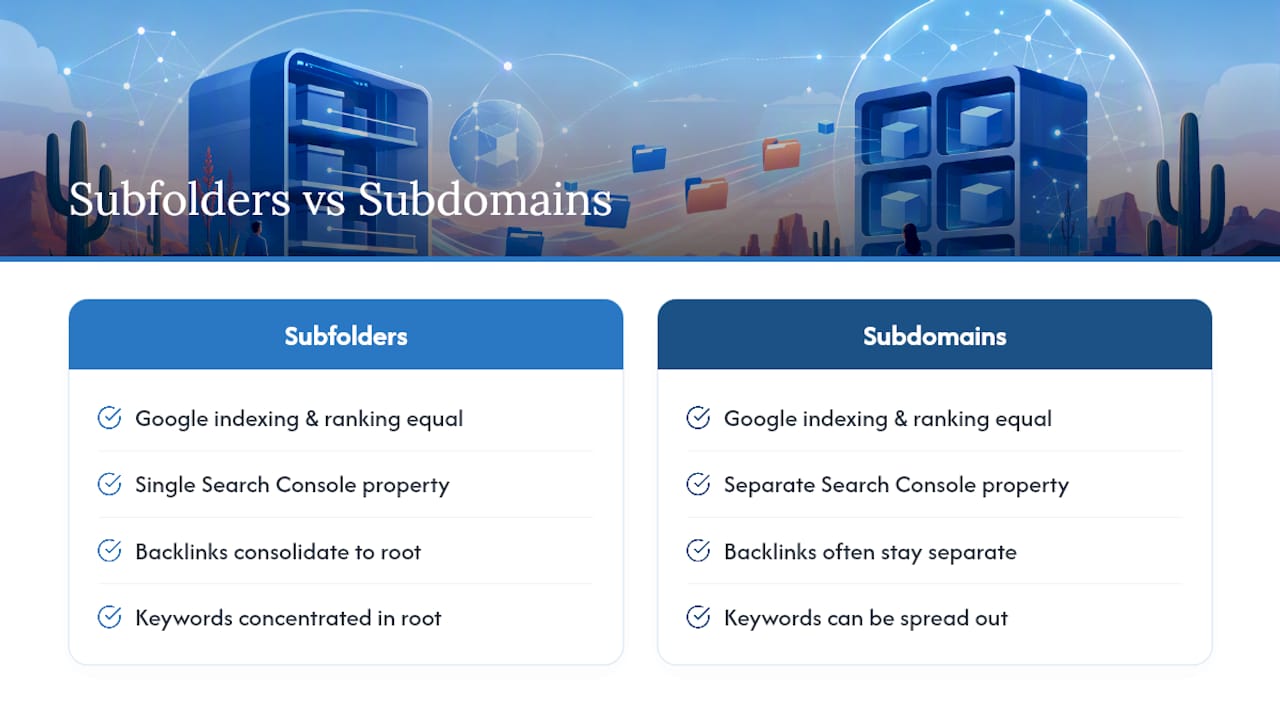
Cloudflare’s engineering team frames it plainly: subdirectories concentrate keywords and link equity in one place, while subdomains can spread those same signals across what search engines may treat as multiple distinct properties, according to Cloudflare’s guide on the subject. If your goal is building one strong, authoritative domain, that spread works against you.
Pros, Cons, and When Each Structure Wins
Choosing between the two comes down to what you’re actually trying to build. Here’s how the trade-offs sort out in practice:
- Subfolders win for marketing content and lead generation. Blogs, service pages, location pages, and case studies belong at example.com/services because every page adds to one domain’s authority instead of starting from zero.
- Subfolders win when you want simple, unified reporting. One Search Console property, one analytics setup, one backlink profile to monitor. That’s less overhead for a small marketing team or a solo owner managing their own site.
- Subdomains win for genuinely separate applications. A SaaS product living at app.example.com, an API at api.example.com, or a documentation portal at docs.example.com often need different code, different security rules, and different deployment schedules than the marketing site.
- Subdomains win for distinct language or regional markets. A business running fr.example.com alongside example.com can isolate translation, hosting, and even legal compliance by market.
- Subdomains sometimes fit help centers and static asset hosts. A help.example.com knowledge base or a cdn.example.com asset host can justify the separation when the content genuinely behaves differently than your core site.
Notice the pattern: subfolders make sense for anything meant to rank and build authority. Subdomains make sense for anything that needs to function differently, not just look different.
What Are the Technical Trade-Offs Behind the Decision?
The SEO debate gets most of the attention, but the technical setup behind each choice is what determines your actual cost and maintenance burden.
- DNS and hosting: A subdomain typically needs its own DNS record, usually a CNAME pointed at new hosting. A subfolder rides on your existing domain’s DNS, no new record required.
- SSL certificates: Modern wildcard certificates cover most subdomains cheaply, but some setups still require separate certificate management per subdomain, adding a small recurring cost.
- Reverse proxies: You can run a completely different tech stack under a subfolder using a reverse proxy, letting a modern app framework sit behind example.com/app while looking like part of the main site to visitors and search engines. Cloudflare Workers is one tool built specifically for this kind of routing.
- Cookies and sessions: Cookies scoped to a subdomain don’t automatically share with the root domain or other subdomains, which can break logged-in experiences unless you deliberately configure cross-subdomain cookie sharing.
- Analytics and Search Console: Plan on one unified property for a subfolder setup, versus a property per subdomain if you go that route, according to developer discussions on Stack Overflow covering deployment and session isolation trade-offs.
Pro Tip: If your developer wants a subdomain purely because it’s easier to deploy a new framework, ask about reverse proxy routing first. You can often get the same deployment flexibility while keeping all your SEO equity in one subfolder.
How Do You Migrate or Consolidate Without Losing Rankings?
Moving content from a subdomain into a subfolder, or the reverse, is one of the riskier SEO projects a business can run. Skip a step and you can lose months of ranking progress overnight.
- Audit and back up everything first. Export a full list of URLs, existing backlinks, and current rankings before touching anything.
- Map every old URL to its new destination. Every single page needs a one-to-one mapping between its current address and its new subfolder or subdomain location.
- Set up 301 redirects at scale, not spot-fixes, and pair them with canonical tags on any page that could otherwise look duplicated across two structures, a common pitfall Semrush flags in its migration guidance.
- Verify the new property in Search Console and keep the old one active during the transition so you can compare indexing and traffic side by side.
- Keep old redirects live for an extended window, according to Search Engine Journal’s migration recommendations, while monitoring backlink graphs to catch any external links still pointed at the old URLs.
- Update every internal link across your site to point at the new location rather than relying on redirects to carry the weight forever. An internal linking strategy can show measurable ranking gains once stale internal links get cleaned up post migration.
What Should Arizona Small Businesses Actually Do?
Most local businesses have a blog on a subdomain, a help page nobody can find, or a “coming soon” microsite that never got folded into the main domain. The fix is almost always the same: consolidate into subfolders unless there’s a genuine technical reason not to.
Run through this before making a decision:
- If the content is meant to attract search traffic (blog, services, locations), it belongs in a subfolder, full stop.
- If you run multiple locations or a franchise model, subfolders like example.com/scottsdale keep all location pages pooling authority under one domain instead of splitting it.
- If you’re weighing a blog placement question specifically, the ranking case for subfolders is strong; blogging’s SEO value compounds fastest when it’s not siloed on its own subdomain.
- If a section needs a separate app, different login system, or different codebase, a subdomain is reasonable, but plan for the separate verification and analytics work.
- If you’re staring down a migration with hundreds of URLs or a large backlink profile, that’s the point to call in outside help rather than risk a DIY redirect mess.
Strong internal linking matters just as much as the structural choice itself, a point Baby Love Growth’s guide on internal linking makes well when discussing authority consolidation during site changes.
The Bottom Line on Subdomains vs Subfolders
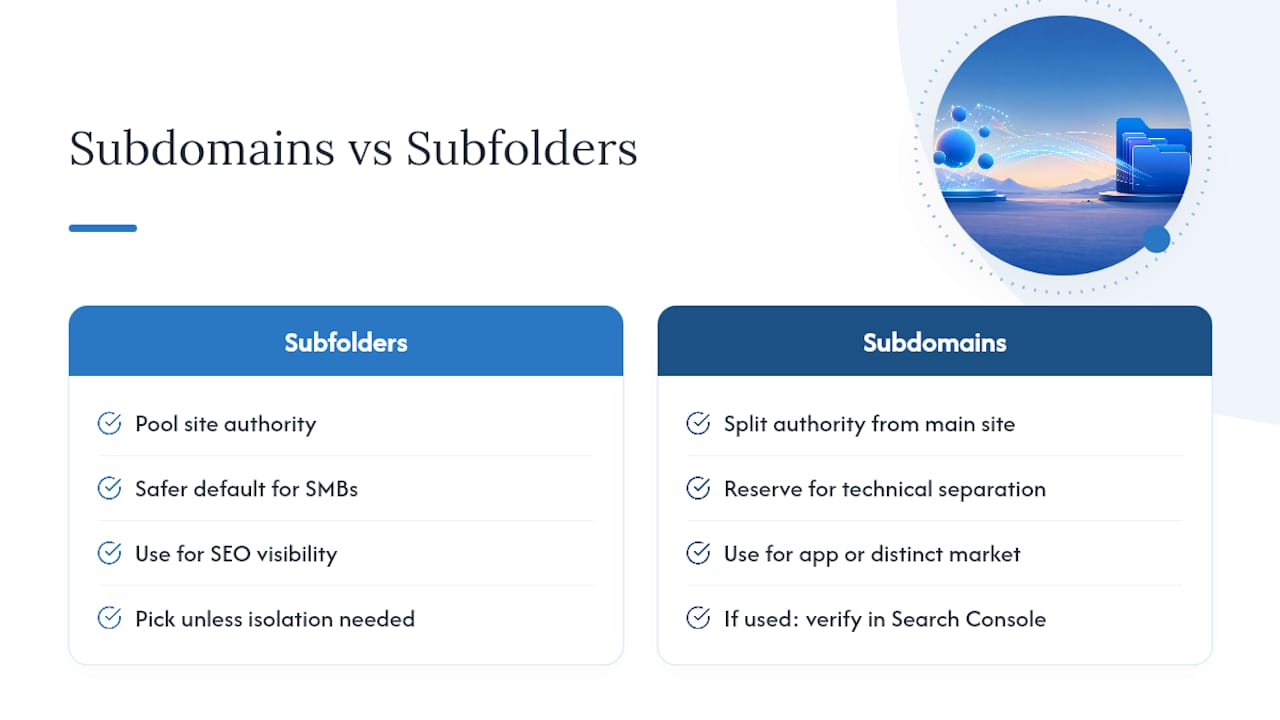
Subfolders remain the safer default for nearly every small business chasing search visibility, since they pool authority instead of splitting it. Reserve subdomains for real technical separation, not convenience. Run through this quickly: pick a subfolder unless you need an isolated app or a distinct market. If you do need a subdomain, verify it separately in Search Console, redirect deliberately, and link back to it from your main site’s navigation and content.
What Local Business Owners Get Wrong Most Often
Most clients don’t ask us whether to use a subdomain or a subfolder. They ask why their blog isn’t ranking, and the answer is often that someone set it up on a subdomain years ago without knowing better. Once we move that content into a subfolder and clean up the internal links, rankings for the main domain tend to climb within a few months, not because the content changed, but because the authority finally has one place to pool.
— Brett
Get Your Site Structure Fixed by People Who Do This Daily
Webtechs is the alternative to guessing your way through a DNS change or a redirect map built in a spreadsheet. We handle the SEO audit, the migration plan, the 301 redirects, the canonical tags, and the Search Console verification, so you’re not the one finding out three weeks later that half your backlinks pointed at a URL that no longer exists.

If your business is running a subdomain blog, a stray microsite, or a multi-location setup that’s splitting your authority instead of building it, this is a common issue many businesses face. Browse available web design services to understand how a migration or rebuild might be scoped, and consider professional advice on what consolidating your site would take.
Sources
- Subdomain vs. Subdirectory: What They Are & Which Is Better for SEO – Semrush
- SEO Best Practices with Cloudflare Workers, Part 1: Subdomain vs. Subdirectory
- Subdomains vs. Subfolders: Which Is Better for SEO & Why? – Search Engine Journal
FAQ
What Is the Difference Between a Subdomain and a Subfolder?
A subdomain is a prefix on your root domain, like blog.example.com, that can function like a separate site. A subfolder is a path on your existing domain, like example.com/blog, and stays technically part of the same site, per Impact Plus.
Does Google Treat Subdomains as Separate Sites?
Google has said its systems can crawl and rank content on both structures, but subdomains typically require separate Search Console verification, which creates practical separation in how authority gets tracked and monitored.
Do Subdomains Hurt SEO?
Subdomains don’t inherently hurt SEO, but they can dilute link equity and slow ranking gains compared to subfolders, since backlinks and authority often need to be earned separately for each subdomain, according to Semrush.
What Is an Example of a Subdomain?
Common examples include blog.example.com, app.example.com, and shop.example.com, each of which can run on different hosting or software than the main site.
Which Is Better for SEO: Subdomain or Subfolder?
For most small businesses focused on lead generation, subfolders are the better SEO choice because they consolidate ranking signals under one domain. Webtechs recommends subdomains only when a project genuinely needs technical isolation, like a separate app or a distinct language market.