

Prove Your Backups Work: Arizona Website Maintenance Plans

Yes, your Arizona small business needs a website maintenance plan, whether that means a paid provider or a disciplined DIY routine you actually follow. The three non-negotiables are tested off-site backups with real restore drills, staged updates before anything goes live, and continuous uptime and security monitoring. Typical maintenance costs for a brochure or service-business site vary widely depending on how much of the work you outsource.
TL;DR:
- Regular testing of backups through restore drills is essential to confirm data safety and prevent data loss during emergencies.
- Security monitoring must be ongoing, including malware scans, incident response readiness, and off-site encrypted backups with a tested restore process.
- Maintenance tasks should follow a strict schedule, with staged updates, speed audits, and vulnerability scans performed weekly and quarterly.
- Costs for website maintenance range from free DIY solutions to over $500 per month for complex or high-traffic sites, depending on services included.
- Before hiring, verify providers can demonstrate recent tested restores, detailed SLAs, and clear incident response procedures to ensure reliable recovery.
Table of Contents
- What Should a Website Maintenance Checklist Cover?
- What Does Website Security and Recovery Actually Look Like?
- How Does Maintenance Affect Page Speed and Local Search Rankings?
- What Do Monthly Maintenance Plans Typically Cost?
- DIY, Freelancer, or Agency: How Do You Choose?
- What Should Happen During Onboarding?
- What Does WebTechs.Net Bring to Arizona Website Maintenance?
- What Most Guides Get Wrong About Maintenance Plans
- Get a Free Website Audit From WebTechs.Net
- Sources
What Should a Website Maintenance Checklist Cover?
A maintenance plan is really just a schedule of recurring tasks, grouped by how often each one needs attention. Skip a task long enough and it stops being a maintenance issue and becomes an emergency. Without regular updates, monitoring, and tested backups, sites accumulate malware risk, lose search rankings to slow load times, and lose data permanently when something finally breaks.
Here’s how the work breaks down by cadence.
Daily or ongoing:
- Uptime monitoring with instant alerts if the site goes down
- Automated backup success checks (not just “did it run,” but “did it complete without errors”)
- Basic firewall and traffic anomaly logging
Weekly:
- Malware and vulnerability scans across the full site, not just the homepage
- Off-site backup verification
- A test update applied to a staging copy of the site, never straight to production
Monthly:
- Core software, plugin, and theme updates pushed live after staging tests pass
- Page speed audit and database cleanup (old revisions, spam comments, orphaned data)
- Broken link and 404 check
Quarterly and annual:
- Full security audit, including a review of user accounts and access permissions
- Hosting and PHP version review to confirm you’re not running on something about to lose support
- A complete restore drill: pull a backup and rebuild the site on a staging server from scratch
- Legal and compliance review (accessibility, privacy policy, contact form data handling)
The backup strategy underneath all of this should follow the 3-2-1 rule: three copies of your data, on two different types of storage, with one copy off-site. A backup nobody has ever restored is a guess, not a safety net. That’s why the Securing treats restore testing as a required line item, not an optional extra.
Pro Tip: Keep a one-page log with the date, who checked what, what they found, and what they fixed. This single habit is what separates a maintenance plan from a folder of good intentions, and it’s the first thing worth asking a provider to show you.
If you’re weighing DIY against hiring help, this is the section to use as your baseline. Anything less frequent than what’s listed here and you’re accepting real risk, whether or not you notice it right away.
What Does Website Security and Recovery Actually Look Like?
Security isn’t a setting you configure once. Certificates expire, plugins introduce new vulnerabilities with every release, and DNS records get changed by people who forget to document it. Cloudflare’s security guidance frames this correctly: it’s a recurring verification process, revisited monthly or quarterly, not a checkbox you tick during launch week.
A trustworthy plan includes a few concrete layers:
- A web application firewall (WAF) and CDN filtering traffic before it reaches your server
- Malware scanning that goes beyond a surface-level check
- A defined incident response process, so an infected site gets triaged within hours, not days
- Encrypted, off-site backup storage with a defined retention window (30 to 90 days is common for small business sites)
- Restore-to-staging testing on a regular schedule, so you know the backup actually works before you ever need it
Statistic Callout: Free remote scanners like Sucuri SiteCheck can flag visible malware symptoms, but they can’t see what’s happening at the server level. Full protection requires server-side scanning plus a managed cleanup service, which is exactly the gap most DIY security setups leave open.
For response times, a reasonable small-business SLA looks like: acknowledgment within one business hour for a confirmed breach, and a restored, cleaned site within 24 to 48 hours. Anything vaguer than that in a contract is a warning sign.
Pro Tip: Before signing with any provider, ask them to show you a restore drill, not describe one. A provider who can pull up a log of a staging restore they ran last quarter is proving the recovery guarantee actually works. One who says “we have backups” and stops there hasn’t proven anything.
Verification steps worth requesting from any provider: a sample of their monthly security report, their backup retention policy in writing, and their documented incident response time. If they hesitate on any of the three, keep looking.
How Does Maintenance Affect Page Speed and Local Search Rankings?
Speed and security aren’t separate conversations. A slow, poorly maintained site loses both rankings and customers, especially in local search where Arizona residents are often searching on mobile while driving between appointments. Google’s Core Web Vitals (Largest Contentful Paint, Cumulative Layout Shift, and Interaction to Next Paint) are ranking signals, and they degrade quietly as plugins pile up and images go unoptimized.
Ongoing maintenance is what keeps those metrics healthy:
- Caching configuration reviewed after major updates, since a plugin change can silently disable it
- CDN delivery for images and static assets
- Image compression and modern format conversion (WebP over JPEG, for instance)
- Deferred loading for non-critical scripts like chat widgets and social embeds
- Page speed audits run monthly rather than only after a redesign
Uptime matters just as much as speed. A Scottsdale plumber whose site is down for even twenty minutes during a Saturday emergency call loses that customer to whoever ranks next. Slow load times, meanwhile, don’t just frustrate visitors, they directly damage SEO performance because Google factors speed into how it ranks pages.
A monthly report worth reading should show: LCP under 2.5 seconds, CLS under 0.1, INP under 200 milliseconds, uptime above 99.9%, and average load time trending flat or down. If a report doesn’t include these numbers, ask why.
What Do Monthly Maintenance Plans Typically Cost?
Pricing scales with how much responsibility you’re handing off. Four bands cover most small business situations in Arizona:
- DIY or monitoring-only ($0 to $50/month): You handle updates yourself; a low-cost tool just alerts you to downtime or failed scans.
- Basic managed ($50 to $199/month): Core and plugin updates, weekly backups, basic uptime monitoring, minimal edit hours included.
- Pro or business tier ($199 to $499/month): Staged updates, tested restores, monthly performance and security reporting, a handful of content edit hours, faster response SLA.
- High-availability or ecommerce ($500+/month): 24/7 monitoring, priority incident response, PCI compliance considerations for stores, more generous edit hours.
Those ranges track closely with what agencies commonly advertise for tiered small business packages, where entry-level plans often start around $95 and business tiers push toward $395 to $499 depending on included features.
What pushes a bill higher than the baseline:
- E-commerce functionality, which adds security and PCI scope
- Custom-coded plugins or integrations that need specialized troubleshooting
- 24/7 support versus business-hours-only response
- Industry compliance requirements, like HIPAA considerations for a medical practice’s contact forms
One detail that trips people up: monthly billing versus annual billing can change your effective cost by 10 to 20%, since many providers discount annual commitments. Read the fine print on what counts as an “edit hour,” too. Some plans exclude emergency fixes or content updates from the base price entirely, turning an advertised $199/month plan into something considerably more expensive once real work starts.
DIY, Freelancer, or Agency: How Do You Choose?
The right choice depends on three honest questions: Do you or someone on staff actually have the technical skill to update software safely? How much downtime can your business tolerate if something breaks? And how complex is your site, really, a five-page brochure site versus an appointment-booking system with online payments?
If you answered “no,” “very little,” and “more complex than I’d like,” you’re a strong candidate for a managed plan rather than DIY.
When vetting a freelancer or agency, run through this checklist:
- Ask for proof of a recent tested restore, not just a description of their backup policy.
- Confirm they use a staging environment before pushing updates live.
- Get their SLA in writing, including response time for security incidents.
- Ask how often you’ll receive a report, and what it includes.
- Clarify contract length, exit terms, and whether you retain full ownership of your domain, hosting, and code if you leave.
Red flags that should end the conversation fast: no staging environment mentioned at all, vague answers about backup testing, unclear language about who owns your assets, and pricing that seems to grow every time you ask a follow-up question.
Pro Tip: Ask any provider this one direct question: “Can you show me a log of the last restore drill you ran for a client like me?” A provider who can produce a real answer, like WebTechs.Net’s approach of testing restores to staging on a recurring schedule, is showing you proof instead of a sales pitch.
What Should Happen During Onboarding?
The first 90 days with a new maintenance plan determine whether your site is actually protected or just theoretically covered. Start with a full inventory: domain registrar, hosting account, DNS records, every plugin and third-party script, and every form connected to your site.
From there, the provider should complete initial tasks quickly:
- A verified baseline backup, tested against a staging restore
- A performance baseline (current Core Web Vitals scores, load time, uptime history)
- A full security scan to catch anything inherited from before the handoff
Before any of this starts, your contract should spell out the SLA and response windows, included hours per month, how backups are handed over to you if you cancel, exit and cancellation terms, and explicit confirmation that you retain ownership of your domain, hosting account, and code.
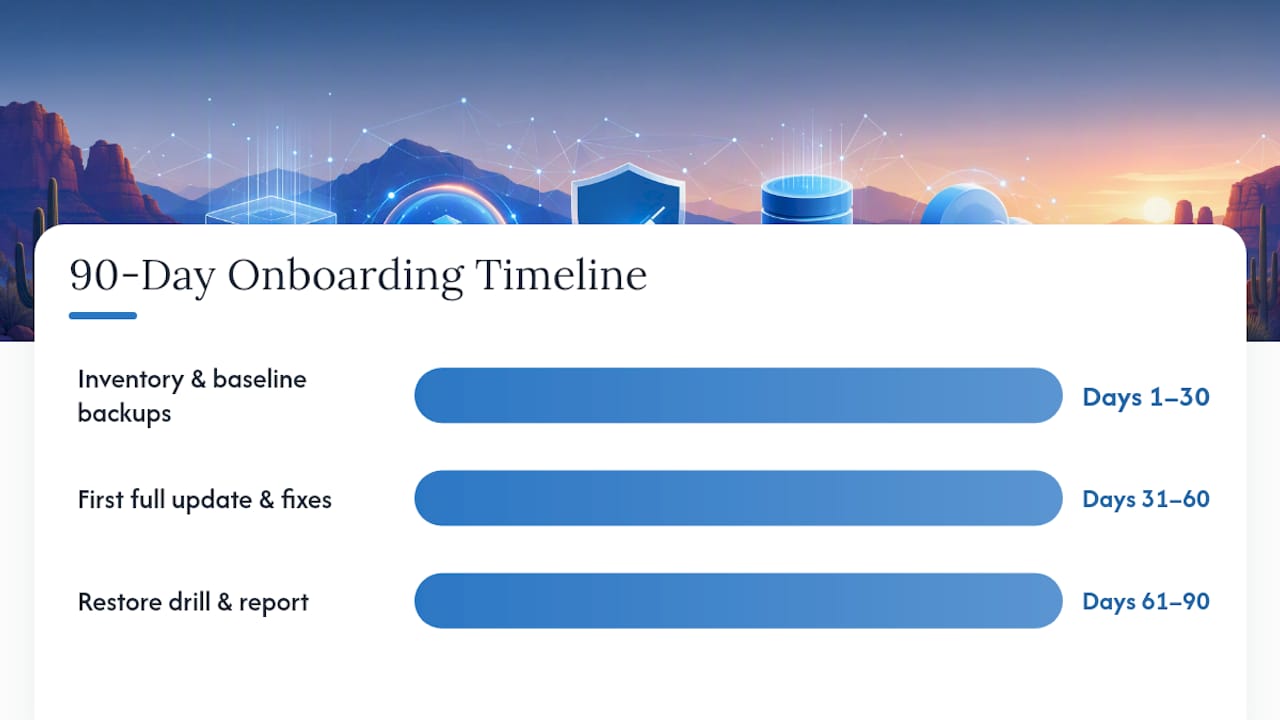
A realistic onboarding timeline looks like this: days 1 to 30 cover inventory, baseline backups, and the first staging test. Days 30 to 60 bring the first full update cycle and initial performance fixes. By day 90, you should have at least one completed restore drill and a full monthly report in hand, proving the monitoring and cadence checklist is actually running, not just promised on a sales call.
What Does WebTechs.Net Bring to Arizona Website Maintenance?
Webtechs has worked with small to mid-sized businesses in Scottsdale and across Arizona since 1997, long enough to have watched maintenance standards evolve from “update it when it breaks” to the tested, cadence-driven approach this guide lays out. That history shapes how the team approaches every retainer: personalized service backed by current technology, not a one-size template applied to every client.
The value in a maintenance plan isn’t the update itself. It’s proof that if something breaks tomorrow, the restore actually works, because someone already tested it.
Clients working with WebTechs.Net have seen measurable gains in traffic and search visibility over time, the kind of result that comes from pairing steady technical maintenance with ongoing SEO attention rather than treating them as separate services—much like how an effective music marketing plan for indie artists integrates multiple elements into a cohesive strategy. Brett, who covers web development, SEO, and digital marketing for WebTechs.Net, wrote this guide with that same philosophy: recovery readiness and search performance are the same conversation, not two different budgets.
What Most Guides Get Wrong About Maintenance Plans
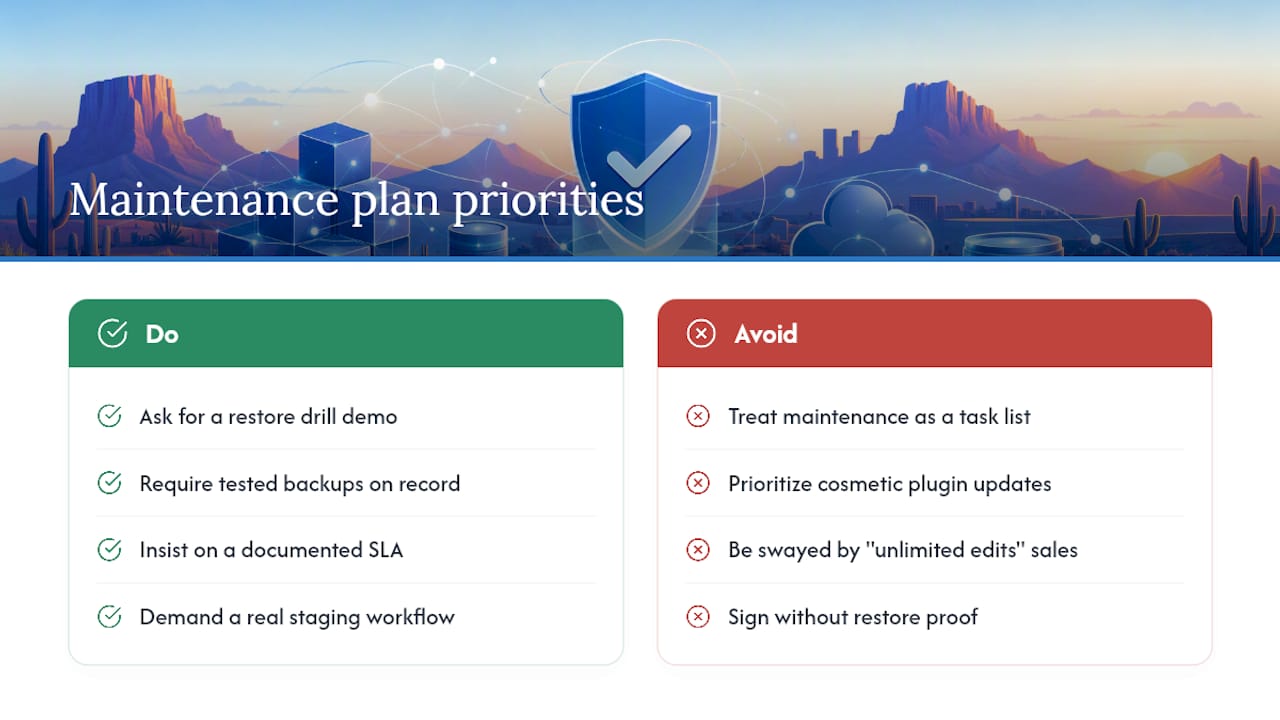
Most advice on this topic treats maintenance as a list of tasks to check off. That’s backwards. The real value is in what those tasks prove, not what they do. A monthly plugin update matters less than whether the provider can show you a restore that actually worked last quarter.
Arizona business owners get pitched heavily on “unlimited edits” and flashy dashboards, when the boring stuff, tested backups, a documented SLA, a real staging workflow, is what actually prevents a bad week. If you take one thing from this guide, make it this: before you sign anything, ask to see proof of a restore drill. Everything else in a maintenance contract is negotiable. That one item is not.
— Brett
Get a Free Website Audit From WebTechs.Net
WebTechs.Net offers managed maintenance retainers built around exactly the practices covered in this guide: staged updates, tested off-site backups, uptime monitoring, and a real incident response process, plus hosting and emergency recovery if your current setup can’t keep up. Rather than guessing whether your current plan (or lack of one) is protecting you, request a free website audit and get a straight answer about what’s missing and what it would cost to fix.

The audit covers your current backup situation, security exposure, page speed, and uptime history, then translates that into a proposal with clear pricing tiers, no vague “call for quote” runaround. If you’re comparing WebTechs.Net against a freelancer or a DIY setup, browse the portfolio of completed Arizona client work to see the kind of sites and results behind these recommendations, then request your professional web design and maintenance proposal to see exact pricing for your site’s size and complexity.
Sources
- What is a website maintenance plan? — Elementor
- Securing
- Website security checklist — Cloudflare
- Monthly website maintenance packages — Redefine Web