

Content Pruning: Four Decisions for a Safer Sitewide Audit

Content pruning is the process of auditing your indexed pages and assigning each one to keep, refresh, consolidate, or remove. Run it to concentrate authority on your strongest pages, help search engines spend their crawl time where it counts, and give readers fewer weak pages to wade through. The sections below show how to decide, roll out safely, and measure the result.
TL;DR:
- Treat low traffic, slipping rankings, weak engagement, few backlinks, technical errors, and outdated facts as review flags, not automatic reasons to delete a page.
- Combine crawl results, GA4 engagement, Search Console data, and backlink records in one inventory keyed by URL, then apply written decision rules consistently.
- When overlapping pages compete, merge the strongest material into one destination, 301 redirect retired URLs, and update internal links to avoid chains.
- Delete pages only when they lack traffic, backlinks, and a strategic purpose; use noindex when visitors still need access, and 410 for permanent removals.
- Ship changes in batches and assess results over weeks, tracking sessions, impressions, rankings, crawl activity, and redirects; reverse only when a change clearly caused losses.
Table of Contents
- What is content pruning and how does the 4-action model work?
- Why does content pruning help SEO and user experience?
- Which signals show a page needs pruning?
- How do you run a content pruning audit step by step?
- How do you carry out a refresh, consolidation, or removal?
- How do you measure whether pruning worked?
- Which data and filters do you need to audit a site?
- What problems come up during pruning and how do you fix them?
- An editorial take: the mistakes that sink pruning projects
- How can we help with your content audit and pruning?
- FAQ
- Sources
What is content pruning and how does the 4-action model work?
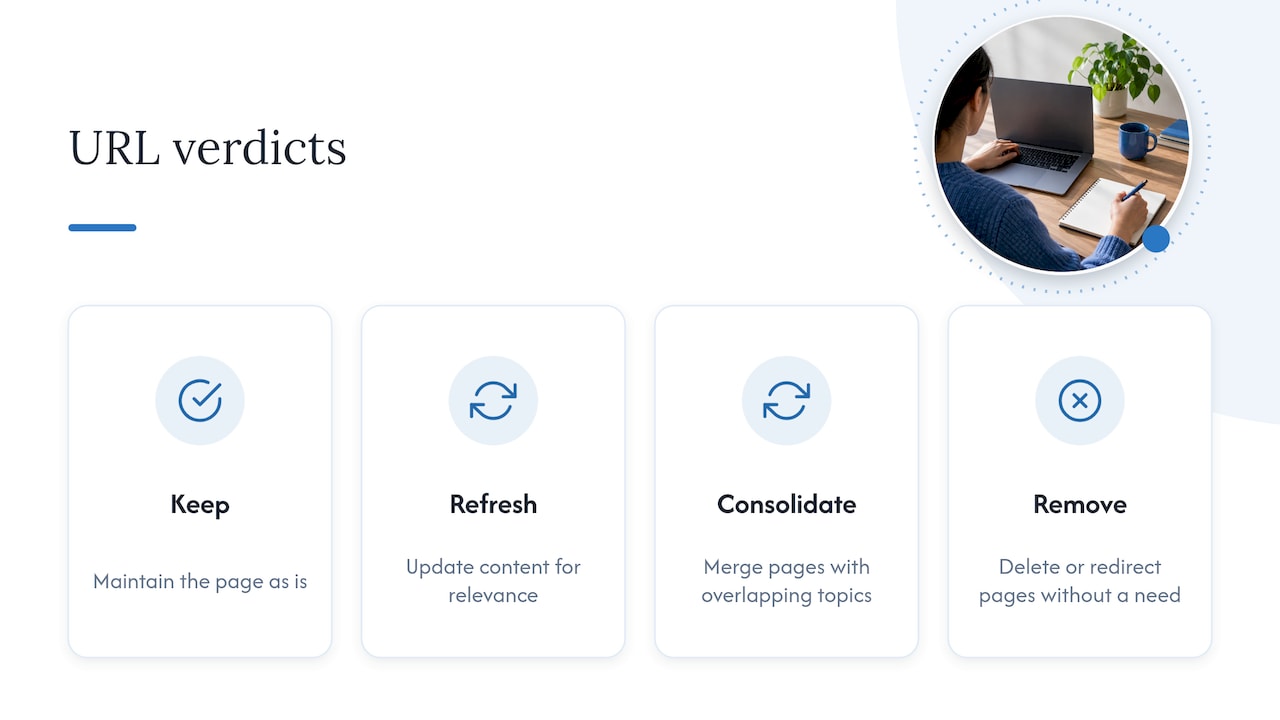
Content pruning is the strategic process of auditing indexed pages and sorting them into four actions: keep (maintain as is), refresh (update for relevance), consolidate (merge duplicates), or remove (delete or redirect pages that no longer serve a business or user need). Every URL gets a verdict. That single-verdict rule is what turns a vague “clean up the blog” wish into a project you can scope, assign, and finish.
Pruning is not the same as routine updating. A regular update cycle improves pages you already know are worth improving, and new content adds coverage. Pruning starts from the opposite question: which pages should not exist in their current form at all? You look at the whole site, including pages nobody has opened in years, and make a call on each.
One practical framing comes from Contentful, which recommends a 4C sequence: Check, Curate, Consolidate, Cut. It maps neatly onto the four actions. Checking and curating tell you what to keep or refresh, consolidating handles overlap, and cutting handles dead weight.
There is also a quality argument behind all of this. Google’s guidance says its ranking systems prioritize content created to benefit people rather than to manipulate search results. Trimming thin or unhelpful pages is one way to show your site is built around that principle, and it supports the E-E-A-T qualities Google describes: experience, expertise, authoritativeness, and trust.
Why does content pruning help SEO and user experience?
Start with crawl efficiency. Search engines only spend so much time on your site, and a library full of stale, duplicate, or near-empty pages dilutes that attention. Pruning pushes crawling and indexing toward the pages that earn money or trust, a point Contentful makes when describing how clearing clutter can improve rankings and organic traffic.
Next, authority. Old pages often hold backlinks, and when several weak articles on the same topic each collect a few links, none of them gets strong enough to rank. Merging them into one thorough page and redirecting the old URLs concentrates that link equity. Search Engine Land’s guide describes this logic for AI-era search, where combining or expanding pages into thorough topic coverage consolidates authority and reduces cannibalization.
Then there is quality signaling. A site with hundreds of outdated how-tos and abandoned announcements sends a mixed message about who it is for. Removing them lines your index up with the people-first approach Google asks for.
The reader benefits too:
- Fewer near-duplicate pages means fewer chances of landing on the wrong one.
- Navigation and search results inside your site get cleaner.
- Visitors reach current, accurate answers faster, which tends to lift engagement.
Pruning also forces a useful discipline on the team. When you have to justify every page, you start publishing with a clearer purpose, and the next audit gets easier.
Which signals show a page needs pruning?
You do not need to guess. A handful of repeatable filters will shortlist candidates before anyone reads a single page. Treat these as flags for review, not automatic deletion orders; a page that fails one test may still earn its place.
- Traffic: Low organic sessions and impressions over a long window, plus low engaged sessions in GA4, which count visits where people actually interacted with the page.
- Rankings: Positions that keep sliding, queries where two of your pages compete with each other, or lost SERP features.
- Engagement: Weak time on page, high bounce rates, and zero conversions attributed to the page.
- Authority: Few or no backlinks and referring domains. A page with strong links deserves a redirect or merge, not a plain delete.
- Technical flags: Non-200 status codes, broken links, and thin pages. HubSpot’s team checked status codes and backlink data as part of its audit.
- Content quality: Duplicate coverage, outdated facts, expired offers, and references to products you no longer sell.
When several of these flags land on the same URL, that page goes to the top of your review list.
How do you run a content pruning audit step by step?
Think of the workflow as a project plan you can run yourself or hand to an agency. Each stage feeds the next, and skipping one is where most audits go wrong.
- Set scope and goals. Pick the KPIs you want to move (organic sessions, engaged sessions, indexed page count) and choose a date range for judging performance. A sufficiently long period of data can smooth out seasonality.
- Build one inventory. Crawl the site and pull every indexed URL into a single dataset, then merge in analytics, Search Console, and backlink data. Texas A&M’s guidance is blunt that you need traffic, engagement, and backlink data in one place, and that auditing manually without structured data is a common pitfall.
- Audit and tag. Add columns for status code, organic sessions, engaged sessions, impressions, backlinks, last updated date, and a “proposed action” field. HubSpot’s approach evaluated each page against predefined performance criteria before deciding to delete, redirect, or historically optimize.
- Apply decision rules. Keep pages that perform. Refresh pages that have traffic or rankings potential but outdated content. Consolidate pages that overlap in topic. Remove pages with no traffic, no links, and no strategic role. Write the rules down so the whole team applies them the same way.
- Plan the rollout. Group changes into batches. Coordinate with whoever manages redirects and the CMS, test on staging where you can, and ship the batches in sequence.
- Monitor. Check each batch on a schedule before starting the next, so any problem points back to a specific change.
Pro Tip: Tag every URL with the date of its change and its batch number in your spreadsheet. When a traffic dip appears, you can trace it to a single batch in minutes instead of arguing about causes for weeks.
Our own technical SEO audit guide covers the technical checks you will want a developer to confirm during the inventory stage.
How do you carry out a refresh, consolidation, or removal?
Each action has its own mechanics, and doing them sloppily can cost you the very traffic you meant to protect.
- Refresh: Rewrite for accuracy and intent rather than just swapping the date. Update facts, examples, and screenshots, tighten the title and meta description, and fix internal links. Once live, request reindexing in Search Console so changes get picked up sooner.
- Consolidate: Choose the strongest URL as the survivor, or build a new authoritative page. Fold in the best material from the others, then 301 redirect each retired URL to the new page so backlinks and visitors follow. HubSpot’s team relied on redirects for pages with value rather than deleting everything.
- Remove: Delete pages with no traffic, links, or purpose. If a page must stay accessible to visitors but should not appear in search, use noindex instead. For permanent deletions, a 410 Gone status signals intentional removal and can lead to faster deindexing than a 404, though Google treats the two similarly over the medium and long term. Google’s Refresh Outdated Content tool can update stale search results for pages that no longer exist, but it does not remove anything from the web.
- Internal link cleanup: After every redirect or deletion, update links that pointed at the old URLs and remove references to pages that are gone. Our write-up on internal linking strategy shows why this housekeeping matters for how authority flows.
- Rollout: Ship redirects in batches and measure after each one. A mass redirect on a single day makes it nearly impossible to diagnose a traffic shock.
How do you measure whether pruning worked?
Measure against the KPIs you set at the start. The core set is organic sessions, impressions, average rankings, and GA4 engaged sessions, plus any change in how often search engines crawl your site. Search Engine Land’s pruning guide points to engagement metrics such as engaged sessions as useful signals alongside referral data.
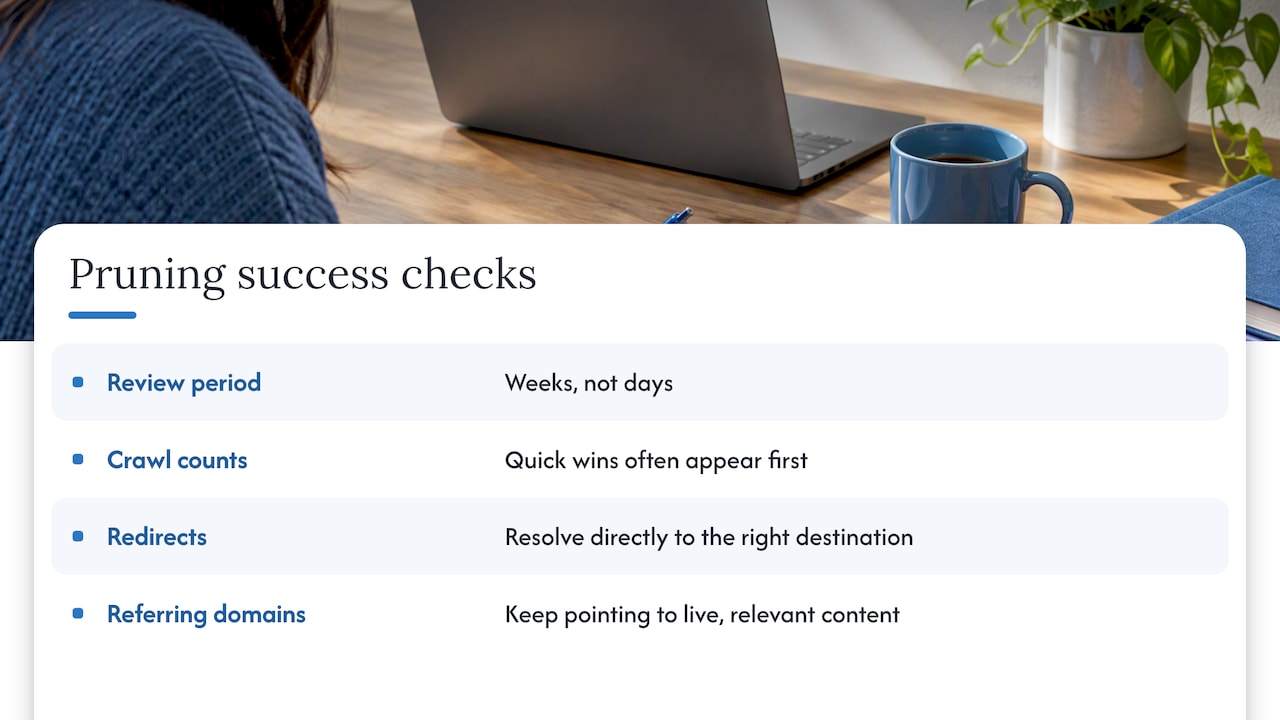
Expect a lag. Search engines need time to recrawl redirects and reprocess consolidated pages, so judge each batch over a period of weeks rather than days, and compare it with the same pages’ behavior before the change. Quick wins often show up first in crawl and index counts, while rankings and traffic gains for consolidated pages usually take longer.
Track redirects directly: confirm each old URL resolves directly to the right destination, and watch whether the destination page picks up impressions for queries the retired pages once held. Verify that referring domains still point to live, relevant content.
Pruning only pays off when you can prove what changed. Search Engine Land’s guide treats engaged sessions as a core measure of whether consolidated pages are serving visitors, not just attracting them.
Consider more action if a batch shows sustained declines on pages that should have gained, and consider a rollback only when a specific redirect or removal clearly caused the loss. For a fuller walkthrough of setting up GA4 reporting, see our guide to measuring SEO ROI.
Which data and filters do you need to audit a site?
You need several datasets, and each answers a different question:
- Site crawl: Every URL, its status code, title, word count, and internal link count.
- GA4 engaged sessions: Which pages hold attention, pulled from Google Analytics.
- Search Console: Impressions and queries, which show whether a page has any search presence at all.
- Backlink tool data: Referring domains per URL, so you never delete a page that earns links without a redirect plan.
Merge them into one spreadsheet or BI view keyed on URL. A unified inventory is the foundation here, as the Texas A&M guidance stresses.
Then apply starter filters and tune them to your site’s size:
- Organic sessions below a threshold you choose, such as a relative cutoff suited to your site.
- Engaged sessions below a threshold that fits your typical page.
- Zero backlinks and zero impressions, which marks the safest removal candidates.
- Any non-200 status code.
A small site might set thresholds near zero; a large publisher needs relative cutoffs. Adjust after reviewing a sample of flagged pages by hand.
What problems come up during pruning and how do you fix them?
Disagreement about what counts as “low value.” Stakeholders defend pages for sentimental or political reasons. Settle it with written decision rules and the shared spreadsheet, so debates are about data, not opinion.
Pages with backlinks but no traffic. Do not delete them. Redirect them to the closest relevant page, or refresh them if the topic still matters.
Cannibalization that is hard to untangle. When several pages target the same query, pick the one with the best links and intent match, merge the others into it, and update internal links to point there.
Redirect chains and loops. Old redirects pile up over years. Crawl again after each batch and flatten any chain to a single hop.
Traffic dips after a batch. Check the batch log first. If the dip lines up with one set of redirects, test those destinations for relevance and fix mismatches before rolling anything back.
Messy data. URL variants, parameters, and trailing slashes split metrics across duplicates. Normalize URLs before you merge datasets, or your thresholds will mislead you.
Coordination with developers and clients. Share the batch schedule early, and give them the exact list of URLs and destinations. Ambiguity at handoff causes more broken redirects than any technical limit.
How can we help with your content audit and pruning?
If you would rather not run this yourself, our team handles content audits, redirect implementation, and the rewriting that refreshes and consolidations require, backed by SEO content writing services and SEO implementation. We aim for cleaner indexation, authority concentrated on the pages that matter, and better engagement from the visitors who arrive. Tell us about your site and we will map out a plan through our main services page.

FAQ
What does content pruning mean?
Content pruning means auditing your indexed pages and deciding whether to keep, refresh, consolidate, or remove each one. The goal is a leaner site where search engines and readers find your best material faster.
Is SEO dead now with AI?
No. Search still depends on well-organized, trustworthy pages, and the same pruning logic applies: combining and expanding pages into thorough coverage can consolidate authority and improve AI visibility. Our overview of AI search optimization covers how it fits with traditional SEO.
What is the 80/20 rule in SEO?
It is the idea that a small share of your pages usually drives most of your results. The rule is a rough heuristic, not a measured law, but it explains why pruning focuses effort on the pages that perform and cleans up those that do not.
Can a beginner do SEO?
Yes. A beginner can run a basic prune with a crawl, analytics, and Search Console data in one spreadsheet, and make careful, batched changes. Start small, log every change, and bring in help for redirects at scale.
Sources
- Creating Helpful, Reliable, People-First Content | Google Search Central | Documentation | Google for Developers
- Content pruning: Clear clutter and improve rankings | Contentful
- Why We Removed 3,000 Pieces of Outdated Content From the HubSpot Blog
- Web