

Google Local Services Ads: Setup & Optimization Guide

Google Local Services Ads (LSAs) are pay-per-lead search ads that place eligible service businesses at the very top of Google Search, above both standard paid ads and organic results, and let you pay only when a customer contacts you by call, message, or booking request. If you’re a local service provider in Scottsdale or anywhere in the U.S., the fastest next step is to confirm your eligibility right now.
Your immediate checklist:
- Check whether your service category and ZIP code qualify at Google’s LSA product page
- Gather your business license(s), insurance certificates, and owner/technician ID
- Create or claim your Local Services account at the Google Local Services sign-up portal
- Contact Webtechs if you want expert setup support from a Scottsdale-based digital marketing team
Pro Tip: Scan your documents before you start the application. Google frequently requests category-specific and state-specific licenses, and uploading clear digital copies from the start cuts verification time significantly.
Table of Contents
- How do Google Local Services Ads work?
- Who qualifies for Google Local Services Ads?
- How do you set up a Local Services Ads account?
- What are the Google Guaranteed and Google Screened badges?
- How does LSA billing work, and how do you dispute a lead?
- What optimization tactics actually move the needle for LSAs?
- What commonly goes wrong with Local Services Ads?
- Key Takeaways
- When do LSAs work best, and when should you hire help?
- Webtechs can manage your LSA setup and ongoing campaigns
- Useful sources for deeper reading
How do Google Local Services Ads work?
LSAs appear at the top of Google Search results, above traditional paid ads and organic listings. In some queries, they also surface in Google Maps and within the Local Services pack. That placement is prime real estate for any local service business.
How customers reach you through an LSA:
- Phone calls: The most common lead type; Google displays a tracking number that forwards to your line
- Messages: Customers send a text-style inquiry directly from the listing
- Booking requests: Available in select markets and categories; customers schedule directly through the ad
Billing is straightforward: you pay per lead, not per click. A charge triggers when a qualified customer contacts you through the listing. Pre-badge ads let you start collecting leads while verification is still in progress, but those listings rank below fully verified profiles, so lead quality can be lower early on.
One thing that surprises many business owners: Google automates keyword selection and ad text for LSAs. You don’t write copy or build keyword lists the way you do in Google Ads Search campaigns. That simplicity speeds up setup but reduces creative control, which is why running LSAs alongside Search campaigns often produces better overall coverage.
Who qualifies for Google Local Services Ads?
Eligibility depends on your service category and location. Google has expanded LSAs to over 70 business types, covering verticals from home services and legal to healthcare and financial advising. The fastest way to confirm your eligibility is to check by ZIP code and category directly in the sign-up flow.
Core verification requirements:
- Business identity: Legal business name, address, and contact information
- Licenses: Category- and state-specific licenses (a plumber in Arizona faces different requirements than a locksmith in Texas)
- Insurance: General liability and, in some categories, workers’ compensation
- Background checks: Required for owners and technicians in most home-service and care categories
| Verification Item | Who It Applies To | Common Delay Cause |
|---|---|---|
| Business license | All categories | Wrong document format or expired license |
| Insurance certificate | Most categories | Missing policy dates or coverage amounts |
| Owner background check | Home services, care | Name mismatch or incomplete ID |
| Technician background check | Field-service categories | Incomplete employee list submitted |
Verification typically takes a few days to a few weeks depending on category complexity and how quickly you upload complete documentation. Missing a single document is the most common delay trigger. If volume becomes unmanageable at any point, you can pause or cancel your ads directly from the LSA dashboard without losing your profile or review history.
How do you set up a Local Services Ads account?
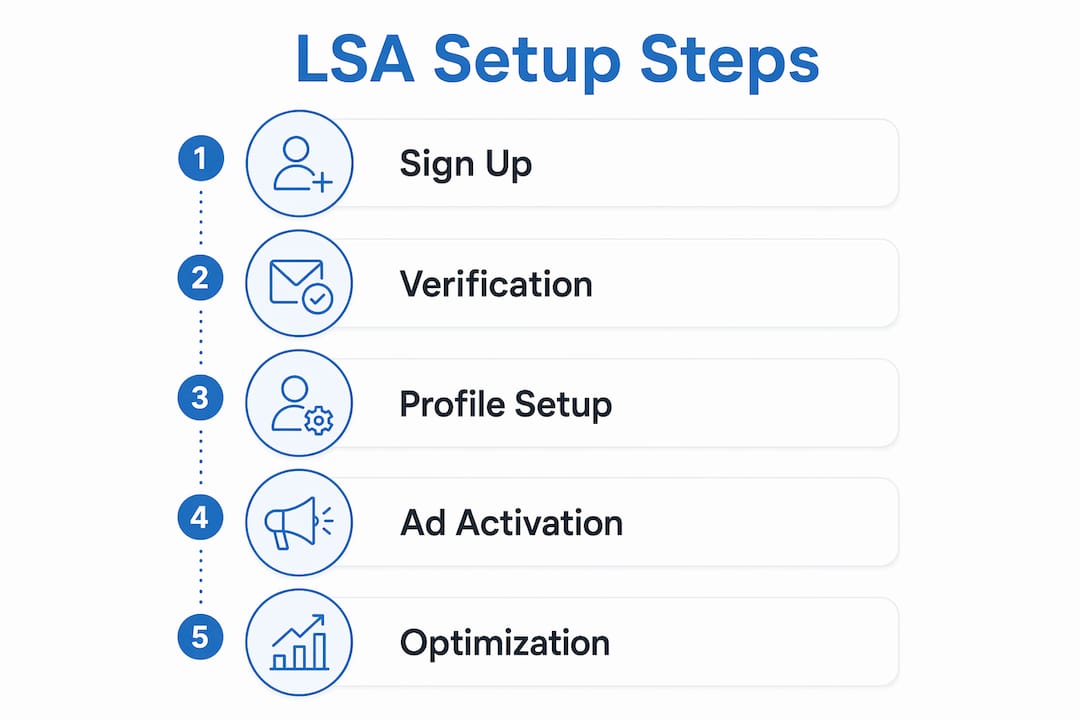
- Sign in or create a Google account linked to your business and navigate to the Local Services Ads sign-up portal.
- Claim or create your business profile. If your business already has a Google Business Profile, you can connect it to pull in existing reviews and information.
- Select your service category. Choose the category that most accurately describes your primary service. This determines which verification documents Google will request.
- Define your service area. Set the ZIP codes or cities you actually serve, not the widest possible radius. Tight, accurate service areas reduce irrelevant leads.
- List your services offered. Be specific. “Water heater installation” converts better than “plumbing” because it matches high-intent queries.
- Set your business hours. Google uses these to determine when your ad is eligible to show and when leads can reach you.
- Upload photos and write your business bio. A complete profile with photos and a clear bio performs better than a bare-bones listing.
- Upload verification documents. Licenses, insurance certificates, and ID as required by your category.
- Set your weekly budget. Google will pace spending to stay within your target; you can adjust at any time.
- Request pre-badge ads if you want leads to start flowing before full verification completes. Understand that pre-badge listings rank below verified ones.
Pro Tip: Map your service area to the ZIP codes where you actually want to work, not the broadest area you could theoretically reach. Scottsdale contractors who tighten their radius to their core neighborhoods consistently report fewer wasted leads and better close rates.
What are the Google Guaranteed and Google Screened badges?

The badge your business earns depends on your category. Both signal to consumers that Google has vetted the business, but they apply to different verticals.
| Badge | Categories | What Google Checks | Consumer Guarantee |
|---|---|---|---|
| Google Guaranteed | Home services (HVAC, plumbing, electrical, etc.) | License, insurance, background check | Google may reimburse customers for unsatisfactory work (up to a lifetime cap) |
| Google Screened | Professional services (law, financial advising, real estate) | License, background check | No financial guarantee; signals professional vetting |
| License Verified | Healthcare and select other categories | License only | Confirms licensure; no financial backstop |
Badge status directly affects ad ranking. Fully verified providers with a Google Guaranteed or Google Screened badge appear above pre-badge listings. If your verification stalls, check the status in your LSA dashboard, confirm all documents are in the correct format (PDF or clear image), and use the Google Support help center to escalate if the review has been pending longer than two weeks.
Common verification troubleshooting:
- Expired license or insurance: upload a current certificate immediately
- Name mismatch between ID and business registration: provide both documents together with a note
- Background check delay: confirm the correct legal name and date of birth were submitted for each person
How does LSA billing work, and how do you dispute a lead?
Charges appear in your LSA dashboard after a lead is received. Google bills against a prepaid balance or a linked payment method, depending on your account setup.
| Lead Status | What It Means | Action Required |
|---|---|---|
| New | Lead received, not yet reviewed | Review and respond promptly |
| Booked | You marked the lead as a job | No dispute needed |
| Archived | Lead closed without booking | Evaluate for dispute eligibility |
| Disputed | Credit request submitted | Track outcome in dashboard |
To dispute an invalid lead:
- Open the lead in your LSA dashboard within the dispute window (commonly within 60 days of the charge).
- Select the reason: wrong number, spam, out-of-service-area request, or duplicate.
- Add notes documenting why the lead is invalid. Specific notes improve dispute success rates.
- Submit and monitor the outcome in the dashboard.
To pause or cancel your ads: Go to your LSA dashboard, select your profile, and toggle the ad status to “Paused” or submit a cancellation request. Pausing preserves your profile, reviews, and ranking history. Canceling removes your ads from rotation but does not delete your account data.
What optimization tactics actually move the needle for LSAs?

Responsiveness is a direct ranking signal in LSA. Google favors businesses that respond to leads quickly, and top performers treat every new lead notification like an inbound call from a ready-to-buy customer.
Prioritized optimization checklist:
- Reviews first. Review count and recency are visible on your LSA listing. Review velocity directly influences click-through and conversion rates. Ask every satisfied customer for a Google review immediately after the job.
- Respond within minutes. Set up the Local Services Ads mobile app and enable push notifications. A simple CRM or call-routing tool like Valiz can help you route and log leads without missing one.
- Complete every profile field. Partial profiles rank lower. Photos, bio, services list, and hours should all be filled in.
- Audit your service area monthly. If you’re getting leads from ZIP codes you don’t serve, tighten the area. Irrelevant leads waste budget and hurt your response rate.
- Connect a CRM or call-tracking tool. Tracking which LSA leads convert to paid jobs is the only way to calculate real ROI and decide when to shift budget to local SEO or other channels.
Pro Tip: When you receive an irrelevant lead, dispute it rather than ignoring it. Ignoring lowers your response rate, which hurts ranking. Disputing keeps your metrics clean and recovers the spend.
What commonly goes wrong with Local Services Ads?
Most LSA problems trace back to a handful of fixable mistakes.
- Incomplete profile: Any blank field is a ranking disadvantage. Fill everything in before your ads go live.
- Inaccurate service area: Too wide means irrelevant leads; too narrow means missed opportunities. Match it to where you actually want to work.
- Slow lead response: Even a 30-minute delay can cost you the job. Google tracks response time and adjusts ranking accordingly.
- Failing to collect reviews: A listing with few reviews loses to a competitor with many, even if your service is better.
- Missing the dispute window: Disputes must be filed within the specified timeframe, commonly 60 days. Set a calendar reminder to review leads weekly.
- Misunderstanding the billing trigger: You’re charged when a customer contacts you, not when they book. Reviewing leads promptly and disputing invalid ones is how you control actual cost per acquisition.
If verification stalls or lead quality stays poor after profile fixes, contact Google Support directly. When the volume of leads, disputes, and profile management exceeds what you can handle alongside running your business, that’s the clearest signal to bring in an agency.
Key Takeaways
Google Local Services Ads deliver the highest-visibility placement on Google Search for eligible service businesses, and the return depends almost entirely on how well the profile is set up and maintained.
| Point | Details |
|---|---|
| Prime placement | LSAs appear above standard paid ads and organic results on Google Search. |
| Pay-per-lead billing | You’re charged only when a qualified customer contacts you, not per click. |
| Badge matters | Google Guaranteed and Google Screened badges improve ranking and consumer trust. |
| Dispute within 60 days | Invalid leads must be disputed within the timeframe Google specifies, commonly 60 days. |
| Webtechs handles setup | Webtechs provides LSA account setup, verification support, and ongoing lead management for Scottsdale businesses. |
When do LSAs work best, and when should you hire help?
LSAs produce the strongest return for businesses in high-intent service categories where customers need someone fast: HVAC, plumbing, electrical, legal, and similar verticals where the searcher is ready to book, not browse. The pay-per-lead model rewards businesses that respond quickly and maintain strong review profiles. If you can answer the phone within minutes and ask every customer for a review, LSAs will work for you.
The case for hiring an agency gets stronger when any of these apply: you’re spending more time managing leads than doing the work, your verification has stalled and you’re not sure why, or your cost per acquired customer keeps climbing without a clear reason.
What to look for in an LSA agency:
- Documented experience with LSA verification for your specific category
- A clear process for lead tracking and dispute management
- Local market knowledge (a Scottsdale agency understands the competitive dynamics here)
- Transparent reporting that ties LSA spend to actual booked jobs, not just lead volume
Webtechs can manage your LSA setup and ongoing campaigns
Webtechs has been helping Scottsdale-area service businesses build and maintain their digital presence since 1997. For LSA campaigns specifically, the team handles the parts that most business owners find time-consuming: account setup, document preparation, verification follow-up, review-generation strategy, and lead-tracking integration.

The onboarding process is straightforward: a free consultation to assess your category and eligibility, document preparation guidance, full profile setup, verification support until your badge is active, and ongoing reporting that shows exactly what each lead costs and which ones convert. You can see the results Webtechs delivers across service verticals in the client testimonials and portfolio. If you’re ready to get your LSA profile live and generating leads, reach out to Webtechs for a free consultation.
Useful sources for deeper reading
- Getting started with Local Services Ads (Google Support): The official U.S. setup guide covering eligibility, verification steps, and billing basics.
- Local Services Ads overview (Google Support): Explains what appears on your ad, how badges work, and how profile information is used.
- Google Local Services Ads product page: Official landing page with eligible categories, badge information, and sign-up options.
- Google Ads vs. Local Services Ads for small business (Google): Google’s own comparison of LSAs and Search campaigns, useful for deciding how to allocate budget.
- Google Local Services Ads vs. Search Ads (Search Engine Land): Practitioner analysis of the tradeoffs between LSAs and Search campaigns, including responsiveness as a ranking factor.
- Google Local Services Ads Explained (Hibu): Business-audience overview of placement, lead types, and how LSAs compare to other local advertising options.
- Local Services Ads for Developers (Google): Technical reference for businesses or agencies managing LSA accounts programmatically.