

Technical SEO Audit for Businesses: 2026 Guide

A technical SEO audit is an infrastructure-level inspection that confirms search engines and AI crawlers can discover, render, index, and trust every page on your site. Here is what you get from a complete audit:
- Prioritized roadmap ranked by impact × effort, so your team fixes what moves rankings first
- Crawl and indexation findings: blocked pages, sitemap mismatches, redirect chains, index bloat
- Core Web Vitals results: LCP, INP, and CLS measured against Google’s 2026 field-data thresholds
- AI-crawler readiness check: whether PerplexityBot, ChatGPT-User, and Anthropic-AI can access and cite your content
- On-page review: title tags, headings, duplicate content, schema, and URL structure
- Remediation steps with code snippets or configuration changes and verification procedures
Who should run this? A small site owner can work through a structured checklist in-house. A mid-size or enterprise site almost always benefits from a vendor audit because log file analysis, sampling strategy, and fix validation require dedicated tooling and time. Either way, the first step is the same: run a full crawl and pull your Google Search Console coverage report before touching anything else.
Table of Contents
- What does a technical SEO audit actually cover?
- What will you actually find, and how do you prioritize fixes?
- How is a professional audit actually performed?
- What should the audit report contain?
- How long does an audit take, and what does it cost?
- How do you evaluate an audit provider before hiring?
- Does your backlink profile belong in a technical audit?
- How does competitive analysis fit into keyword mapping?
- What qualifications should an audit provider have?
- Key questions to ask vendors before you hire
- Red flags that should stop you from signing
- In-house audits vs. agency audits: what is the real difference?
- What support should you expect after the audit?
- Key Takeaways
- Why the audit always comes first
- Webtechs audits Arizona businesses with a 2026-ready process
- Useful sources and recommended reading
What does a technical SEO audit actually cover?
A complete audit spans six core areas. Use this checklist to scope your own audit or compare vendor proposals line by line.
| Audit Area | Specific Checks | Quick Win or Deep Work? |
|---|---|---|
| Crawling & Indexation | robots.txt rules, XML sitemap validity and submission, crawl errors in GSC, noindex tags, orphan pages, index bloat | Mix: robots.txt fix is quick; orphan cleanup is deep |
| Site Architecture & Redirects | Redirect chains (max 2 hops), canonicalization conflicts, URL structure | Mix: chain fixes are quick; architecture overhaul is deep |
| Page Speed & Core Web Vitals | LCP under 2.5 seconds, INP failures, CLS issues, mobile rendering problems, render-blocking resources | Mix: image compression is quick; JS refactoring is deep |
| Mobile & UX | Mobile-friendly rendering, responsive design, tap target sizing, viewport configuration | Usually quick unless a full redesign is needed |
| Schema & Structured Data | JSON-LD implementation, required properties per type (Product, Article, FAQ, LocalBusiness), rich result eligibility | Quick to add; deep to audit at scale |
| Security & Trust | HTTPS site-wide, valid SSL, HSTS header, no mixed content, Content-Security-Policy | Quick to verify; certificate issues need immediate action |
| AI Readiness (2026) | llms.txt configuration, AI bot user-agent access (PerplexityBot, ChatGPT-User, GoogleOther, Anthropic-AI), schema coverage for entity citability, authority signals | New area; varies by site complexity |
Technical audits that skip AI checks are incomplete in 2026 because AI engines increasingly pull and cite site content directly. The AI readiness section is no longer optional.
Defining your sample page set: For most sites, audit the homepage, your top five converting product or service pages, your three highest-traffic blog posts, and one category or archive page. That sample surfaces roughly 80% of systemic issues without requiring a full manual review of every URL.
Pro Tip: robots.txt and sitemap mismatches are among the most common causes of indexation problems. Check both files immediately after any site migration, CMS update, or hosting change — staging configurations deployed to production have wiped sites from Google in as few as four days.
What will you actually find, and how do you prioritize fixes?
Most audits surface the same core issues. Knowing how to rank them before you start saves weeks of wasted effort.
Common findings across site types:
- Crawl blocks from misconfigured robots.txt or accidental noindex tags on production
- Sitemap/index discrepancies (pages in the sitemap returning 4xx, or indexable pages missing from the sitemap entirely)
- Redirect chains longer than two hops, adding latency and burning crawl budget
- Duplicate or near-duplicate content without canonical tags
- LCP failures caused by unoptimized hero images or render-blocking CSS
- INP failures from third-party scripts (analytics, chat widgets, session recorders)
- Mobile rendering issues on embedded tables or video elements
- Missing or malformed schema markup on key pages
- Insecure assets (HTTP resources loaded on HTTPS pages)
- AI crawler blocks, often unintentional: a significant portion of sites block at least one AI crawler without realizing it
The impact × effort matrix:
| Priority | Impact | Effort | Action |
|---|---|---|---|
| Fix immediately | High | Low | Crawl blocks, noindex errors, broken sitemaps |
| Schedule on roadmap | High | High | Core Web Vitals overhaul, JS rendering fixes, site architecture |
| Batch when convenient | Low | Low | Meta description updates, alt text gaps, minor redirect consolidation |
| Defer | Low | High | Full URL restructure, hreflang implementation on small sites |
Fix crawl and indexation issues before anything else. If Google cannot discover your pages, speed tuning and content work have no surface to act on.
Pro Tip: Server-level throttling and code inefficiencies produce nearly identical symptoms in PageSpeed Insights but require completely different fixes. Before escalating a slow LCP to your dev team, check whether the issue is a hosting response time problem (Time to First Byte above 600ms) or a front-end asset problem. GSC’s Core Web Vitals report and a server response time test in WebPageTest will separate them in under ten minutes.
Pages with LCP under 2.5 seconds consistently correlate with better ranking and engagement in field data. That threshold is the single most actionable number in a speed audit.
How is a professional audit actually performed?
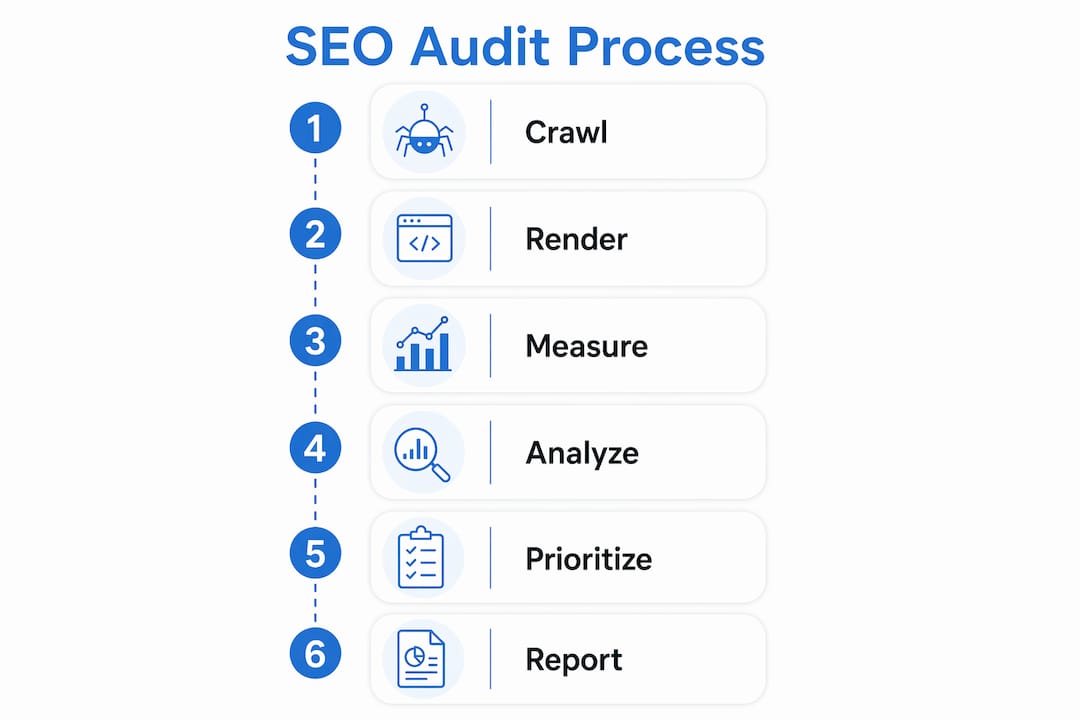
The audit workflow runs in one direction: crawl → render → measure → analyze → prioritize → report. Skipping steps or running them out of order produces findings that contradict each other.

Tools and data sources for a 2026 audit:
A professional audit pulls from multiple sources simultaneously. Site crawlers (Screaming Frog, Sitebulb, or similar) map structure and surface on-page issues. Google Search Console provides real indexation data, coverage errors, and field Core Web Vitals. Bing Webmaster Tools catches indexation gaps that GSC misses. PageSpeed Insights and Chrome UX Report supply lab and field performance data. Log file analysis is the only reliable way to confirm how bots actually crawl your site; pair it with crawl simulations and GSC data to identify gaps between expected and actual bot behavior.
Field Core Web Vitals from the Chrome UX Report should be monitored monthly. Lab tools like PageSpeed Insights diagnose root causes, but field data is what Google actually uses for ranking. Prioritize fixes based on field data, not lab scores alone.
Sampling strategy for large sites:
For sites with thousands of pages, a mixed methodology works best. Run an automated site-wide crawl to catch systemic issues, then apply focused manual checks to a representative sample: homepage, top-converting pages, highest-traffic content, and a random sample of category and product pages. Combining crawlers, GSC data, and server log analysis at scale is the only way to validate that bot behavior matches your intent.
The 2026 AI-crawler readiness check:
This is the newest addition to a standard audit. Verify that llms.txt (or equivalent signals) does not block major AI crawlers. Check user-agent access for PerplexityBot, ChatGPT-User, GoogleOther, and Anthropic-AI individually, since a robots.txt rule blocking one does not necessarily block others. Review schema coverage for entity-rich pages: do your key pages carry the markup that lets an AI answer engine identify your business, products, or expertise? Finally, assess content citability: are authority signals (author credentials, About page, E-E-A-T signals) visible and linked? LLMs can assist with drafting remediation suggestions and summarizing findings, but they cannot replace a crawler plus field data for the actual audit.
Webtechs has applied this methodology across Arizona small and mid-sized businesses, with documented results including a 4,490% increase in organic traffic for one client after technical and content work were sequenced correctly.
What should the audit report contain?
A quality audit report is not a list of issues. It is a prioritized implementation plan with enough detail that a developer or in-house team can act without a follow-up call.
Sample report contents:
- Executive summary: one-page TL;DR with the top five findings and their estimated traffic impact
- Prioritized impact × effort roadmap: every issue ranked, with estimated hours attached so you can budget
- Full issue inventory: each finding listed with the affected URLs, a description of the problem, and a remediation step (including code snippets or configuration examples where applicable)
- Verification steps: how to confirm each fix worked (GSC re-index request, crawl re-run, field data re-check)
- AI-readiness score: bot accessibility rating, schema coverage percentage, and citability assessment
- Follow-up plan: a 30/60/90-day monitoring schedule with the KPIs to track
KPIs to track after implementation:
- Pages indexed (GSC Coverage report, before and after)
- Crawl errors resolved (zero target in GSC)
- LCP, INP, and CLS improvements in field data (Chrome UX Report)
- Mobile usability errors (GSC Mobile Usability report)
- Schema validation score (Google Rich Results Test)
- AI-crawler access confirmed for all four major bots
Handoff materials should include CSV or Google Sheets exports of the full issue list, annotated screenshots of critical findings, and a prioritized implementation backlog with estimated hours per task. Vendors who do not supply estimated hours or clear acceptance criteria are harder to budget for and manage. Ask for them upfront.
How long does an audit take, and what does it cost?
Timeline and price both scale with site complexity, not just page count.
| Site Size | Pages | Typical Timeline | Typical Price Range |
|---|---|---|---|
| Small business site | Small sites | About two weeks | Lower-cost range |
| Mid-size site | Mid-sized sites | 2–4 weeks | Moderate price range |
| Enterprise / complex | Large sites | 4+ weeks + ongoing monitoring | Higher price range |
These ranges cover audit-only engagements. Audit plus implementation retainers run higher and vary by scope.
What pushes cost up:
- JavaScript-heavy or headless CMS architectures that require rendering analysis
- Log file analysis (requires server access and processing time)
- Multilingual or multi-regional sites with hreflang complexity
- Bespoke AI-readiness testing beyond standard bot checks
- Large e-commerce catalogs with faceted navigation and duplicate URL patterns
Procurement guidance: Fixed-price audit proposals are easier to budget and compare. A good statement of work specifies scope (pages, page types, audit areas), assumptions (access to GSC, server logs, staging environment), exclusions, deliverable format, timeline, and acceptance criteria. Time-and-materials arrangements work for enterprise sites where scope is genuinely unknown, but require a not-to-exceed cap and weekly check-ins.
Technical audits are foundational and should precede content and backlink work. Paying for link building before fixing crawl issues is spending money on a leaky bucket.
How do you evaluate an audit provider before hiring?
Questions to ask every vendor
- What is your audit methodology and in what order do you run checks?
- Which tools do you use, and do you include log file analysis?
- How do you handle AI-crawler readiness checks in 2026?
- What CMS platforms have you audited, and do you have experience with ours?
- How do you validate that fixes actually worked after implementation?
- Can you share a sample deliverable or a redacted report from a similar site?
- What post-audit support do you offer: consulting, implementation help, or training?
Red flags to watch for
- Generic reports with no site-specific URLs or examples
- No sample deliverable available before you sign
- No verification or re-crawl plan included in the scope
- Promises of ranking improvements within a specific timeframe
- No mention of AI-crawler checks or Core Web Vitals field data
- Pricing with no itemized scope or acceptance criteria
Pro Tip: Ask for the prioritized roadmap format before you hire. If a vendor cannot show you how they rank findings by impact and effort with estimated hours, their report will be a list, not a plan. A list does not tell your developer what to build first.
Does your backlink profile belong in a technical audit?
Backlink analysis sits at the boundary between technical and off-page SEO, but it belongs in a complete site audit. A toxic or thin backlink profile can suppress rankings even when the technical infrastructure is clean.
A backlink audit identifies links from spammy, irrelevant, or penalized domains and flags patterns that could trigger a manual action: excessive reciprocal linking, paid links without the nofollow or sponsored attribute, or a sudden spike in low-quality links from a negative SEO attack. The output is a disavow file ready for Google Search Console submission, plus a list of high-authority domains worth pursuing for legitimate link building.
Pair the backlink review with an internal link audit. Pages with strong external authority but few internal links pointing to them are leaving ranking potential on the table. Redistributing internal links from high-PageRank pages to underperforming ones is one of the fastest wins an audit can surface.
How does competitive analysis fit into keyword mapping?
Keyword mapping connects each target keyword to a specific page on your site. Without it, multiple pages compete for the same query (keyword cannibalization), or high-value queries have no dedicated page at all.
Competitive analysis shows which pages your closest competitors rank for that you do not, and which of your pages rank on page two or three for queries where a competitor holds position one. That gap list becomes a prioritized content and optimization roadmap. For Arizona businesses, local competitive analysis also surfaces which competitors dominate Google Maps results and what on-page signals their top-ranking pages share.
The keyword-to-page map is a deliverable that should accompany every audit. It tells you not just what is broken, but what to build next.
What qualifications should an audit provider have?
Credentials matter less than documented outcomes. Look for a provider who can show you before-and-after GSC data, specific findings from past audits, and a clear explanation of how those findings were prioritized and fixed.
Relevant qualifications include hands-on experience with your CMS (WordPress, Shopify, custom builds), familiarity with Google Search Console and Bing Webmaster Tools at an advanced level, and a working knowledge of Core Web Vitals field data interpretation. For 2026, add AI-crawler readiness to that list. A provider who has never heard of llms.txt or PerplexityBot is working from an outdated checklist.
Reputation signals worth checking: published SEO case studies with measurable outcomes, client testimonials that reference specific results, and a portfolio that includes sites in your industry or of similar complexity.
Key questions to ask vendors before you hire
Beyond methodology, ask about communication and support:
- How often will you provide status updates during the audit?
- Who is the point of contact, and what is the typical response time?
- What happens if you find issues outside the original scope?
- Do you offer a post-audit consulting call to walk through the roadmap?
- Can you assist with implementation, or is the report the final deliverable?
- What does ongoing monitoring look like after the initial audit?
The answers reveal whether you are buying a report or a working relationship. For small businesses in Arizona without an in-house SEO team, post-audit support is often as valuable as the audit itself.
Red flags that should stop you from signing
A few specific patterns signal a vendor who will waste your budget:
- No sample report: any professional auditor has a redacted example. Refusing to share one means the deliverable is not worth showing.
- Guaranteed rankings: no audit provider can guarantee a position. Google’s algorithm is not a contract.
- One-size-fits-all pricing: a 15-page local business site and a 10,000-page e-commerce catalog are not the same audit. Flat pricing with no scope definition means one of you is getting a bad deal.
- No post-fix verification: an audit that ends at the report stage with no plan to confirm fixes worked is an incomplete service.
- Ignoring AI readiness: in 2026, skipping AI-crawler checks is the equivalent of skipping mobile usability checks in 2019.
In-house audits vs. agency audits: what is the real difference?
An in-house audit is faster to start and cheaper in direct cost. Your team knows the site architecture, has access to all credentials, and can move from finding to fix without a handoff. The limitation is objectivity and tooling depth. Internal teams often miss issues they introduced themselves, and few small businesses maintain licenses for professional crawlers, log analyzers, and field data platforms simultaneously.
An agency audit brings an outside perspective, a structured methodology, and dedicated tooling. The tradeoff is time (onboarding, access provisioning, communication cycles) and cost. For a site that has never been audited, or after a major migration, the outside perspective almost always surfaces issues the internal team missed.
The practical answer for most Arizona small businesses: run a lightweight in-house check quarterly using Google Search Console and PageSpeed Insights, and commission a full agency audit annually or after any significant site change. The SEO for Dummies guide from Webtechs covers the basics for owners who want to handle routine monitoring themselves.
What support should you expect after the audit?
The report is the beginning, not the end. Post-audit support options vary by vendor:
- Consulting calls: a walkthrough of the roadmap with your developer or marketing team, answering implementation questions
- Implementation assistance: the vendor makes the fixes directly (common for smaller sites or when the client lacks technical resources)
- Training: teaching your in-house team to run recurring checks, interpret GSC data, and maintain the technical baseline
- Ongoing monitoring retainers: scheduled re-crawls, monthly Core Web Vitals reviews, and regression alerts after deploys
For businesses without a dedicated developer, implementation help is worth budgeting for. A prioritized roadmap sitting in a Google Sheet for six months produces zero ranking improvement.
Key Takeaways
A technical SEO audit is only as valuable as the prioritized roadmap it produces: fix crawl and indexation issues first, then speed, then on-page and AI readiness, in that order.
| Point | Details |
|---|---|
| Crawl and index first | Fix robots.txt errors, sitemap mismatches, and noindex issues before any other optimization. |
| Use impact × effort ranking | Attach estimated hours to every finding so your team knows what to build first. |
| Add AI-readiness checks | Verify llms.txt, AI bot access, schema coverage, and citability signals for 2026 audits. |
| Demand a verification plan | Any audit without a re-crawl and field data re-check after fixes is an incomplete service. |
| Webtechs delivers full-scope audits | Webtechs provides prioritized roadmaps, AI-readiness checks, and documented case studies for Arizona businesses. |
Why the audit always comes first
The conventional wisdom in SEO is to work on everything simultaneously: publish content, build links, fix technical issues, and hope the combined effort moves rankings. That approach is expensive and slow. The reason is straightforward: content and links cannot compensate for a site that search engines cannot crawl or render correctly. Fixing the foundation first means every subsequent dollar spent on content or outreach works on a site that is actually visible.
What gets underestimated is how often the audit surfaces issues that were introduced by well-intentioned changes. A CMS update that accidentally adds a noindex tag to a category template. A CDN configuration that blocks Googlebot from rendering JavaScript. A redirect chain that grew one hop at a time over three years. None of these show up in analytics until rankings drop, and by then the damage is done.
The 2026 addition of AI-crawler readiness is not a trend to monitor. It is a present-day gap. Sites that block PerplexityBot or lack entity-rich schema are already missing citation opportunities in AI answer engines. That gap will widen, not close, as AI-driven search grows.
For Arizona businesses competing in local and regional markets, the audit is also the fastest way to identify why a competitor outranks you on a specific query. The answer is almost always structural, not a content quality gap.
Webtechs audits Arizona businesses with a 2026-ready process
Webtechs has worked with Arizona small and mid-sized businesses since 1997, and every engagement starts with a structured technical audit before any content or link work begins. The audit covers all six core areas above, including the 2026 AI-crawler readiness checks, and delivers a prioritized impact × effort roadmap with estimated hours so you know exactly what to fix and in what order.

The results speak for themselves. One client saw a 353% increase in organic traffic after Webtechs identified and resolved foundational crawl and indexation issues that had been suppressing rankings for years. Every new client receives a sample report format before signing, a clear timeline, and a post-audit consulting call to walk through the roadmap with your team.
Ready to see what is holding your site back? Request a proposal or review Webtechs’s portfolio of past work to confirm the fit before you commit.
Useful sources and recommended reading
These resources are worth bookmarking alongside your vendor evaluation checklist.
Keep your audit checklist and vendor evaluation criteria in the same document. When you solicit proposals, share the checklist with each vendor and ask them to confirm which items they cover. Any vendor who cannot map their deliverables to a standard checklist is working without a structured methodology.
- Moz Technical SEO Audit Checklist: includes a downloadable spreadsheet and covers crawl-first sequencing; useful for structuring an in-house audit or evaluating vendor scope
- Rankeo 45-Point Technical SEO Checklist (2026): the most current checklist for AI-readiness checks, including llms.txt and AI bot user-agent verification
- QuickSEO Complete SEO Audit Checklist (2026): strong on Core Web Vitals field data prioritization and the sequencing of technical before content work
- Semrush On-Page SEO Checklist: covers on-page optimization factors including title tag length, meta descriptions, and heading structure
- Similarweb On-Page SEO Guide (2026): explains why technical audits must precede content audits and provides a sequencing framework
- Seobility 50-Point SEO Audit Checklist: covers all four pillars (technical, on-page, content, backlinks) with a structured framework grounded in Google’s SEO Starter Guide
- Google Search Console: the primary source for indexation data, Core Web Vitals field data, and mobile usability errors; free and authoritative
- Google PageSpeed Insights: lab-based Core Web Vitals measurement with specific remediation suggestions; use alongside Chrome UX Report for field data