

NAP Consistency: A Local SEO Guide for Small Businesses

What is NAP consistency and why does it matter?
NAP stands for Name, Address, and Phone Number. NAP consistency means those three details appear identically across every platform where your business shows up online: your website, Google Business Profile, Yelp, Facebook, local directories, and anywhere else.
Google uses this data to verify that your business is real and located where you say it is. When the information matches everywhere, Google gains confidence and rewards you with better placement in local search results. When it conflicts, Google hesitates, and your rankings can slip.
The stakes for consumers are just as real. Inconsistent or outdated NAP information frustrates 93% of consumers and causes 80% to lose trust in a business. That is not a rounding error. That is most of the people who find you online.
Key benefits of maintaining accurate, uniform listings:
- Higher visibility in Google’s local 3-pack and Maps results
- Stronger citation signals that reinforce your local authority
- Reduced friction for customers trying to contact or visit you
- Clearer brand identity across every platform
- Better conversion rates from local search traffic
Table of Contents
- Why even small NAP differences can hurt your local rankings
- Where NAP inconsistencies come from in the first place
- How to audit your NAP data across the web
- How to choose your canonical NAP
- How to fix inconsistent listings once you find them
- How to display NAP on your website for maximum SEO impact
- Expert advice on keeping your NAP accurate over time
- Key Takeaways
Why even small NAP differences can hurt your local rankings
A missing suite number, a swapped abbreviation, a phone number formatted differently on two platforms. None of these feel like emergencies, but they add up.

Search engines are sophisticated enough to treat common formatting variants like “St.” and “Street” as equivalent, so pure formatting differences rarely cause serious damage. The real problem is core accuracy: a wrong phone number, an old address from a previous location, or a business name that appears under two slightly different versions. Those discrepancies signal unreliability.
Think of it from Google’s perspective. It is trying to match your listing against dozens of other data points across the web. If your address reads “Suite 200” on your website but “Ste. 200” on Yelp and nothing on your Google Business Profile, Google can still connect the dots. But if your phone number changed six months ago and half your listings still show the old one, that is a genuine conflict. Google may lower your local ranking because it cannot confidently confirm your identity.
The practical rule: sweat the substance, not the style. Standardize formatting for consistency’s sake, but treat wrong or outdated core details as urgent.

Where NAP inconsistencies come from in the first place
Most business owners do not create NAP problems on purpose. They accumulate over time through predictable channels:
- Multiple listing platforms: Directories like Yelp, Yellow Pages, and Apple Maps often pull data from aggregators, not directly from you. Errors introduced at the aggregator level spread fast.
- User-generated edits: On platforms like Google Maps, anyone can suggest an edit to your listing. Those suggestions sometimes go live without your approval.
- Business changes: A move, a new phone number, or a rebrand creates a gap between your current reality and what dozens of old listings still say.
- Dynamic Number Insertion (DNI): Call tracking tools swap your real phone number for a tracking number on your website. If implemented carelessly, DNI can create inconsistent phone data that search engine crawlers pick up.
- Legacy data: Old citations from years ago do not disappear. A business that moved three years ago may still have its former address listed on a dozen directories nobody actively manages.
How to audit your NAP data across the web
A thorough audit takes some time, but the process is straightforward.
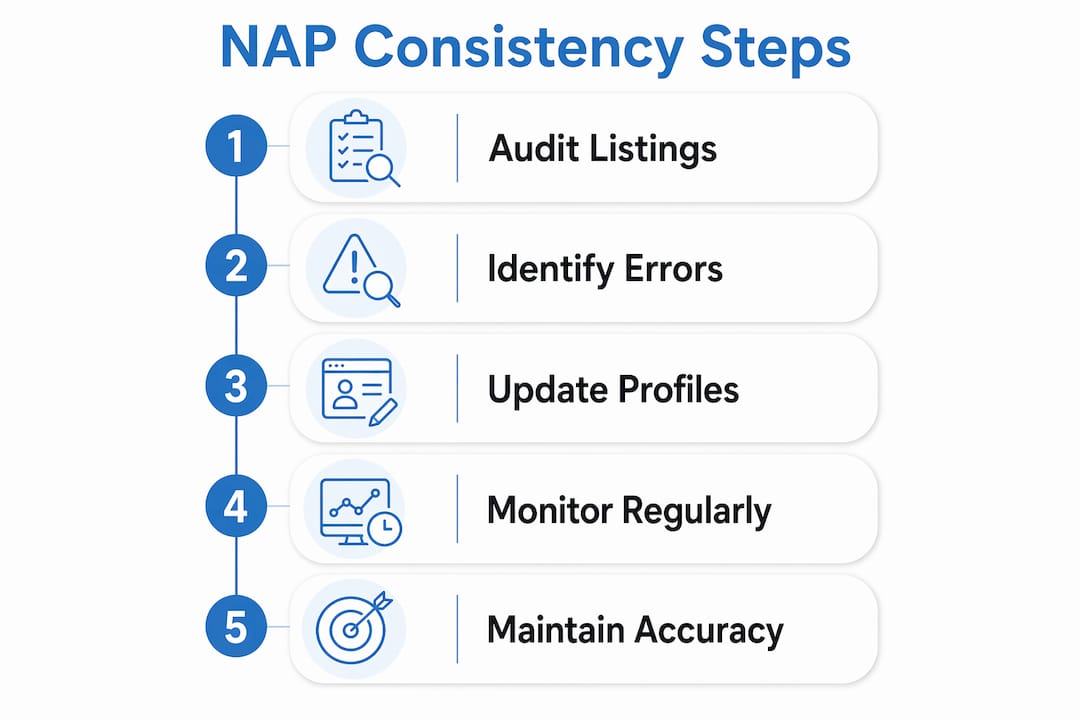
- Define your canonical NAP first. Before you check anything, decide what the correct version of your business name, address, and phone number actually is. Write it down exactly as it should appear everywhere.
- List every platform where your business appears. Start with Google Business Profile, Yelp, Facebook, Apple Maps, Bing Places, and the Better Business Bureau. Then expand to industry-specific directories and any local Scottsdale business listings.
- Check each listing manually. Compare the name, address, and phone number on each platform against your canonical version. Note every discrepancy, no matter how minor.
- Use automation tools to catch what you miss. Tools like BrightLocal and Moz Local can scan hundreds of directories simultaneously and flag inconsistencies. Manual audits are time-consuming; automation handles the volume, but you still need to verify the results yourself.
- Prioritize by platform authority. Google Business Profile, Yelp, and Facebook carry the most weight. Fix those first before working down to smaller directories.
- Document everything in a spreadsheet. Record the platform name, the current NAP as listed, what needs to change, and the status of each correction. This becomes your master audit log.
Pro Tip: Search Google for your business name plus your city and scan the first two pages of results. Anything that surfaces there, including old press mentions and aggregator listings, is worth adding to your audit log.
How to choose your canonical NAP
Your canonical NAP is the single official version of your business details that every listing should match. Getting this right before you start fixing anything saves you from creating new inconsistencies.
- Use your legal business name as registered, not a shortened nickname or a marketing tagline. If your registered name is “Scottsdale Plumbing Solutions LLC,” that is your baseline, though you may reasonably drop the “LLC” for consumer-facing listings as long as you do it consistently.
- Match your address to USPS formatting. The United States Postal Service standardizes address formats; using their version reduces ambiguity across platforms.
- Pick one phone number and stick with it. A local number generally outperforms an 800 number for local SEO purposes. If you use call tracking, configure DNI so tracking numbers display only to human visitors while crawlers see your real number.
- Confirm internally before publishing. If you have a team, a marketing vendor, or an agency like Webtechs managing your listings, everyone needs to work from the same document. One person updating listings with a slightly different address format undoes the work.
- Treat your Google Business Profile as the anchor. Whatever formatting Google accepts and displays for your address should be your standard everywhere else.
How to fix inconsistent listings once you find them
Fixing NAP errors is less glamorous than finding them, but it is where the SEO gains actually happen.
- Start with Google Business Profile. Log in, verify your details, and correct anything that does not match your canonical NAP. This is the single most impactful listing you control.
- Claim unclaimed listings. Many directories allow businesses to claim their profile and edit it directly. Claim every major platform before attempting corrections.
- Submit corrections directly where possible. For platforms that accept direct edits, update them manually. For aggregators like Data Axle or Neustar Localeze, correcting the data at the source pushes updates downstream to dozens of directories at once.
- Use listing management tools for scale. Services like BrightLocal or Moz Local can push corrections across hundreds of directories simultaneously. This is especially useful for businesses with many existing citations.
- Find and resolve duplicate listings. Duplicates confuse both search engines and customers. Merge or remove them rather than leaving two competing versions of your business live.
- Schedule a follow-up check. Set a calendar reminder for 30 days after your corrections to verify that changes went live and no new errors appeared.
Pro Tip: After any business change, update your Google Business Profile and your website within 24 hours. Then work through your top ten directory listings within the same week. Waiting months lets bad data spread to aggregators.
How to display NAP on your website for maximum SEO impact
Your website is the one platform you fully control, which makes it the most reliable anchor for your NAP data.
- Place your NAP in the footer of every page. Search engines crawl your footer on every page load, reinforcing your location signal consistently across your entire site.
- Include a dedicated contact page with your full canonical NAP, an embedded Google Map, and your business hours.
- Use schema.org LocalBusiness markup. Structured data helps search engines confirm your NAP and improves local SEO visibility. Adding this markup to your homepage and contact page is one of the highest-leverage technical steps you can take.
- Never display conflicting addresses or phone numbers on the same site. If you have multiple locations, each location needs its own dedicated page with its own NAP, not a single page listing all of them together.
- Match your website NAP exactly to your Google Business Profile. Even minor formatting differences between these two sources can create a signal conflict.
For Scottsdale businesses especially, where local competition in industries like real estate, healthcare, and home services is intense, getting this right on your own site is a meaningful edge. Webtechs builds local SEO foundations directly into every site it develops, including proper schema markup and footer NAP placement.
Expert advice on keeping your NAP accurate over time
NAP management is not a project you complete once. It is an ongoing process, and the businesses that treat it that way consistently outperform those that do not.
Run a full audit every 3–6 months, and immediately after any business change: a move, a new phone number, a rebrand, or even a change in business hours. Aggregators re-pull data on their own schedules, so errors can reappear even after you fix them.
For call tracking, configure DNI correctly so tracking numbers are visible only to human visitors. Search engine crawlers should always see your real, canonical phone number. Well-implemented DNI preserves your NAP consistency while still giving you the conversion data you need.
Webtechs has worked with Scottsdale businesses across industries, from hair salons to garden nurseries, and the pattern is consistent: businesses that maintain clean, uniform citations see measurable improvements in local pack rankings and inbound calls. The work is not complicated, but it requires discipline and a system.
Key Takeaways
NAP consistency is the single most controllable factor in local SEO, and fixing it costs far less than losing customers to a competitor whose listings are simply more accurate.
| Point | Details |
|---|---|
| Define your canonical NAP first | Choose one exact version of your name, address, and phone number before touching any listings. |
| Audit every platform systematically | Check Google Business Profile, major directories, and social profiles, then document every discrepancy. |
| Fix high-authority listings first | Correct Google Business Profile, Yelp, and Facebook before working down to smaller directories. |
| Use schema markup on your website | LocalBusiness structured data helps search engines confirm your NAP and strengthens local visibility. |
| Audit every 3–6 months | Business changes and aggregator re-pulls can reintroduce errors; regular checks prevent backsliding. |