

How to Fix a Google Business Suspension and Get Reinstated

A Google Business suspension is almost always reversible if you correct the compliance issue behind it and file a single, well-documented appeal through Google’s official tool. The catch: if your managing Google Account is restricted or disabled, that has to be fixed first, or the appeal itself won’t process. Start there before you touch anything else on the profile.
TL;DR:
- Fixing account restrictions must come before filing an appeal, as a disabled or restricted Google Account blocks the process entirely.
- Identifying whether the suspension is soft or hard influences your actions; soft suspensions allow profile edits but no responses, while hard suspensions remove the profile from search results completely.
- Common suspension triggers include virtual addresses, keyword stuffing, duplicate listings, rapid bulk edits, policy violations, and account-level restrictions.
- Gathering and submitting clear, official documentation like business registration and proof of physical address within a strict 60-minute window enhances appeal success.
- Waiting up to five working days for the review process is standard; resubmitting appeals prematurely or with incomplete evidence often delays reinstatement.
Table of Contents
- Immediate 24 to 48 Hour Checklist to Preserve Your Appeal
- What Kind of Suspension Do You Have, and What Caused It?
- Step-by-Step Appeals Workflow That Actually Works
- Fixing Google Account Problems That Block Reinstatement
- Practical Prevention for Arizona Local Businesses
- What to Expect After You Submit the Appeal
- The Agency Checklist Webtechs Uses to Restore Suspended Profiles
- What Arizona Business Owners Get Wrong About This Process
- Get Your Google Business Profile Back and Keep It Stable
- Official Pages to Bookmark Before You Appeal
- Sources
Immediate 24 to 48 Hour Checklist to Preserve Your Appeal
Before you file anything, spend the first day figuring out what you’re actually dealing with. A suspended listing can mean two very different things, and treating a hard suspension like a soft one (or vice versa) wastes your best window to act.
- Check whether it’s soft or hard. Log into your account and try to edit the listing. If you can still access it but changes aren’t going live, that’s a soft suspension. If the profile has vanished from Maps and Search entirely and you can’t edit it, that’s hard.
- Do not create a new listing. This is the single most common mistake business owners make while panicking, and it commonly gets appeals denied outright.
- Secure your Google Account. Confirm you can log in normally, with two-factor authentication intact and no security holds.
- Build one evidence folder now. Business registration, professional license, a recent utility bill, and a photo of your storefront signage. Put them in a single folder, ready to upload.
- Open the appeals tool for your profile and read the exact reason Google lists. This tells you what to fix before you submit anything.
Pro Tip: Save every document as a clearly labeled PDF (like “license_2026.pdf”) before you open the evidence upload form. You get a 60-minute window once it opens, and fumbling through file folders under a countdown is how good evidence gets left out.
What Kind of Suspension Do You Have, and What Caused It?
Soft suspensions leave your profile visible on Maps and in Search results, but you lose the ability to make edits, respond to reviews, or post updates. Google is essentially flagging something for review while letting the listing stand. Hard suspensions are more severe: the profile disappears from search results entirely, and you often can’t access it through the dashboard at all.
Testing which one you have is simple. Search your business name directly. If it still shows up but the dashboard blocks your edits, you’re dealing with soft. If it’s gone from Maps and Search, and your dashboard access reflects that, you’re looking at hard.
The root causes tend to cluster around a handful of repeat offenders. According to guidance from BrightLocal, the most common triggers include:
- Virtual office or P.O. box addresses used as the primary business location instead of a real, staffed premises.
- Keyword-stuffed business names, like listing your business as “Smith Plumbing, Best Emergency Plumber Scottsdale AZ” instead of just the actual registered name.
- Duplicate listings, often created by a previous marketing vendor or a franchise location mixup.
- Rapid bulk edits, especially changing your name, address, and category all in the same session.
- Policy violations, such as a category that doesn’t match your actual services, or reviews that look manipulated.
- Account-level restrictions, where the suspension has nothing to do with the profile itself and everything to do with your Google Account’s standing.
The suspension notification email and the appeals tool itself usually name a specific policy category, not just a generic “suspended” label. Read it carefully. Google’s own policy overview notes that automated systems can flag a profile after sudden edits or inconsistent address data, without any human ever reporting it. That’s worth knowing, because it means your fix needs to address the actual data mismatch, not just “wait it out.”
Step-by-Step Appeals Workflow That Actually Works
Once you know what triggered the suspension, the fix has a specific order. Skipping steps, or trying to shortcut the evidence upload, is what turns a fixable issue into a drawn-out mess.
- Audit your profile against your official records first. Pull up your Arizona business registration or your county license and compare every field: legal name, address, phone number, category. Fix any mismatch on your end before you appeal, since Google will check this same data.
- Log into the managing Google Account and confirm it’s the account that actually owns the profile. If you manage multiple locations, make sure you’re not accidentally trying to appeal from a secondary or unauthorized account.
- Open the appeals tool and select the affected profile. Read the stated reason. This determines what evidence you prioritize.
- Prepare your evidence folder before opening the upload form, not after. You’ll get a 60-minute window to submit documents once the form opens, and that clock does not pause. Include your business registration, professional or trade license, a recent utility bill tied to the business address, and a clear photo of exterior signage.
- Submit exactly one appeal. Reviews take up to five working days, and Google is explicit that submitting a second or third appeal for the same issue doesn’t speed anything up. It just creates confusion in the queue and can flag your account for closer scrutiny.
- If denied, don’t resubmit the same appeal. Instead, gather additional or stronger evidence and use Google’s separate additional-review request process.
Here’s a number worth sitting on: appeal reviews can take up to five working days according to Google’s own support documentation, and that’s the ceiling under normal circumstances, not an average. If you’re on day two and tempted to file again because nothing’s happened yet, resist it. A second appeal doesn’t jump the queue. It usually resets it.
For businesses managing ten or more locations, the process shifts slightly. Google requires a spreadsheet listing each profile’s ID alongside its supporting documents rather than one appeal at a time, so if you’re a multi-location service provider, build that spreadsheet early rather than trying to appeal locations individually.
Fixing Google Account Problems That Block Reinstatement
A suspended Business Profile sometimes isn’t the real problem. It’s a symptom of a Google Account that’s already in trouble. Google’s policy documentation is direct about this: if the account managing your profile is disabled, suspended, or otherwise restricted on any linked Google product, every Business Profile tied to it can go down too, even if the listing itself never violated a single policy.
This catches business owners off guard constantly. You didn’t do anything wrong with your Maps listing. But the same Gmail account you used to set it up got flagged for something in Google Ads or YouTube, and now your local visibility is collateral damage.
Work through this before you touch the appeals tool:
- Check your account status directly by trying to log into other Google services tied to the same account, like Gmail or Google Ads.
- Follow Google’s account recovery steps if you see a suspension or disabled notice, which usually involves identity verification and a review request specific to the account, separate from the Business Profile appeal.
- Turn on two-factor authentication once you’re back in, and remove any unfamiliar devices or apps with account access.
- Use a dedicated business account, not a personal Gmail you also use for unrelated projects, to reduce the odds of unrelated flags spilling over.
- Wait until the account shows good standing before submitting your profile appeal. Filing while the account is still restricted is close to guaranteed to fail, since the profile appeal system checks account status as part of its review.
Restore the account first, then appeal the profile. Reversing that order is the number one reason otherwise-solid appeals get denied.
Practical Prevention for Arizona Local Businesses
Once you’re back online, the job shifts from recovery to maintenance. Most repeat suspensions happen because the same underlying inconsistency that triggered the first one never got fully cleaned up.
Start with consistency across every public record. Your business name and address should read identically on your Arizona Secretary of State registration, your website’s footer, your invoices, and your Business Profile. Even small variations, like “Suite 200” on one and “Ste 200” on another, can look like manipulation to Google’s automated review systems.
- Never use a P.O. box as your primary address. If you run a virtual office setup, keep proof of occupancy or a service agreement on hand in case Google requests verification.
- Limit who has editor access to your profile. Every additional manager account is another point of failure, especially if a former employee or old marketing vendor still has access.
- Avoid bulk edits in a single session. Changing your name, category, and address all at once is one of the fastest ways to trigger an automated flag, per Google’s own guidance.
- Monitor suggested edits from the public. Anyone can propose a change to your listing, and unreviewed edits sometimes introduce the exact inconsistency that gets a profile flagged.
- Run a quarterly audit. Cross check your name, address, phone number, hours, and category against your official documents every three months.
Pro Tip: Keep a single reference document with your exact legal business name, address, and phone number as they appear on your Arizona license. Every platform, from your website to review sites to local directories, should copy from that one source, not from memory.
Local resources documenting real evidence formats, like the examples compiled by Southern California business directories, can also give you a sense of what documentation reviewers respond well to, even outside Arizona.
What to Expect After You Submit the Appeal
Google’s own guidance sets the review window at up to five working days, and that’s the number to plan around, not a guess or an estimate you should discount. During that window, resist filing a second appeal even if you haven’t heard anything by day three.
- A pending status means your appeal is in the queue; check back rather than resubmitting.
- A reinstated profile should get an immediate visibility check. Confirm your reviews, photos, and hours came back intact, since some content occasionally doesn’t restore cleanly.
- A denial means it’s time to gather stronger or additional evidence, not to file the exact same appeal again.
- The additional-review process exists specifically for denied appeals and expects new documentation, not a repeat of what you already submitted.
If reinstated, don’t assume everything snapped back exactly as it was. Check for missing reviews or photos and address gaps immediately.
The Agency Checklist Webtechs Uses to Restore Suspended Profiles
Webtechs approaches every suspended profile the same structured way: full audit of every listed field against official records, a packaged evidence file matched to the exact violation Google cited, and a single, clean appeal submission rather than a scattershot approach.

Once reinstated, the work isn’t done. Local citations often need rechecking for consistency, missing reviews sometimes need documented recovery requests, and ongoing visibility monitoring catches new issues before they escalate into another suspension. DIY works fine for a single, straightforward soft suspension with clear documentation on hand. Agency help earns its cost when you’re managing multiple locations, facing a denied appeal, or trying to recover lost review history while running your actual business.
What Arizona Business Owners Get Wrong About This Process
Most advice on Google Business suspensions treats it like a technical support ticket: follow the steps, wait, done. That undersells how much of this is actually a documentation problem dressed up as a tech problem. The businesses that get reinstated fastest aren’t the ones who appeal first. They’re the ones who spend an extra hour lining up their Arizona license, their utility bill, and their registration before they ever touch the appeals tool.
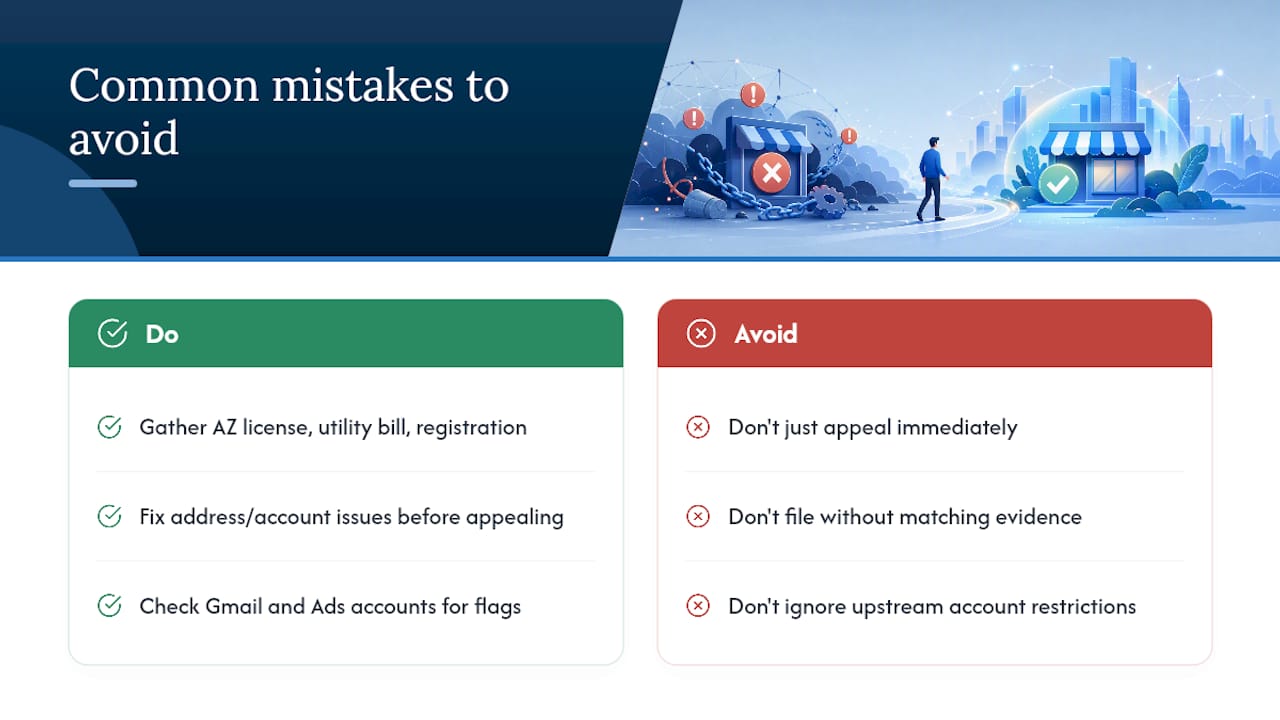
The conventional wisdom to “just appeal and see what happens” is where a lot of local service providers lose weeks. Filing before you’ve fixed the underlying address or account issue just guarantees a denial and resets your five-day clock for nothing. Prioritize the diagnosis over the speed of your response. A suspension that sits for three extra days while you gather the right utility bill and license copy beats a same-day appeal that gets bounced because the evidence didn’t match your official records.
The account-restriction piece also gets overlooked constantly. Business owners fixate on the listing itself when the actual blocker is a flagged Gmail or Ads account sitting one layer up.
— Brett
Get Your Google Business Profile Back and Keep It Stable
Webtechs is the practical alternative to guessing your way through Google’s appeals process alone. Instead of piecing together documentation on your own timeline, our team runs a full profile audit, packages your evidence to match the exact policy reason Google cited, and files the appeal correctly the first time, which matters when repeat submissions can slow your case down.

For local service providers across Scottsdale and the broader Phoenix area, we also handle what comes after reinstatement: rebuilding your Google Business Profile optimization, recovering lost visibility, and monitoring your listing so a second suspension doesn’t catch you off guard. If your profile has been down for days and you’re losing calls because of it, a Google Local Services Ads campaign can also fill the visibility gap while your appeal processes. Take a look at our portfolio to see the kind of local SEO recovery work we’ve done for Arizona businesses, and reach out for a consultation to find out exactly what your profile needs to get back to full visibility.
Official Pages to Bookmark Before You Appeal
Start with Google’s Business Profile appeals tool and its suspended profile guidance. For real-world troubleshooting, the Google Business Profile Community and AZ Big Media’s recovery guide offer useful firsthand context.
Sources
- Appeal Business Profile content and profile restrictions – Google Business Profile Help
- Fix suspended or disabled profiles – Google Business Profile Help
- Fixing a Suspended Google Business Profile – BrightLocal