

Scottsdale Video SEO That Works: Transcripts, Schema, One Watch Page
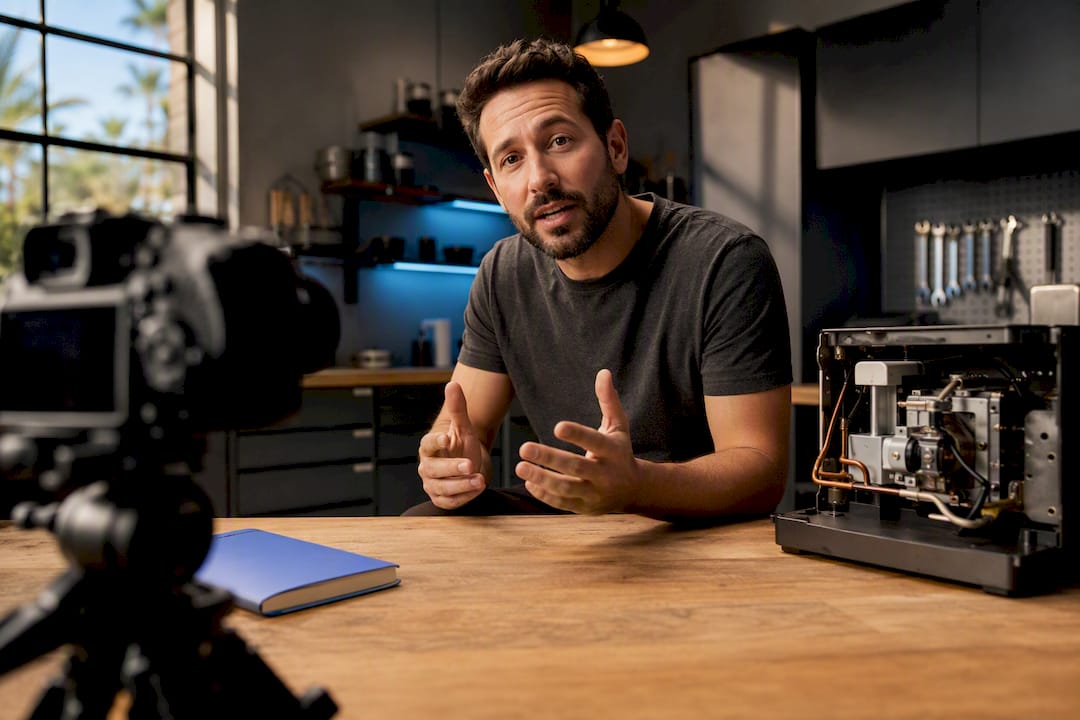
Video SEO for business means structuring your video content, metadata, and hosting so search engines and AI models can index and rank it, the same way they rank a webpage. The single highest-impact move is publishing a watch page with a stable thumbnail, a human-verified transcript, and VideoObject markup, since that combination is what actually gets Scottsdale service businesses found in Google Search, Video mode, and AI-generated answers.
TL;DR:
- A stable thumbnail, human-verified transcript, and VideoObject schema are essential for indexing and ranking videos on Google and AI platforms.
- Creating individual watch pages with proper metadata and avoiding JavaScript hurdles improves video discoverability and indexing.
- Including location-specific keywords and embedding videos on local service pages boosts relevance for Scottsdale-based searches.
- Hosting videos on YouTube enhances reach, but embedding them on your own site with schema allows better control over conversions and structured data.
- Proper measurement using Google Search Console and YouTube Analytics is crucial for tracking video performance and adjusting your local SEO strategy accordingly.
Table of Contents
- Why video SEO matters for Scottsdale businesses
- Local execution: DIY, hire, or hybrid?
- Video schema (VideoObject) and structured data essentials
- Video sitemaps and watch page requirements
- Thumbnail and metadata best practices
- Hosting and distribution tradeoffs
- How to measure video SEO performance
- Local SEO strategies for video in Scottsdale
- Optimizing video for mobile viewers
- Integrating video SEO with your broader local strategy
- What separates working video SEO from wasted production budget
- Get your Scottsdale business found with professional video SEO
- Sources
Why video SEO matters for Scottsdale businesses
Google surfaces video in more places than most business owners realize: standard Search results, the dedicated Video tab, Discover feeds, and increasingly, AI-generated summaries that pull from indexed transcripts rather than the video file itself. A landscaper in north Scottsdale who embeds a 90-second job walkthrough on their “Desert Landscaping” service page isn’t just adding content. They’re giving Google a text-rich asset tied to a location and service, which is exactly what Google’s own video guidance says increases eligibility for rich results.
The payoff shows up in three places:
- More qualified sessions — visitors who watch a video before contacting you convert at a different rate than cold traffic.
- Longer time-on-site, a signal Google associates with page relevance.
- Better lead quality, since video pre-sells the visitor on your process before they call.
None of that happens if the video sits unindexed on a page with no supporting text.
Local execution: DIY, hire, or hybrid?
Some of this you can do this week. Some of it needs a professional, and it’s worth knowing the line before you start.
What a small team can handle in-house (1 to 2 weeks):
- Writing and correcting an auto-generated transcript by hand
- Adding a keyworded title, description, and file name
- Building basic VideoObject schema using a template
What usually needs a hire (2 to 4 weeks for full rollout):
- Professional filming and editing
- Full schema implementation across a video library
- Analytics setup that ties video engagement to leads, not just views
Budgets vary widely, but a single well-produced watch page with schema and transcription tends to run as a project fee. Ongoing video SEO (new videos monthly, schema maintenance, performance tracking) fits better as a retainer alongside broader SEO work. When you’re vetting a vendor, ask directly: Who writes the transcript, and is it human-verified? Do you implement VideoObject schema, or just upload to YouTube and call it done? Where does the video actually live? If a vendor can’t answer the schema question specifically, that’s a red flag. No transcript plan and no structured data means you’re paying for a video, not video SEO.
Pro Tip: Pull the exact phrases customers use on sales calls or in support tickets and build those into your video title and transcript. Real customer language almost always outperforms generic marketing copy for search intent match.
Webtechs builds this way for Scottsdale clients from the start, pairing production with schema and transcript work rather than treating video as an afterthought bolted onto a website.
Video schema (VideoObject) and structured data essentials
VideoObject is the structured data type that tells Google what your video actually is, not just where it sits on a page. Get the core properties right and you’re eligible for thumbnails, key moments, and richer placement in search results.
The essentials: name, description, thumbnailUrl, uploadDate, and either contentUrl or embedUrl. That last choice matters more than most people realize. Supplying contentUrl, the direct link to your video file, gives you more control over where clicks land, which matters when you want traffic hitting your own watch page instead of a third-party platform.
Beyond the basics, Schema lists properties like duration and interactionStatistic that add depth search engines can use. For businesses that want key moments to appear in results (jumping to “pricing” or “before and after” inside a long video), nested types like Clip or SeekToAction handle that.
Here’s what a minimal but functional VideoObject looks like conceptually:
| Property | Purpose | Required? |
|---|---|---|
| name | Video title | Yes |
| description | Summary text | Yes |
| thumbnailUrl | Preview image | Yes |
| contentUrl or embedUrl | Where the video lives | Yes |
| uploadDate | Publish date | Yes |
| duration | Length | Recommended |
| transcript | Full text of spoken content | Strongly recommended |
Skipping schema entirely doesn’t disqualify a video from ranking, but it removes most of the shortcuts to richer visibility.
Video sitemaps and watch page requirements
A watch page is the actual page your video lives on, and Google needs to be able to crawl and index that page independently of the video file itself. If your watch page is buried behind JavaScript that hides content until user interaction, or if it redirects before the video loads, indexing gets unreliable fast.
The core requirements, per Google’s video best practices, come down to a short list:
- The watch page must be indexable, meaning no
noindextag and no accidental block inrobots.txt. - Thumbnail and media URLs need to stay stable. Swapping thumbnail images or moving video files breaks the connection Google built between the schema and the asset.
- A video sitemap helps Google discover videos it might otherwise miss, especially on larger sites with dozens of watch pages.
For a Scottsdale HVAC company with fifteen service-area pages, each carrying a short video, a video sitemap listing every watch page URL alongside its VideoObject data speeds up discovery considerably compared to hoping organic crawling finds everything. It’s a small technical file, but it’s the difference between Google finding your video next week or next quarter.
Thumbnail and metadata best practices
Your thumbnail is the first impression, and it needs to stay consistent once it’s set. A stable, high-contrast thumbnail with a real frame from the video (not a generic stock graphic) performs better in click-through than a blurry auto-generated frame Google grabs on its own.
Titles and descriptions carry more weight than most business owners assume. A title like “Pool Resurfacing Scottsdale AZ, Before and After” does two jobs at once: it tells a human what they’re about to watch, and it gives search engines a geographic and service anchor. Descriptions should expand on that, front-loading the key details in the first two sentences since that’s often what gets pulled into search snippets.
Key moments deserve specific attention. If a five-minute video covers pricing at the two-minute mark and a live demo at three-thirty, tagging those with Clip or SeekToAction markup lets viewers jump straight there from the search result. That’s a meaningful advantage for service businesses whose videos run long, since most viewers won’t watch start to finish. They’ll search for the moment they care about.
A few habits worth adopting immediately:
- Match the thumbnail to the actual content, not an unrelated intro frame.
- Front-load the service and location in the title within the first 60 characters.
- Write descriptions that read like a real summary, not a keyword list.
- Tag at least two to three key moments in any video over three minutes.
Skipping metadata doesn’t just cost you rankings. It costs you the click even when you do rank, since a vague title next to three specific competitor titles rarely wins.
Hosting and distribution tradeoffs
Where you host a video changes what you get out of it. YouTube offers the biggest discovery surface, since it’s the second-largest search engine in the country and Google frequently pulls YouTube results directly into Search. But YouTube also keeps the viewer, and the data, on Google’s platform rather than yours.
Self-hosting or using a professional video host puts the watch page and the schema entirely under your control, which matters for conversion tracking and for keeping visitors on your own site long enough to convert. The tradeoff is discoverability. A brand-new watch page on a small business site starts with zero audience, while a YouTube upload taps into existing search traffic almost immediately.
The most effective approach for most local businesses is a hybrid one: upload to YouTube for reach, then embed that same video (or a self-hosted version) on your own service or location pages with full VideoObject schema attached. YouTube handles top-of-funnel discovery. Your own watch page captures the conversion and keeps the structured data in your control.
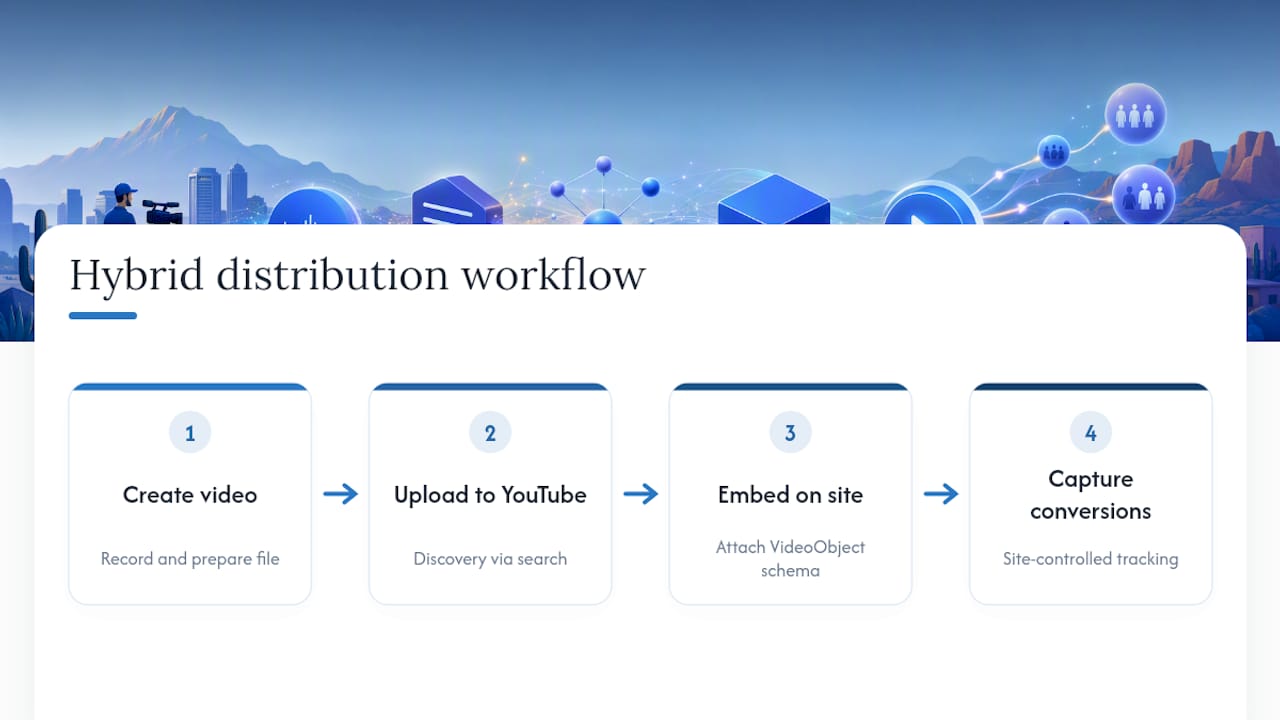
For a Scottsdale plumbing company, that might look like a YouTube channel covering common repair questions, with the highest-converting videos also embedded directly on service pages like “Water Heater Repair Scottsdale.” Split the job by strength: visibility to YouTube, conversion to the website.
How to measure video SEO performance
Two tools do almost all the measurement work here, and they answer different questions.
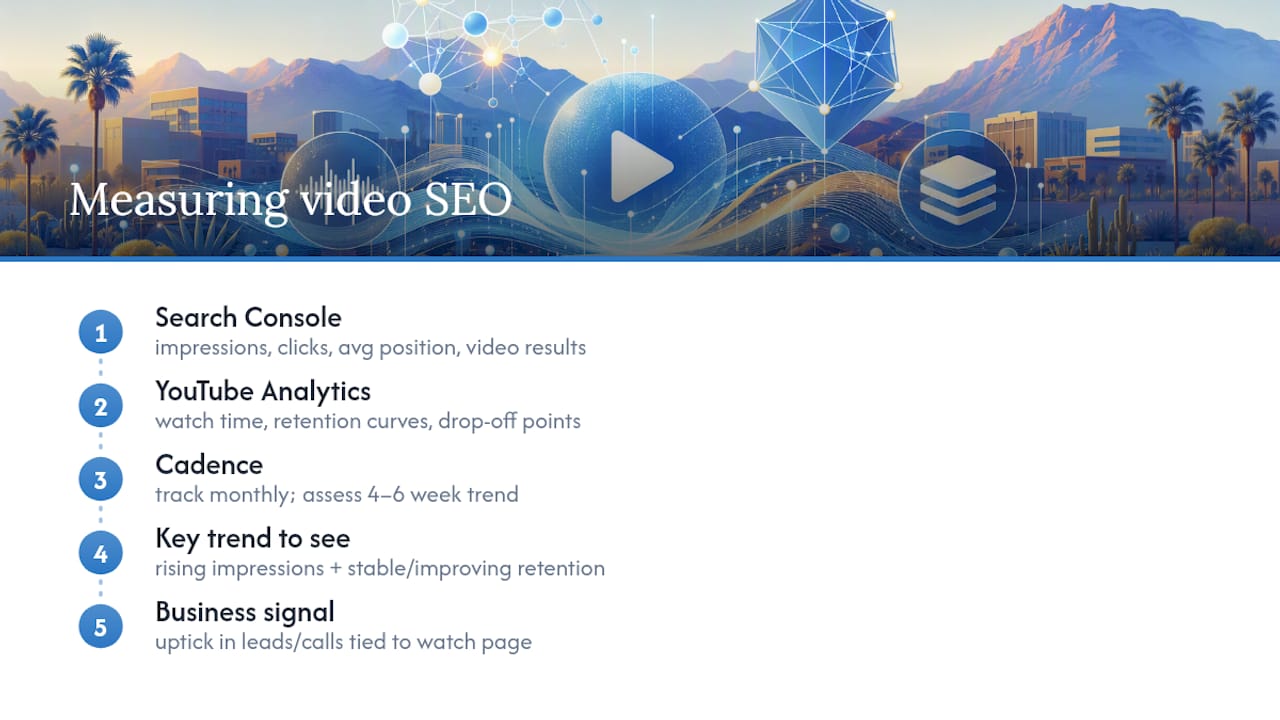
Google Search Console tells you how your watch pages perform in organic search: impressions, clicks, average position, and whether Google is even indexing the page with video rich results attached. Check the “Video results” report under the Search Appearance filters. If a watch page shows zero video impressions weeks after publishing, that’s a signal something in the schema or indexing chain is broken.
YouTube Analytics tells a different story: watch time, audience retention curves, and where viewers drop off. A steep drop at the fifteen-second mark usually means the hook is weak, not that the topic is wrong. Retention data like this is something Search Console can’t give you, since it only sees the search side, not viewer behavior once they click play.
Track these numbers monthly rather than daily. Video SEO moves slower than paid ads, and single-day fluctuations rarely mean anything. What matters is the trend across four to six weeks: rising impressions in Search Console, stable or improving retention in YouTube Analytics, and eventually, an uptick in contact form submissions or calls that you can trace back to a video-heavy landing page. If you’re not already tying video engagement to lead source in your CRM, that’s the gap to close first, since view counts alone don’t tell you whether video SEO is actually growing the business.
Local SEO strategies for video in Scottsdale
Generic video SEO advice ignores geography, and that’s a mistake for a business competing in a specific metro. Geo-tagging your video files and including location data in your metadata gives search engines another signal tying your content to Scottsdale specifically, not just “Arizona” or “Phoenix metro” broadly.
Practical steps that make a real difference locally:
- Include “Scottsdale” or the specific neighborhood (Old Town, McCormick Ranch, DC Ranch) in the video title and first sentence of the description.
- Embed the video on the matching local landing page, not just a general “our videos” gallery page.
- Reference recognizable local landmarks or service areas in the spoken content itself, since that language often ends up in the transcript verbatim.
- Add your business’s
LocalBusinessschema alongside the VideoObject on the same page, reinforcing the geographic connection.
A pool builder serving both Scottsdale and Paradise Valley benefits from separate videos, or at minimum separate watch pages, for each area rather than one generic video stretched across every location page. Search engines reward specificity, and so do customers scanning results for a business that clearly knows their neighborhood.
Optimizing video for mobile viewers
Most local searches in Scottsdale, especially “near me” service queries, happen on a phone. That changes what “optimized” means for video. A video that looks great on a desktop monitor but takes eight seconds to load on a cellular connection loses viewers before it ever gets watched, and that abandonment can hurt engagement signals that feed back into ranking.
A few mobile-specific fixes matter more than people expect:
- Keep file sizes compressed without sacrificing thumbnail clarity, since a heavy file stalls load time on mobile data.
- Design for vertical or square viewing when the video will circulate on social platforms, but keep a horizontal version on the actual watch page for a cleaner desktop and mobile-web experience.
- Front-load the value in the first ten seconds. Mobile viewers scroll fast, and a slow intro loses them before the message lands.
- Make sure captions are legible on a small screen, since many mobile viewers watch with sound off in public settings.
Page speed on the watch page itself matters just as much as the video file. A bloated page that takes six seconds to load will bury even a perfectly optimized video, because most mobile visitors won’t wait around for it to appear.
Integrating video SEO with your broader local strategy
Video SEO doesn’t work well as a standalone project. It works best woven into the SEO your business is already doing on service pages, location pages, and blog content. A broader content strategy that treats video as one format among several, rather than a separate initiative, tends to produce stronger results than a video uploaded in isolation and never connected to anything else on the site.
The most direct integration point is embedding videos on the exact local landing pages they support. A “Roof Repair Scottsdale” service page with a 60-second walkthrough embedded above the fold, paired with matching VideoObject and LocalBusiness schema, reinforces every signal on that page at once: text, video, and structured data all pointing at the same service and the same location.
This also solves a real content gap for a lot of small business sites. Service pages built years ago and never updated often read thin, a few paragraphs and a contact form. Adding a well-optimized video with a full transcript effectively doubles the indexable text on that page, since the transcript itself becomes crawlable content search engines can match against queries. It’s a practical way to strengthen an aging page without a full rewrite, and it works especially well for businesses following a local SEO checklist that already flags thin content as a weak point.
What separates working video SEO from wasted production budget
Most video SEO advice treats transcripts as an accessibility afterthought. That’s backwards. A human-verified transcript is closer to the foundation than a nice-to-have, since AI-driven search increasingly reads text, not pixels, and an auto-generated transcript full of misheard brand names or technical terms actively degrades how that content gets indexed.
The gap between businesses that see real traffic from video and those that don’t usually isn’t production quality. It’s the unglamorous back half: schema, transcripts, and a watch page built to be found rather than just watched. Webtechs has seen that pattern play out directly in client work, including SEO programs behind a 1220% traffic increase for an RV insurance client and a 4490% increase for a music industry client, both built on the same principle: structured, text-rich content search engines can actually parse.
Upload-only strategies chase views. Structured strategies build an asset that keeps working in search long after the upload date.
— Brett
Get your Scottsdale business found with professional video SEO
Webtechs is the alternative to hiring a video production company and an SEO agency separately for Scottsdale businesses. One team handles the filming, the transcript, and the schema, so nothing gets lost in the handoff between “who shot this” and “who’s supposed to make it rank.”

That combination is what shows up in results like the 4490% traffic increase for a music industry client and the case studies covering garage door repair and other Scottsdale-area service businesses. Webtechs handles website video production, watch page delivery, VideoObject implementation, transcript writing, and the ongoing SEO work that keeps a video ranking months after publish. Most clients see initial indexing and early Search Console visibility within four to six weeks of a properly optimized watch page going live.
If you want to see how this actually looks before committing to anything, browse the Webtechs portfolio or reach out directly to talk through a plan for your service pages and video content.
Sources
- Video best practices — Google Search Central
- How to optimize video for AI-powered search — Search Engine Land
- Video SEO: How to optimize videos for YouTube and Google — Semrush blog