

Get More Google Reviews: A Local Guide for Small Businesses

The fastest way to get more Google reviews is to ask every customer within hours of service using a direct review link and one automated follow-up. That single habit, done consistently, outperforms any software or agency tactic you can layer on top.
Three things to do in the next 24–72 hours:
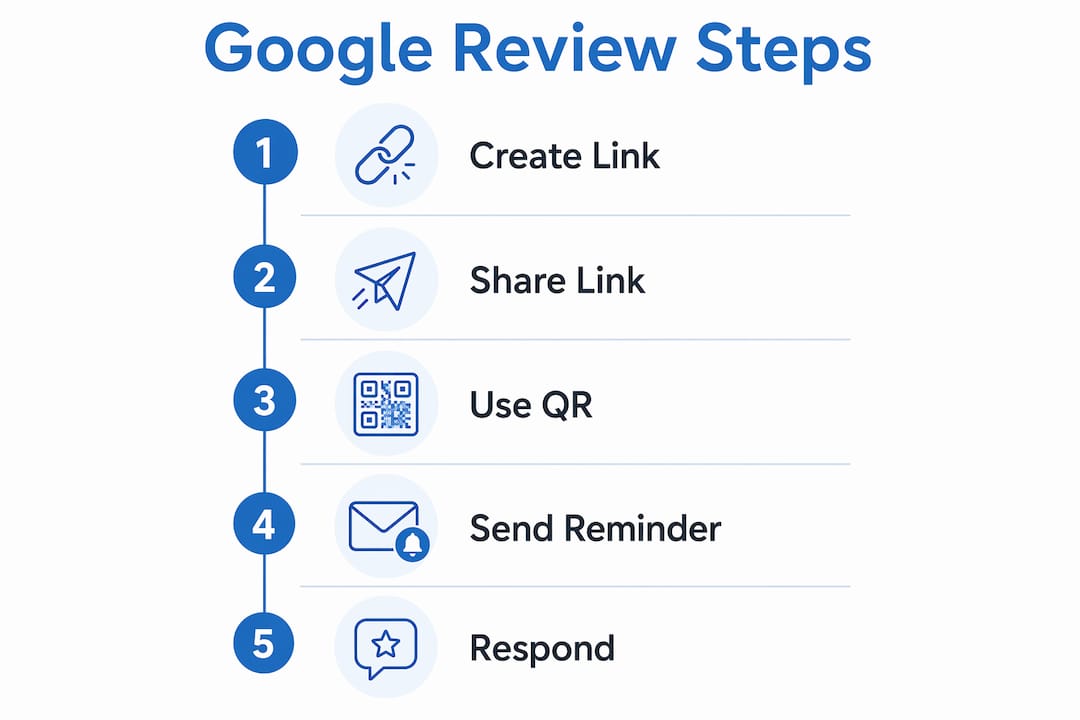
- Create your Google review link. In your Google Business Profile, select “Read Reviews,” then “Get more reviews” to copy your direct link or download a QR code.
- Ask at the point of service. Train staff to say it out loud: “If you have a second, a Google review really helps us.” Hand over the link immediately.
- Set one automated follow-up. If the customer doesn’t respond, a single reminder a few days later often significantly increases your conversion rate.
Which provider should you hire? If you want a local Scottsdale agency to handle local SEO, Google Maps marketing, and review workflows together, Webtechs is the call. If you want a self-serve automation tool you can launch this week, Get More Reviews is built for that.
Table of Contents
- Which provider should you choose: Webtechs or Get More Reviews?
- How to get more Google reviews this week
- When does automation help, and how do you keep it personal?
- How to respond to reviews and turn negatives into trust
- Google’s review policies: what you can and can’t do
- Pricing, timeline, and realistic goals
- Why Webtechs delivers for Scottsdale businesses
- Key Takeaways
- The part most businesses get wrong about review growth
- Webtechs can build your review growth system for you
- Sources and further reading
Which provider should you choose: Webtechs or Get More Reviews?
| Feature | WebTechs.Net | Get More Reviews |
|---|---|---|
| Best for | Full-service local SEO + review strategy | Automation-first, self-serve review collection |
| Channels supported | Email, SMS, QR code, Google Maps | SMS, email, QR code, receipt integrations |
| Automation features | Managed campaigns, workflow setup | Bulk requests, reminders, AI auto-replies |
| Integrations | POS, CRM, scheduling (custom per client) | POS, CRM, scheduling software |
| Pricing / free trial | Project and retainer-based; local SEO pricing varies | Free trial available; subscription tiers |
| Onboarding / support | Hands-on onboarding, dedicated account contact | Self-serve setup, platform support |
| Multi-location scalability | Yes, managed across locations | Yes, built for multi-location teams |
| Google reviews | 4.8★ (19 reviews) | Not publicly listed |
Webtechs brings a local Scottsdale presence and a track record across contracting, HVAC, roofing, and cleaning verticals. The agency handles the strategy layer that a standalone tool can’t: site improvements, Scottsdale SEO, and Google Maps optimization alongside review collection. Get More Reviews is the right pick if you want to launch a review program yourself this week, with staff gamification badges and AI reply features included in the platform.
Questions to ask either provider before signing:
- Who owns the customer data and review history if we cancel?
- Does your system comply with Google’s no-gating and no-incentive policies?
- Which specific integrations do you support for our POS or scheduling software?
- How do you handle negative reviews in the workflow?
How to get more Google reviews this week
Step 1: Create and share your review link
Google makes this straightforward. In your Business Profile Manager, go to “Read Reviews,” then click “Get more reviews.” Copy the link or download the QR code directly.

Shorten the URL with Bitly or a custom short domain so it fits in an SMS message. A link like bit.ly/YourBusinessReview is far easier to share than a 90-character Google URL.
Step 2: Place the QR code everywhere customers finish their experience
Print it on receipts, table tents, invoices, and exit signage. Google’s guidance specifically lists receipts and in-store signage as ideal placements. For service businesses, laminate a small card and hand it over at job completion.
Step 3: Use these message templates
SMS (under 160 characters):
Hi [First Name], thanks for choosing [Business Name]! Mind leaving us a quick Google review? It helps a lot: [short link]
Email subject: “Quick favor, [First Name]?”
Hi [First Name], we really enjoyed working with you on [job/service]. If you have two minutes, a Google review means the world to us and helps other [city] residents find us. [Review link button]
Staff script (in person):
Pro Tip: Ask within 2–6 hours of service completion. Conversion rates for a single request run 15–25%; a follow-up sent 3–5 days later often doubles that. After that window, response rates drop sharply.
When does automation help, and how do you keep it personal?
Automation solves the consistency problem. A plumber who remembers to ask half the time will always trail a competitor whose CRM fires a text within two hours of every closed job. Appointment-based businesses (salons, dental offices, HVAC companies) benefit most from a post-appointment trigger. POS-integrated systems work well for retail and restaurants. Delivery-completion triggers suit e-commerce and logistics.
The catch: automated messages that feel like mass blasts get ignored or marked as spam. Every request should include the customer’s first name, a reference to the specific job or visit, and a real person’s sign-off, not “The Team.” That single change lifts response rates meaningfully.
Integrations to verify before buying any tool:
- POS system (Square, Toast, Clover, Lightspeed)
- CRM (HubSpot, Salesforce, Jobber, ServiceTitan)
- Scheduling software (Acuity, Calendly, Jane App)
- Invoicing tools (QuickBooks, FreshBooks)
Ask the vendor for a live demo of the specific integration you need, not a screenshot.
How to respond to reviews and turn negatives into trust
Responding to every review signals to Google that your profile is active. It also signals to every future customer reading those reviews that you actually care.
Positive review reply template:
Negative review reply template:
Escalation flow:
- Post a public reply within 24 hours acknowledging the issue.
- Reach out privately by phone or email to resolve it.
- Once resolved, ask the customer if they’d be willing to update their review.
- Never pressure or incentivize a review update.
Keep public replies short and professional. Avoid restating the complaint in detail or getting defensive. A calm, solution-focused response often impresses future readers more than the negative review itself damages you.
Google’s review policies: what you can and can’t do
Google’s rules are clear, and violating them can get reviews removed or your profile flagged.
Allowed:
- Asking any customer for a review
- Sharing a direct review link or QR code
- Responding to reviews publicly
- Using natural, keyword-rich language in your replies
Not allowed:
- Offering discounts, gifts, or any incentive in exchange for a review
- Review gating: routing only happy customers to Google while sending unhappy ones to a private form
- Buying reviews or posting fake reviews from any account
- Asking customers to include specific keywords or your brand name in their review
Pro Tip: When reaching out to older customers you haven’t asked yet, send requests in small weekly batches rather than one large blast. Sudden spikes in review volume can trigger Google’s spam filters and cause legitimate reviews to be held or removed.
Pricing, timeline, and realistic goals
Most businesses see their first automated reviews within days of launching a request workflow. A consistent monthly increase becomes visible in 4–6 weeks. The compound effect on local search rankings typically takes 3–6 months of steady volume.
| Timeframe | What to expect |
|---|---|
| Days 1–6 | First reviews from direct asks and automated requests |
| Weeks 4–6 | Visible upward trend in monthly review count |
| Months 3–6 | Measurable improvement in local search prominence |
Cost comparison:
- Free / manual: Direct asks, QR codes, email templates. Zero cost, but inconsistent without a system.
- Paid automation tools: Get More Reviews offers a free trial; paid tiers vary by volume and features.
- Agency-managed: Webtechs bundles review strategy into broader local SEO retainers. See local SEO cost for current pricing ranges.
A free trial from an automation tool is worth running for 30 days to benchmark your baseline conversion rate before committing to a paid plan or agency.
Why Webtechs delivers for Scottsdale businesses
Webtechs has operated in Scottsdale since 1997, with verified local expertise across SEO, Google Maps marketing, content writing, and industry-specific campaigns for contractors, HVAC companies, roofers, plumbers, and cleaning services.
Case study results include a 353% traffic increase for a local garden nursery and a 1,620% increase for a garage door repair company, both driven by combined local SEO and reputation improvements.
What Webtechs will ask for in onboarding:
- Access to your Google Business Profile
- Current review count and average rating baseline
- List of services and service areas
- CRM or scheduling tool in use
- Any existing review request process
Key Takeaways
Asking every customer within 2–6 hours of service, with one follow-up reminder, is the single most effective system for growing Google reviews consistently.
| Point | Details |
|---|---|
| Ask timing matters | Send review requests within 2–6 hours; a follow-up at 3–5 days often doubles conversion rate. |
| Free tactics work | A direct link, QR code, and staff script cost nothing and deliver results immediately. |
| Automation needs personalization | Include the customer’s name and job reference; generic blasts underperform. |
| Results compound over time | Expect first reviews within days, visible trends in 4–6 weeks, and ranking gains in 3–6 months. |
| Webtechs for full-service | Scottsdale businesses wanting SEO, Maps, and review strategy managed together should contact Webtechs. |
The part most businesses get wrong about review growth
Most small business owners treat review collection as a campaign: they set something up, get a burst of reviews, then stop. Six months later the profile looks stale and the ranking slips. Google’s algorithm weights recency heavily, and a profile that collected 40 reviews in March but nothing since looks less authoritative than a competitor with 20 reviews spread evenly across the year.
The businesses that consistently rank well in Scottsdale’s local results aren’t doing anything exotic. They ask every customer, respond to every review, and never let the habit lapse. That’s the whole system. The tools and agencies just make it easier to sustain.
Webtechs can build your review growth system for you
If running a review program yourself sounds like one more thing on an already full plate, Webtechs handles it as part of a broader local SEO strategy built specifically for Scottsdale service businesses. The agency sets up review-collection workflows, manages Google Maps optimization, and handles the ongoing work that keeps your profile active and ranking.

Services relevant to review growth include local SEO, Google Maps marketing, content writing, and reputation workflow setup. All customer data stays yours. Webtechs operates under Google’s compliance guidelines on every campaign it runs.
See the Webtechs portfolio for before-and-after results across local service verticals, or reach out directly to book a free consultation and get a baseline audit of your current Google Business Profile.
Sources and further reading
- Tips to get more reviews — Google Business Profile Help: Google’s official policy on asking for reviews, prohibited behaviors, and incentive rules.
- Create a Google link or QR code to request reviews: Step-by-step instructions for generating your review link and QR code from Business Profile Manager.
- How to Get More Google Reviews: 2026 Guide — Plaudit: Timing benchmarks, conversion rate guidance, and follow-up best practices.
- WebTechs.Net Phoenix SEO: Webtechs’s local SEO and Google Maps marketing services for Scottsdale and the surrounding area.
- Get More Reviews: Automation-first review platform with free trial; review the feature set and pricing before committing.
This article is general information for educational purposes. Consult Google’s current Business Profile policy pages and, for large-scale campaigns, a qualified digital marketing professional before launching any review program.