

Call Tracking for Ads: A 2025 Guide for Marketers

Call tracking for ads is the practice of attributing inbound phone calls directly to the specific campaigns, keywords, or channels that generated them. The core mechanism is dynamic number insertion (DNI), a JavaScript-based technique that swaps the phone number displayed on your website based on how a visitor arrived. Someone clicking a Google Ads campaign sees one number; someone from a Facebook post sees another. Both route to the same business, but each carries a distinct attribution trail.
Without this, phone calls are a black hole in your analytics. You know the call happened. You have no idea which ad paid for it.
Key capabilities call tracking delivers:
- Attribution at the session level: DNI ties each call to the exact source, campaign, and keyword, not just the page.
- Conversion counting: Set a minimum call duration (say, 90 seconds) and count only those as conversions.
- Bid strategy input: Feed call conversion data directly into Google’s automated bidding to optimize for calls, not just clicks.
- AI-driven lead scoring: Platforms like Invoca analyze call content and sentiment, not just duration, to score lead quality.
- CRM integration: Push call data into HubSpot, Salesforce, or similar tools to enrich contact records automatically.
Table of Contents
- How does call tracking for ads work with Google Ads?
- What are the real benefits of call tracking in ad campaigns?
- Which Arizona providers offer call tracking for your ad campaigns?
- How do you choose the right call tracking service?
- Why tracking missed calls and call duration changes your ROI picture
- Webtechs brings SEO and PPC together for Arizona businesses
- Key Takeaways
How does call tracking for ads work with Google Ads?
The DNI mechanism
DNI assigns a tracking number at the visitor session level, not the page view. That distinction matters. If a visitor clicks your Google Ad, browses three pages, then calls, the attribution stays pinned to the original ad source throughout the session. Without session-level tracking, multi-page journeys break the attribution chain.
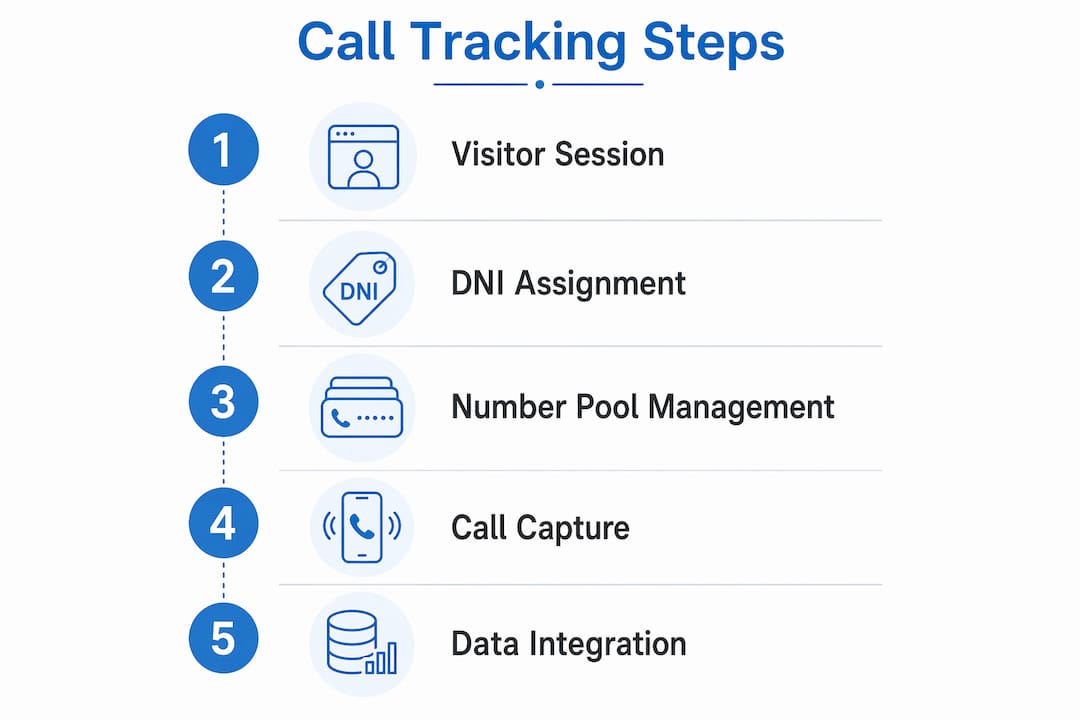
One technical detail most guides skip: number pool sizing. If two visitors arrive simultaneously and your pool only has one tracking number, both calls get logged to the same number, corrupting your data. Your pool needs to cover your maximum expected concurrent visitors, not just your average.
Script placement matters too. Place your DNI script in the HTML head tag rather than the body or footer. A script loaded late causes the default number to flash visibly before being replaced, which degrades both user experience and data quality.
Setting up call tracking in Google Ads
- Enable Call Reporting at the account level under Account Settings. This tells Google to assign forwarding numbers to your ads.
- Install the Google tag on every page of your site. Use Google Tag Manager if you want to avoid touching code directly.
- Add the phone snippet to pages displaying your business number. This is the code that triggers the number swap when a visitor arrives from a Google Ad.
- Configure a call conversion action in your Conversions settings. Set the minimum call duration that counts as a conversion for your business.
- Enable call recording (US and Canada only). Google AI analyzes call recordings to evaluate lead quality beyond simple duration, which sharpens automated bidding decisions.
- Verify forwarding numbers are live by running a test click from your ad and confirming the swapped number appears.
Eligibility and privacy notes: Google forwarding numbers are available in the United States and a range of other countries. Caller ID still works for routed calls. Google Ads charges only when a user clicks the forwarding number shown in the ad, not when someone manually dials it. If you prefer to show your own business number or use a third-party platform, you can disable Call Reporting in account settings without losing ad functionality.
Troubleshooting checklist:
- Number flicker on load: move the script higher in the
<head>. - Attribution gaps: check that the Google tag fires on all pages, not just the homepage.
- Pool collisions: increase your number pool if concurrent traffic spikes during campaigns.
- Conversion undercounting: confirm your minimum call duration threshold is realistic for your sales cycle.
What are the real benefits of call tracking in ad campaigns?
Phone calls convert at a higher rate than digital form submissions for most service businesses. Tracking them closes the attribution gap between your online ad spend and the offline conversations that actually close deals, giving you a complete picture of ROI rather than a partial one.
The practical gains stack up quickly:
- Accurate attribution: Know which campaign, ad group, and keyword drove each call. Stop funding ad groups that generate clicks but no conversations.
- Smarter bidding: Google’s automated bidding strategies improve when fed call conversion data alongside form and purchase conversions.
- AI-powered lead scoring: AI call scoring systems analyze conversation content and sentiment, flagging high-intent callers in real time rather than waiting for a sales rep to manually qualify them.
- CRM enrichment: Every call can auto-create or update a contact record, tag the marketing source, and trigger a follow-up task.
- Multi-channel clarity: Third-party platforms extend attribution beyond Google Ads to cover Facebook, email, direct mail, and organic search in a single dashboard.
Common challenges: Many teams underestimate the setup time for CRM integrations, or set call duration thresholds too low, counting short wrong-number calls as conversions. Start conservative on thresholds and adjust based on actual sales data.
Pro Tip: Set up custom AI outcome fields in your call tracking platform to detect specific phrases like “schedule an appointment” or “what’s your price?” These signals are far more predictive of deal quality than call duration alone, and they feed directly into bid optimization.
Which Arizona providers offer call tracking for your ad campaigns?
The providers below serve the Arizona market with varying degrees of specialization. Some are full-service digital agencies; others focus on specific niches like AI-driven local lead generation or data analytics.
| Provider | Services Offered | Specializations | Local Presence | Pricing & Contracts | Rating |
|---|---|---|---|---|---|
| GPS and Track | GPS and tracking systems, supplier services | GPS/tracking hardware and solutions | Scottsdale area | Not publicly listed | 4.8★ (105 reviews) |
| Cyber Controller | AI Local Dominance, Google Maps marketing, AI Lead-to-Job automation, Generative SEO | Local service businesses, Phoenix metro lead generation | Phoenix metro | Month-to-month after 90-day initial period | 5★ (28 reviews) |
| WebTechs.Net | Full-service SEO, PPC management, web design, local SEO, Google Maps marketing | Contractors and local businesses, affordable SEO | Scottsdale, AZ | Project-based and monthly retainers | 4.8★ (19 reviews) |
| Ads With Excellence | Advertising services | Professional ad services, local reputation | Glendale, AZ | Not publicly listed | 5★ (6 reviews) |
| Az Mobile Ads | Mobile and digital advertising | Mobile advertising, Phoenix-area campaigns | Phoenix, AZ | Not publicly listed | 3★ (8 reviews) |
| eDataTalk | Data analytics, conversion tracking support | Marketing analytics, call tracking insights | Phoenix, AZ | Not publicly listed | 5★ (2 reviews) |
Cyber Controller is the strongest fit for local service businesses in the Phoenix metro that want AI-driven lead generation without a long-term contract commitment. Its Lead-to-Job automation and Google Maps focus are genuinely differentiated, not just marketing language.
Webtechs suits contractors and small-to-mid-sized businesses that need call tracking integrated into a broader Scottsdale SEO and PPC strategy. The agency has managed PPC campaigns and local SEO since 1997, and its client testimonials document measurable traffic and lead growth.
GPS and Track operates as a supplier of GPS and tracking hardware in the Scottsdale area. It serves businesses needing physical tracking systems rather than ad attribution software.
eDataTalk is worth considering when you need analytics support to interpret call tracking data alongside other conversion metrics. It is a thin-profile provider with limited public detail, but its local Phoenix presence and analytics focus make it a reasonable complement to a primary tracking platform.
Ads With Excellence and Az Mobile Ads are local advertising services. Neither publishes detailed service breakdowns publicly, so treat them as options to evaluate directly for fit.
How do you choose the right call tracking service?
The decision comes down to what you actually need to measure and how much of the setup you want to own.
Questions to ask before committing to a provider:
- Does the platform support DNI for every channel you run ads on, including paid search, social, and display?
- How does it integrate with your CRM? Native connector or API only?
- What is the pricing model: monthly subscription, per-call, or per-minute? Pricing structures vary significantly and affect cost predictability at different call volumes.
- Is the contract month-to-month or annual? What are the exit terms?
- Does it offer AI call scoring and transcription, or just duration-based reporting?
- Can it handle multi-channel attribution across both online and offline sources?
Match the platform to your campaign complexity. A single-location business running Google Ads can start with Google’s native call reporting at no additional cost. Once you need cross-channel attribution, CRM sync, or AI lead scoring, third-party platforms like CallRail, CallTrackingMetrics, or Invoca earn their subscription fees.
Budget matters too. Start with your highest-spend channel, prove the attribution model works, then expand tracking to secondary channels. Trying to instrument everything at once usually means instrumenting nothing well.

Why tracking missed calls and call duration changes your ROI picture
Duration and outcome data are where call tracking shifts from a reporting tool to a revenue tool. A 12-second call is almost certainly a wrong number or a hang-up. A 4-minute call from someone who found you through a specific ad group is a qualified lead. Treating both as “calls” in your conversion data produces a misleading cost-per-lead figure.

Missed calls deserve equal attention. If a campaign drives 40 calls on a Tuesday afternoon and your team misses 15 of them, that is not a tracking problem. That is a staffing and response-time problem that your call data just surfaced. Many platforms flag missed calls in real time and can trigger automated follow-up sequences via SMS or email.
Voicemail tracking adds another layer. A caller who leaves a voicemail is expressing higher intent than one who hangs up immediately. Segmenting voicemails by source lets you identify which campaigns attract callers willing to wait, a signal that often correlates with purchase intent.
The practical move: build separate conversion actions in Google Ads for calls over 2 minutes, missed calls, and voicemails. Weight them differently in your bidding strategy. That granularity is what separates a campaign optimized on real revenue signals from one optimized on raw call volume.
Webtechs brings SEO and PPC together for Arizona businesses
If the providers compared above feel like a lot to evaluate on top of running your actual campaigns, Webtechs offers a different path. Rather than purchasing a standalone call tracking subscription and managing it yourself, you get professional web design and full PPC campaign management from a Scottsdale agency that has been doing this since 1997.

Webtechs handles the setup, the tracking integration, and the ongoing optimization, so your team focuses on closing the calls rather than debugging tag fires. For contractors, local service businesses, and small-to-mid-sized companies across Arizona, that managed approach often costs less in total than a DIY stack of tools plus the time to run them. Check the website design price list to see current service tiers, or review the client portfolio to see what results look like in practice.
Key Takeaways
Call tracking for ads works when DNI, proper number pool sizing, and conversion thresholds are configured correctly from the start.
| Point | Details |
|---|---|
| DNI is session-level, not page-level | Tracking numbers follow the visitor across pages, preserving attribution through multi-page journeys. |
| Number pool sizing prevents data corruption | Your pool must cover maximum concurrent visitors, not average traffic, to avoid reuse collisions. |
| Script placement affects data quality | Place the DNI script in the HTML <head> to prevent number flicker and protect tracking accuracy. |
| Segment by call type for real ROI | Track missed calls, voicemails, and call duration separately to build conversion actions that reflect actual revenue signals. |
| Webtechs manages the full stack | For Arizona businesses wanting PPC, SEO, and tracking handled together, Webtechs offers managed campaigns without the DIY overhead. |