

Does SSL Help SEO for Scottsdale Small Businesses?

Yes. HTTPS is a confirmed Google ranking signal, though a lightweight one that mostly acts as a tiebreaker between otherwise similar pages. The bigger risk isn’t a ranking penalty. It’s the trust and conversion damage that comes from not having it: Chrome flags plain HTTP pages as “Not secure,” which scares off visitors before they read a word of your site.
For Scottsdale businesses competing for local searches, that matters more than the algorithm technicality. TLS/SSL certificates also unlock HTTP/2 and HTTP/3, protocols that load pages faster, which feeds into Google’s Core Web Vitals scoring indirectly. A local provider like WebTechs.Net handles this migration daily, and it’s rarely a big lift when done correctly.
Quick rundown of what SSL actually buys you:
- No browser security warnings scaring off potential customers
- Faster page loads via HTTP/2 and HTTP/3, both of which require TLS
- A tiebreaker edge in search results when competitors are otherwise equal
- Encrypted customer data on contact forms, checkouts, and account logins
Pro Tip: If your site still runs on plain HTTP in 2026, treat it as a trust problem first and an SEO problem second. Both get solved the same way.
Key Takeaways
HTTPS functions as a baseline trust and technical requirement that protects rankings and conversions, while the real SEO gains come from content, links, and site performance built on top of it.
| Point | Details |
|---|---|
| HTTPS is a tiebreaker, not a booster | Google counts it as a lightweight ranking signal that mainly breaks ties between similar pages. |
| DV certificates cover most small sites | Domain Validated certificates meet SEO and trust needs for most Scottsdale small businesses without the OV/EV price premium. |
| Redirects must be one-hop | Configure direct 301 redirects from HTTP to HTTPS URLs to preserve link equity, per KeyCDN’s guidance. |
| Canonicals and sitemaps prevent duplicates | Update canonical tags and resubmit an HTTPS-only sitemap in Search Console to stop duplicate indexing. |
| Mixed content is the top migration failure | Scan every asset URL for lingering HTTP references before flipping redirects live. |
Table of Contents
- Which Local Scottsdale Agencies Handle SSL Migrations and Technical SEO?
- What Does an SSL Certificate Cost, and How Should You Budget for Migration?
- Does SSL Slow Down or Speed Up Your Website?
- How Does HTTPS Affect Mobile Search Rankings?
- How Do You Avoid Duplicate Content When Switching to HTTPS?
- Why HTTPS Should Be Treated as the Floor, Not the Ceiling
- Tools and Resources for Testing Your HTTPS Migration
- Frequently Asked Questions
- Sources
Which Local Scottsdale Agencies Handle SSL Migrations and Technical SEO?
Scottsdale has a handful of established shops that handle SSL migrations and broader technical SEO work, and they differ mainly in scope and specialty.
WebTechs.Net has operated in Scottsdale since 1997, handling web design, hosting, and SEO migrations for small and mid-sized businesses. The agency’s longevity and local footprint make it a natural fit for business owners who want one team managing the certificate install, the redirects, and the ongoing SEO retainer instead of juggling three vendors.
Lewis SEO Oklahoma City focuses on SEO campaigns for businesses in the Oklahoma City market, with an emphasis on local search visibility.
IronChess Oklahoma City SEO offers technical SEO and search marketing services, positioned toward Oklahoma-based clients seeking search rankings improvements.
OK SEO Pros provides SEO consulting and campaign management, again rooted in the Oklahoma market rather than Arizona.
SEO Oklahoma City Firm rounds out that regional cluster, offering search optimization services to businesses in that area.
If you’re running a business in Scottsdale, proximity matters for site audits, in-person strategy sessions, and understanding local competition. A Scottsdale SEO company that already knows the Phoenix metro market saves you the explanation step that out-of-state agencies require before they can even start.
What Does an SSL Certificate Cost, and How Should You Budget for Migration?
Certificate pricing varies by type, and that’s the first budgeting decision. A Domain Validated (DV) certificate confirms only that you control the domain and typically costs the least, sometimes bundled free with hosting. Organization Validated (OV) certificates verify your business identity and cost more. Extended Validation (EV) certificates require the deepest vetting and carry the highest price, though browsers no longer display the green company-name bar that once made EV visually distinct.
For most Scottsdale small businesses, a DV certificate covers the SEO and trust requirements just fine. Many hosting providers now include free certificates through Let’s Encrypt as a standard feature, which is worth checking before you pay for anything separately. If you’re shopping for hosting for a small business, confirm SSL is bundled rather than sold as an add-on.
The certificate itself is rarely the expensive part. The real budget line is the migration labor: updating internal links, setting up server-level 301 redirects, fixing mixed content, and verifying Search Console and Analytics still track correctly. Shopify’s migration checklist covers these steps, and skipping any of them is what turns a simple certificate install into a week of cleanup. Budget for a few hours of technical work, or a fixed project fee if you’re hiring it out, rather than assuming the certificate cost is the whole story.
Does SSL Slow Down or Speed Up Your Website?
SSL itself adds a small handshake delay when a browser first connects. That cost is nearly invisible today, and it’s outweighed by what HTTPS unlocks: HTTP/2 and HTTP/3 protocols, both of which require an encrypted connection to function. These protocols let browsers request multiple resources over a single connection instead of opening new ones for every image and script, cutting load time on most sites.
That speed gain feeds into SEO indirectly. Google’s ranking systems weigh page experience through Core Web Vitals, and faster load times generally improve those metrics. HTTPS isn’t a speed booster on its own. It’s a gateway to the protocols that are.

The catch: you only get the benefit if your server and CDN are actually configured to use HTTP/2 or HTTP/3, not just serving HTTPS over the older HTTP/1.1. This is where a lot of DIY migrations leave performance on the table. Cloudflare’s guidance on encrypting traffic end to end recommends Full (strict) mode between your CDN and origin server, which keeps the entire path encrypted rather than just the visitor-facing half.
How Does HTTPS Affect Mobile Search Rankings?
Mobile matters more here than desktop, because Google indexes and ranks primarily using the mobile version of your site. Mobile users are also more sensitive to load delays and security warnings, since they’re often on public Wi-Fi or cellular connections where a “Not secure” label feels riskier.
HTTPS on mobile carries the same tiebreaker weight it does on desktop, but the performance angle hits harder. HTTP/3, built on QUIC, was specifically designed to perform better on unstable mobile networks than older protocols. A slow, insecure mobile experience compounds two problems at once: weaker Core Web Vitals scores and higher bounce rates from visitors who don’t trust the padlock icon, or lack of one.
If your site serves a mostly mobile local audience, which most Scottsdale service businesses do, HTTPS is one of the few technical fixes that improves both trust and speed in a single move.
How Do You Avoid Duplicate Content When Switching to HTTPS?
Every HTTP URL and its HTTPS counterpart look identical to Google unless you tell it otherwise, which creates a duplicate content problem the moment both versions are crawlable. Fix this with three coordinated steps, not one.
First, set server-level 301 redirects from every HTTP URL directly to its final HTTPS equivalent. KeyCDN’s migration guidance stresses one-hop redirects specifically, because redirect chains dilute link equity and slow crawling. Second, update your canonical tags so every page declares its HTTPS URL as the canonical version, even before the redirect finishes propagating. Third, submit an updated XML sitemap listing only HTTPS URLs, and resubmit it in Google Search Console.
A full migration runbook also flags HSTS as a factor here: once enabled, browsers force HTTPS automatically, which locks in the canonical version but should be rolled out gradually with a short max-age before you commit to includeSubDomains sitewide. Skip any one of these three steps and Google may keep indexing both versions, splitting your ranking signals across duplicate pages.
Why HTTPS Should Be Treated as the Floor, Not the Ceiling
WebTechs.Net treats HTTPS as non-negotiable for any professional site because it prevents avoidable losses in trust and visibility, not because it’s a ranking hack. Google confirmed it as a tiebreaker signal back in 2014, and its real value shows up indirectly through browser trust, click-through rates, and the faster protocols it enables. Anyone selling it as a shortcut to page one is misreading what it actually does.
Tools and Resources for Testing Your HTTPS Migration
Test with the SSL Labs server test, browser dev tools for mixed content, a site crawler for stray HTTP links, and Google’s Search Console indexing reports.
Frequently Asked Questions
What is SSL in SEO?
SSL, technically superseded by TLS but still the common term, is the encryption technology behind HTTPS. In SEO terms, it’s the certificate that lets your site show a padlock instead of a “Not secure” warning, and Google has counted it as a ranking signal since 2014.
Does moving from HTTP to HTTPS actually improve rankings?
It rarely produces a dramatic jump on its own, since it’s a lightweight, tiebreaker-style signal. What it reliably prevents is ranking and traffic loss from browser security warnings and the duplicate-content mess an unmanaged migration creates.
How long does an HTTPS migration take to stabilize in search results?
Most well-executed migrations settle within a few weeks. Short-term ranking fluctuation during that window is normal; long-term traffic loss almost always traces back to migration mistakes like broken redirects or mixed content, not the HTTPS switch itself.
What’s the most common mistake businesses make during migration?
Mixed content, meaning images, scripts, or stylesheets still loading over HTTP after the switch. It triggers browser warnings and breaks page functionality even when the redirect and certificate setup were done correctly.
Should I hire someone or handle the SSL migration myself?
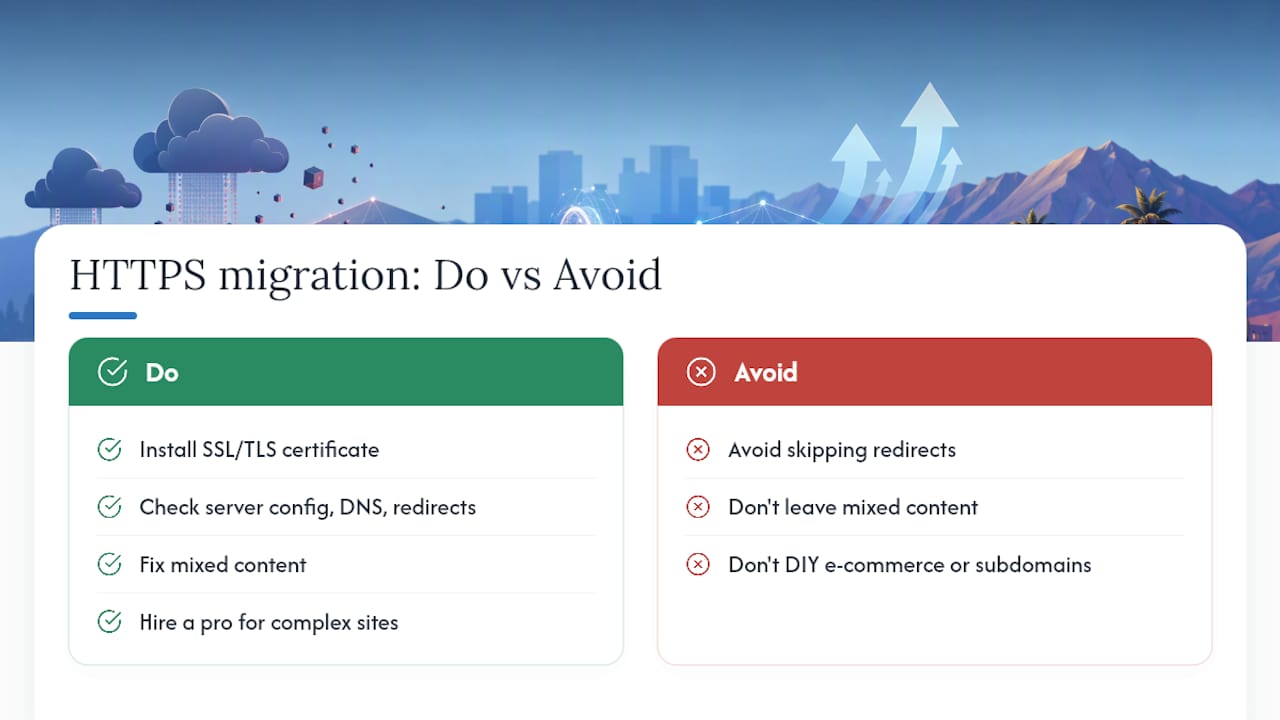
If you’re comfortable with server configuration, DNS, and redirect rules, a DIY migration is doable for a simple brochure site. For anything with e-commerce, multiple subdomains, or existing SEO rankings worth protecting, a local Scottsdale SEO company that handles migrations regularly reduces the risk of costly errors. WebTechs.Net’s web design services include SSL setup as part of full builds, and the portfolio page shows past migration and redesign work if you want to see the track record before you commit.
Sources
- How to move your online store from HTTP to HTTPS – Shopify
- Dchost
- Encrypt all traffic and keep your site secure — Cloudflare Docs