

Get Stars in Scottsdale: Schema for Reviews & Local Shortlist

For most Scottsdale businesses with multiple customer reviews, the fastest fix is adding AggregateRating schema to the pages that carry those reviews. Do it yourself if you have a developer on staff or a CMS plugin; hire Schema App for sitewide automation, or WebTechs.Net for hands-on local implementation and monitoring. Either way, treat schema for reviews as a click-through booster, not a ranking shortcut.
TL;DR:
- Proper implementation of AggregateRating schema requires at least five genuine reviews on a page to qualify for star-rich snippets in search results.
- Use JSON-LD formatted data embedded correctly in HTML, and verify markup with Google’s Rich Results Test before deployment.
- Avoid inauthentic practices like applying schema without visible reviews, falsely inflating review counts, or using ineligible page types to prevent manual actions.
- Automation platforms are ideal for managing schema across multiple pages or locations, especially at scale, while hands-on coding suits small, local pages.
- Review schema impacts click-through rates significantly but does not directly improve organic ranking positions beyond that.
Table of Contents
- What Is Schema for Reviews, and Which Type Do You Need?
- Scottsdale Providers: Ratings, Review Counts, and What Each Does Best
- How Do You Choose the Right Review Schema Type and Deploy It Safely?
- How Do You Test Review Schema and Fix Common Errors?
- What Impact Should You Expect, and How Fast?
- Why Trust This Guide: Local Experience and Practitioner Proof
- How Do You Handle Negative Reviews in Schema Markup?
- What Other Schema.org Review Types Exist Beyond Review and AggregateRating?
- What’s New in Schema.org Standards for Reviews?
- What Common Mistakes Trigger Manual Actions From Google?
- What Do Review Schema Examples Look Like Across Industries?
- The Local Provider Shortlist Beats Generic Schema Advice
- Get Your Review Schema Implemented the Right Way
- Sources
What Is Schema for Reviews, and Which Type Do You Need?
“Schema for reviews” is the shorthand marketers use, but the actual technical term is review structured data, or more specifically, the Review and AggregateRating types defined by Schema. Both let Google understand that the stars and numbers on your page represent genuine customer feedback rather than decorative text.
Most Scottsdale business owners searching for this topic want one thing: the gold stars that show up under a listing in search results. Getting those stars requires structured data for reviews formatted as JSON-LD and embedded correctly on eligible pages. Get the type wrong, and Google either ignores your markup or, worse, flags it during a manual review.
Scottsdale Providers: Ratings, Review Counts, and What Each Does Best
If you’re comparing who can actually get this done for you, two names come up consistently in the Scottsdale market: Schema App and WebTechs.Net. They solve different problems.
| Provider | Google Places Rating | Number of Reviews | Primary Service Focus / Standout |
|---|---|---|---|
| Webtechs | 4.8★ | 19 reviews | Hands-on local implementation, monitoring, and Scottsdale SEO expertise |
| Schema App | 4.7★ | 26 reviews | Automated schema deployment and governance at scale |
- WebTechs.Net fits hands-on local businesses that want someone to write the JSON-LD, deploy it, and watch for errors after launch, without needing an in-house developer.
- Schema App fits companies managing schema across hundreds or thousands of pages, where manual tagging isn’t realistic and a centralized platform keeps rating values and review counts synced automatically.
- A single-location Scottsdale retailer with many reviews on one page has a very different problem than a multi-location franchise managing schema across many location pages. Match the provider to that scale, not to the brand name you recognize.
If you’re evaluating either option, ask for a sample JSON-LD output before signing anything, and request a quick audit of your current pages to see whether you’re even eligible for AggregateRating yet. A provider that can’t show you a real markup example in the first conversation probably isn’t the right fit.
How Do You Choose the Right Review Schema Type and Deploy It Safely?
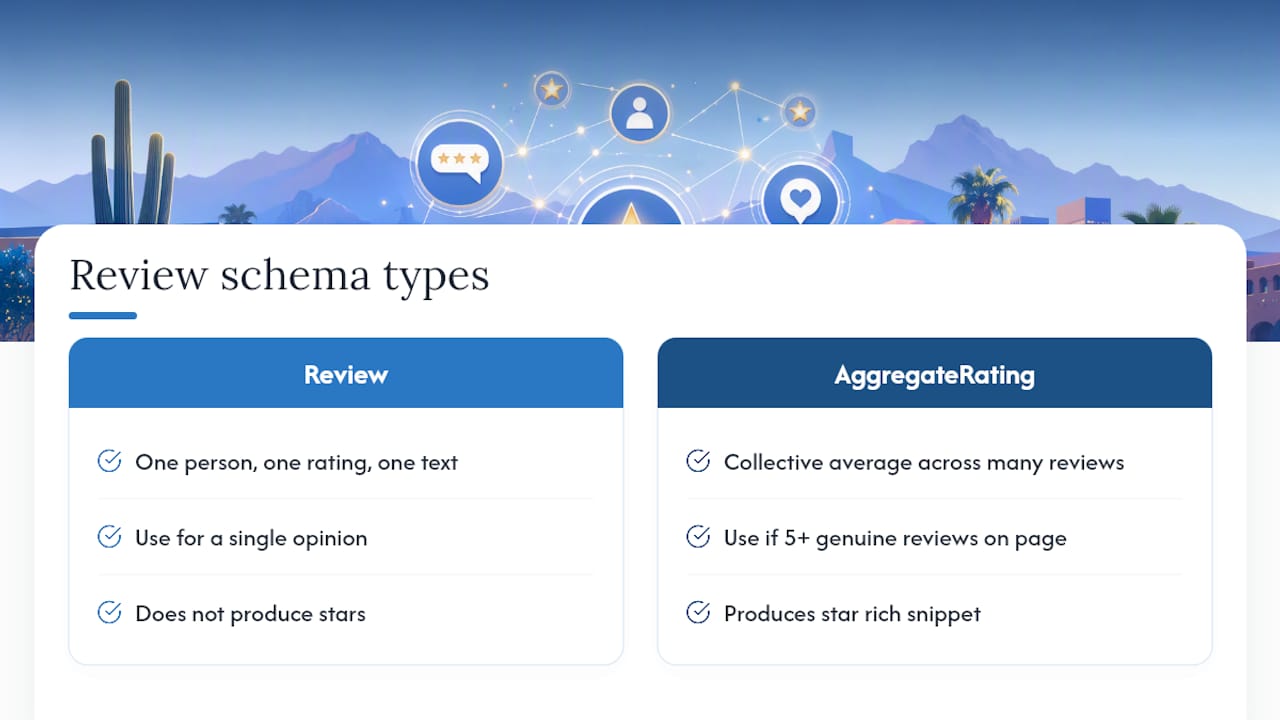
Start with the type. Review schema represents a single opinion, one person, one rating, one piece of text. AggregateRating represents the collective average across many reviews, and it’s what actually produces the star rich snippet most businesses want. If you have five or more genuine reviews on a page, AggregateRating is almost always the right call.
For AggregateRating to qualify for rich results, you need itemReviewed.name, ratingValue, and either ratingCount or reviewCount, according to Semrush’s review schema guidance. Use reviewCount when the reviews include written text and ratingCount when you’re only pulling in numeric scores. bestRating and worstRating are recommended, especially if your scale isn’t the standard 1 to 5.
A minimal AggregateRating block looks like this:
{
  "@context": "https://schema.org",
  "@type": "LocalBusiness",
  "name": "Desert Ridge Landscaping",
  "aggregateRating": {
    "@type": "AggregateRating",
    "ratingValue": "4.8",
    "reviewCount": "42"
  }
}
A single Review, nested where it makes sense, looks like this:
{
  "@type": "Review",
  "author": { "@type": "Person", "name": "Maria T." },
  "reviewRating": {
    "@type": "Rating",
    "ratingValue": "5",
    "bestRating": "5"
  },
  "reviewBody": "Fast quote, showed up on time, yard looks great."
}
For deployment, you have four real paths: hand-coding the JSON-LD directly into your HTML, using a CMS plugin (WordPress and most builders have review schema add-ons), injecting it through Google Tag Manager, or using a governance platform like Schema App for automated, sitewide management. Manual coding works for a handful of pages. Tag Manager is a decent middle ground but harder to audit later. Automation platforms win once you’re managing schema across dozens of location or product pages.
Nest Review or AggregateRating inside Product markup for e-commerce listings, or inside LocalBusiness markup for service pages, restaurants, and storefronts, following the structure Schema.org documents.
Pro Tip: Never hardcode a review count that’s higher than what’s actually visible on the page. Google’s crawlers compare the two, and a mismatch is one of the fastest ways to lose your rich snippet.
How Do You Test Review Schema and Fix Common Errors?
Run every new deployment through Google’s Rich Results Test first, then check Search Console’s structured data reports a few days later to confirm Google actually indexed it without flagging errors. Do a live URL inspection on at least one production page before calling it done.
The mistakes that repeatedly break review schema:
- Missing required fields, usually
ratingCountorreviewCountleft out entirely. - Schema values that don’t match the visible page content, like a page showing “4.6 stars” while the markup says “4.9.”
- Using a 1 to 10 scale without declaring
bestRatingandworstRating, which confuses Google’s parser. - Applying review schema to a page with no visible customer reviews at all, an ineligible-page violation.
- Publishing self-written or incentivized “testimonials” formatted as if they were verified customer reviews.
Google’s structured data documentation is explicit that mismatched or inauthentic markup can trigger removal of your rich snippet entirely, not just a warning. After rollout, validate again at seven days and again at 30 days, since eligibility checks aren’t always instant.
What Impact Should You Expect, and How Fast?
Google Business Profile ratings can take up to two weeks to update across Search and Maps after a new review comes in, and that same lag applies to how quickly aggregated schema changes reflect in search results. Google also filters out spam and unverified reviews before averaging, so a sudden spike in five-star reviews won’t always move your visible score immediately.
The bigger mindset shift: review schema is a click-through lever, not a ranking lever. Google doesn’t treat star counts as a direct organic ranking factor, but a listing with visible stars in the results consistently pulls more clicks than one without.
Track these after rollout:
- SERP impressions for pages with new schema
- Click-through rate specifically on rich-result listings
- Organic clicks and time-on-page
- Rich result appearance rate in Search Console
- Conversions attributed to organic search sessions
A simple before/after comparison, two weeks pre-launch versus two weeks post-launch on the same set of pages, gives you a rough read on the CTR lift without needing a formal split test.
Why Trust This Guide: Local Experience and Practitioner Proof
This provider has worked with small and mid-size businesses on web design and SEO for many years, long enough to have watched structured data evolve from an experimental tag into a standard local SEO requirement. That local specialization shows up directly in how review schema gets applied for service businesses, retailers, and multi-location clients across the Phoenix metro.
A few resources worth bookmarking if you’re doing this yourself:
- Get more Google reviews before you even bother with schema. No reviews, no AggregateRating.
- Google Business Profile optimization for understanding how Google surfaces your local rating data.
- Video SEO with schema and transcripts as a real example of structured data applied beyond just reviews.
How Do You Handle Negative Reviews in Schema Markup?
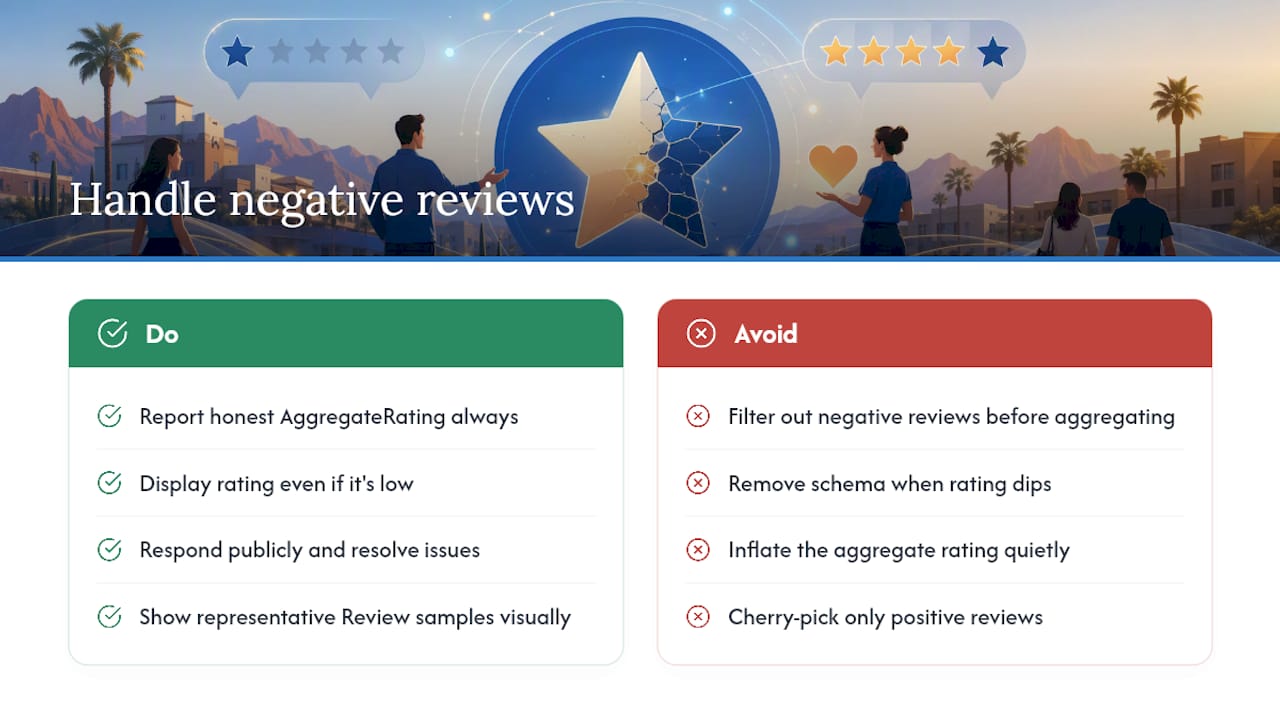
You don’t get to cherry-pick. AggregateRating schema has to reflect your true average, one-star reviews included. Filtering out negative feedback before calculating ratingValue is exactly the kind of mismatch that Google’s guidance warns can trigger removal of your rich snippet.
That said, a low average doesn’t mean you should hide schema altogether. A 3.9-star rating with 60 reviews is often more persuasive to a searcher than no visible rating at all, because it reads as authentic. What matters more is addressing the negative reviews themselves: respond publicly, resolve what you can, and let your review volume grow organically so a handful of bad experiences don’t dominate the average.
If you’re using individual Review markup rather than aggregated data, there’s no obligation to feature every single review as a highlighted Review object. You can showcase a representative sample in visible content while still reporting the honest aggregate in your schema. Just make sure the aggregate number itself is never quietly inflated. Schema.org’s own properties, including positiveNotes and negativeNotes, exist specifically so businesses can present balanced feedback (pros and cons) rather than pretending every review was glowing.
One thing to avoid entirely: removing schema from a page the moment your rating dips, then re-adding it once it recovers. That pattern is easy for Google to notice and looks like manipulation even when the intent was defensive.
What Other Schema.org Review Types Exist Beyond Review and AggregateRating?
Review and AggregateRating cover most business use cases, but Schema.org defines review-adjacent properties for other content types too, and mixing them up is a common source of confusion.
CreativeWork reviews apply when you’re reviewing a book, a movie, a piece of music, or similar media rather than a business or product. A Scottsdale bookstore reviewing titles on its blog would use CreativeWork as the itemReviewed, not LocalBusiness.
Event reviews apply to things like concerts, festivals, or classes, situations where the “product” being rated is time-bound and doesn’t exist as a permanent listing. A Scottsdale event venue rating past performances would nest reviews under an Event type.
UserReview, a subtype Schema.org documents alongside the standard Review type, is meant specifically for reviews submitted directly by end users rather than professional critics, useful if you’re distinguishing between staff-written editorial reviews and customer-submitted ones on the same site.
The practical takeaway: match itemReviewed to what’s actually being reviewed. A landscaping company reviewing its own completed projects should use Service or LocalBusiness, not Product. Getting this wrong doesn’t always break the rich snippet, but it does make your structured data harder for Google to parse confidently, which increases the odds it gets ignored rather than displayed.
What’s New in Schema.org Standards for Reviews?
Schema.org’s vocabulary for reviews hasn’t changed dramatically in structure, but the property set continues to expand toward more nuanced, aspect-based feedback rather than a single flat number.
The reviewAspect property lets you attach a rating to a specific attribute of a business or product rather than an overall score, so a Scottsdale restaurant could theoretically mark up separate satisfaction scores for food, service, and ambiance. Few businesses use this yet, but it signals where structured data is heading: more granular, more specific, less reliant on one aggregate number.
positiveNotes and negativeNotes, both documented properties on the Review type, give businesses a structured way to summarize pros and cons directly in markup rather than burying that nuance in free text. This matters more now that AI-driven answer engines are pulling structured summaries directly into generated responses rather than just displaying blue links. A growing body of guidance on answer engine optimization points to structured, well-labeled data as one of the clearest ways to get pulled into those AI-generated summaries in the first place.
None of this changes the core mandatory fields. ratingValue, ratingCount or reviewCount, and itemReviewed.name remain the baseline. The newer properties are additive, useful for businesses that want to stand out with richer detail, not required for basic eligibility.
What Common Mistakes Trigger Manual Actions From Google?
Manual actions against structured data are rare compared to algorithmic filtering, but they happen, and they’re almost always tied to a pattern of deception rather than a one-time honest error.
The clearest violation is marking up reviews that don’t exist on the page at all, sometimes called “invisible” schema, where a business tags a 4.9-star AggregateRating with zero visible reviews anywhere on the site. Google’s documentation treats this as inauthentic markup, and it’s grounds for removing rich results across the entire domain, not just the offending page.
Self-written testimonials formatted as verified customer reviews are another repeat offender. If your team wrote the “customer” quote, it’s not a review, and marking it up as Review schema misrepresents its source.
Applying AggregateRating schema sitewide through a template, so every page on your site claims the same “4.8 stars, 200 reviews” regardless of whether that page has anything to do with reviews, is a frequent enterprise-scale mistake that automation tools can accidentally cause if not configured carefully.
The fix in all three cases is the same: strip the schema, publish real reviews on the page first, then re-add markup that reflects what a visitor can actually see and verify.
What Do Review Schema Examples Look Like Across Industries?
A Scottsdale med spa reviewing individual treatments nests Review objects under a Service type, often using reviewAspect for separate comfort and results ratings. A local auto repair shop typically runs a straightforward AggregateRating tied to LocalBusiness, pulling numeric scores directly from Google Business Profile data.
Restaurants frequently combine both: AggregateRating for the overall star display in search, plus individual Review objects highlighting specific dishes or service experiences in visible content. E-commerce retailers nest reviews inside Product schema, which is why product listings often show stars directly in shopping results, distinct from the LocalBusiness stars a service company would show.
Professional services, law firms, accountants, consultants, tend to rely almost entirely on AggregateRating with minimal individual Review markup, since client confidentiality often limits how much detail can appear in a public testimonial.
The Local Provider Shortlist Beats Generic Schema Advice
Most schema guides treat review markup as a universal checklist: add these five properties, run one validator, done. That advice isn’t wrong, but it skips the actual decision Scottsdale business owners face, which is whether to spend a Saturday hand-coding JSON-LD or hand it to someone who does this daily.
The overrated part of this whole topic is the obsession with ranking impact. Schema for reviews earns its keep through click-through rate, not through moving you up the results page, and business owners who chase it expecting a ranking bump usually walk away disappointed and blame the wrong culprit.
What actually deserves priority: get your review volume up first, verify visible content matches your markup exactly, and only then worry about advanced properties like reviewAspect. A business with 12 honest reviews and clean AggregateRating markup will outperform one with inflated numbers and a mismatch flag every time Google audits it.
Get Your Review Schema Implemented the Right Way
This provider has been building and fixing structured data for local businesses for many years, and review schema is one of the most common fixes made on client sites, usually because a previous developer either skipped it or applied it incorrectly.

The package works in three stages: an audit of your current pages to see what’s eligible for AggregateRating, hands-on implementation of the JSON-LD itself, and ongoing monitoring so a Google update or a site change doesn’t quietly break your rich snippets months later. Most clients come out of the audit stage with a clear list of which pages qualify and which need more reviews first, before a single line of code gets written.
If you want to see the kind of local work this looks like in practice, check our portfolio or reach out through our Scottsdale SEO services page to request a review schema audit for your site.
Sources
- Review snippet – Google Search Central documentation
- Understand review scores for local places & businesses – Google Business Profile Help
- What Is Review Schema? & How to Implement It
- Schema