

Prove Website Backup Strategy: Scottsdale SMBs 3/2/1 Plan with CISA
The right website backups strategy for most small and mid-sized businesses is a 3-2-1 setup, three copies, two media types, one off-site, strengthened with an immutable or offline copy and checked with regular recovery tests. Scottsdale business owners can build this with a local managed provider or a vendor-backed platform such as Datto or Veeam. Whatever you choose, verify your latest backup exists and can restore a single file before you do anything else.
TL;DR:
- Backup plans must include an immutable or offline copy that attackers cannot access or delete to effectively counter ransomware threats.
- Confirm regular restore tests are performed and well-documented, especially for full site rebuilds and database recovery, to ensure backup reliability.
- Use the 3-2-1 rule by maintaining three copies of data on two media types, with at least one off-site, adjusted to your site’s data change frequency.
- For a high-transaction site or ecommerce, near-continuous or daily backups are necessary to prevent significant data loss.
- Evaluate Backup recovery targets, geographic redundancy, and support response times before choosing a vendor or plan to ensure it matches your recovery needs.
Table of Contents
- Scottsdale shortlist: WebTechs.Net, Datto, and Veeam compared
- How to evaluate backup plans and what to ask a vendor or host
- Step-by-step website backup strategy to implement
- How to test restores and run practical recovery drills
- Local evidence: how WebTechs.Net helps Scottsdale SMBs recover
- Backup of third-party integrations and APIs
- A priority checklist for backups that actually work
- Get managed backups and restore testing from WebTechs.Net
- Sources
- FAQ
Scottsdale shortlist: WebTechs.Net, Datto, and Veeam compared
Scottsdale site owners generally land on one of three paths: a local agency that manages hosting and backups directly, an MSP-distributed appliance built for continuous protection, or an enterprise platform built for virtualized infrastructure. Each fits a different kind of website.
A basic brochure site or blog usually does fine with a managed host that includes daily backups and a documented restore process, which is where a local team like WebTechs.Net earns its keep. An ecommerce store with constant order and inventory changes needs tighter recovery points, often the kind of continuous protection Datto’s appliances are built around. An agency or IT team managing several client sites on virtualized servers tends to reach for Veeam because of its VM-level restore depth and immutable storage options.
- Ask any provider whether backups include an immutable or offline copy, not just a same-network snapshot.
- Confirm they run test restores on a schedule and can show you documentation, not just a claim.
- Check whether your backups sit on the same infrastructure as your live site, which defeats the point of an off-site copy.
Pro Tip: Get the answer to “when did you last restore a backup for a client” in writing before you sign anything.
How to evaluate backup plans and what to ask a vendor or host
Before picking a plan, judge it against a short list of concrete criteria rather than marketing language.
- Recovery targets. Ask what recovery point objective (how much data you could lose) and recovery time objective (how long a restore takes) the plan actually delivers, not just promises.
- Immutability and offline copies. Confirm at least one copy can’t be altered or deleted by an attacker who gains admin access, a defense CISA recommends because ransomware often hunts down and deletes accessible backups.
- Geographic redundancy. Make sure at least one copy sits in a different physical location or cloud region than your production server.
- Support and escalation. Find out what hours support covers and how fast someone picks up when a site is actually down.
- Pricing structure. Understand whether backups are bundled into hosting or billed separately per gigabyte or per restore.
Ask directly: How often are restores tested, and can you show documentation? Where physically will my backups be stored? Who holds the encryption keys, and can I access them independently of your platform?
Pro Tip: Treat “no restore testing” as a red flag, not a minor gap. A backup nobody has restored is a guess, not a plan.
Step-by-step website backup strategy to implement
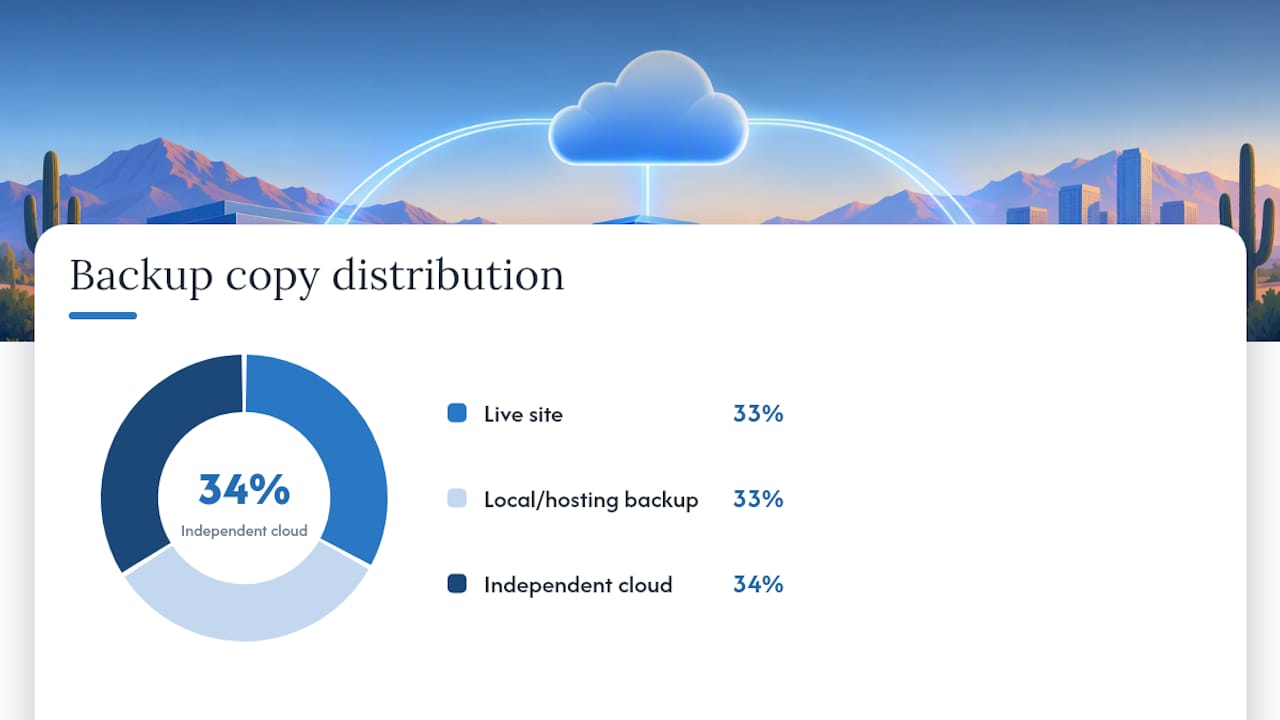
Start with the 3-2-1 rule: keep three total copies of your data, on two different types of media, with at least one copy off-site. In practice, that means your live site is copy one, a local or hosting-panel backup is copy two, and an independent cloud account you control is copy three. CISA notes that hosting-provider backups often sit on the same infrastructure as production, so a separate cloud account matters more than it sounds.
Match your backup cadence to how much data you can afford to lose. A static brochure site can run weekly full backups. A blog updated daily needs at least daily backups. An ecommerce or high-transaction site needs continuous or near-continuous protection, since losing even a few hours of orders is costly.
Three backup types cover most needs:
- Full backups capture everything and are simplest to restore but slowest to run.
- Incremental backups save only changes since the last backup, which is faster but requires the full chain to restore.
- Continuous data protection (CDP) captures changes in near real time, suited to transaction-heavy sites.
For WordPress sites, back up files and the database separately. The WordPress developer documentation walks through exporting the database with mysqldump or a plugin, and many hosting-included backups quietly omit one or the other unless you configure it yourself.
One in three ransomware defenses that matter most is having an offline copy your attacker can’t reach, according to CISA guidance on backing up business data, since attackers routinely search for and delete backups they can access.
Encrypt backups both in transit and at rest, and keep the encryption keys somewhere separate from the backup storage itself. Use a cloud account independent of your hosting provider so a single compromised login can’t wipe every copy at once.
How to test restores and run practical recovery drills
A backup only counts once you have proven it restores. NIST’s guidance on recovering from ransomware treats testing as the step that separates a real disaster recovery plan from a folder of files, and recommends maintaining golden images and infrastructure-as-code templates you can rebuild from offline.
- Single-file restore. Pull one file back from backup and confirm it opens correctly.
- Database-only import. Restore just the database to a staging environment and check the site loads against it.
- Full site rebuild. Rebuild the entire site, files and database together, on a separate server.
- Golden-image deploy. Confirm your server configuration and software stack can be redeployed from a stored image, not just your content.
Run a partial test monthly and a full rebuild quarterly, more often for ecommerce sites. Document each test: what you restored, how long it took, and what broke. Set up alerts for failed backup jobs so a silent failure doesn’t go unnoticed for weeks, a problem sometimes called backup drift, where backups quietly stop matching the live site.
Pro Tip: Keep an offline “go bag”: critical credentials, certificates, and a recent backup image on an encrypted external drive stored off-site, so you’re not locked out if your cloud accounts or network go down at the same time.
Local evidence: how WebTechs.Net helps Scottsdale SMBs recover
WebTechs.Net has worked with Scottsdale small and mid-sized businesses since 1997, and its hosting and maintenance services fold backups directly into ongoing site management rather than treating them as an afterthought. Maintenance plans typically include managed hosting, scheduled backups, and restore testing so a client isn’t discovering a backup is unusable during an actual outage.
For businesses that want backup handled by someone local rather than self-managed, a maintenance plan is a practical option between doing it yourself and hiring an enterprise IT team. The next step is usually a short conversation about your current hosting and backup setup, followed by a plan tailored to your site’s traffic and update frequency.
Backup of third-party integrations and APIs
Most SMB sites depend on more than their own files and database. Payment processors, email marketing tools, booking systems, and CRM integrations often store configuration, API keys, and webhook settings that live outside your core backup. A full site restore can bring back your pages and posts while leaving every third-party connection broken.

Start by inventorying every integration your site relies on: which plugins or scripts call external APIs, and what credentials they need to reconnect. Export configuration settings for booking widgets, payment gateways, and marketing tools separately, since many of these live in a vendor’s dashboard rather than your website’s database.
Store API keys and webhook URLs in an encrypted password manager, not just inside the plugin settings you’re backing up, since some exports strip credentials for security reasons. After any full restore, test each integration individually: place a test order through your payment processor, submit a test form through your CRM connection, confirm a booking widget still talks to its calendar.
For sites with heavy API dependency, document the reconnection steps the same way you document a restore test, so whoever handles recovery isn’t guessing which service needs which key.
A priority checklist for backups that actually work
Testing and offline copies matter more than the tool you pick. Run a quick check within 24 hours of any change, a deeper verification within seven days, and a full drill monthly. If your recovery time needs outpace what you can do yourself, bring in help before an outage forces the decision.
— Brett
Get managed backups and restore testing from WebTechs.Net
If building and testing all of this yourself sounds like more time than your business has, WebTechs.Net handles it directly for Scottsdale companies as part of ongoing hosting and maintenance.

- Managed hosting with backups built into the plan, not sold as an add-on
- Scheduled restore testing so you know your backups actually work
- Monitoring and alerts for backup failures before they become emergencies
The first step is a conversation about your current site and hosting setup. From there, WebTechs.Net can outline a maintenance plan that fits your site’s size and update frequency. Visit Webtechs to get started, or look at the maintenance plan details directly.
Sources
- Back Up Business Data | CISA
- NIST SP 1800-11B: Data Integrity: Recovering from Ransomware and Other Destructive Events
- Backing Up Your Database — WordPress Developer Resources
FAQ
What is the 3/2/1 rule for backing up?
The 3-2-1 rule means keeping three total copies of your data, stored on two different types of media, with at least one copy off-site. CISA recommends this as the baseline for small and mid-sized businesses because it protects against both hardware failure and ransomware that targets accessible backups.
Which website backup service is the best?
There is no single best service, since the right choice depends on your site’s complexity and how much downtime you can tolerate. A local managed provider such as WebTechs.Net suits SMBs that want hands-on restore support, while appliance-based platforms like Datto or enterprise tools like Veeam Software fit MSPs and virtualized infrastructure with heavier recovery needs.
What is the best backup strategy?
The strongest approach for most SMBs is 3-2-1 at minimum, strengthened with an immutable or offline copy and regular recovery testing. NIST guidance treats tested restores, not just stored files, as the real measure of whether a backup strategy works.
What is the 3-2-1-1-0 backup rule?
The 3-2-1-1 rule extends 3-2-1 by adding one immutable or offline copy that can’t be altered, and includes regular restore testing. It builds directly on the offline-copy and testing practices CISA outlines for ransomware resilience.