

SSL: Set Up HTTPS in 5 Minutes for Arizona Small Businesses
Yes, your small business needs SSL. Every website that collects customer data, accepts payments, or wants to avoid a “not secure” warning in Chrome should run on HTTPS now. The fastest path is turning on host-managed SSL in your hosting dashboard or installing a free Let’s Encrypt certificate if your host supports automation. Either route gets you encrypted, trusted, and ready to serve customers safely.
TL;DR:
- Most small businesses must use SSL if they accept payments, collect login information, or display personal data, to avoid security warnings and protect trust.
- Free DV certificates from Let’s Encrypt or bundled host SSL are often sufficient for typical needs, with OV or EV certificates reserved for high-volume e-commerce or regulated industries.
- Automating renewal through ACME clients or hosting providers reduces risks of expired certificates and enhances security, given certificates last only 90 days.
- Proper deployment requires fixing mixed content issues and implementing HSTS, with thorough testing before enabling long-term security features.
- Costs vary from free to hundreds of dollars annually; paid certificates are only necessary for specific compliance, verification, or multi-domain needs.
Table of Contents
- When you need SSL and what it protects
- Certificate types explained for small businesses
- How to get an SSL certificate: comparing your options
- Renewal, automation, and reliability
- Fixing mixed content, HSTS, and TLS configuration
- Costs and where to get SSL in the United States
- Installing SSL on cPanel, Shopify, and similar platforms
- Testing and troubleshooting your SSL installation
- Evaluating your security needs and compliance requirements
- How we approach SSL for Arizona small businesses
- Get HTTPS set up and maintained without the overhead
- FAQ
- Sources
When you need SSL and what it protects
Some small-business sites can get away with putting HTTPS off for a while. Most cannot. If your website has any of the following, SSL is not optional:
- You accept payments or send customers to a checkout page, even through a third-party processor.
- You collect login credentials for a customer portal, member area, or employee dashboard.
- You run contact forms, quote requests, or lead-capture forms that gather names, emails, or phone numbers.
- You store or display any personal information, including appointment bookings or account details.
Beyond data protection, HTTPS affects how visitors perceive your business the moment they land on your site. Browsers flag unencrypted pages as “Not Secure,” and that warning shows up right in the address bar before a visitor reads a word of your copy. For a landscaping company in Scottsdale or a dental office in Tempe, that warning can send a potential customer straight to a competitor’s site. HTTPS also unlocks browser features like geolocation and service workers that some modern web tools depend on, and it factors into how search engines treat your site’s trustworthiness.
Run this five-minute self-check:
- Type your website address with “https://” in front of it. Does it load without a warning?
- Click the padlock icon in your browser’s address bar. Does it show a valid, unexpired certificate?
- Check whether any page on your site has a form, login, or payment button.
- Search your site for a lock icon or “secure checkout” badge that might not match reality.
- Ask your host directly whether SSL is included and whether it renews automatically.
If you answered “no” or “not sure” to any of these, treat HTTPS as a this-week priority rather than a someday project.
Certificate types explained for small businesses
SSL certificates come in three validation levels, and they are not interchangeable in terms of what they prove. Domain Validation (DV), Organization Validation (OV), and Extended Validation (EV) certificates all encrypt traffic identically. What differs is how much vetting the certificate authority does before issuing one, and how long that vetting takes. DV can be issued in minutes, while OV and EV typically take days because of manual checks on your business’s legal identity, according to eNom’s certificate guide.
DV, OV, and EV only differ in identity vetting, not encryption strength. A DV certificate on a small bakery’s ordering page encrypts data exactly as well as an EV certificate on a bank’s login page, per eNom’s guide. The difference is the trust signal OV and EV certificates were designed to display, which matters more for brand reputation than for technical security.
For most small businesses, DV is enough. Consider OV or EV only when:
- You run an e-commerce store processing significant transaction volume and want the added identity assurance for customers.
- A payment processor, partner, or compliance framework specifically requires it.
- Your industry (legal, financial, healthcare) benefits from visible organizational verification.
Coverage type matters too. A single-domain certificate covers one exact domain. A wildcard certificate covers a domain and all its subdomains (like shop.yourbusiness.com and blog.yourbusiness.com) under one certificate. A multi-domain or SAN certificate covers several unrelated domains at once, useful if you run more than one business site from a shared hosting account.
How to get an SSL certificate: comparing your options
Three main paths get you to HTTPS, and they differ mainly in how much work falls on you versus your host.
Host-managed SSL is the easiest route for most small businesses. Hosts like Bluehost, SiteGround, InMotion Hosting, DreamHost, Hostinger, and A2 Hosting bundle free SSL certificates, usually powered by Let’s Encrypt or Sectigo, directly into their hosting plans. Kinsta offers a wildcard SSL courtesy of Cloudflare on its plans. A2 Hosting also sells paid options including QuickSSL Premium, RapidSSL, Secure Site Pro SSL, Secure Site SSL, DigiCert STD SSL, True BusinessID, and various EV and wildcard tiers for businesses that need OV or EV validation. Before relying on host-managed SSL, confirm four things: does it auto-install on new domains, does it auto-renew without manual steps, does support actually handle SSL issues when something breaks, and does the host support modern certificate types like ECDSA alongside RSA.
Let’s Encrypt and ACME automation give you free DV certificates with a 90-day lifespan, built around the expectation that renewal happens automatically. Let’s Encrypt is a nonprofit certificate authority, and most hosting control panels already integrate its ACME client under the hood, so you may already be using it without realizing it. If you manage your own server, running Certbot or another ACME client takes under an hour to set up and handles renewal on a schedule going forward. Newer ACME clients also support ARI (ACME Renewal Information), which can suggest better renewal windows and in some cases exempt well-timed renewals from rate limits, according to Let’s Encrypt’s integration guide.
Paid certificate authorities make sense when you specifically need OV or EV validation, a warranty backing the certificate, or a multi-domain contract managed by a dedicated account rep. Expect a manual vetting process and a yearly fee instead of a 90-day free cycle.
| Setup effort | Ongoing maintenance | Typical cost | Trust level displayed |
|---|---|---|---|
| Low (host-managed) | Minimal, auto-renews | Often included free | Standard padlock |
| Low to moderate (ACME/Certbot) | Automated once configured | Free | Standard padlock |
| Moderate to high (paid CA, OV/EV) | Manual renewal and re-vetting | Paid annually | Padlock plus organization details |
Pro Tip: If your host already bundles free SSL, use it first. Only move to a paid certificate when a specific business reason, like a payment processor’s requirement, demands it.
Renewal, automation, and reliability
Let’s Encrypt certificates last 90 days by design, and that short lifespan is a deliberate security feature rather than an inconvenience. Shorter lifetimes shrink the window of exposure if a private key is ever compromised, and they force automation instead of relying on someone remembering to renew once a year, according to Let’s Encrypt’s documentation. Automating renewal removes the human error that causes most expired-certificate outages.
Follow this schedule to stay ahead of expiration:
- Set renewal to trigger automatically around the 60-day mark, well before the 90-day expiration, which lines up with Let’s Encrypt’s recommended renewal window.
- Confirm your ACME client or host supports ARI, which can suggest optimal renewal timing and reduce rate-limit issues when renewals happen inside the suggested window.
- Run a manual test renewal at least once after initial setup to confirm the automation actually works end to end.
- Set up an expiration-monitoring alert, either through your host’s dashboard or a third-party uptime checker, as a backup in case automation silently fails.
- Keep a documented manual renewal process on hand so you can act fast if automation breaks and a certificate is about to lapse.
Shorter certificate lifetimes paired with automation reduce both renewal failures and the damage window from a compromised key, per Let’s Encrypt’s guidance on certificate lifetimes. Treat automation as the default, not an advanced option.
Fixing mixed content, HSTS, and TLS configuration
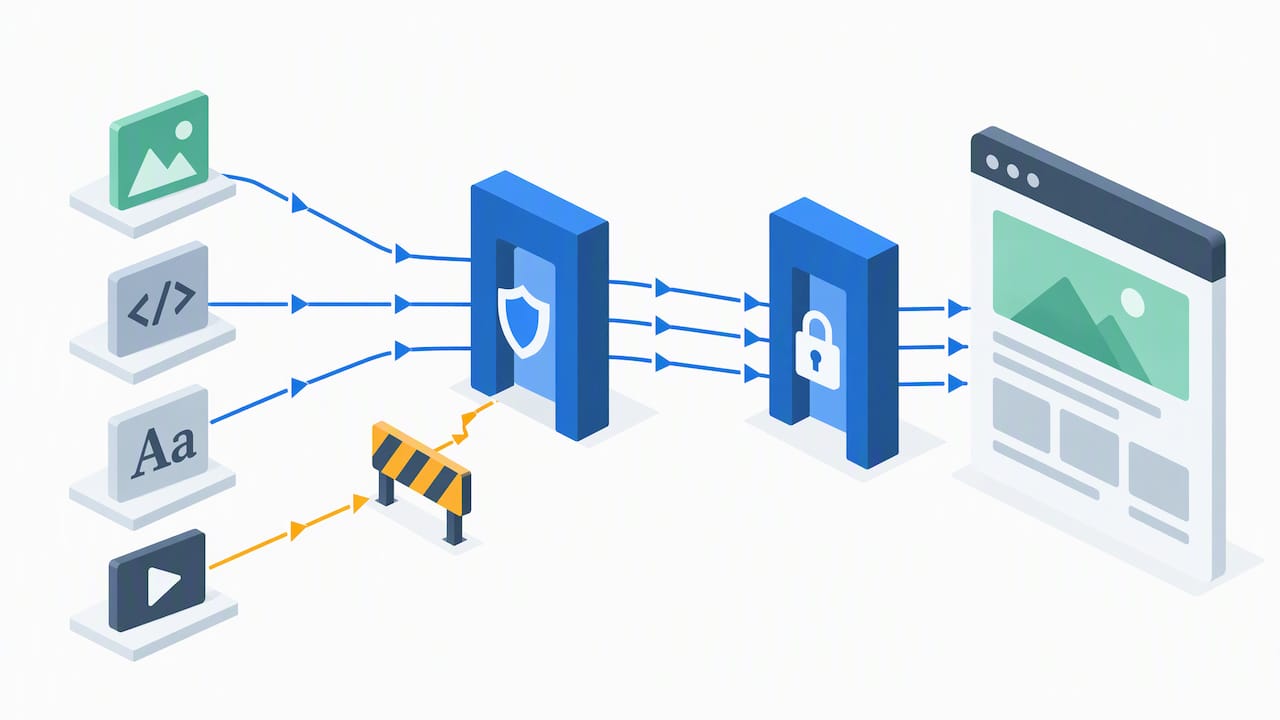
Switching to HTTPS sometimes breaks pages that worked fine on HTTP, and the usual culprit is mixed content, meaning an HTTPS page still loading an image, script, or stylesheet over plain HTTP. Browsers block or silently upgrade some mixed content, but scripts and other active resources are often blocked outright, which can break page functionality, according to MDN’s mixed content documentation.
To find and fix mixed content:
- Open your browser’s developer console on each key page and look for mixed-content warnings.
- Run a link-checking tool across your site to catch hardcoded HTTP links in old content or theme files.
- Convert hardcoded HTTP links to relative links or HTTPS equivalents wherever you find them.
Once your site loads cleanly over HTTPS, HSTS (HTTP Strict Transport Security) tells browsers to always use HTTPS for your domain going forward, even if someone types “http://” by habit. Start with a moderate max-age setting for a few weeks or months before considering longer values, and hold off on the “includeSubDomains” flag and HSTS preload lists until you have fully tested every subdomain, per MDN’s TLS configuration guidance. Preloading is hard to reverse, so test thoroughly first.
Pro Tip: Check every image, script, font, and embed on your most-visited pages before flipping HSTS on. A single overlooked HTTP resource can quietly break page functionality for visitors.
For a broader hardening checklist beyond SSL, see our website security basics for Arizona SMBs.
Costs and where to get SSL in the United States
Pricing for SSL ranges from nothing to several hundred dollars a year, and the right number depends on what your business actually needs. Free DV certificates through Let’s Encrypt or your host cost nothing and renew automatically. Paid OV and EV certificates run from modest annual fees into hundreds of dollars a year depending on the certificate authority, the validation level, and how many domains the certificate covers.
Here’s how to decide where to land:
- Choose free DV when your site is informational, a lead-generation form, or a small storefront without a specific compliance requirement for organizational identity.
- Pay for OV or EV when a payment processor, industry regulation, or enterprise client contract specifically asks for it.
- Pay for a multi-domain or wildcard certificate when you run several subdomains or related sites and want one certificate to manage instead of several.
Before buying from any provider, confirm it operates and supports customers in the United States, check that its certificates are trusted by major browsers out of the box, and read its renewal and support terms before committing to a multi-year contract. A legitimate host or CA will list this plainly, not bury it in fine print.
Installing SSL on cPanel, Shopify, and similar platforms
Most small-business hosting falls into a handful of common setups, and each has a fairly standard SSL installation path.
On cPanel hosting: Log into cPanel and look for “SSL/TLS Status” or “Let’s Encrypt SSL” under the Security section. Select your domain, click install, and most cPanel hosts handle the certificate request, installation, and renewal automatically from that point forward. If your host offers “AutoSSL,” enabling it once covers future renewals without further action.
On Shopify: SSL is included automatically for every Shopify store and every custom domain connected to it. There is no manual installation step. If you see a mixed-content or insecure warning on a Shopify store, the cause is almost always a theme or app loading an external resource over HTTP, not a missing certificate.
On WordPress with host-managed hosting: Check your hosting dashboard first, since Bluehost, SiteGround, Hostinger, and similar hosts typically offer a one-click SSL toggle. After enabling it, install a plugin like “Really Simple SSL” or update your site URL settings to force HTTPS across the whole site, then clear any caching plugin so old HTTP links don’t linger.
On a self-managed server: Install Certbot or another ACME client, point it at your domain, and let it handle both the initial certificate request and ongoing renewal through a scheduled task.
Testing and troubleshooting your SSL installation
After installing a certificate, confirm it actually works before assuming you’re done. Load your site with “https://” and check for the padlock icon in the address bar. Click the padlock to view certificate details, confirming the domain name matches, the certificate hasn’t expired, and the issuing authority is one you recognize.
Common validation errors and what they usually mean:
- A “certificate name mismatch” error means the certificate was issued for a different domain or subdomain than the one being loaded, often because “www” and non-“www” versions weren’t both covered.
- A “mixed content” warning in the browser console means some page resource is still loading over HTTP, as covered above.
- A “certificate not trusted” error on a fresh install sometimes means an intermediate certificate wasn’t installed alongside the main certificate, which is common with manually installed paid certificates.
- An “expired certificate” error means automated renewal failed silently, which is exactly why a backup monitoring alert matters.
If your own browser shows no warnings but customers report issues, ask them which browser and device they’re using. Older devices sometimes lack support for newer encryption standards, which can surface as a connection error only on their end.
Evaluating your security needs and compliance requirements
Not every small business has the same risk profile, so it helps to think through what you actually handle before choosing a certificate level or security budget. Start by listing every type of data your site touches: names and emails from a contact form, payment details routed through a processor, health information, or financial records.
If you process payments directly rather than through a hosted checkout like Stripe or Square, you likely fall under PCI DSS requirements, which involve more than just SSL and may require a broader security review. If you serve healthcare clients and your site touches patient information, HIPAA considerations may apply beyond what a certificate alone covers. Most small businesses selling general goods or services through a third-party payment processor have lighter obligations, since the processor absorbs much of the compliance burden.
A practical way to frame it: HTTPS is the baseline every business needs, and compliance requirements layer on top of that baseline depending on the data you collect directly versus the data a processor handles for you. When in doubt about which rules apply to your specific setup, a quick conversation with your payment processor or a compliance professional is worth more than guessing. For a deeper look at how certificate validation affects how trustworthy your site appears to visitors and search engines, see this explanation of website trust signals.
How we approach SSL for Arizona small businesses
For client sites, we lean toward host-managed SSL or automated ACME certificates by default, since both deliver the same encryption with far less ongoing effort than a manually managed paid certificate. We reserve OV or EV certificates for clients whose payment processor or industry specifically calls for it. That decision comes down to what the business actually needs, not what sounds more impressive on a sales page. For readers who want the mechanics explained further, our guide on SSL and SEO for Scottsdale businesses covers the search visibility side in more depth.
— Brett
Get HTTPS set up and maintained without the overhead
Setting up SSL correctly and keeping it renewed, hardened, and free of mixed-content errors takes ongoing attention most small-business owners don’t have time for. Our complete website hosting includes SSL setup, automated renewal, TLS configuration, and HSTS hardening as part of the package, so you’re not stuck debugging certificate errors between everything else running your business.

If you’re redesigning your site anyway, our website design services build HTTPS and proper TLS configuration in from day one rather than bolting it on afterward. Reach out through Webtechs to talk through your current setup and get a straightforward plan for securing your site.
FAQ
How much should I pay for an SSL certificate?
Many small businesses pay nothing, since free DV certificates from Let’s Encrypt or a host’s bundled SSL cover most needs without ongoing fees. Paid certificates make sense only when a payment processor, industry rule, or client contract specifically requires OV or EV validation.
Is SSL being phased out?
No, SSL as a protocol was replaced by TLS years ago, but the term “SSL certificate” is still the common name for the certificates that enable HTTPS today. What has changed is certificate lifespan: Let’s Encrypt’s shorter 90-day lifetimes are pushing the industry toward automated renewal instead of manual yearly updates.
How much does a 1-year SSL certificate cost?
Cost depends entirely on validation level and provider, ranging from free for a DV certificate through Let’s Encrypt or a host up to several hundred dollars a year for an OV or EV certificate from a paid certificate authority like those offered through A2 Hosting. There is no single fixed price across the industry.
Can I get an SSL certificate for free?
Yes, Let’s Encrypt issues free DV certificates, and most major hosts, including Bluehost, SiteGround, InMotion Hosting, DreamHost, and Hostinger, bundle free SSL directly into hosting plans. Kinsta includes a free wildcard certificate through Cloudflare on its plans as well.