

Video Scriptwriting for Aspiring Videographers Who Want Results

A video script is the decision layer that determines exactly what an audience hears and sees, built to deliver one clear outcome rather than a general impression. Every solid script runs on the same spine: Hook, Promise, Payoff, Ask. Write the hook first. If you only take one thing from this article, it’s that one sentence: name the payoff in your opening line, then build everything else around getting there.
One rule anchors the math behind every script you’ll write: one page of double-spaced script equals roughly one minute of screen time. A 60 second social video runs about a quarter page. A five minute explainer runs multiple pages. That single conversion saves you from writing a script that reads fine but plays twice as long as your client, professor, or client’s client agreed to.
Key Takeaways
A usable video script starts with the Hook → Promise → Payoff → Ask spine, follows a Prep → Structure → Words → Revision workflow, and stays inside platform-specific length targets that follow the one-page-per-minute rule.
| Point | Details |
|---|---|
| Write the hook first | State the payoff or stakes within the first 5 to 15 seconds to stop scroll-past behavior. |
| Follow the spine | Structure every script as Hook, Promise, Payoff, Ask, regardless of length. |
| Prep before words | Lock the audience and single goal before writing any dialogue or narration. |
| Match format to project | Use AV two-column for corporate work, single-column for talking-heads, screenplay for narrative shorts. |
| Test before shooting | Run a table read with at least four people and time the script against platform targets. |
| Consider Webtechs | Webtechs handles script development, shoot direction, and post-production for Scottsdale video projects as one coordinated service. |
Table of Contents
- Why Video Scriptwriting Matters Before You Shoot Anything
- What Is the Video Script Spine and How Do You Time It?
- Which Script Format Should You Actually Use?
- How Do Professionals Actually Write a Script Step by Step?
- How Do You Time a Script Without Guessing?
- Which Tools Fit Each Stage of the Scriptwriting Process?
- What Mistakes Kill Video Scripts and How Do You Fix Them?
- Three Ready-to-Use Script Templates You Can Fill In Today
- How Do You Test a Script Before You Shoot It?
- How Webtechs Approaches Video Scriptwriting for Scottsdale Productions
- Skip the Learning Curve: Webtechs Video Production in Scottsdale
- Frequently Asked Questions
- Sources
Why Video Scriptwriting Matters Before You Shoot Anything
Skipping the script feels faster. It isn’t. A director without a script has to invent blocking on the spot, an editor without a script has to guess which take matches the intended line, and an actor without a script improvises tone that may not match the brand or the assignment. Ambiguity on set costs money in every direction, and it costs more in student productions where you can’t just call the crew back tomorrow.
Different formats lean on scripts differently:
- Social clips need a script to lock the hook before the crew wastes a shoot day on footage nobody watches past second three.
- Explainer videos need a script to sequence complex ideas into a chain the viewer can actually follow without pausing.
- Training videos need a script to guarantee consistency across every module, so employee number 40 gets the same instruction as employee number one.
- Corporate messaging needs a script because legal, marketing, and leadership all want approval before a camera rolls, not after.
The return shows up in three places: fewer reshoots because everyone agreed on the line beforehand, faster edits because the editor is matching footage to a document instead of reconstructing intent, and sharper calls to action because the “ask” was decided in preproduction instead of improvised on the last day of the shoot.
| Point | Details |
|---|---|
| Ambiguity is expensive | Undirected shoots generate footage that doesn’t match anyone’s expectation, which means reshoots. |
| Format changes the stakes | Social clips live or die on the hook; training videos live or die on consistency. |
| ROI is measurable | Scripted productions cut editing time because footage maps directly to a document. |
What Is the Video Script Spine and How Do You Time It?
The canonical script spine, Hook → Promise → Payoff → Ask, scales from a 15 second ad to a 10 minute tutorial without changing shape. Each piece does one job:
- Hook stops the scroll or the channel-flip. It states the stakes or the payoff immediately.
- Promise tells the viewer what they’ll get if they keep watching.
- Payoff delivers on that promise, usually in several smaller beats rather than one long block.
- Ask tells the viewer exactly what to do next.
Timing on the hook isn’t a suggestion. Short-form video structure guidance puts the hook window at 5 to 15 seconds, and shorter formats need it closer to the 5 second end. Wait past that window and a large share of your audience is already gone.
Length targets follow platform behavior more than personal preference:
| Format | Target length |
|---|---|
| Social/Reels/TikTok | Short videos around one minute |
| YouTube tutorial/explainer | Several minutes long explainer videos |
| Corporate/training module | Moderate length corporate or training videos |
Structure the payoff as a chain of small open loops rather than one continuous explanation. Open a question, close it, open the next one. That rhythm is what keeps a five minute explainer from feeling like a lecture, and it’s the same technique that keeps a 60 second ad from feeling rushed even though it’s covering three ideas in one breath.
Which Script Format Should You Actually Use?
Format choice depends on what you’re shooting, not personal habit. The AV two-column format is the industry standard for corporate and commercial work because it forces audio and visual cues into horizontal alignment, so an editor never has to guess which shot pairs with which line.
AV two-column puts narration or dialogue on one side and visual/graphic cues on the other, row by row. Single-column or master-scene format works for talking-heads content, vlogs, and interviews where there’s no tight sync requirement between picture and audio. A dedicated screenplay format, complete with sluglines and character blocks, belongs to narrative short films where you’re directing actors through scenes rather than delivering information.
Producers expect specific formatting conventions no matter the format: slugines that mark location and time, centered dialogue blocks, and clearly labeled GFX and SFX cues. A cleanly formatted script functions as a quick credibility check on set; it signals to a director within seconds whether the writer has done this before.
A stripped-down AV sample looks like this:
| Visual | Audio |
|---|---|
| Wide shot, storefront exterior, morning light | NARRATOR: Every business in Scottsdale competes for the same three seconds of attention. |
| Cut to interior, close-up on hands typing | NARRATOR: Here’s how the ones that win actually do it. |
For tools, a shared Google Docs file with a two-column table handles most AV drafts and lets stakeholders comment in real time. Screenplay projects belong in Final Draft or Celtx, which auto-format sluglines, dialogue, and action lines so you’re not fighting tab stops during a rewrite.
How Do Professionals Actually Write a Script Step by Step?
The order matters more than most beginners assume. Practitioner workflow runs Prep → Structure → Words → Revision, and skipping straight to Words is the single most common mistake among first-time scriptwriters.
- Prep. Define the audience, one clear goal, and a success metric before typing a sentence. If you can’t state the single action you want the viewer to take, you’re not ready to write.
- Structure. Build the spine, then break the payoff into three to five distinct sections, each one a small open-and-close loop.
- Words. Write for the ear. Use contractions, short sentences, and intentional repetition, the same techniques copywriters use to keep spoken language easy to follow without a page to scan back over. Add on-screen visual cues as you go rather than after the fact.
- Revision. Run a table read. Cut any line that doesn’t earn its place. Bring in one person outside the project as an audience proxy, and ask them specific questions rather than “does this work?”
Producers who’ve run this process repeatedly estimate the actual written words represent roughly the final 10 percent of the effort; the prep decisions about audience and goal drive the other 90.
Pro Tip: Read your script out loud before you touch a camera. If you stumble on a line twice, a voice-over artist will stumble on it three times, and an editor will end up cutting around it.

How Do You Time a Script Without Guessing?
The page-to-minute rule holds up in practice: one double-spaced page runs about one minute, and social scripts commonly land at 50 to 150 words for a 15 to 60 second video. That gives you a math check before you ever pick up a camera.
- Read the script aloud at a natural speaking pace and time it with a phone stopwatch.
- Run a words-per-minute calculation, roughly 130 to 150 spoken words per minute for conversational narration, to sanity-check your page count.
- Do a second timer pass after revision, since cutting even three lines can shift a script from 62 seconds to 47.
- Time the hook separately. If it runs past 15 seconds on a short-form piece, cut it regardless of how good the line sounds.
Guessing at length is how a “quick 30 second ad” turns into a 58 second cut that gets throttled by a platform’s algorithm before it ever reaches the audience it was written for.
Which Tools Fit Each Stage of the Scriptwriting Process?
Different stages call for different software, and using the wrong one slows you down without you noticing.
- Google Docs handles drafting and collaboration best. A shared two-column table lets a client or professor leave comments directly on the line in question, and insight from working scriptwriters confirms this simple table setup covers most marketing and corporate scripts without needing dedicated software at all.
- Final Draft and Celtx handle screenplay formatting for narrative shorts, auto-generating sluglines, character cues, and dialogue blocks so you’re writing story instead of fighting margins.
- StudioBinder picks up where the script leaves off, turning an AV script into a shot-by-shot production breakdown that a director or DP can shoot from directly.
- TechSmith offers free downloadable script templates, including the A.A.A.A. formula, which is a solid on-ramp if you’ve never structured a script before.
None of these tools write the script for you. AI scaffolding tools can help sketch a hook or rough out beats, but the revision pass and the human decision about audience and goal still fall entirely on you.
What Mistakes Kill Video Scripts and How Do You Fix Them?
“Written for the eye, not the ear” is the single most common flaw in beginner scripts. Sentences that read fine on a page turn clunky the moment an actor tries to say them out loud.
The fixes are specific, not vague advice:
- Mistake: writing an essay instead of a script. Fix: read every line aloud during revision and cut any sentence that trips your tongue.
- Mistake: no single goal. Fix: name the one measurable action you want the viewer to take, then delete anything, however clever, that doesn’t serve it.
- Mistake: under-formatting audio and visual cues. Fix: switch to a two-column AV layout so image and sound stay locked together for the editor.
Before: “Our company has been providing exceptional customer service for over fifteen years, which has allowed us to build a strong reputation.” That’s 22 words a narrator will trip over.
After: “Fifteen years. Zero shortcuts. That’s how we built our name.” Same idea, half the words, and it actually sounds like a person talking.
Three Ready-to-Use Script Templates You Can Fill In Today
Templates work because they force you to hit a word count before you second-guess the writing.
- 15 second ad (35 to 40 words). Hook in the first 5 words. Promise in the next 10. Payoff in 15. Ask in the final 5. Example structure: “Tired of X? [hook] Here’s the fix. [promise] It takes 30 seconds and costs nothing. [payoff] Tap the link now. [ask]”
- 60 second social explainer (100 to 130 words). Open on a question or bold claim (5 seconds), deliver three quick payoff beats with a visual cue for each, close on a direct ask with on-screen text reinforcing it.
- 3 minute how-to (400 to 450 words). Hook in the first 10 seconds, promise the outcome, then break the payoff into three sections of roughly 100 words each, one per step or idea, closing with a clear ask and a recap line.
| Template | Word count target | Runtime | Structure |
|---|---|---|---|
| 15s ad | 35 to 40 words | 15 seconds | Hook, promise, payoff, ask |
| 60s social explainer | 100 to 130 words | 60 seconds | Hook, 3 payoff beats, ask |
| 3-minute how-to | 400 to 450 words | 3 minutes | Hook, 3 payoff sections, ask |
How Do You Test a Script Before You Shoot It?
A table read catches problems a silent read never will. Bring at minimum the writer, the director, the editor, and one person who represents the target audience and has no stake in the project’s ego.
- Read the full script aloud in real time, at the pace it will actually be delivered on camera.
- Check whether the hook genuinely holds attention in the first 15 seconds or just reads that way on paper.
- Confirm the payoff delivers what the promise set up, and that the ask is unmistakable.
- Deliver the final file as a labeled AV document, a locked PDF, and, for anything with tight timing, a time-coded version the editor can cut against directly.
Pro Tip: When you send a script for feedback, ask three specific questions instead of “thoughts?”: Does the hook make you want to keep watching? Is the ask clear? Is there a line you’d cut?
How Webtechs Approaches Video Scriptwriting for Scottsdale Productions
Every script Webtechs builds for a Scottsdale client runs through the same Prep → Structure → Words → Revision workflow covered above, because it’s the process that consistently produces footage that matches the plan instead of footage the editor has to rescue. Prep means sitting down with a business owner and pinning one goal, whether that’s more phone calls, more foot traffic, or more form submissions, before a single line gets written. Structure means mapping the spine against the actual runtime the client needs for their ad placement or landing page. The pattern shows up across other Webtechs work too, including measurable content outcomes where a coordinated script and content plan produced results the client could actually point to. That same discipline is what goes into every video production project Webtechs builds for local clients.
Skip the Learning Curve: Webtechs Video Production in Scottsdale
Webtechs is the alternative to hiring a freelance scriptwriter and a separate production crew for Scottsdale businesses that want one team handling the script, the shoot, and the edit under a single point of contact.

You now know the spine, the formats, and the timing math. Applying all of it correctly while also running a shoot, directing talent, and managing post-production is a different skill set entirely, and it’s exactly what Webtechs handles for Scottsdale clients from first draft to final cut. The deliverables cover script development in proper AV format, on-set shoot direction, and a full post-production handoff with time-coded files your website or ad platform can use immediately. Because the same team writes the script and shoots the footage, there’s no gap where a freelancer’s script doesn’t match what the crew can actually deliver on budget.
Browse the Webtechs portfolio to see finished Scottsdale video work, then reach out to scope a script-to-screen project for your business.
Frequently Asked Questions
How long is a 2 hour film script?
A feature-length script running 2 hours typically lands around 120 pages, following the one-page-per-minute standard used throughout the film industry. That’s a rough guideline, not a hard rule. Pacing, amount of dialogue, and genre all shift the actual runtime somewhat, but 120 pages remains the benchmark screenwriters and readers use to estimate a feature’s length before it’s shot.
Is screenwriting being replaced by AI?
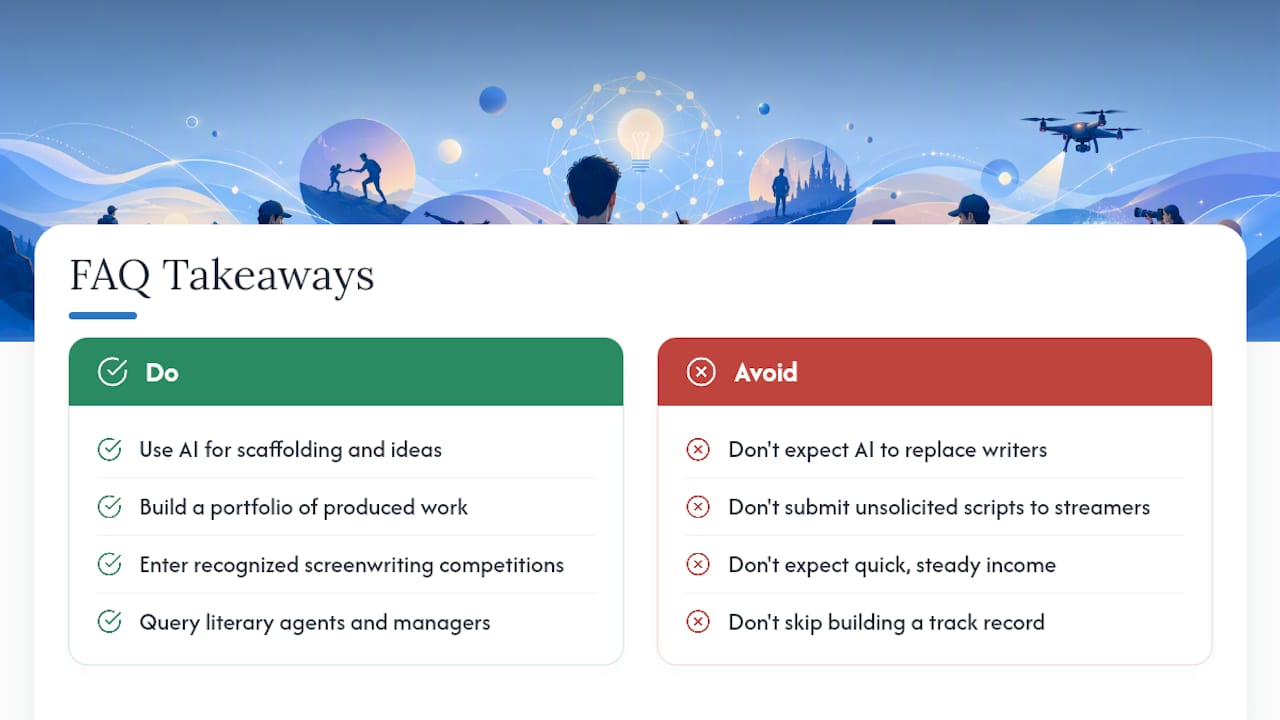
No. AI tools are useful for scaffolding, generating rough hook ideas or beat outlines quickly, but the core decisions about audience, goal, and revision still require a human writer. AI can draft a first pass; it can’t sit in a table read and tell you which line actually lands.
Will Netflix buy my script?
Streaming platforms and studios acquire scripts through agents, managers, and established industry relationships far more often than through unsolicited submissions. Building a portfolio of produced short-form work, entering recognized screenwriting competitions, and querying literary agents are the realistic paths toward that kind of sale, not a cold submission to a streamer’s inbox.
Does screenwriting pay well?
Pay varies enormously by project type, experience level, and whether you’re working under a union contract like the Writers Guild of America versus freelance corporate or commercial script work. Beginners often start with lower-paying corporate, social, or freelance projects to build a reel before moving into higher-paying narrative or studio work. Consistent income in screenwriting typically comes after building a track record, not from a single script sale.
Sources
A handful of resources are worth bookmarking as you build out your own script library.
- How many pages of script equal one minute of screen time? | InVideo FAQ
- Short-form video structure guide (2026) | Socialync
- How to write a video script | Moonb blog
- How to write a video script | Storyflow