

Google Ads Not Showing? How to Find the Cause and Fix It

If your Google Ads are not showing, the cause is almost always one of a short list: a billing problem, an ad still in review, a paused or scheduled campaign, a budget that runs dry, targeting that is too narrow, or a bid and quality level that loses the auction. Check them in that order. Most of the list takes five minutes inside your account, and you do not need to Google your own ad to do it. In fact, you should not.
TL;DR
- Start with the account, not the search results: confirm billing is active, the campaign is enabled, and the ad status is “Eligible” rather than “Under review” or “Disapproved.”
- Use the Ad Preview and Diagnosis tool inside Google Ads. Searching for your own ad creates impressions with no click and can drag down your click-through rate.
- A campaign “Limited by budget,” a tight location or schedule, or a low Ad Rank can all keep ads dark for part of the day or most of it.
- After you change a budget or a bidding target, give the system time. Repeated edits during a review or learning period can make things slower.
- If everything checks out and nothing serves, the issue is usually strategy, not a bug: the keywords, the offer or the landing page.
Table of Contents
- Do not search for your own ad
- Step 1: Check billing first
- Step 2: Read the status column
- Step 3: Understand ad review times
- Step 4: Look at budget and delivery
- Step 5: Check targeting, schedule and keywords
- Step 6: Ad Rank and quality
- Step 7: Performance Max and other campaign types
- A fast checklist to run in ten minutes
- Our perspective: the account is rarely “broken”
- When it is time to get help
- FAQ
- Sources
Do not search for your own ad
It is the first thing everyone does. You type your keyword into Google, do not see your ad, and assume the campaign is broken. That test misleads you for two reasons.
First, Google decides at the moment of each search whether to show an ad, based on the searcher’s location, device and context, so your result is one data point. Google explains that Ad Rank is recalculated for every individual search, which means visibility shifts from one query to the next.
Second, repeated searches for your own ad with no click lower your click-through rate, which feeds back into quality. Google’s guidance is to use the Ad Preview and Diagnosis tool instead. It shows how an ad would appear for a given location, language and device, and it tells you why an ad is not appearing, without logging a fake impression.
You will find it under Tools in your Google Ads account. Enter the search term, set the location to where your customers actually are (for a Scottsdale business, that might be Scottsdale or the wider Phoenix area), choose the device, and run it. If the ad is blocked, the tool names the reason.
Step 1: Check billing first
Billing is the least glamorous cause and the most common one for a campaign that suddenly goes silent. Google’s own troubleshooter for ads you cannot find opens with billing questions: whether you entered your billing information and whether a card was declined.
Check these in the Billing section:
- The payment method on file has not expired and has not been declined.
- There is no payment hold or suspended-account notice.
- If you prepay, your balance has not run to zero.
- The billing profile is linked to the right account, which matters if you manage more than one.
A declined card can stop every campaign in the account at once. If all your campaigns went dark on the same day, start here before anything else.
Step 2: Read the status column
Open the Campaigns page and look at the status of the campaign, the ad group and the individual ad. Each one can stop delivery on its own, so check all three levels.
| Status you see | What it usually means | What to do |
|---|---|---|
| Paused | Someone paused the campaign, ad group, ad or keyword | Switch it back to Enabled |
| Scheduled | The start date is in the future | Edit the start date |
| Ended | The end date has passed | Remove or extend the end date |
| Under review | Google is checking the ad against its policies | Wait, and do not keep editing |
| Disapproved | The ad broke a policy | Read the reason, fix the ad, resubmit |
| Eligible (limited) | The ad runs, but something restricts it | Look at budget, bids, targeting |
| Limited by budget | Daily budget is too small for demand | Raise budget or narrow targeting |
A common surprise is a campaign that is enabled while its only ad group is paused, or one where the ads are approved but every keyword has been paused. Walk down from campaign to keyword.
Step 3: Understand ad review times
A brand-new ad does not serve instantly in many cases. Google says review of new ads typically takes 24 to 48 hours, and can stretch to up to five working days for new accounts or for image and video formats.
There is one change worth knowing. Google has introduced real-time policy reviews for Responsive Search Ads, which give a policy decision while you build the ad. When no issue is found, those ads can start serving without the usual wait.
The practical advice is the opposite of what feels natural: when an ad is under review, leave it alone. Google’s guidance notes that making multiple changes during a review can restart the clock and keep your ads dark longer. Make one clean set of edits, save, and wait.
If an ad is disapproved, hover over the status. Google lists the policy involved, such as a destination that does not work, restricted content, or misleading claims. Fix that exact thing, then resubmit.
Step 4: Look at budget and delivery
A budget problem rarely shows up as “no ads.” It shows up as ads that appear in the morning and vanish by lunch, or that appear only some days.
On the Campaigns page, look for the status “Limited by budget.” That means Google sees more eligible searches than your daily budget can pay for. You have three honest options:
- Raise the budget. Even a modest increase can help. Google’s troubleshooting guidance suggests that a modest increase, around 20%, can improve impression volume on a campaign flagged as limited by budget.
- Narrow the targeting. Fewer locations, fewer broad keywords and tighter hours make a small budget go further.
- Accept the limit. If your budget is tiny and your market is competitive, you may simply not be able to afford all the searches. Our guide to what Google Ads costs a small business puts real numbers on that so you can set a budget that matches the keywords you want.
Watch the bidding strategy too. Automated strategies such as target CPA or target ROAS need enough budget to learn. For Demand Gen campaigns, Google’s documentation recommends a daily budget of at least ten times your target CPA, and the same logic applies as a rule of thumb elsewhere: a target CPA far above what your budget can fund leaves the system starved of conversions and cautious about bidding.
Learning periods and sudden drops
If performance fell off right after you changed the budget or bidding target, the cause may be the learning period rather than a fault. Automated bidding generally needs about one to two weeks to stabilize, and large changes can reset it. Resist the urge to tweak daily. Change one thing, then wait long enough to judge it.
Step 5: Check targeting, schedule and keywords
Ads that are approved, funded and enabled can still show to almost nobody because the targeting leaves too small a pool.
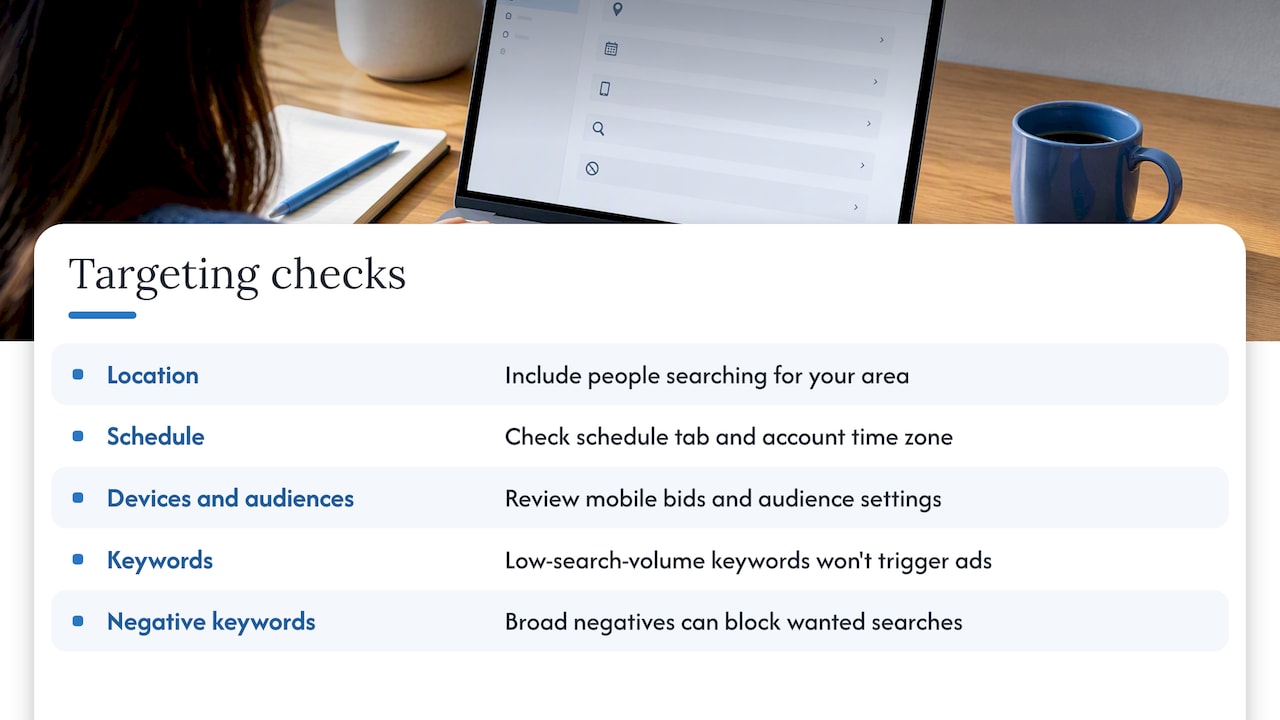
Location. A radius of a few miles around a single office is fine for a plumber, but poor for a niche service with few searches. Check that you have not excluded the area by accident, and that the location option includes people searching for your area, not only people physically in it.
Schedule. An ad schedule set to business hours Monday to Friday will show nothing on weekends. Check the schedule tab and the time zone of the account.
Devices and audiences. A large negative bid adjustment on mobile can take most of your traffic away. Audience restrictions set to “targeting” rather than “observation” can shrink reach to a sliver.
Keywords. Very specific phrase or exact match keywords may have almost no search volume in your area. If Google marks keywords as having low search volume, they will not trigger ads. Add related terms and check the search terms report to see what people actually type. If you are unsure where to look for ideas, our roundup of keyword research tools is a place to start.
Negative keywords. An overly broad negative keyword can block the searches you want. Review the list when impressions suddenly stop.
Step 6: Ad Rank and quality
Sometimes everything is switched on and the ad still loses. Google decides whether and where your ad shows by Ad Rank, which combines your bid, ad quality (relevance, expected click-through rate and landing page experience), the context of the search and the expected impact of your assets. Google’s Ad Rank explanation spells out these ingredients.
A low Ad Rank can mean your ad drops to a lower position or does not appear at all for that search. This is often what is happening when a competitor’s ad shows and yours does not. It is not a broken campaign. The auction judged your ad less relevant or less competitive for that person at that moment.
The fixes are not mysterious:
- Match ad to keyword. Put the searcher’s words in your headlines.
- Match landing page to ad. If the ad promises a price and the page buries it, quality suffers. Our playbook on PPC landing pages that convert covers this.
- Bid realistically. If a click in your category costs several dollars and you bid far below that, you will rarely win.
- Work on Quality Score. We lay out a practical sequence in our Quality Score checklist.
Step 7: Performance Max and other campaign types
The steps above are written for Search campaigns. If you run Performance Max, the diagnostic tools differ. Google points advertisers to campaign diagnostics that flag issues limiting a campaign’s ability to serve and offer recommendations. Open the campaign, look for those flags first, and work through them before changing anything else.
A fast checklist to run in ten minutes
- Billing: payment method valid, no hold.
- Status: campaign, ad group, ad and keywords all Enabled.
- Dates: start date reached, end date not passed.
- Ads: approved or eligible, not under review or disapproved.
- Budget: not Limited by budget, bidding target reasonable.
- Targeting: location, schedule, devices and audiences not too tight.
- Keywords: search volume exists, negatives not blocking.
- Diagnosis tool: run the exact search term in the target area.
- Ad Rank: compare your bid, ad relevance and landing page to what the search demands.
If you get through all nine and the answer is still unclear, the next step is a closer look at the account, not more guessing.
Our perspective: the account is rarely “broken”
We have been building websites and running search marketing for small and mid-sized businesses since 1997, and the pattern on “my ads are not showing” calls is consistent. The owner assumes Google has switched them off. Usually it is one of two things: a basic setting nobody checked, or a campaign that was never built to win the auctions it entered.
The first kind is easy and we are glad to see it. A lapsed card, a paused ad group, a schedule set to the wrong hours. Fix it and move on.
The second kind is harder to hear. If a local service business spreads a small budget across broad keywords, points everything at a home page and wonders why Google will not show the ads, the problem is the plan. Tighter keywords, ads that echo the search, and a landing page built for one action will do more than a bigger budget. Our small business Google Ads guide lays out how we think about budget and strategy, and our piece on choosing a PPC partner explains what to ask before you hire anyone, including us.
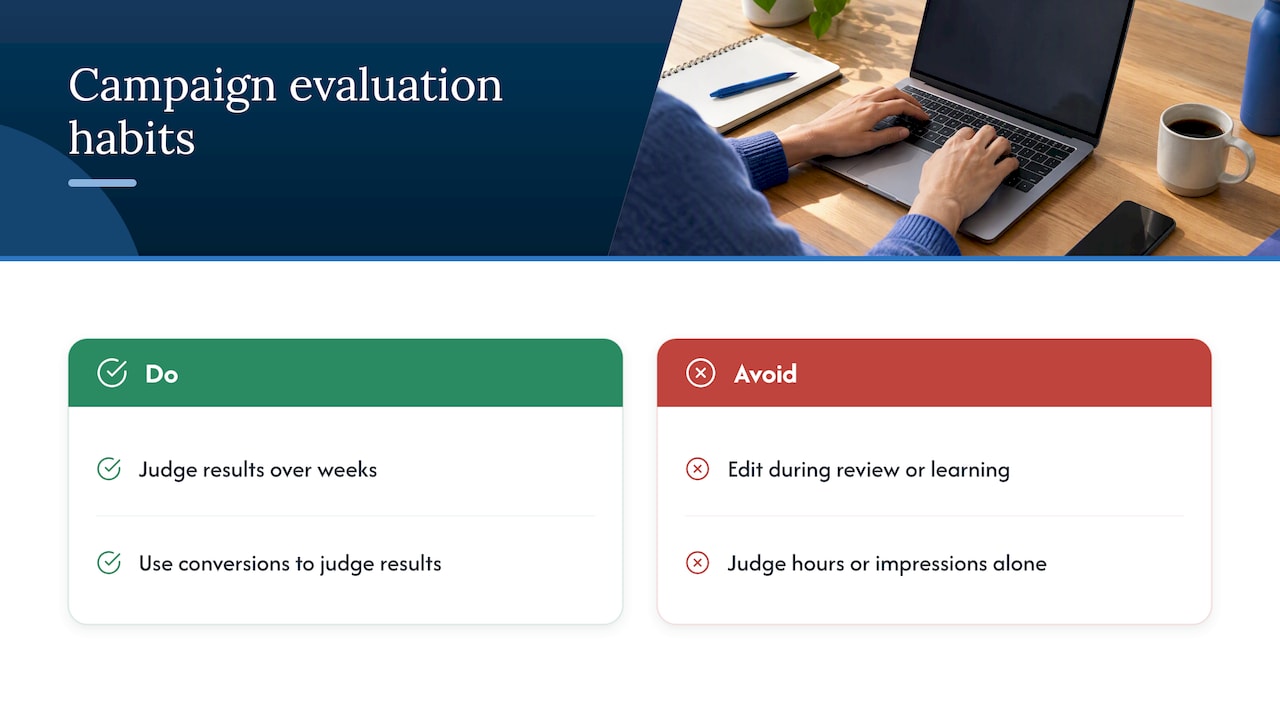
Two habits save the most money. Do not keep editing a campaign in the middle of a review or learning period, because every change muddies what you can learn. And judge results over weeks, not hours, using conversions and not impressions alone.
When it is time to get help
Some situations deserve a specialist rather than another afternoon of clicking:
- The account is suspended or flagged for a policy violation you do not understand.
- Everything looks correct, spend is flowing, and still nothing converts.
- You rely on calls and want to know which ads actually produce them. Our guide to call tracking for ads explains how.
- You are a local business weighing Search ads against Local Services Ads or Google Maps ads.
If you want a second pair of eyes, WebTechs runs PPC campaign management alongside web design, SEO, hosting and content writing, so the ad, the landing page and the site behind it are handled by one team out of Scottsdale. You can see how we work on our SEO and search marketing page, or start from our home page and tell us what you are seeing. We will tell you plainly whether the fix is a setting or a rebuild, and we do not use pressure sales. If you want to know what ongoing management typically costs first, read our PPC management pricing guide.
FAQ
Why are my Google Ads suddenly not working?
Check billing first, since a declined card stops everything at once. Then look at campaign status, ad status and whether you recently changed a budget or bidding target, because large changes can trigger a learning period. If you made edits during a review, wait before touching anything else.
How long until a new Google ad starts showing?
Google says review typically takes 24 to 48 hours, and up to five working days for new accounts or some image and video formats. Some Responsive Search Ads can start sooner under real-time policy review. If it has been longer than a week, look for a disapproval or a billing issue.
How do I turn Google Ads back on?
Open the Campaigns page, find the campaign, ad group or ad marked Paused, and change its status to Enabled. Do this at every level, from campaign down to keyword. Then confirm the end date has not passed and that billing is active.
Is it normal for my ad not to show every time I search?
Yes. Google decides on each search whether to show your ad and in what position, based on Ad Rank, location, device and other signals. Use the Ad Preview and Diagnosis tool rather than searching repeatedly, which can hurt your click-through rate.
Sources
- How to fix Google Ads Search campaigns not running or getting low traffic, Google Ads Help
- About Ad Rank, Google Ads Help
- About the Ad Preview and Diagnosis tool, Google Ads Help
- Find out why you may not see your ad, Google Ads Help
- Troubleshoot campaigns not running or low traffic, Google Ads Help
- Performance Max campaign not running or low traffic, Google Ads Help
- Faster ad creation with real-time policy reviews, Google