

5 Copy and Paste Negative Keyword Starters for Arizona Small Businesses

Copy a universal negative keywords list into your account today, then pull your Search terms report and add any high-spend query that has nothing to do with what you sell. Doing both cuts wasted spend fast and sharpens ad relevance within days. The lists and steps below, all backed by Google Ads Help, get you there without guesswork.
TL;DR:
- Sort actual Search terms by cost, then prioritize queries with meaningful spend and few conversions; report additions default to negative exact unless changed.
- Broad negatives block every word in any order, phrase negatives preserve order, and exact negatives block one query; close variants may still pass.
- A negative for parts excludes buyers for plumbers yet attracts plumbing supply customers, so tailor universal starters to your business before applying them.
- Manager accounts can hold 20 negative lists with 5,000 keywords each, while campaigns allow 10,000 negatives; Display and Video campaigns cap at 1,000.
- Review negatives quarterly and after sharp performance drops; if results fall within 48 hours of an update, inspect recent broad exclusions first.
Table of Contents
- Ready-to-use negative keyword lists you can copy today
- How to find negative keyword candidates in the search terms report
- Where to add negatives and how match types actually behave
- Google Ads limits and how to structure account-level lists
- Best practices and how often to review your negatives
- How WebTechs.Net applies negative lists for local service clients
- Protect your budget before you tighten your negatives
- Get a negative keyword audit from WebTechs.Net
- FAQ
- Sources
Ready-to-use negative keyword lists you can copy today
A good starter list stops the bleeding before you have months of data to analyze. Add these at the account level first, since none of these terms describe a paying customer for most small businesses.
Universal account-level starters:
- jobs, careers, hiring, employment
- free, cheap, cheapest, discount
- DIY, how to, tutorial
- torrent, download, crack
- parts, replacement parts, spare parts
These five categories catch the bulk of irrelevant clicks across almost every industry, according to the behavior Google documents for broad match negative keywords. Add them as broad match negatives at the account level so they apply everywhere automatically.
Three industry examples show how to extend that base:
- Home services (plumbing, HVAC, roofing): impound, repossession, parts, manuals, how to fix, jobs, warranty claims. A homeowner searching “how to fix a water heater” wants a video, not a quote.
- Ecommerce: used, wholesale, bulk, sample, vintage, free shipping, coupon codes. Someone hunting “wholesale” pricing is rarely your retail buyer.
- B2B and consulting: training, jobs, internships, certification, course, syllabus. These searches usually come from students or job seekers, not prospective clients.
On match types: keep the universal list as broad negatives so they block variations automatically, but add negative phrase for multi-word terms you want to catch in any order (“free estimate,” “estimate free”) and reserve negative exact for single, specific queries you want to block with no ambiguity, such as a competitor’s exact brand name if you’ve chosen not to bid against them.
Adapt every list to your own Search terms data before locking it in. A plumbing company near Phoenix might need “parts” excluded hard, while a plumbing supply retailer would want to remove it entirely since parts searches are exactly their customer.
How to find negative keyword candidates in the search terms report
The Search terms report lives under Campaigns in your Google Ads dashboard, and it shows every query that actually triggered your ad, not just the keyword you bid on. The same reporting exists for Performance Max campaigns, which surface terms across Search and Shopping inventory.
- Open the report and sort by cost, the highest first, so the queries draining the most budget surface immediately.
- Filter for zero or low conversions combined with meaningful spend. Google recommends this exact approach for prioritizing negative keyword candidates, since high-cost, low-conversion terms deliver the fastest ROI fix.
- Scan for three signals that a term should become a negative: a clear intent mismatch (someone searching “jobs” on a service ad), a competitor name you don’t want to pay for, or a product mismatch (searching “used” when you only sell new).
- Check the box next to the term and click “Add as negative keyword,” choosing whether it applies to the ad group, campaign, or an account-level list.
Pro Tip: Negatives added directly from the Search terms report default to negative exact match unless you manually change the match type, per Google’s own instructions, so double-check the match type before saving if you intended broader coverage.
Where to add negatives and how match types actually behave
You can add negative keywords at three levels: the account (via shared negative lists), the campaign, or the individual ad group. Account-level shared lists are the most efficient way to apply a universal list across every campaign at once.
- Negative broad: blocks any search containing all the words in any order. Adding “repossession” as negative broad blocks “car repossession laws” and “repossession company.”
- Negative phrase: blocks searches containing the exact phrase in that order, plus extra words before or after. “Free estimate” blocks “free estimate near me” but not “estimate for free.”
- Negative exact: blocks only that precise search, with no extra words. “Jobs” as negative exact blocks only “jobs,” not “plumbing jobs.”
Negative keywords do not match close variants the same way positive keywords do. Google notes that plurals, accents, and some misspellings may slip through unless you add them explicitly, so a negative for “repair” might not automatically block “repairs.”
One limit worth knowing: a single negative keyword can contain up to 10 words, and Google’s matching logic treats phrase-match negatives differently once a search query itself exceeds 16 words, a technical edge case covered in Google’s negative keyword documentation. The bigger practical risk is overcorrecting: a broad negative like “free” can accidentally block “free consultation” searches that would have converted, so review before adding anything that broad.
Google Ads limits and how to structure account-level lists
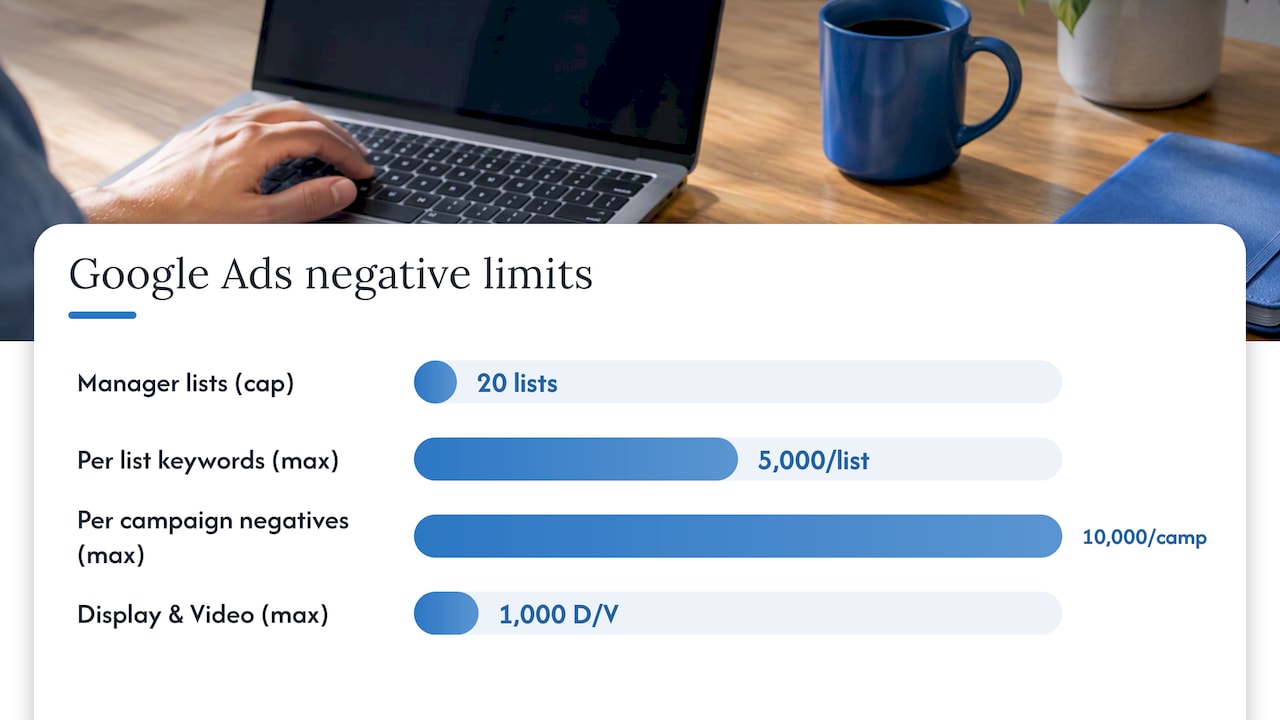
Before you build a sprawling negative keyword list, know the ceilings. A manager account can hold up to 20 negative keyword lists, each list can contain up to 5,000 keywords, and a single campaign can apply up to 10,000 negatives. Display and Video campaigns max out at 1,000 negatives.
Those numbers are generous for most small businesses, but structure still matters:
- Keep one broad, universal account-level list for terms that are never relevant (job seekers, free, DIY).
- Build separate campaign-level lists for exclusions specific to one service area or product line.
- Name lists by function, not by date, so “Universal Negatives” is easier to maintain than “List 1.”
- Review your list count occasionally if you manage multiple accounts under one manager, since the 20-list cap applies per manager.
Best practices and how often to review your negatives
Start with a modest number of negatives pulled from your universal list and early Search terms data rather than trying to predict every bad query in advance. Expand the list as real search data accumulates.
Check the Search terms report regularly during the first phase of a new campaign, since early data reveals mismatches fast. After that, periodic reviews can help keep pace with seasonal query shifts.
- Use a consistent naming convention so lists are identifiable at a glance.
- Audit quarterly for negatives that may be blocking converting traffic.
- Watch for a sudden drop in impressions or conversions right after adding a batch of negatives.
Pro Tip: If performance drops sharply within 48 hours of a negative keyword update, check the most recent broad-match additions first, since they’re the most likely to have caught traffic you actually wanted.
For readers weighing how aggressive to get with exclusions versus adjusting match types directly, tightening match type is often the gentler first move before adding sweeping negatives.
How WebTechs.Net applies negative lists for local service clients
We have built out negative keyword structures for home service and local business clients in the Scottsdale area, and the pattern holds steady: job-seeker terms, DIY and how-to searches, and parts or warranty queries account for a large share of wasted spend before anyone touches a list. We group negatives by intent category rather than by campaign, keep one account-level universal list live from day one, and run weekly Search terms reviews during a campaign’s first month before shifting to monthly checks once performance data firms up.
Protect your budget before you tighten your negatives
Add the universal starter list on day one, then let the Search terms report guide every addition after that. Chasing a long negative list before you have spend data wastes time and risks blocking searches that would have converted.
Favor match-type adjustments over sweeping negatives when a term is only sometimes irrelevant. Reserve hard negatives for terms that are never your customer, like “jobs” or “free.”
Get a negative keyword audit from WebTechs.Net
We review your Search terms report, build an account-level negative list tailored to your business, and set up a maintenance cadence to help reduce wasted spend. For local service businesses we’ve worked with, cleaning up irrelevant queries is typically one of the first and fastest wins in a PPC account.

Our audit includes:
- A full Search terms review across Search and Performance Max campaigns
- A custom account-level negative list built around your actual industry and service area
- A monthly maintenance check so new irrelevant queries get caught early
If you’d rather compare costs before committing, our PPC management pricing guide breaks down what managed campaigns typically run. Ready to stop paying for clicks that never convert? Get in touch about PPC management and we’ll start with a Search terms review.
FAQ
What are examples of negative keywords?
Common examples include “free,” “cheap,” “jobs,” “DIY,” and “wholesale,” terms that signal a searcher isn’t a paying customer for most businesses. The right examples depend on your industry, which is why pulling your own Search terms report matters more than any generic list.
Where do I find the negative keyword list in Google Ads?
Negative keyword lists live under the Campaigns menu in Tools and Settings, where you can create, edit, and apply shared lists across multiple campaigns. You can also add negatives directly from the Search terms report using the “Add as negative keyword” option.
How do I make a negative keyword list?
Start with a universal list of terms that are never relevant to your business, then pull your Search terms report and add high-spend, low-conversion queries as you spot them. Google’s own guidance recommends checking terms directly in the report and choosing whether to apply them at the ad group, campaign, or account level.
What’s the benefit of negative keywords?
Negative keywords stop your ad from showing on searches that have no chance of converting, which reduces wasted spend and improves your overall click quality. Over time, this also tends to improve Quality Score signals since your ads match searcher intent more closely.